



The Bottom Line
StrongVPN’s main selling points are its reputation as one of the oldest VPNs, a great Smart DNS tool, and its fast connection speeds. However, none of these features justify its high price tag. The VPN has never proven its no-logs privacy policy and its selection of features hasn’t changed in 6 years. We recommend using its sister product, IPVanish, instead, as it’s actually audited, feature-rich, and much nicer to use.
9.6/10 6.0/10 6.6/10 8.0/10 4.8/10 8.3/10 7.6/10 8.0/10 3.3/10
- Fast & reliable download speeds
- Excellent Smart DNS tool
- Long-standing & trusted VPN service
- Torrenting & P2P allowed on all servers
- No-logs & no IP, DNS, or WebRTC leaks
- Up to 12 simultaneous connections
- Multiple regions without servers
- Based in privacy-unfriendly US
- Renews at a much higher price after the initial year
- Unaudited logging policy
- Basic & outdated VPN apps
We’ve reviewed StrongVPN for several years, but we’re yet to be impressed by anything the VPN has to offer. Despite launching in 2005, it’s been overtaken by newer VPN services that provide a better user experience and greater functionality.
The only exception is StrongVPN’s outstanding Smart DNS feature, that allows you to unblock services from 22 countries. If you regularly stream on a game console, Smart TV, or any other device that doesn’t support VPN apps, then StrongVPN is one of the best choices.
We were also impressed by its fast download speeds and torrenting performance, but we don’t feel it’s enough to justify its high price tag. Moreover, its annual plan renews at a much higher price of $89.99, cementing our point.
In light of this, we recommend using IPVanish instead. It’s another Ziff Davis-owned VPN, except its logging policy has been audited and its apps regularly updated. It’s even faster and better at torrenting than StrongVPN, despite a 30% cheaper annual plan.
For value for money, we suggest using PIA VPN. It offers more features than StrongVPN, offers IP addresses from 49 more countries, and costs just $1.33 per month on its longest plan.
🔄 Recent Updates
We’ve refreshed our review with new images, revised our Privacy and Additional Features chapters, and added corrections throughout.
Pricing Plans
$$$$| 1 month | $11.99 |
|---|---|
| 12 months | $47.64 ($3.97/mo) |
Free Trial Options
| Money-Back Guarantee | 30 days |
|---|---|
| Free Trial | No |
| 100% Free Plan | No |
Privacy
We calculated this rating by examining the VPN's logging policy, jurisdiction, ownership, and privacy features. We also evaluated its history of handling user data and responding to legal requests.
Ranked #23 out of 60 VPNs for Privacy
StrongVPN claims it doesn't log or process any data, but this is yet to be proven by an audit or real-world event. Its privacy policy also mentions sharing user data for targeted ads (California only) and an indefinite data retention period. All of this is concerning given its US jurisdiction.
| Originating IP Address | No |
|---|---|
| Browsing Activity | No |
| Individual Connection Timestamps | No |
| Date of Last Connection | No |
| VPN Server IP | No |
| Device Information | No |
| Individual Bandwidth Usage | No |
| Account Information | Yes |
| Jurisdiction | US (Five-Eyes Member) |
|---|---|
| Privacy Policy | No Logs |
| Transparency Reports | No |
| Diskless Servers | No |
| Anonymous Payment Options | No |
You can read StrongVPN's full privacy policy on its website.
StrongVPN claims to log no user data or identifiable information. However, we discovered that StrongVPN tracks your IP address on iOS, albeit for the duration of the VPN session. While this won’t compromise your anonymity, we’re confused as to why this isn’t disclosed in the privacy policy.
That said, there’s plenty about StrongVPN’s policy we don’t like either. It states California residents have to actively opt out of data sharing, otherwise their personal information will be shared for ad targeting.
We’re also troubled by StrongVPN’s open-ended data retention. The privacy policy discloses it will retain your data for any length of time necessary “to establish, exercise or defend any legal rights.” Most VPNs, like ExpressVPN, clearly state their retention periods.
Perhaps most crucially, we’re unable to verify StrongVPN as genuinely ‘no-logs’ as it hasn’t been audited or tested by real-world events. This means the US government can demand access to any user data, given StrongVPN’s jurisdiction.
While none of this is great, there’s no public record of the VPN complying with a subpoena request. Plus, its sister VPN, IPVanish, uses an audited no-logs policy. Based on this track record, our own analysis, and our correspondence with its development team, we find it likely that StrongVPN is a privacy-friendly VPN service.
Owned by Ziff Davis
StrongVPN was launched in 2005 by Strong Technology, LLC. It has changed hands a number of times over the years. In 2019 it was acquired by J2 Global, an American technology company.
In October 2021 J2 Global split in two as a company, becoming Consensus Cloud Solutions, Inc. and Ziff Davis. Its VPN properties now fall under ownership of Ziff Davis, a conglomerate digital media, affiliate marketing and technology company.
Despite this confusing latest change of ownership, we’ve seen no reason to believe that StrongVPN has changed as a service.
Streaming
We calculated this rating by identifying which streaming services the VPN could unblock and measuring how consistently it could access them.
Ranked #14 out of 60 VPNs for Streaming
StrongVPN is a decent choice for streaming, especially with US services, but it lacks across-the-board consistency. Access to HBO Max and Hulu is reliable, but BBC iPlayer and Amazon Prime Video frequently block connections. It’s a similar story with Netflix: the US catalog works perfectly, but every other region remains blocked.
| Streaming Service | Works with StrongVPN |
|---|---|
| BBC iPlayer (UK) | Yes |
| DAZN (Canada) | No |
| Disney+ (UK) | No |
| Hulu (US) | Yes |
| ITVX (UK) | No |
| HBO Max (US) | Yes |
| Netflix (US) | Yes |
| Netflix (UK) | No |
| Prime Video (US) | Yes |
| Sky Go (UK) | No |
In our experience, StrongVPN works best for US streaming services. While connected to the VPN, we unblocked almost every American platform we test, including Peacock, Paramount+, and Hulu.
However, it can’t match the reliability of our best streaming VPNs, such as ExpressVPN or NordVPN, with many of the services requiring multiple attempts to work. The only two exceptions were Hulu and HBO Max, which we were able to stream on all 15 US servers.

StrongVPN always unblocked HBO Max on the first attempt.
This inconsistency extends to UK streaming services, too. For instance, we were sometimes able to load BBC iPlayer only to be blocked later that same day.
To prevent this from happening to you, we regularly test StrongVPN with BBC iPlayer and record which UK servers are still working:
Note: BBC iPlayer compatibility was last tested in June 2026.
If you’re still unable to load the service, there are more consistent VPNs for BBC iPlayer available.
At the time of writing, StrongVPN works with US Netflix on several of its servers. While this is great, we’ve noticed a trend in our testing data that suggests StrongVPN switches between working and not working with Netflix every few months.
For guaranteed access, we suggest using CyberGhost which has never failed to unblock US Netflix in our experience.

StrongVPN’s Chicago server had the highest success rate with US Netflix.
Though StrongVPN streamed US Netflix in HD quality, we were unable to unblock any other Netflix region. We tested over 10 libraries, with no success.
In comparison, NordVPN unblocks 17 Netflix regions, including Germany and the UK.
Speed
We calculated this rating using our proprietary tests of download, upload, and ping speeds across servers in 10 countries.
Ranked #8 out of 60 VPNs for Speed
According to our speed test data, StrongVPN is one of the fastest VPNs on our site. We recorded just 8% average speed loss on connections across five continents. Though StrongVPN’s upload speeds aren’t quite as impressive, its extremely low latency means it’s well-suited to online gaming.
As you can see, StrongVPN is extremely fast on long-distance connections. One of the fastest VPNs we’ve tested, it maintains impressive speeds across continents to Europe and Asia.
Most notably, we recorded only 1% speed loss connecting to Canada and 4% speed loss connecting to the UK.
StrongVPN’s local connection speeds are also impressive. It manages to reach 96Mbps on a 100Mbps connection, which is more than enough for full HD streaming and uninterrupted torrenting.
Here’s a chart comparing StrongVPN’s local and international download speeds to other high-quality VPNs:
These results show that StrongVPN’s download speeds almost catch up to the fastest VPN available, Hotspot Shield, and even outperforms IPVanish and NordVPN on international speed stability. Though, it doesn’t perform as well when comparing upload speeds with other top-tier VPNs.
Lowest Latency Recorded
In our 2026 speed tests, we found that StrongVPN has the lowest local ping times out of all the 60 VPNs we’ve reviewed.
At just 4ms, it beats other top-tier VPNs like NordVPN and Hide.me. Using StrongVPN, we’re able to play fast-paced online games, like Overwatch 2 and PUBG, without lagging and connection drops.
Here’s a table comparing ping times between top VPNs:
Ping times refer to the time it takes for data to be transmitted from your device to a server and back again. A lower ping time (or latency) is one of the most important features to a good gaming VPN because it reduces the amount of lag you experience gaming online.
Security
We calculated this rating by testing the VPN's security protocols, encryption, leak protection, and kill switch reliability. We also assessed the provider's track record and any past security incidents.
Ranked #22 out of 60 VPNs for Security
StrongVPN is a secure VPN, particularly for Windows users. It encrypts your web traffic with unbreakable encryption and tunnels it using open-source protocols, like WireGuard and OpenVPN. However, its kill switch isn't enabled by default, its VPN apps aren't audited, and it's missing post-quantum encryption (PQE).
| Independent Audit | No |
|---|---|
| VPN Kill Switch | Yes |
| Leak Protection | Yes |
| OpenVPN (TCP/UDP) | Yes |
|---|---|
| WireGuard | Yes |
| ChaCha20 | Yes |
| AES-256 | Yes |
StrongVPN encrypts your connection with ChaCha20 (via WireGuard), by default. This is a secure and highly reliable configuration, and our recommended choice.
However, there’s one major exception: the macOS app restricts its kill switch to the OpenVPN protocol. As a kill switch is vital for protecting your IP during an unexpected disconnection, we strongly advise switching to OpenVPN on Mac.
We tested StrongVPN’s encryption by analyzing our VPN traffic with Wireshark. Our results confirmed that StrongVPN fully encrypted our browsing activity.

StrongVPN left our internet traffic indecipherable.
We also tested StrongVPN for IP, WebRTC, geolocation, and DNS leaks. Thankfully, we found no worrying data leaks with StrongVPN and we discovered it uses its own DNS servers, meaning your traffic won’t be routed through a middle man.
Using our kill switch test tool, we verified that StrongVPN includes a kill switch on Android on iOS. It isn’t visible within the settings and can’t be turned off, but it activates reliably.
On Windows and macOS, we noticed the kill switch wasn’t on by default, leaving your personal data vulnerable. Until StrongVPN (hopefully) reverses this decision, we recommend you enable the kill switch in the app settings before you activate your VPN connection.
Aside from its clumsy kill switch implementation, there are several key security features we’d like to see added to StrongVPN.
This includes open-source apps to allow anyone to inspect the source code for vulnerabilities, which is a practice already adopted by top-rated VPNs like Proton VPN and Mullvad.
Similarly, we’d like StrongVPN to undergo a security audit by an independent third-party to verify the integrity of its server infrastructure and encryption.
Server Locations
We calculated this rating by assessing the number of countries and cities available, their geographic spread, and availability in popular regions.
Ranked #30 out of 60 VPNs for Server Locations
StrongVPN provides servers in 42 countries, including additional city-level locations. While an acceptable number of locations, its coverage is too focused on Europe. For example, we'd like to see servers added to Greece, Egypt, and New Zealand.
| Continent | Countries with Servers |
|---|---|
| Europe | 22 |
| Asia | 10 |
| South America | 5 |
| North America | 4 |
| Oceania | 1 |
| Africa | 0 |
StrongVPN’s total number of countries with servers is slightly below what we expect from a paid-for VPN service, and its global distribution is especially poor.
Around 50% of its server locations are concentrated in Europe, with only a single location in Oceania, and no coverage whatsoever in Africa.
That said, we were pleased to see StrongVPN provide city-level choice in five countries:
- Australia (4 cities)
- Canada (3 cities)
- France (3 cities)
- UK (5 cities)
- US (15 cities)
The city-level choice in the US is excellent, covering both coasts. However, we were disappointed to see the number of UK locations drop to 5, with the Maidenhead server now gone.
Similarly, StrongVPN has removed city-level choice from Germany and Brazil. This limits your options if you need a server close to you for better speeds or if you want to try a different IP address.
StrongVPN’s South Africa servers have been removed entirely and its India servers limited to just Mumbai. In comparison, ExpressVPN has servers in six African countries (Algeria, Egypt, Ghana, Morocco, Kenya, and South Africa), and two in India.

StrongVPN’s server list on iOS.
First-Party Server Ownership
StrongVPN owns and operates all of its own servers, just like its ‘sister’ VPN, IPVanish.
Ownership of its “infrastructure of global servers” is one of StrongVPN’s best selling points because it eliminates the risks associated with rental servers. It guarantees there is no “third-party meddling with [its] users’ activity,” and only trusted employees have access to the physical servers.
The exception is India due to its intrusive VPN laws that allow the government to seize servers. In our experience, this hasn’t affected our connection speeds, but we’ve noticed that you sometimes need to refresh the StrongVPN app for the India server to appear.
User Experience
We calculated this rating by assessing the VPN’s ease of use, interface design, and setup process across multiple platforms.
Ranked #24 out of 60 VPNs for User Experience
We've reviewed StrongVPN since 2019 and have always found it easy-to-use, if not slightly basic. You can connect and disconnect from the VPN easily, but we wish the app would signpost this change more clearly. We'd also welcome an update to its app design as it looks bland and blurry, especially on iOS.
Installation & Setup
We found it straightforward to install StrongVPN on all platforms. Unlike with NordVPN or IVPN, we were able to download the Mac app directly from the provider’s website using an installer that worked on all versions of macOS.
On average, the installation process took less than 2 minutes to complete. If you do encounter any problems, StrongVPN provides helpful setup guides.
Interface & Ease of Use
Due to its simplicity, we think StrongVPN is a good choice for beginners. Its main screen is very stripped back, displaying only the most important connection details.

To start using the VPN, tap the green ‘Connect’ button to initiate the connection. Though simple, we didn’t like how little the app changes to indicate a successful connection. Much better VPNs, like ExpressVPN, use in-app animations and change their color scheme so you’ll notice a disconnection.
To avoid this happening, we suggest keeping notifications enabled in StrongVPN’s settings. They can be annoying and intrusive, but it’s better than your VPN disconnecting without you noticing.
All of its apps use a minimalist design with only two elements: a world map and a solid background color. Unlike with IPVanish and NordVPN, this map can’t be interacted with and serves no function. We don’t mind this on macOS and Android where it looks sleek, but on Windows and iOS the map is lazily superimposed onto the background.
It’s also worth noting that the kill switch on macOS is only compatible with OpenVPN. This is an unnecessary and frustrating disparity that we’d like StrongVPN to correct.
For a complete overview of how StrongVPN’s apps differ, you can use the table below:
Day-to-Day Experience
In general, our experience with StrongVPN was mixed. An issue across all apps is that clicking a server location doesn’t automatically connect you to the VPN. You have to select your location first and then connect to the VPN, which is an unnecessary extra step.
On PC, we resented that the app wouldn’t close normally but instead required to be manually shut down in the system tray. We also found its notifications disruptive, especially when streaming.
Our user experience was much smoother on mobile, and we enjoyed experimenting with its Siri Shortcuts. For the most part, we had no issues with the VPN and were able to browse without any disruption. Our only criticism is that we experienced some eyestrain using StrongVPN on our iPhone as its font is too small and blurry.
Torrenting
We calculated this rating by assessing the VPN's torrenting features, including P2P servers and port forwarding support. We also evaluated its average bitrate and stance on file-sharing.
Ranked #16 out of 60 VPNs for Torrenting
StrongVPN is safe to use for torrenting. It allows P2P connections on all servers with fast speeds, and its privacy policy ensures your file-sharing activity can't be traced to you. However, it doesn't support port forwarding.
| Torrenting Attribute | StrongVPN |
|---|---|
| Permits P2P Traffic | Yes |
| Average Download Bitrate | 9.7MiB/s (3% loss) |
| Countries with P2P Servers | 42 |
| Port Forwarding | No |
| Kill Switch | Yes |
| Logging Policy | No Logs |
In our standardized P2P speed tests, we detected minimal speed loss from our baseline of 10MiB/s. Without the VPN, we were able to download a 22GB movie in 35 minutes. While connected to StrongVPN’s New York server, we downloaded the same file in 36 minutes.
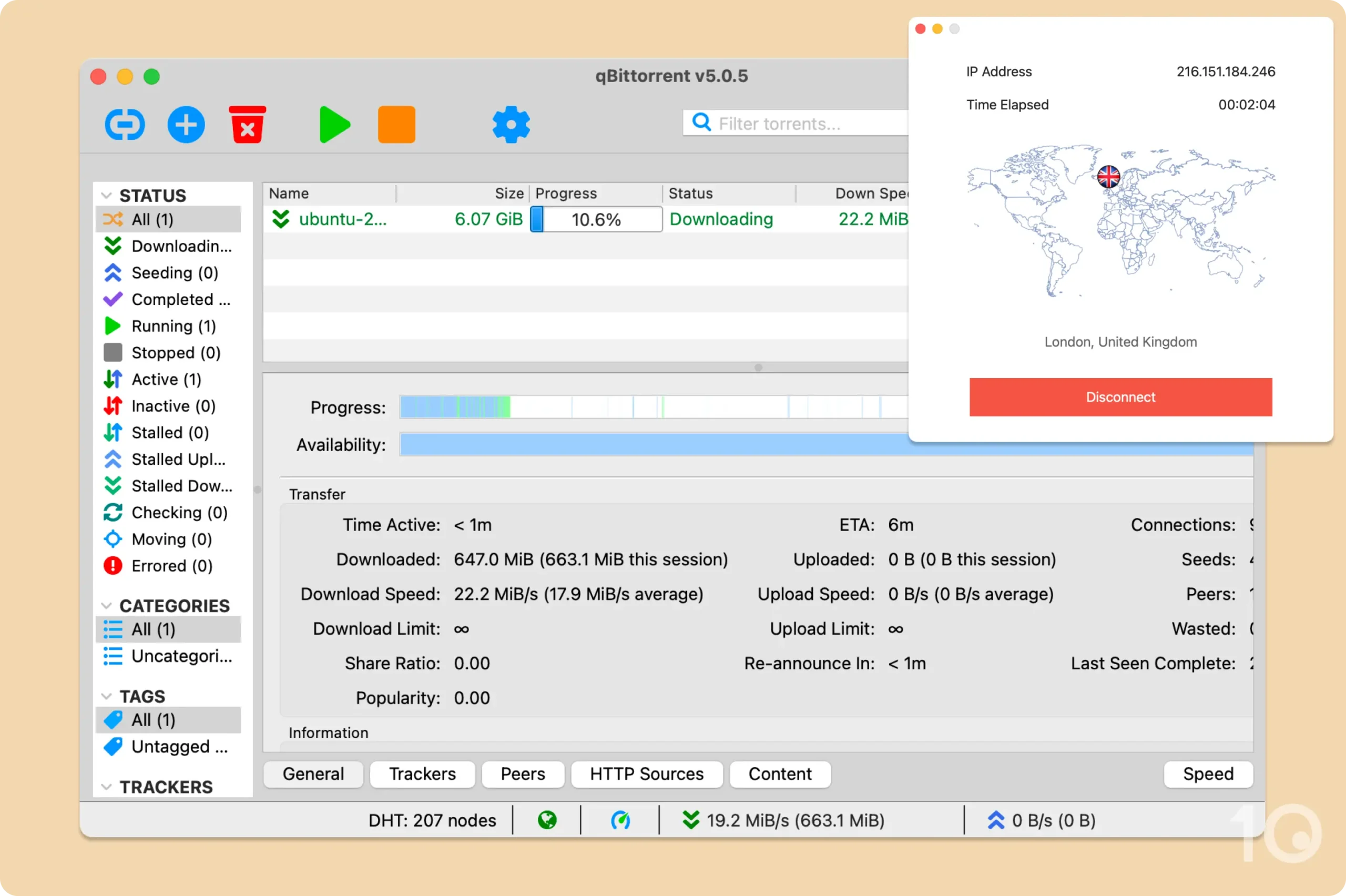
You can use StrongVPN to torrent securely.
While StrongVPN doesn’t explicitly label its servers as P2P-friendly, all of its servers support BitTorrent traffic. In our many years of using StrongVPN, we’ve never had our connection throttled or blocked while file-sharing with the VPN.
The only real deficiency is the VPN’s lack of port forwarding. This feature is useful for torrenting as it improves upload speeds for seeding, so its absence is frustrating.
Device Compatibility
We calculated this rating by evaluating the VPN's support for various devices. We considered dedicated apps, browser extensions, Smart DNS functionality, and router compatibility.
StrongVPN has apps for iOS, Android, Mac, Windows, and Fire TV, as well as router support and Smart DNS for consoles. Most notably, its Smart DNS tool covers 22 countries, more than most VPNs we test
| Windows | Yes |
|---|---|
| Mac | Yes |
| iOS | Yes |
| Android | Yes |
| Linux | Manual Setup Only |
| Amazon Fire TV | Yes |
| Android TV | No |
| Apple TV | No |
| Router | Yes |
| Chrome | Yes |
| Smart DNS | Yes |
|---|---|
| Unblocks Content From |
|
Simultaneous Connections: 12
StrongVPN is one of a handful of VPNs in our top 25 that doesn’t have apps for Apple TV or Android TV. While you can manually install StrongVPN on your router to sidestep this problem, it isn’t a convenient solution.
You can buy a router pre-flashed or you can use an automatic installer script to bypass most of the more technical setup.
StrongVPN is compatible with over 125 router models — around 100 more than VyprVPN. This is also a great option if you want to use the VPN on devices that don’t support native VPN apps, like a PlayStation 5 or Smart TV.
Thankfully, StrongVPN provides an app for Amazon Fire TV devices, but it’s not as user-friendly as our highest-rated Fire TV VPNs.
An alternative setup method is StrongVPN’s Smart DNS tool. It doesn’t provide any encryption, but it lets you unblock content from 22 server locations.
This is superior to ExpressVPN’s MediaStreamer which only works to access the US or PIA’s tool which is limited to 5 locations.
Additional Features
We calculated this rating by evaluating the VPN's extra capabilities beyond the basic VPN service. This includes bypassing censorship, additional tools like malware blockers, and customization options like split tunneling.
StrongVPN is lacking in additional features compared to its rivals. There’s no ad or tracker blockers, dedicated IP address, double VPN, malware blocker, or GPS spoofing. That said, there is split tunneling on Android and its Scramble obfuscation works well in Russia, Turkey, and the UAE, though its success rate in China has dropped off recently.
| Additional Feature | StrongVPN |
|---|---|
| Split Tunneling | Yes (Android only) |
| VPN Obfuscation | Yes |
| Multi-Hop Servers | No |
| Dedicated IP | No |
| Ad Blocker | No |
Android-Only Split Tunneling
StrongVPN includes a split tunneling feature that lets you select apps to bypass the VPN connection. This is useful for keeping apps in your real location, while remaining connected to StrongVPN.

You can use split tunneling to continue watching your local streaming services.
We’re disappointed to see this feature limited to Android, given most other VPNs support it across all platforms. Only having the option to exclude apps, and not include, also feels quite basic compared to the customization offered by PIA.
Scramble Feature Unblocks Censorship
You can use the Scramble feature in StrongVPN’s desktop and mobile apps to bypass online censorship.
To activate it, either check the box in your protocol settings or enable the “Optimize the VPN for China” toggle. By doing the latter, your VPN automatically connects with OpenVPN UDP, switches to port number 1195, and checks the Scramble box.

It takes a few seconds to enable the Scramble feature.
Though quick to set up, we personally found StrongVPN’s China mode more effective with Russia and the UAE, than with China itself. While we could connect to our Shanghai server on occasion, it wasn’t consistent enough for regular usage.
StrongVPN Key Data
| Attribute | StrongVPN | Typical VPN |
|---|---|---|
| Owner | Ziff Davis | Independent |
| Launch Date | 2005 | 2015 |
| Local Download Speed | 96Mbps (4% loss) | 89Mbps (11% loss) |
| International Download Speed | 92Mbps (8% loss) | 80Mbps (20% loss) |
| Countries with Servers | 42 | 40 |
| Privacy Policy | No Logs | Identifiable Data |
| Simultaneous Connections | 12 | 10 |
| Netflix Libraries | 1 | 3 |
| Torrenting | Yes | Yes |
| Works In China? | Sometimes | No |
| Cheapest Price | $3.97/mo over 12 months | $3.87/mo over 24 months |
| Customer Support | 24/7 Live Chat | |
| Apps & Extensions |           | |