



개인정보 보호
개인정보 보호부문 총 59개 VPN 중 4위
Mullvad는 민감한 데이터를 일절 기록하지 않으며, 그 주장은 입증됐습니다. 수집하는 건 결제 정보와 고객 지원 문의뿐입니다. 필수는 아니지만, 투명성 보고서와 자체 관리 서버로의 전환이 더해진다면 반가울 겁니다.
| 원본 IP 주소 | 없음 |
|---|---|
| 브라우징 내역 | 없음 |
| 개인 연결 시간 기록 | 없음 |
| 마지막 연결 날짜 | 없음 |
| VPN 서버 IP | 없음 |
| 디바이스 정보 | 없음 |
| 개인 대역폭 사용량 | 없음 |
| 계정 정보 | 없음 |
Mullvad의 개인정보 보호 정책 전체 내용은 공식 웹사이트에서 확인할 수 있습니다.
Mullvad의 개인정보 보호 정책은 명확합니다. 인터넷 트래픽, 사용자 대역폭, 원본 IP 주소를 일절 로그하지 않습니다.
데이터 수집을 최소화하기 위해 가입 절차 자체를 아예 없앴습니다. 이메일 주소를 제공할 필요 없이, 무작위 16자리 계정 번호를 받게 됩니다.
여기에 더해 Mullvad는 전통적인 구독 방식 대신 선불 충전 방식을 택했습니다. 이 방식의 장점은 대부분의 VPN에 있는 자동 갱신 기능이 없다는 것으로, 덕분에 이름, 이메일 주소, 결제 정보를 저장할 필요가 없습니다.
최대한의 프라이버시를 원한다면 암호화폐로 결제하거나, 현금을 봉투에 담아 Mullvad 사무실로 보낼 수도 있습니다.
Mullvad는 한 걸음 더 나아가 VPN 서버 인프라 전체와 DNS 서버망을 디스크리스로 전환했습니다. 어떤 데이터도 물리 하드웨어에 저장되지 않는다는 뜻입니다.
이런 각종 개인정보 보호 노력은 2023년 5월 스웨덴 당국이 Mullvad 사무실을 압수수색했을 때 어떤 사용자 데이터도 확보하지 못하면서 입증됐습니다. 제가 보기에 이건 궁극의 시험대이고, 이를 통과했다는 건 Mullvad가 진짜 노로그(no-log) 서비스라는 증거입니다.
Mullvad VPN의 운영 주체는?
Mullvad VPN은 스웨덴 기업 Amagicom AB가 소유하고 있으며, CEO 얀 악셀 욘손(Jan Axel Jonsson)이 운영합니다. Amagicom AB의 소유주이자 단독 주주는 프레드리크 스트룀베리(Fredrik Strömberg)와 다니엘 베른트손(Daniel Berntsson)으로, 스스로를 “이상주의자”라고 소개합니다. 회사는 스웨덴 예테보리(Engelbrektsgatan 28, 411 37 Göteborg)에 있습니다.
Kape Technologies(ExpressVPN, CyberGhost 소유), Ziff Davis(IPVanish, StrongVPN), Cyberspace(NordVPN, Surfshark) 같은 대기업 아래로 VPN들이 인수·통합되는 흐름 속에서도, Mullvad는 독립 VPN 서비스 제공업체로 남아 있습니다.
스트리밍
스트리밍부문 총 59개 VPN 중 16위
스트리밍에서 Mullvad는 대단히 실망스럽습니다. 미국 아마존 프라임 비디오 라이브러리와 HBO Max(롤리 서버)만 차단 해제할 수 있고, 미국 넷플릭스, 훌루, BBC iPlayer 등에서는 실패했습니다.
| 스트리밍 플랫폼 | Mullvad VPN에서 작동 |
|---|---|
| BBC 아이플레이어 (영국) | 없음 |
| DAZN (캐나다) | 없음 |
| 디즈니 플러스 (영국) | 없음 |
| 훌루 (미국) | 없음 |
| ITVX (영국) | 없음 |
| HBO Max (미국) | 있음 |
| 넷플릭스 (미국) | 없음 |
| 넷플릭스 (영국) | 없음 |
| 프라임 비디오 (미국) | 있음 |
| Sky Go (영국) | 있음 |
Mullvad는 스트리밍 서비스를 차단 해제하지 못하며, 그런 척도 하지 않습니다. 넷플릭스에서는 더 이상 작동하지 않고, 스트리밍 최적화 서버나 아마존 파이어 TV 스틱용 앱을 만들 생각조차 없어 보입니다.
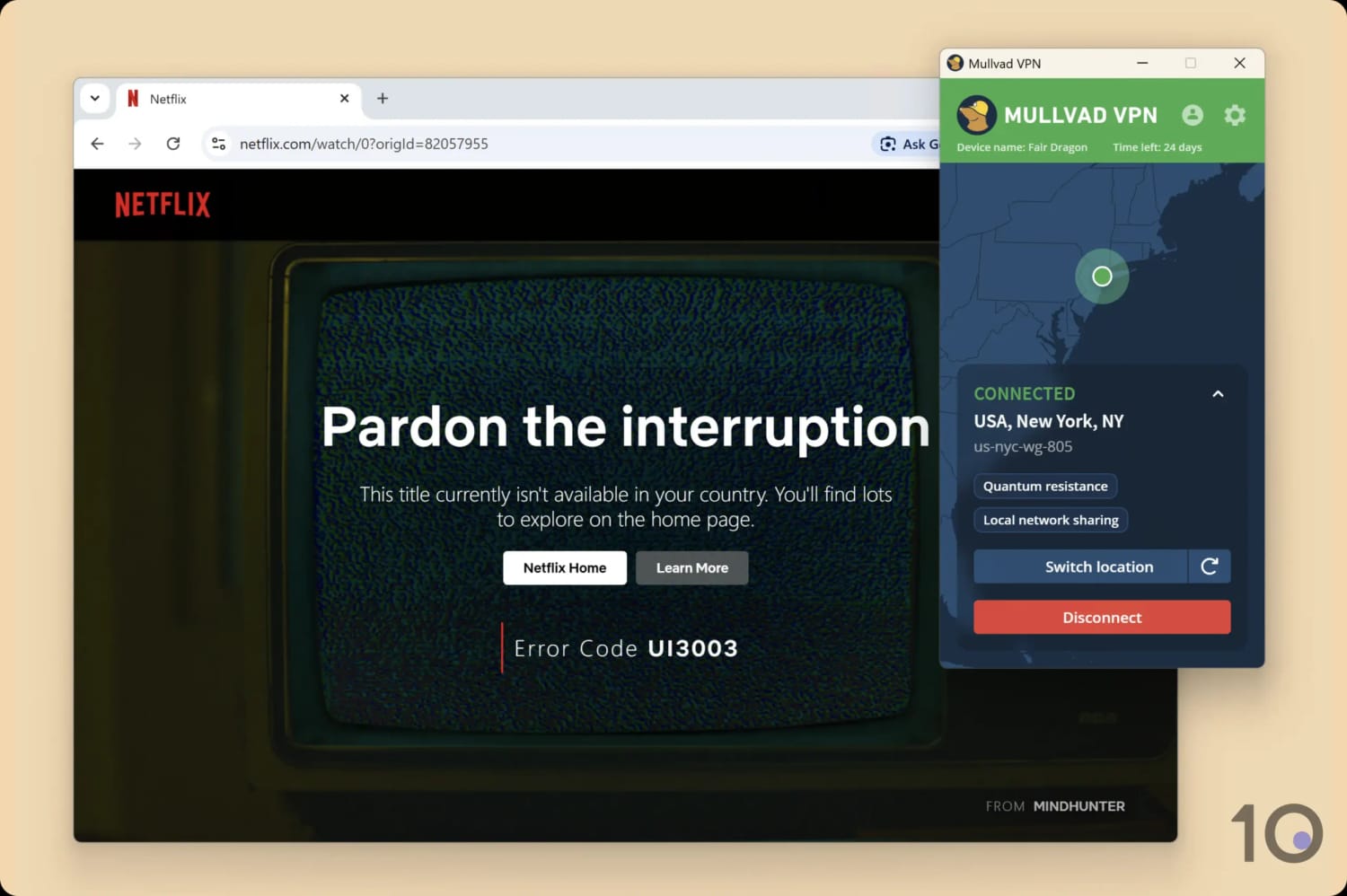
Mullvad는 여러 차례 시도에도 미국 넷플릭스 차단 해제에 실패했습니다.
제가 주요 스트리밍 사이트 전부에서 테스트했지만 성공은 극히 드물었습니다. 해당 지역 밖에서 볼 수 있게 된 건 아마존 프라임 비디오(미국)와 HBO Max뿐이었습니다. 훌루 차단 우회도 안 됩니다.
그럼에도 Mullvad가 Sky Go와 NOW 스트리밍에는 손꼽히게 좋은 VPN이라는 걸 발견했습니다. 두 Sky 제품 모두에서 거의 항상 작동했고 720p 화질을 유지했습니다.
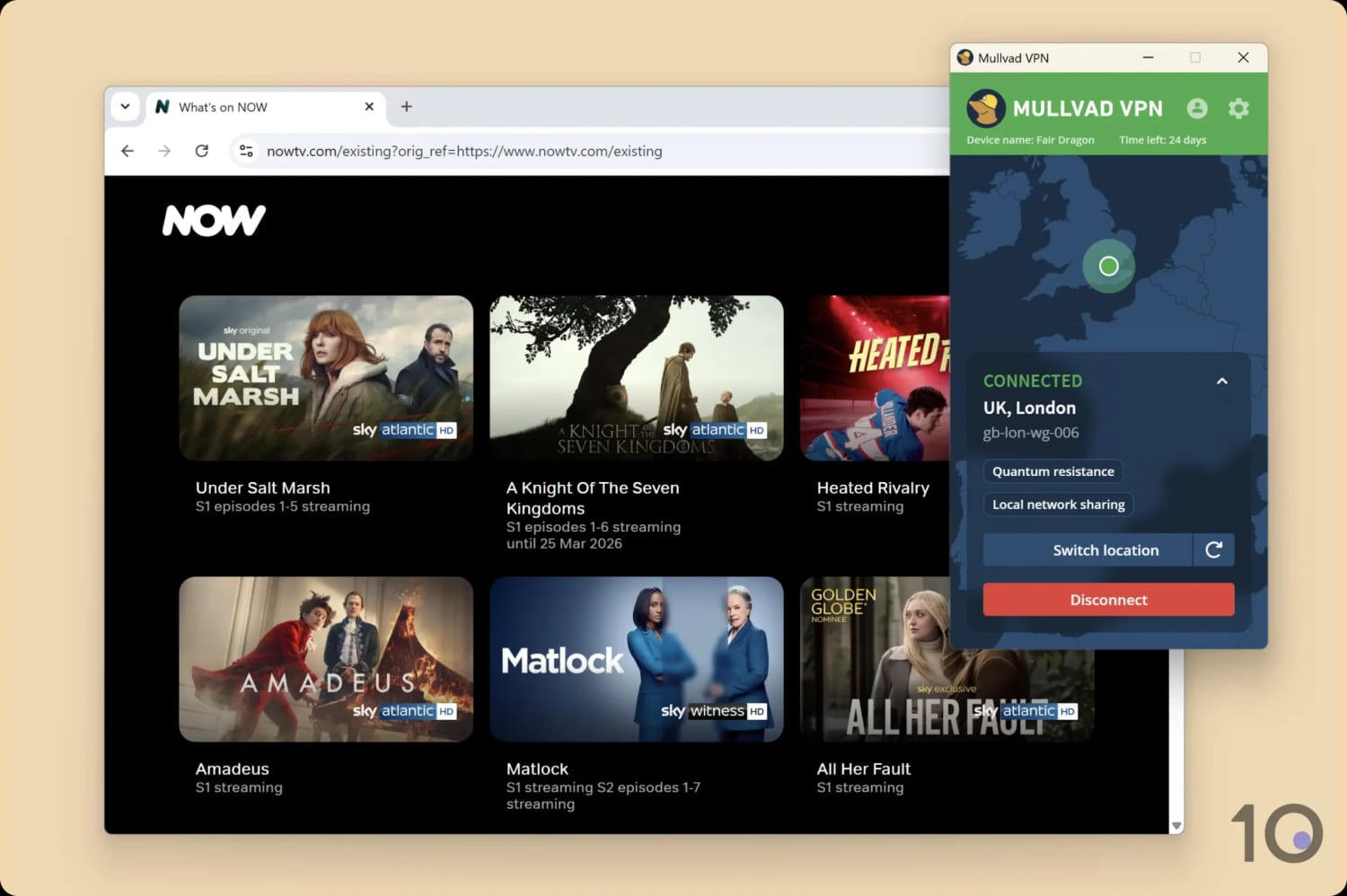
Mullvad는 Sky Go와 NOW 모두에서 믿을 만한 선택입니다.
Astrill VPN과 마찬가지로, Mullvad가 개인정보 보호에 집중하는 건 그럴 수 있습니다. 하지만 VPN은 둘 다 할 수 있습니다. Mullvad가 스트리밍 플랫폼 차단 해제, 특히 넷플릭스까지 영역을 넓히면 좋겠습니다. 그래야 제가 진심으로 추천할 수 있으니까요.
속도
속도부문 총 59개 VPN 중 17위
Mullvad VPN은 WireGuard 전용으로 연결되기 때문에 빠릅니다. 특히 로컬 속도가 탁월해, 평상시 인터넷 연결 대비 속도 손실이 6%에 불과했습니다. 장거리 국가 연결에서는 손실이 커지지만, 예상을 벗어나는 수준은 아닙니다.
평상시 인터넷과 VPN 연결 상태의 차이가 6%라는 건 매우 좋은 수치지만, 일부 다른 VPN 서비스만큼 빠르진 않습니다.
캐나다 연결에서는 5%의 다운로드 속도 손실을 기록했는데, 그 거리를 감안하면 매우 좋은 결과입니다. 마찬가지로 브라질 연결에서는 속도가 10% 떨어졌습니다.
다만 영국 연결에서 평균 13%의 속도 손실은 조금 아쉬운 대목입니다. 위 차트에서 보이듯, 인기 경쟁 VPN들과 비교하면 힘을 쓰지 못합니다.
Hotspot Shield처럼 장거리 연결에 더 좋은 VPN도 있지만, Mullvad의 성능에도 만족하실 거라 생각합니다.
보안
보안부문 총 59개 VPN 중 3위
Mullvad는 업계 보안 혁신의 최전선에 선 VPN입니다. 신뢰할 수 있는 킬 스위치, ChaCha20 암호화, WireGuard 프로토콜 같은 필수 요소를 전부 갖추고, 오픈소스 앱과 양자 내성 WireGuard 같은 최첨단 기능까지 더했습니다. 무엇보다 매년 보안 감사를 통해 취약점을 찾아 고치는 데 남다른 공을 들입니다.
| 독립 보안 감사 | 있음 |
|---|---|
| VPN 킬 스위치 | 있음 |
| 유출 방지 | 있음 |
2026년 현재 Mullvad는 WireGuard만 지원합니다. OpenVPN보다 성능이 우수하고, 하나의 프로토콜에 집중하고 싶다는 것이 이유입니다.
놀랄 일은 아닙니다. Mullvad는 실제로 WireGuard 프로토콜 개발에 돈을 기부했고, 이를 가장 먼저 도입한 VPN 중 하나였으니까요. 이후 WireGuard 도입은 업계 표준 관행이 됐습니다.
저희는 Mullvad 서버에 연결한 뒤 데이터 패킷 분석기인 Wireshark로 인터넷 트래픽을 흘려봤습니다. 테스트 결과, ChaCha20 암호화로 탐색 활동을 성공적으로 숨기고 있었습니다:
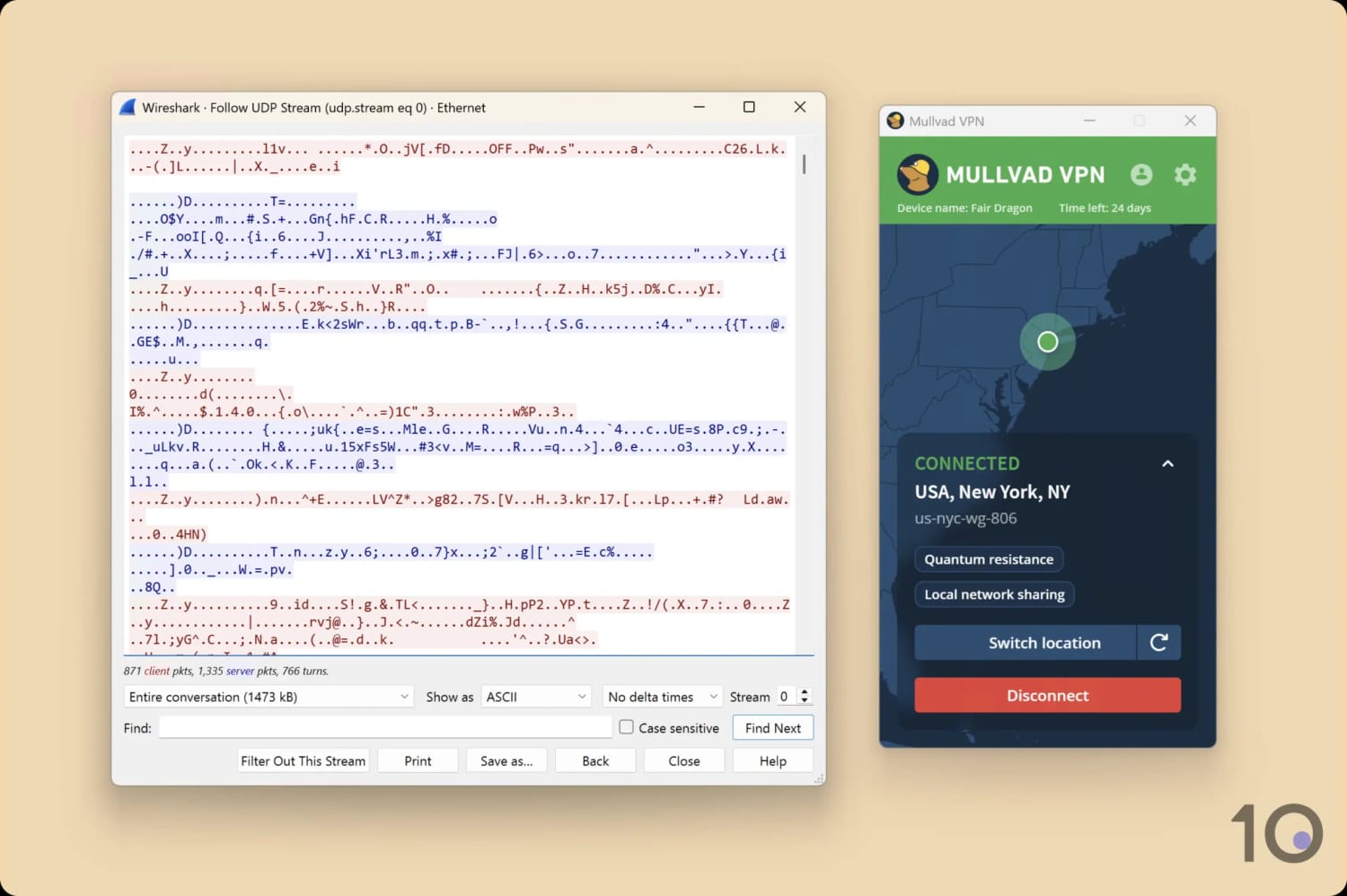
예상대로 Mullvad는 인터넷 트래픽을 암호화했습니다.
연결 암호화를 넘어, Mullvad는 자사 버전의 WireGuard를 개선하고 미래에 대비시키는 방법도 찾아냈습니다. 예를 들어 AI 유도 트래픽 분석 방어(DAITA) 기능은 무작위 배경 트래픽을 더해 식별 가능한 데이터 패턴을 왜곡함으로써 FBI의 대량 감시로부터 보호해줍니다.
다만 이 기능은 전송되는 데이터 패킷 양을 늘리기 때문에, 속도가 느려지거나 데이터가 더 빨리 소진될 수 있다는 점은 유념하세요.
여기에 더해 Mullvad는 더 정교한 사이버 공격까지 방어하는 양자 내성 WireGuard 연결도 추가했습니다.
WireGuard 밖으로 눈을 돌리면, Mullvad는 IPv4와 IPv6 연결을 모두 지원하는 몇 안 되는 VPN이기도 합니다. 다른 VPN 다수는 IPv6 주소를 그냥 유출하거나, 연결을 차단하고 IPv4로 돌려보냅니다.
자동 킬 스위치
Mullvad에는 내장 킬 스위치가 항상 켜져 있어, VPN 연결이 끊기면 인터넷 연결을 차단합니다.
킬 스위치가 기본 비활성화인 VPN이 많다 보니, 보안을 우선하고 실제 IP 주소의 우발적 노출을 막는 Mullvad의 접근이 마음에 듭니다.
데스크톱에서는 “차단 모드(Lockdown Mode)”라는 고급 킬 스위치를 켤 수 있습니다. Mullvad 서버에 먼저 연결해야만 인터넷에 접속할 수 있게 만드는 기능인데, Mullvad 앱을 종료해도 인터넷 연결이 복구되지 않아 한층 더 안전합니다.
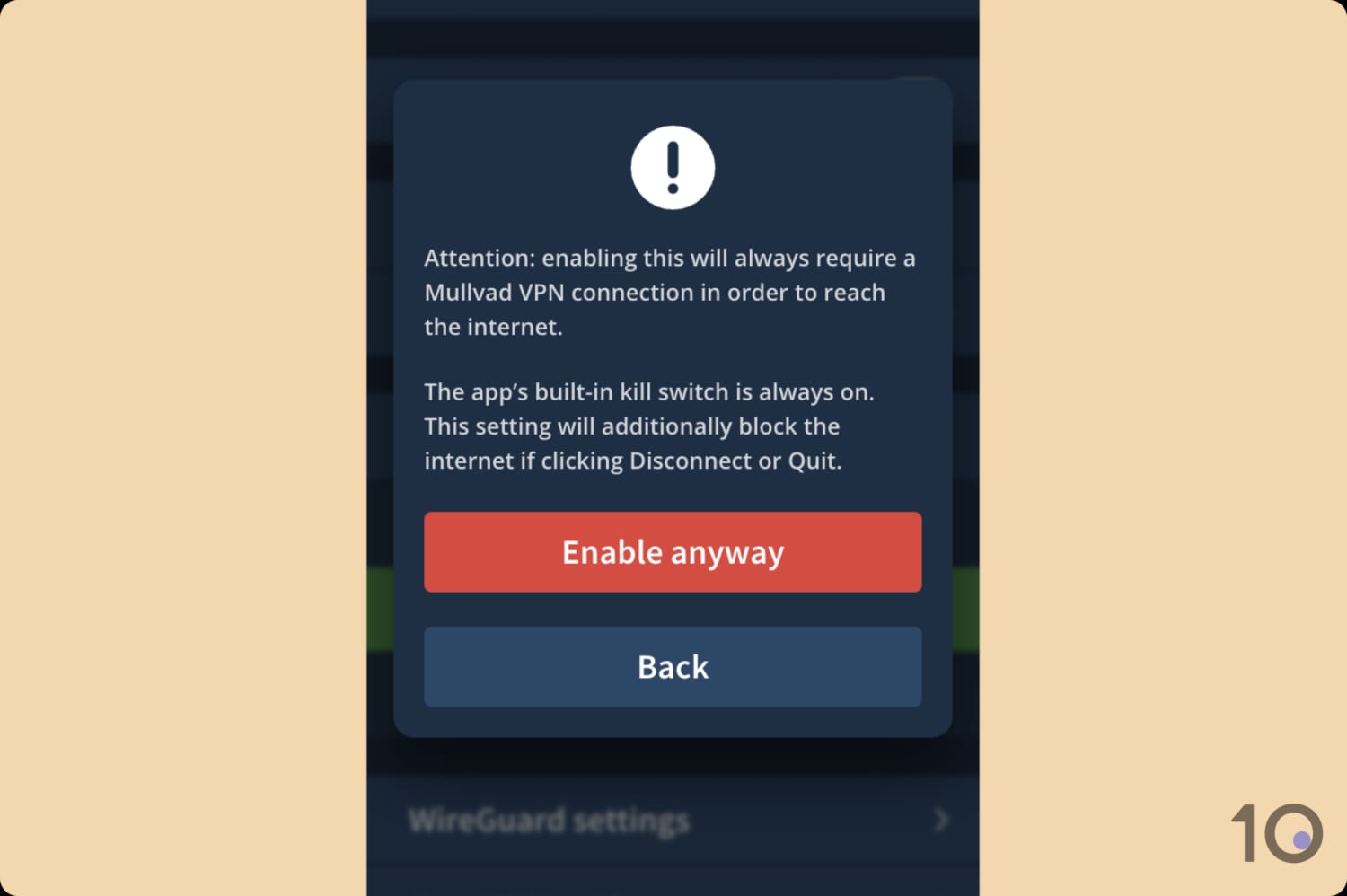
활성화하면 Mullvad는 VPN 서버에 연결할 때까지 인터넷 연결을 차단합니다.
안드로이드에서는 기기의 네트워크 설정에서 항상 VPN 사용과 VPN 없이 연결 차단을 직접 켜야 합니다. 이상적으로는 안드로이드 앱 안에 통합돼야 할 기능입니다.
전문가 조언: Mullvad는 안드로이드 OS에서 비롯된 버그로 인해 안드로이드 앱에서 DNS 유출이 발생할 수 있다고 사용자들에게 경고했습니다. 수정이 배포되기 전까지는 민감한 용도로 안드로이드에서 Mullvad 사용을 피할 것을 권합니다.
정기 보안 감사와 오픈소스 앱
Mullvad가 서버 인프라와 앱에 대해 정기 보안 감사와 침투 테스트를 실시한다는 점은 반가운 대목입니다.
이런 외부 감사는 VPN이 버그와 취약점을 찾아내 고칠 수 있게 해줍니다. 전반적으로, 시간이 갈수록 VPN 서비스의 보안을 끌어올리는 훌륭한 방법입니다.
다음은 Mullvad의 최근 보안 감사와 그 결과입니다:
| 연도/감사 | 치명적 | 높음 | 중간 | 낮음 |
|---|---|---|---|---|
| 2024 – Mullvad OpenVPN 및 WireGuard | 0 | 0 | 1 | 1 |
| 2026 – Mullvad 계정 및 결제 서비스 | 0 | 0 | 3 | 2 |
| 2026 – Mullvad GotaTun | 0 | 0 | 0 | 2 |
투명성을 한층 높이는 차원에서, Mullvad의 모든 데스크톱 및 모바일 앱은 완전한 오픈소스입니다. 누구나 GitHub에서 코드를 쉽게 열람하고 취약점을 제보할 수 있다는 뜻입니다.
PIA나 IVPN 같은 개인정보 보호 중심 VPN들도 코드를 오픈소스로 공개했지만, VPN 업계에서는 여전히 꽤 드문 일입니다.
서버 위치
서버 위치부문 총 59개 VPN 중 16위
Mullvad는 50개국에 674개의 물리 서버를 두고 있습니다. 엄청난 규모는 아니지만 대부분의 사용자에게는 충분할 것이고, 특히 Mullvad 서버가 대부분 몰려 있는 유럽 거주자라면 더욱 그렇습니다. 서버 대부분이 임대이긴 하나, 검증을 거쳤고 안전하게 유지되고 있습니다.
| 대륙 | 서버 국가 수 |
|---|---|
| 유럽 | 29 |
| 아시아 | 9 |
| 남미 | 5 |
| 북미 | 3 |
| 아프리카 | 2 |
| 오세아니아 | 2 |
Mullvad는 50개국에 서버를 두고 있습니다. 많은 경쟁 VPN만큼 넓은 커버리지는 아닙니다. 예를 들어 ExpressVPN은 113개국에 서버가 있죠. 그래도 대부분의 사용자에게는 충분할 것이고, 서버 혼잡으로 속도가 떨어지는 일도 없습니다.
Mullvad는 전 세계 도시 단위 서버도 꽤 갖추고 있습니다.
도시 단위 서버가 여러 곳인 몇몇 국가입니다:
- 호주 (5개 도시)
- 캐나다 (4개 도시)
- 프랑스 (3개 도시)
- 독일 (3개 도시)
- 일본 (2개 도시)
- 영국 (3개 도시)
- 미국 (18개 도시)
도시 단위 서버는 미국이 18곳으로 가장 많습니다. 최고의 미국용 VPN 일부보다도 나은 분포지만, 미국 50개 주에 서버를 둔 PIA에는 못 미칩니다.
호주도 돋보입니다. 애들레이드, 브리즈번, 멜버른, 퍼스, 시드니 IP 주소가 전부 제공됩니다. 최고의 호주용 VPN 서비스들조차 보통 도시 옵션이 서너 곳에 그치는데 말이죠.
다만 미국·호주만큼 잘 챙겨주는 지역은 많지 않습니다. 아프리카는 남아프리카공화국과 나이지리아, 딱 두 국가뿐입니다. 아시아와 중동도 서비스가 빈약합니다.
Mullvad 서버 대부분은 임대
Mullvad VPN은 어떤 종류의 서버를 몇 대 운영하는지 친절할 만큼 투명하게 공개합니다(모든 VPN이 그렇진 않습니다).
Mullvad의 서버 페이지에서 각 서버의 소유/임대 여부, 20Gbps 속도 지원 여부, 현재 상태를 확인할 수 있습니다.
Mullvad 서버 대부분은 임대입니다. 신뢰할 수 있는 업체에서 빌리고 Mullvad가 엄격한 검증 과정을 거친다면 문제될 게 없습니다. Mullvad는 그렇게 하고 있으며 임대 서버를 다른 누구와도 공유하지 않는다고 밝히고 있습니다.
인프라를 이토록 투명하게 공개하는 덕분에, Mullvad 소유 서버만 골라 연결하는 것도 가능합니다. 소유 서버가 가장 안전하겠지만, 임대 서버라고 해도 프라이버시 위험은 매우 낮습니다.
사용자 경험
사용자 경험부문 총 59개 VPN 중 8위
Mullvad의 앱은 매끈하고, 군더더기 없고, 보기에도 좋습니다. 저는 이 단순함이, 그리고 기능마다 옆에 붙은 설명이 마음에 듭니다. 초보자도 주눅 들지 않게 해주죠. Mullvad를 쓰면서 버그를 맞닥뜨린 적은 한 번도 없고, 인터페이스 구조도 모든 플랫폼에서 동일합니다. 다만 혼란을 없애려면 기능과 도구까지 모든 기기에서 같았으면 하는 바람입니다.
설치 & 설정
Mullvad 설정은 속이 시원할 만큼 간단합니다. 어떤 개인 정보도 요구하지 않는 Mullvad 계정을 만든 뒤, 원하는 기기용 앱을 다운로드했습니다. Mullvad의 계정 시스템은 독특합니다. 이메일 주소나 비밀번호 대신 익명의 계정 번호를 씁니다.
설치 과정은 빠르고 직관적이었습니다. 다만 고급 사용자용 설정 일부, 예컨대 WireGuard 키 같은 옵션은 Mullvad 웹사이트를 거쳐야 해서 살짝 덜 편하게 느껴졌습니다.
그래도 Mullvad는 앱 내 설명을 통해 다소 기술적인 기능까지도 사용자를 잘 이끌어주며, 그 과정에서 어려움을 덜어줍니다.
인터페이스 & 사용 편의성
Mullvad의 인터페이스는 깔끔하고, 일관되고, 사용자 친화적입니다. 필수 요소만 남기고 덜어낸 구성이라, 초보자든 숙련된 VPN 사용자든 쓰는 재미가 있습니다.
데스크톱(윈도우·맥OS)과 모바일(iOS·안드로이드) 모두에서 큼직한 연결 버튼, 서버 목록, 설정 톱니 아이콘으로 이뤄진 단순명료한 레이아웃을 제공합니다. 이런 플랫폼 간 일관성 덕분에 기기를 오가며 써도 경험이 하나로 이어집니다.
아래 섹션을 펼치면 각 플랫폼에서 Mullvad가 어떻게 보이고 느껴지는지 자세한 분석을 확인할 수 있습니다:
데스크톱 & 노트북 (윈도우·맥)
Mullvad 데스크톱 앱의 디자인은 전부 마음에 듭니다. 단순한 사용자 인터페이스, 성가신 광고의 부재, 슬림한 창 크기까지요.

VPN들이 유료 부가 기능 홍보에 아까운 화면 공간을 점점 더 내주는 요즘, Mullvad 앱이 필요한 것에만 집중한다는 점이 고맙게 느껴집니다. 홈 화면에서 할 수 있는 건 서버 연결, 위치 변경, 설정 메뉴 열기, 이게 전부입니다.
연결하면 새로고침 버튼이 나타나는데, 원하는 작업이 될 때까지 IP 주소를 계속 갈아탈 수 있습니다. 많은 VPN처럼 수동으로 연결을 끊었다 다시 잇는 것보다 훨씬 편했습니다.
앱 배경의 지도 그래픽도 거슬리지 않았습니다. 평소라면 지적했을 요소인데, 여기서는 온라인 위치를 맥락 있게 보여주는 역할을 제법 잘해냅니다.
두 데스크톱 앱의 유일한 차이이자 제 유일한 불만은, 맥OS 앱이 메뉴 막대에 붙박이라는 점입니다. 앱을 화면에서 원하는 위치에 둘 수 없다는 뜻이죠.
또 다른 모든 앱과 달리 아이콘을 우클릭해 종료할 수 없고, 설정 안으로 파고들어야 한다는 것도 눈에 띄었습니다.
모바일 (아이폰·안드로이드)
Mullvad의 모바일 앱은 보기 좋고 쓰기에 충분히 쉽지만, 데스크톱 버전만큼 기능이 많지는 않습니다.

둘 중에선 안드로이드 앱이 더 발전돼 있습니다. IPv6, 로컬 네트워크 공유, 분할 터널링을 지원하고, 외관과 앱 아이콘을 바꿀 수 있는 꾸미기 옵션도 더 많습니다.
아이폰에서는 경험이 상대적으로 제한적입니다. 기능이 더 적을 뿐 아니라, iOS 위젯이나 Siri와 연동되지 않는 등 OS에 녹아들려는 노력 자체가 덜합니다.
그렇긴 해도, 두 모바일 앱 모두 경쟁사 앱들에 비하면 상당히 고급입니다. 예를 들어 둘 다 멀티홉, 양자 내성 WireGuard, 커스텀 DNS를 포함하는데, CyberGhost나 Mozilla는 따라올 수 없는 부분입니다.
토렌트
토렌트부문 총 59개 VPN 중 7위
Mullvad는 스트리밍보다 토렌트에 훨씬 낫습니다. 모든 서버에서 P2P 활동이 허용되고, 평균 9.8MiB/s로 다운로드되며, 개인정보 보호 정책도 안전하고, 더 빠른 파일 공유를 위한 SOCKS5 프록시까지 갖췄습니다. 다만 포트 포워딩은 제거됐습니다.
| 토렌트 속성 | Mullvad VPN |
|---|---|
| P2P 트래픽 허용 | 있음 |
| 평균 다운로드 속도 | 9.8MiB/s (2% 속도 손실) |
| P2P 서버 국가 수 | 50 |
| 포트 포워딩 | 없음 |
| 킬 스위치 | 있음 |
| 로그 정책 | 식별 가능 데이터 없음 |
Mullvad는 최상위급 토렌트 VPN입니다. 모든 서버가 P2P 활동에 최적화돼 있습니다. TorGuard처럼 이제 인기 토렌트 웹사이트를 차단하는 VPN도 있지만, Mullvad에는 여전히 아무런 제한이 없습니다.
토렌트 VPN으로서의 성능을 보려고 qBittorrent 같은 안전한 토렌트 클라이언트에서 Mullvad VPN을 테스트했습니다. 다운로드 속도는 빠르고 안정적이었고, 평균 토렌트 비트 전송률 9.8MiB/s라는 탁월한 결과를 냈습니다.
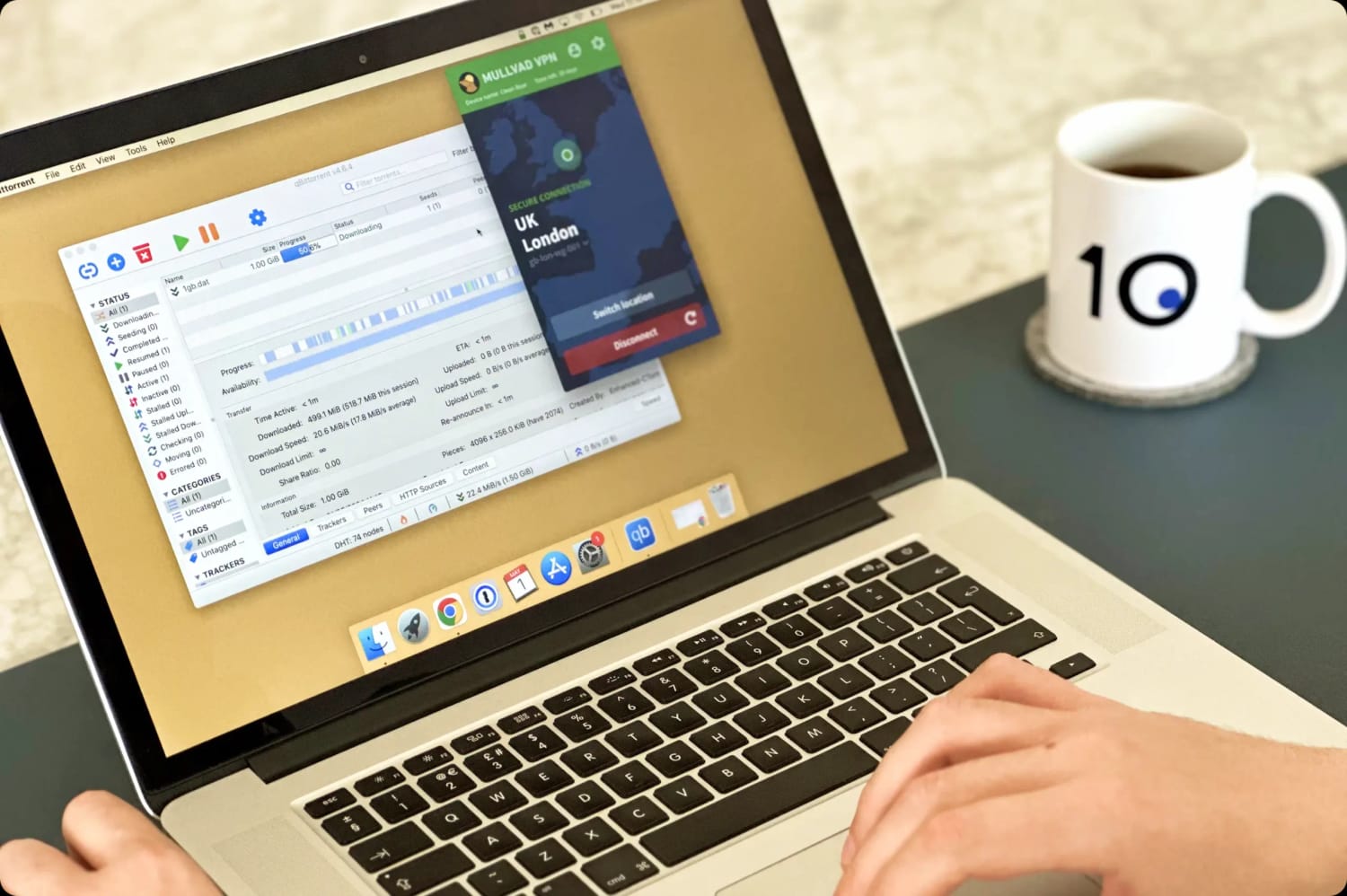
최고의 토렌트용 VPN들만큼 빠르진 않았지만, 그래도 빠르고 개인정보 보호가 지켜지는 선택입니다. 킬 스위치 보호와 안전한 로그 정책이 이를 뒷받침합니다.
SOCKS5는 Mullvad의 모든 서버에서 사용할 수 있습니다. 원하는 애플리케이션에서 활성화만 하면 됩니다. 토렌트 이용자에게 유용하고, CAPTCHA를 만날 확률까지 줄여줍니다.
다만 Mullvad는 “악용 여지”를 이유로 더 빠른 P2P 연결을 위한 포트 포워딩 사용을 더 이상 허용하지 않습니다. 포트 포워딩은 VPN을 쓰는 게이머에게 유용한 수동 도구입니다. 속도를 최적화하고, NAT 유형을 변경하고, 렉을 줄일 수 있게 해주니까요.
기기 호환성
기기 호환성부문 총 59개 VPN 중 24위
Mullvad VPN은 맥, 윈도우, iOS, 안드로이드 등 대부분의 주요 기기에 설치할 수 있습니다. 다만 일부 기기 지원이 빠져 있습니다. 파이어 TV 전용 앱이나 스마트 DNS 서비스가 없죠. 라우터에 수동으로 설정해 스마트 TV와 게임 콘솔까지 커버할 수는 있지만, 이런 우회 방법은 네이티브 지원보다 훨씬 번거롭습니다.
| 윈도우 | 있음 |
|---|---|
| 맥 | 있음 |
| iOS | 있음 |
| 안드로이드 | 있음 |
| 리눅스 | 있음 |
| 파이어 TV | 없음 |
| 안드로이드 TV | 있음 |
| 애플 TV | 없음 |
| 라우터 | 수동 설정만 가능 |
| 크롬 | 없음 |
동시 접속 수: 5
Mullvad의 기기 호환성은 경쟁사 대비 평균 이하입니다. 특히 안드로이드 TV 앱은 수년째 제공하면서도 파이어 TV 전용 앱은 없습니다.
또한 동시 로그인은 기기 5대까지만 허용됩니다. 더 많은 기기에서 쓰려면 다른 기기를 먼저 로그아웃해야 합니다.
Surfshark나 Windscribe 같은 경쟁 서비스 다수는 기기 제한이 아예 없습니다.
부가 기능
부가 기능부문 총 59개 VPN 중 12위
Mullvad는 부가 기능도 알차게 갖췄습니다. 분할 터널링에, 안전한 탐색을 위한 광고·트래커·악성 소프트웨어 차단까지 제공합니다. 멀티홉 서버는 검열 우회에 활용되는데, 러시아와 중국에서 잘 작동합니다.
| 부가 기능 | Mullvad VPN |
|---|---|
| 분할 터널링 | 있음 |
| VPN 난독화 | 있음 |
| 멀티홉 서버 | 있음 |
| 전용 IP | 없음 |
| 광고 차단기 | 있음 |
| 프라이빗 브라우저 | 있음 |
난독화 기술
Mullvad는 검열 우회를 위한 트래픽 난독화 옵션을 여러 개 제공하며, 하나가 통할 때까지 전부 시도해보라고 권합니다.
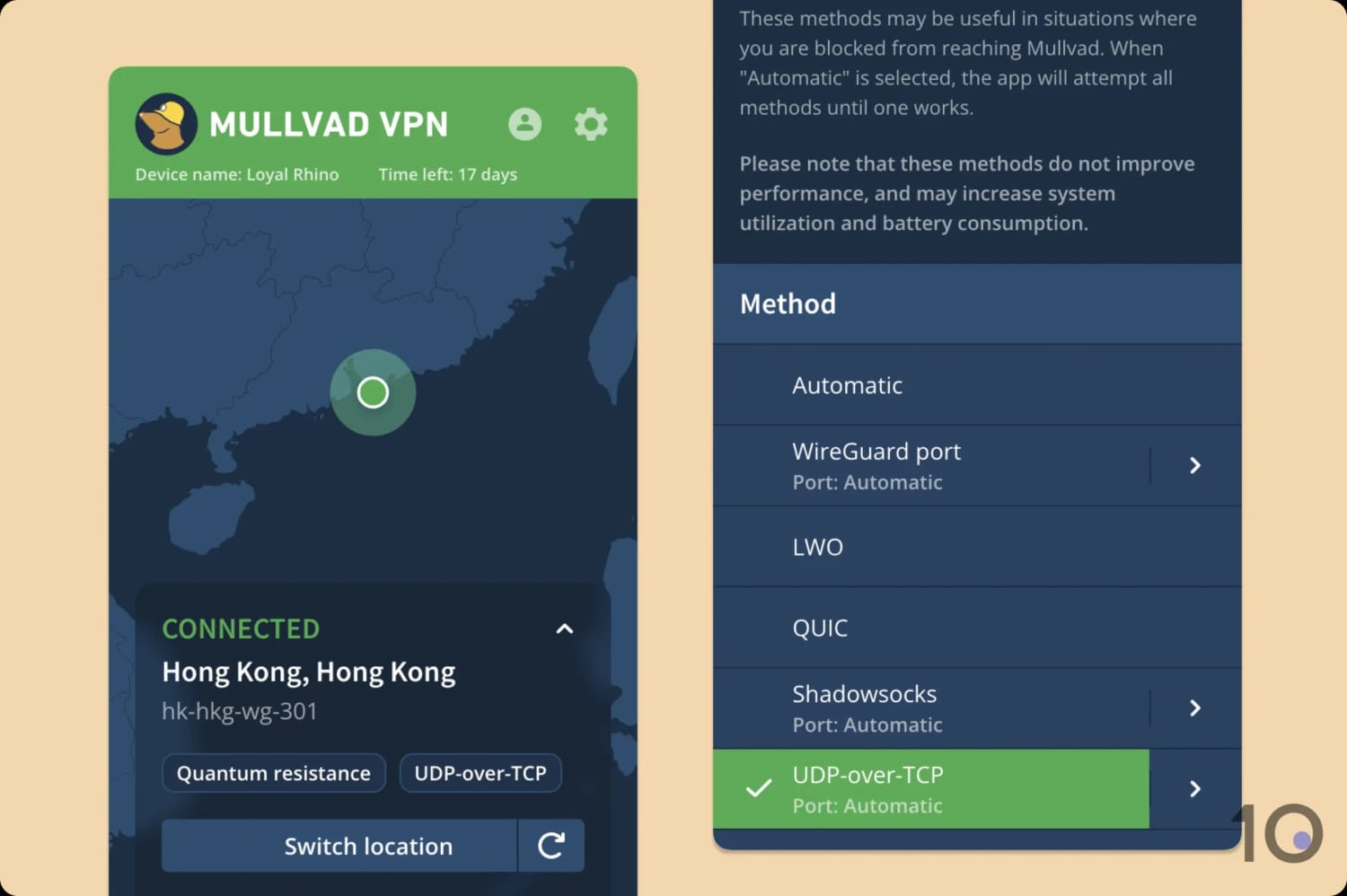
Mullvad의 검열 우회 모드는 앱 설정에서 쉽게 켤 수 있습니다.
이 기술은 잘 통했고, 그중 QUIC 프로토콜이 가장 효과적이었습니다. 세계에서 가장 엄격한 웹 검열인 중국의 만리방화벽까지 넘어섰습니다.
기본은 하는 분할 터널링
Mullvad에는 특정 앱을 VPN 터널에서 제외할 수 있는 분할 터널링 기능이 있습니다. 예를 들어 핑 상승을 막으려고 Steam 트래픽만 VPN 서버를 거치지 않게 할 수 있죠.
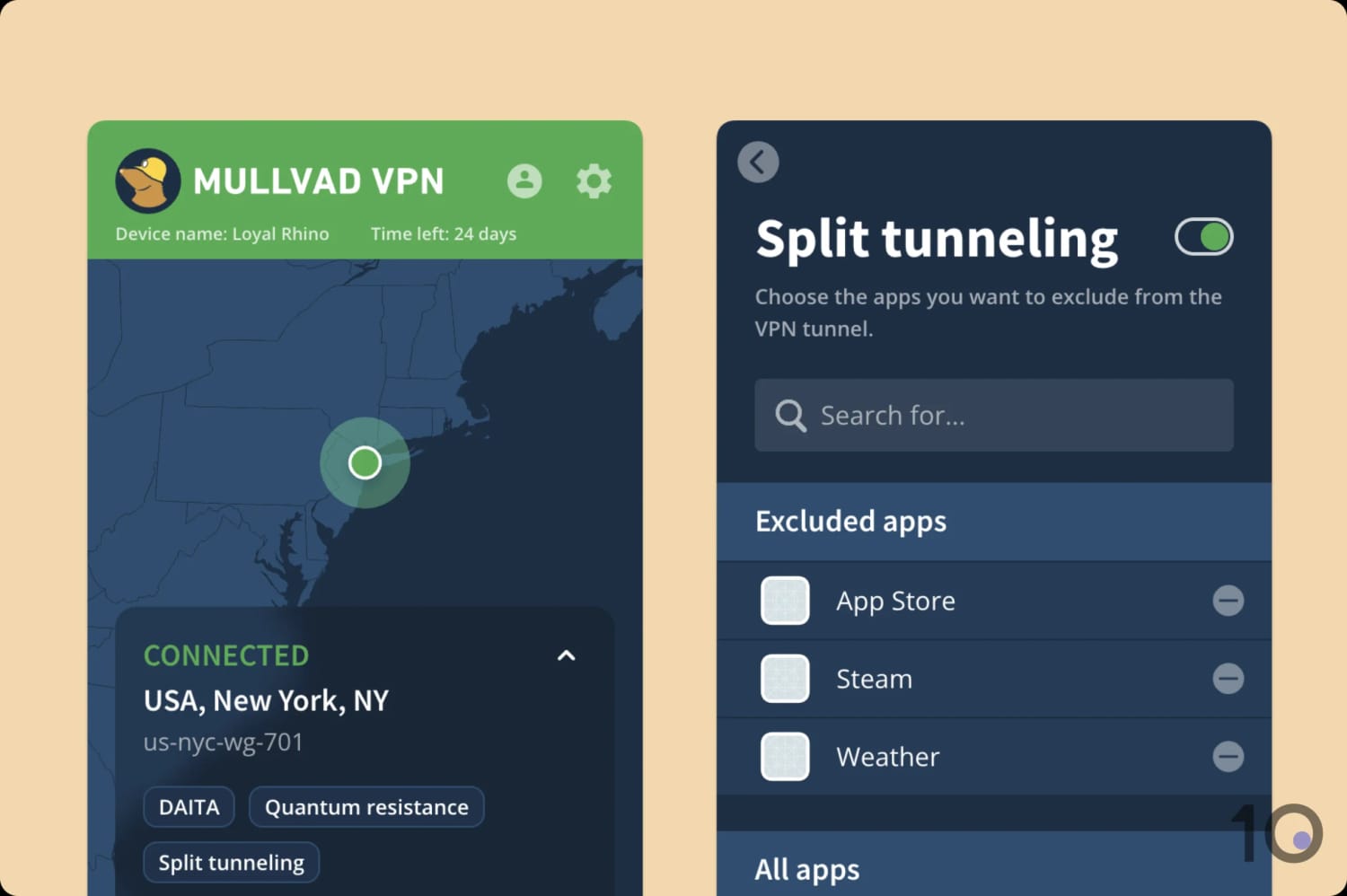
분할 터널링은 모든 앱에서 의도대로 작동했습니다.
다만 이 기능은 Mullvad의 다른 도구들과 달리 꽤 기본 수준입니다. 다른 VPN 서비스와 비교하면 특히 그렇습니다. 예를 들어 Hide.me는 앱을 터널에서 제외할 수도, 반대로 포함할 수도 있게 해 필요에 맞게 조정할 수 있습니다.
Mullvad가 맥에서 분할 터널링을 설정하려면 전체 디스크 접근 권한을 요구한다는 점도 마음에 들지 않았습니다. 과하게 침해적으로 느껴졌는데, 다른 VPN들은 이 정도 접근 없이도 분할 터널링을 지원하니 더욱 그렇습니다.
잘 작동하는 광고·트래커·악성 소프트웨어 차단기
환경설정에서 시작 시 앱 실행과 자동 연결 토글, 그리고 광고·트래커·악성 소프트웨어 차단기 활성화 옵션을 찾을 수 있습니다.
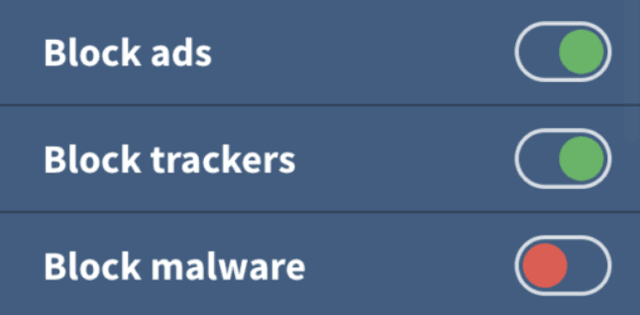
Mullvad는 침해적인 광고, 트래커, 악성 소프트웨어를 차단할 수 있습니다.
Mullvad의 광고 차단기가 저희가 테스트한 최고 수준은 아니지만, 소셜·분석 트래커 대부분과 일부 팝업 광고를 차단해냅니다.
이미 Mullvad를 쓰고 있다면 켜둘 만하지만, uBlock Origin만큼 효과적이진 않습니다.
Mullvad 브라우저
Mullvad 브라우저는 Tor 프로젝트와 협업으로 만들어졌으며, 추적과 브라우저 핑거프린팅을 방지하는 역할을 합니다.
방식은 다음과 같습니다:
- 텔레메트리 데이터 수집 비활성화
- 제3자 트래커 차단
- 세션이 끝날 때마다 쿠키, 캐시, 방문 기록 삭제
윈도우, 맥OS, 리눅스에서 사용할 수 있습니다.


