



The Bottom Line
I’ve tested 59 VPNs and I’ve yet to find a better one than ExpressVPN. Its apps are intuitive, my speeds dropped by just 2% on nearby servers, and it unblocked 115 of the 120 streaming services I tested. It passed all of my security tests, and it logs nothing that can identify you. It’s pricier than some of its rivals and lacks certain extra features, but it’s still the only VPN I use every day.
9.7/10 9.8/10 9.2/10 9.0/10 9.9/10 9.5/10 9.9/10 9.5/10 6.4/10
- Logs zero identifiable data & diskless servers
- Works with Netflix, Disney+ & all other streaming sites
- Robust security features
- Fast connection speeds in every location
- Most user-friendly apps I've reviewed
- Servers in 113 countries
- Slightly more expensive than main rivals
- Fewer advanced features than competitors
- No multi-hop or port forwarding
- Renews at $8.33/mo
ExpressVPN’s apps are the best I’ve ever used. They’re astonishingly simple, with a user-friendly design that makes connecting a breeze. No identifying user data is logged either, which has been proven by real-world events.
My download speeds were exceptional on servers all over the world, with almost no effect on latency or video quality. It also works with almost every streaming service I’ve tried to unblock. No other VPN can match this, not even NordVPN.
Despite this, some publications still try to deny ExpressVPN’s superior performance, citing its owners’s past practices as a justification. Not only is this inaccurate, but it highlights how commercial interests can unjustly skew VPN rankings.
I know for a fact that many tech review sites rank rival VPNs above ExpressVPN simply because they offer higher affiliate fees. This unhelpful practice ignores clear performance differences and could ultimately come at your expense.
At Top10VPN, our impartial testing methodology provides a data-driven assessment of all VPN services. When you cut through the noise, our numbers and evaluation show that ExpressVPN is the best choice.
🔄 Recent Updates
I re-tested the desktop apps, added new screenshots, and analyzed the VPN’s latest transparency report.
Pricing Plans
$$$$| 1 month | $14.99 |
|---|---|
| 15 months | $74.85 ($4.99/mo) |
| 28 months | $83.72 ($2.99/mo) |
Free Trial Options
| Money-Back Guarantee | 30 days |
|---|---|
| Free Trial | 3 days (mobile only) |
| 100% Free Plan | No |
Privacy
We calculated this rating by examining the VPN's logging policy, jurisdiction, ownership, and privacy features. We also evaluated its history of handling user data and responding to legal requests.
Ranked #6 out of 59 VPNs for Privacy
ExpressVPN doesn't log any identifying information, as proven by high-profile server seizures. This is guaranteed by its TrustedServer technology: a RAM-only server network that automatically wipes all data following a server reboot, making logging anything impossible.
| Originating IP Address | No |
|---|---|
| Browsing Activity | No |
| Individual Connection Timestamps | No |
| Date of Last Connection | Yes |
| VPN Server IP | No |
| Device Information | No |
| Individual Bandwidth Usage | Yes |
| Account Information | Yes |
| Jurisdiction | British Virgin Islands (Privacy Haven) |
|---|---|
| Privacy Policy | No Identifiable Data |
| Transparency Reports | Yes |
| Diskless Servers | Yes |
| Anonymous Payment Options | Yes |
You can read ExpressVPN's full privacy policy on its website.
ExpressVPN collects far less data than most VPNs, retaining only anonymous connection logs for diagnostic purposes and service improvement.
While I’d prefer it used a no-logs policy like PIA VPN, the bottom line is that none of this information can be used to identify you.
This was proven when Turkish authorities seized an ExpressVPN server and found zero user data.
To underpin its privacy policy, the VPN service operates a diskless server network. Unlike most VPNs that store data on hard drives, ExpressVPN’s servers run on volatile memory that wipes with every reboot, making it impossible to log anything.
It’s also one of the only VPN services to have had its RAM-only server network audited by a third party.
The Truth Behind ExpressVPN’s Ownership
Kape Technologies’ 2021 acquisition of ExpressVPN sparked controversy due to its past as Crossrider, an ad-injector platform shut down in 2016.
However, Kape has since replaced its management team, rebranded, and adopted an ethos centered on digital privacy.
Despite what some publications claim, there is absolutely no evidence that ExpressVPN’s ownership compromises user privacy. This is a fabrication used to justify lowering the VPN’s rating, since it’s much harder to criticize its performance.
Under Kape, the VPN service has actually improved its privacy practices through additional audits, biannual transparency reports, and bug bounty programs. It’s also a much better product in general, with massively improved app design and streaming performance.
Streaming
We calculated this rating by identifying which streaming services the VPN could unblock and measuring how consistently it could access them.
Ranked #1 out of 59 VPNs for Streaming
ExpressVPN unblocked 96% of the 120 streaming services I tested, which outperformed every other VPN. No matter which device you stream with, ExpressVPN has a compatible app. My videos loaded in maximum quality, without buffering, on Fire TV, Apple TV, PC, mobile, game consoles, and more.
| Streaming Service | Works with ExpressVPN |
|---|---|
| BBC iPlayer (UK) | Yes |
| DAZN (Canada) | Yes |
| Disney+ (UK) | Yes |
| Hulu (US) | Yes |
| ITVX (UK) | Yes |
| HBO Max (US) | Yes |
| Netflix (US) | Yes |
| Netflix (UK) | Yes |
| Prime Video (US) | Yes |
| Sky Go (UK) | Yes |
ExpressVPN consistently works with Netflix, unblocking a staggering 18 libraries. This is more than NordVPN, and includes popular regions like the US, UK, and Canada.
It reliably unblocks UK Disney+, which I took advantage of to access Hulu content that’s normally locked behind an expensive US bundle. As long as you have a standard Disney+ subscription, connecting to a UK server bypasses that extra fee.
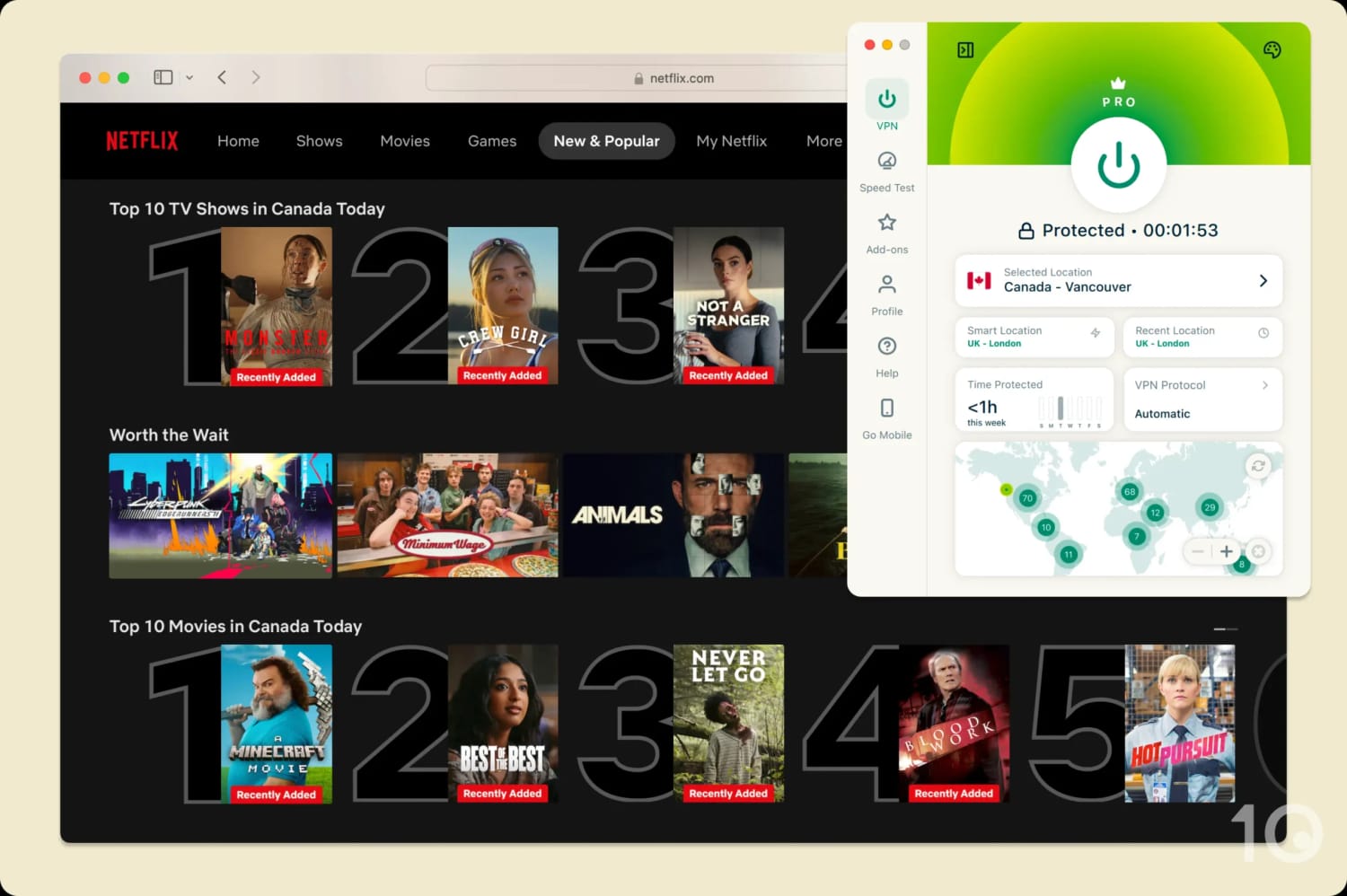
ExpressVPN unblocks all major Netflix libraries without issue.
I’m also happy to report that ExpressVPN now bypasses BBC iPlayer’s strict geo-restrictions, letting you stream live and on-demand content. That wasn’t always the case, so I’m glad to see ExpressVPN has addressed it.
FuboTV Canada is the only notable outlier, with the VPN failing to bypass its strict proxy detection. Surfshark works if you want access, but you’ll also need a Canadian payment method.
Beyond unblocking geo-restrictions, ExpressVPN provides a smooth and consistent streaming experience across all devices. For example, its plug-and-play apps meant it took less than five minutes to install the VPN on Fire TV and start streaming JioHotstar. This is much easier than with most VPNs, like Mullvad, which doesn’t provide apps for Apple TV or Fire TV.
This even extends to devices that don’t support VPNs, like game consoles, thanks to ExpressVPN’s browser-based router app. Just connect your streaming device to your router, select a VPN server, and begin streaming.
While other VPNs make you connect to a “streaming-optimized” server, ExpressVPN works the first time, making accessing geo-blocked content a walk in the park. The only exception is US Netflix, where I found that the “New Jersey - 1” server works much better than the default.
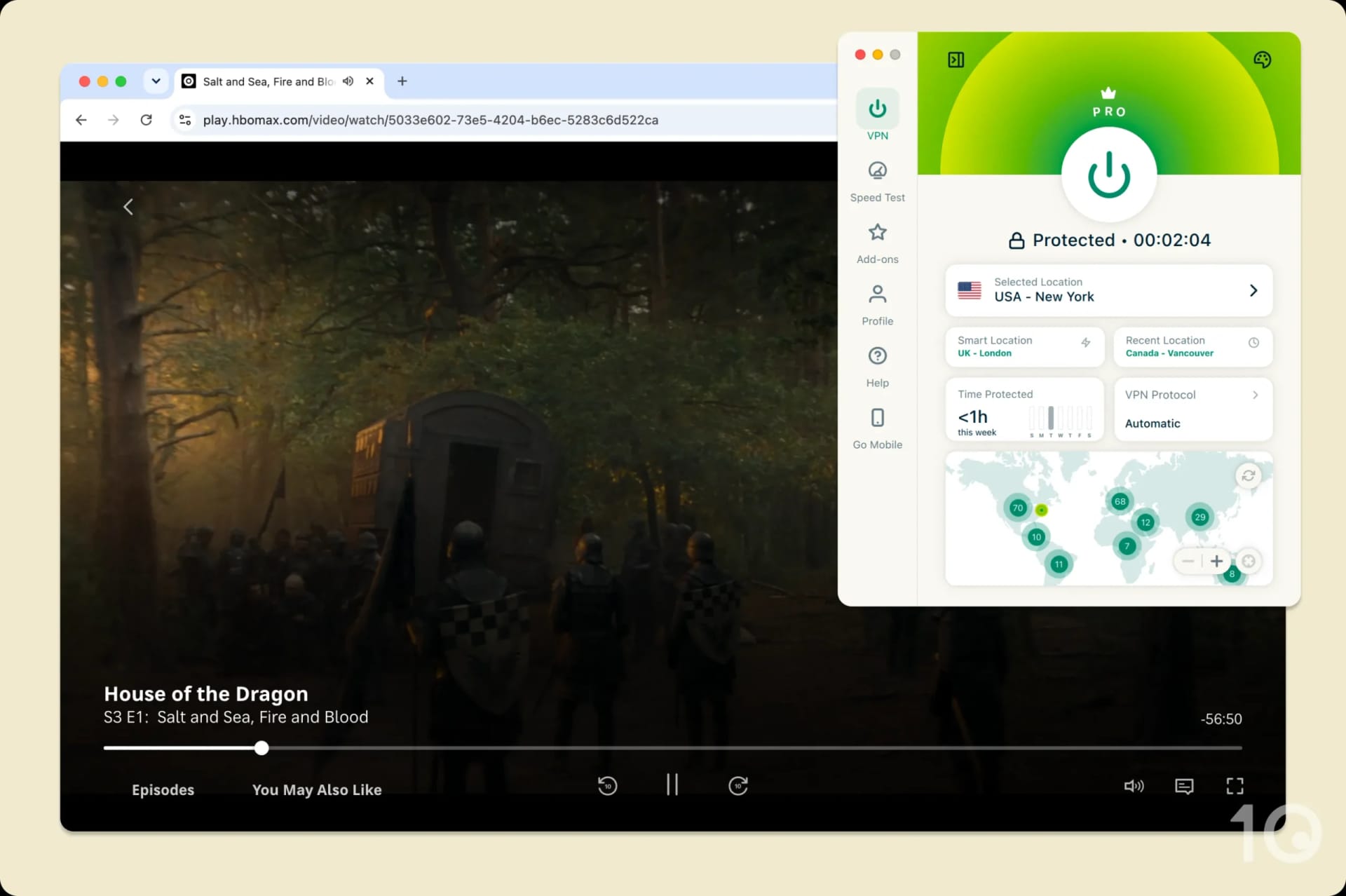
You can use ExpressVPN to watch US streaming services from anywhere.
The VPN’s focus on user experience is also seen in its server location accuracy. Far too many VPNs claim to connect you to New York only for your IP address to end up in Delaware. ExpressVPN rarely gets this wrong, and it makes all the difference when streaming local broadcasts.
Speed
We calculated this rating using our proprietary tests of download, upload, and ping speeds across servers in 10 countries.
Ranked #5 out of 59 VPNs for Speed
ExpressVPN is faster than almost every other VPN service on nearby servers, including NordVPN, PIA, and IPVanish. Using its Lightway protocol, I recorded speed losses of just 2%, ensuring buffer-free gaming, streaming, and video calling.
Connecting to a VPN server near my testing location resulted in a 2% speed loss. In practical terms, this is no different from browsing or streaming without a VPN — it’s that fast.
My connection speeds remained stable throughout, rarely fluctuating, which meant I never had to deal with any sudden lag or buffering.
No matter where you’re located, you can expect a similar result when using a nearby server. In fact, I’ve run the numbers and ExpressVPN is the second-fastest VPN I’ve tested for download speeds on local connections.
I put this down to two key features: its custom-made Lightway protocol, and a network of 10Gbps servers that provide high bandwidth capacity. You can also use Lightway Turbo on its Windows app, which delivers even faster speeds.
However, I’ve observed a significant decline in the VPN service’s international speeds recently. Compared to previous tests, its speeds have decreased by 34% in South Africa and 13% in Germany.
To put all of this into context, you can see how ExpressVPN’s speed performance compares to other leading VPNs in the chart below:
Security
We calculated this rating by testing the VPN's security protocols, encryption, leak protection, and kill switch reliability. We also assessed the provider's track record and any past security incidents.
Ranked #8 out of 59 VPNs for Security
At no point did I feel unsafe or at risk using ExpressVPN. Its apps passed all of my internal security tests, and it's added the long-overdue WireGuard protocol. In particular, I liked how seamlessly the VPN switched between ChaCha20 and AES-256 encryption to optimize performance based on my setup.
| Independent Audit | Yes |
|---|---|
| VPN Kill Switch | Yes |
| Leak Protection | Yes |
| OpenVPN (TCP/UDP) | Yes |
|---|---|
| Lightway | Yes |
| WireGuard | Yes |
| ChaCha20 | Yes |
| AES-256 | Yes |
| Post-Quantum Cryptography | Yes |
ExpressVPN defaults to its self-developed Lightway protocol, which automatically switches between two secure encryption ciphers (ChaCha20 and AES-256) depending on your device and network settings. This optimizes performance without compromising your security.
I verified this myself by running my VPN traffic through Wireshark, a data packet analyzer.
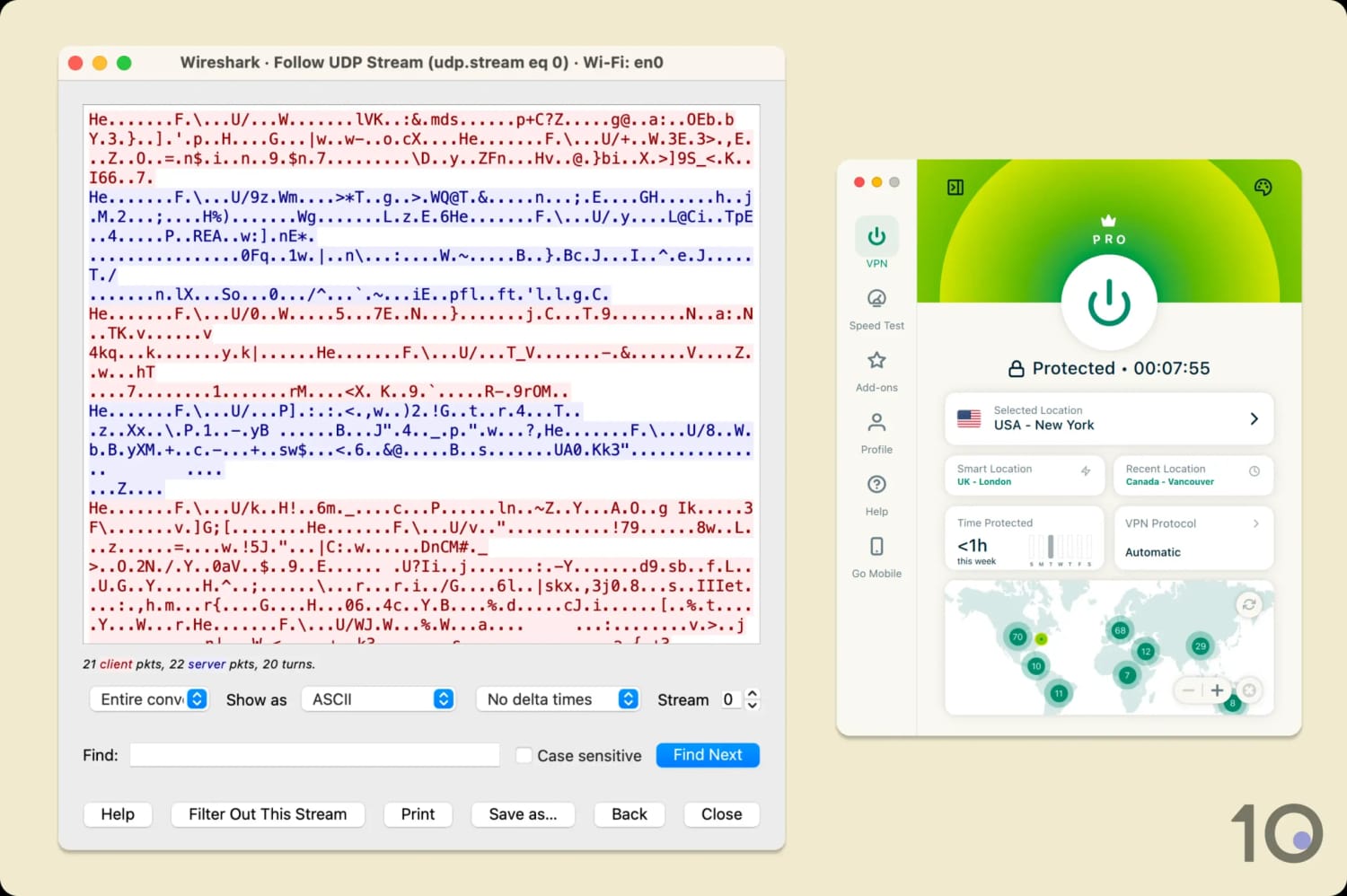
ExpressVPN encrypted my connection with AES-256.
Every ExpressVPN app and browser extension successfully encrypted my traffic. This is unheard of, as most VPN browser extensions are basic, unencrypted web proxies.
Lightway is also open-source, meaning anyone can inspect its codebase for vulnerabilities. If you’re still unconvinced, you also have the choice of post-quantum WireGuard in all ExpressVPN apps (aside from macOS).
ExpressVPN uses perfect forward secrecy, a 4096-bit RSA key, and SHA-512 HMAC authentication. While most tech review sites overhype these features as cutting-edge, I want to be transparent: almost every VPN includes them as standard connection protocols.
Passed My Internet Data Leak Tests
All ExpressVPN apps feature its Network Lock kill switch, including frequently overlooked platforms like Fire TV and iOS. You can also enable an advanced version of Network Lock that blocks your device’s internet connection until the VPN is reactivated.
Using our in-house tools, I also ran IP, DNS, and WebRTC leak tests while connected to a nearby ExpressVPN server. It passed every test with flying colors, ensuring none of my personal information was exposed.
Previously, a bug in ExpressVPN’s Windows app caused DNS leaks when split tunneling was enabled, allowing your ISP to see the websites you visited. Thankfully, the issue was fixed quickly once disclosed, and I’ve not seen any evidence to suggest the issue has recurred.
Reassuringly, ExpressVPN also uses first-party DNS servers to prevent your ISP from handling DNS requests.
All of the above has been verified by multiple independent security audits. In the last three years alone, ExpressVPN has undergone 13 security-related audits. By comparison, NordVPN has had just two over the same period.
Server Locations
We calculated this rating by assessing the number of countries and cities available, their geographic spread, and availability in popular regions.
Ranked #1 out of 59 VPNs for Server Locations
ExpressVPN has servers in 113 different countries, which is the third-highest total among the 59 VPNs I review. However, what really sets ExpressVPN apart is the precision of its server network, with more city-specific options than any other VPN.
| Continent | Countries with Servers |
|---|---|
| Europe | 45 |
| Asia | 33 |
| North America | 16 |
| South America | 9 |
| Africa | 7 |
| Oceania | 3 |
ExpressVPN offers IP addresses from more countries than most VPN services: 22 more than PIA, for example.
That said, it covers slightly fewer countries in Asia and Africa than its closest rival, NordVPN.
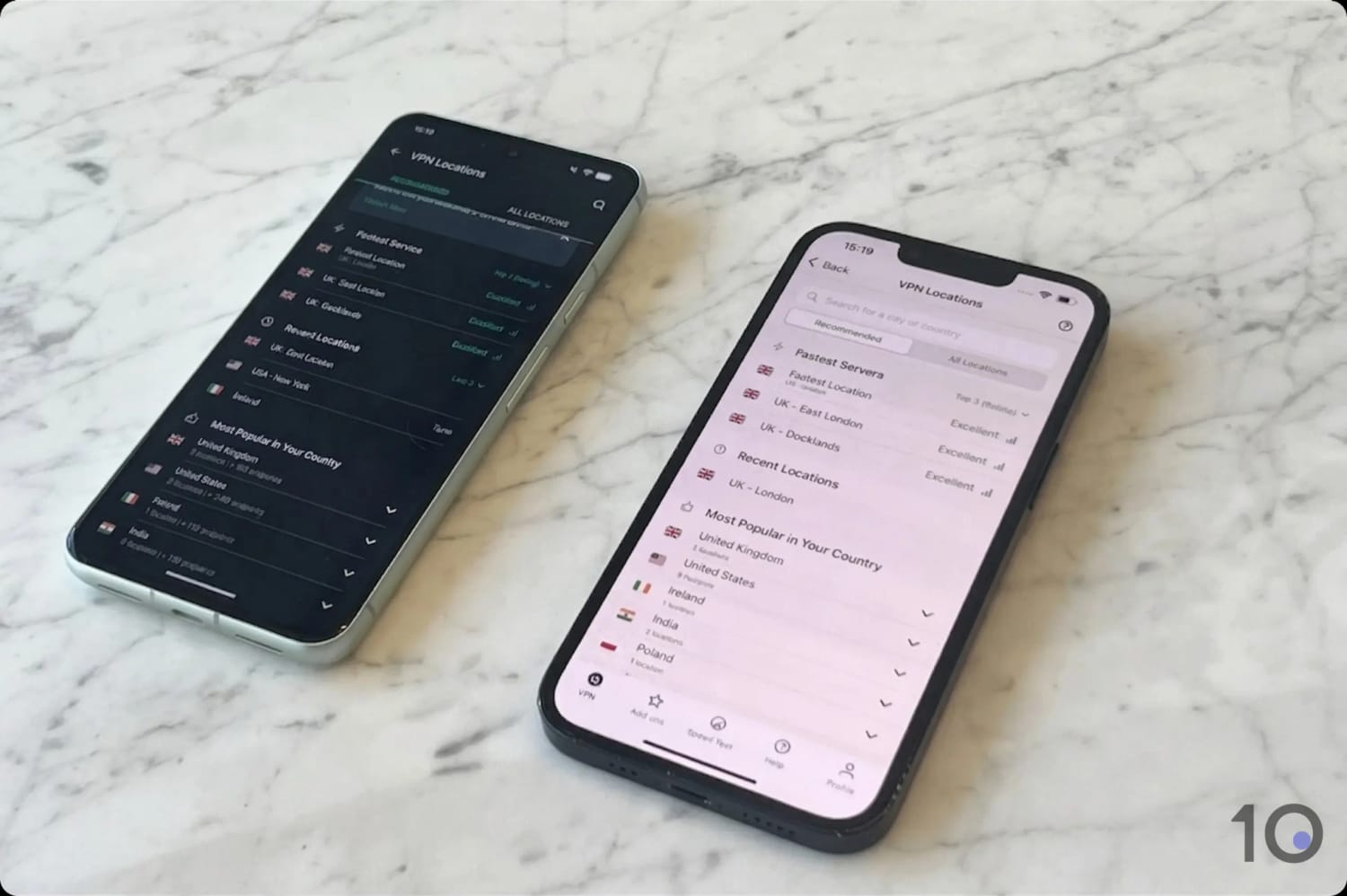
ExpressVPN server list on Android (left) and iOS (right).
Where ExpressVPN truly stands out is its city-level choice, with options in 15 countries. That’s far more than IPVanish (7) and CyberGhost (9).
You can use this feature to minimize latency by connecting to a server in or near your own city, or to access highly localized content, like out-of-market NFL games.
Moreover, ExpressVPN provides access to the most VPN server locations in the USA (56) and covers all 50 states. No other VPN has servers in as many American cities.
User Experience
We calculated this rating by assessing the VPN’s ease of use, interface design, and setup process across multiple platforms.
Ranked #1 out of 59 VPNs for User Experience
For me, ExpressVPN is categorically the easiest VPN to use. There's no learning curve: just need to press the large power button and it automatically selects the best protocol and server based on your physical location. I also love just how fast the app opens and connects to a server. These quality-of-life features might seem small, but they make a noticeable difference when you're using a VPN daily.
ExpressVPN’s user experience and design are consistent across devices, with one or two variations. You can expand each section below for a closer look at how the VPN looks and feels on a specific platform.
Desktop & Laptop (Windows & Mac)
Unlike some other VPNs that heavily prioritize Windows over Mac, ExpressVPN has created desktop apps that look, feel, and perform the same.

The simple red, white, and green color palette contrasts well with any device display and makes reading labels easy. Clicking the power button once automatically connects you to a nearby server, and clicking it again disconnects.
I found this so much quicker and easier than on other VPNs. Take NordVPN, for example, which overcomplicates its main screen by placing a pause function next to the disconnect button.
ExpressVPN’s interface adopts a card-based approach that displays only the most essential information. While this is very user-friendly, I personally prefer to enable the ‘compact’ view for a slimmer window. To do this yourself, click the sidebar toggle (the boxed chevron) in the top-left of the app.
The server list is easy to navigate with ‘Recommended’ servers selected by default. To view the full list, click ‘All Locations’ or use the search bar to find a specific region.
The recent inclusion of an interactive map on the home screen isn’t to my taste, but it isn’t overly intrusive. Moreover, it serves as another visual cue for seeing your connection status at a glance.
Mobile (iPhone & Android)
ExpressVPN’s mobile apps look and feel very similar to the desktop versions, with some minor changes.

I love how compact the mobile apps are. You can avoid trawling through the settings by tapping the appropriate home screen shortcut. For example, the crescent moon icon in the top right changes the app’s appearance.
Both apps include a map in the bottom half of the home screen to show your virtual location. While it’s far less distracting than the maps in NordVPN’s or IPVanish’s apps, I’d still like the option to touch and drag it.
That said, I’m extremely pleased with the updates, particularly two long-requested improvements. The mobile apps now have a dark mode option (two, in fact), and the overly complicated protection summary graph now takes up far less space on the home screen.
Streaming Devices (Fire TV, Apple TV & Android TV)
ExpressVPN’s apps for Fire TV, Apple TV, and Android TV are well-designed and user-friendly, featuring a dark mode interface that made it easier to read text on my TV screen.
While a light mode option would be a welcome addition for added customization, the apps already stand out for their intuitive layout. Server locations are organized by continent, complemented by a clear and straightforward visual design that simplifies server selection.

I like how ExpressVPN keeps its interface consistent across all these devices. I’m always puzzled when competitors like NordVPN use a different app design for Fire TV and Apple TV.
Day-to-Day Experience
As I’ve mentioned throughout this review, ExpressVPN is simply a joy to use. It’s my daily driver, ahead of every other VPN I’ve tested.
After years of using it, I sometimes take for granted just how well it does the basics: quick server connection times, a minimal and attractive interface, and superb performance that handles everything with ease.
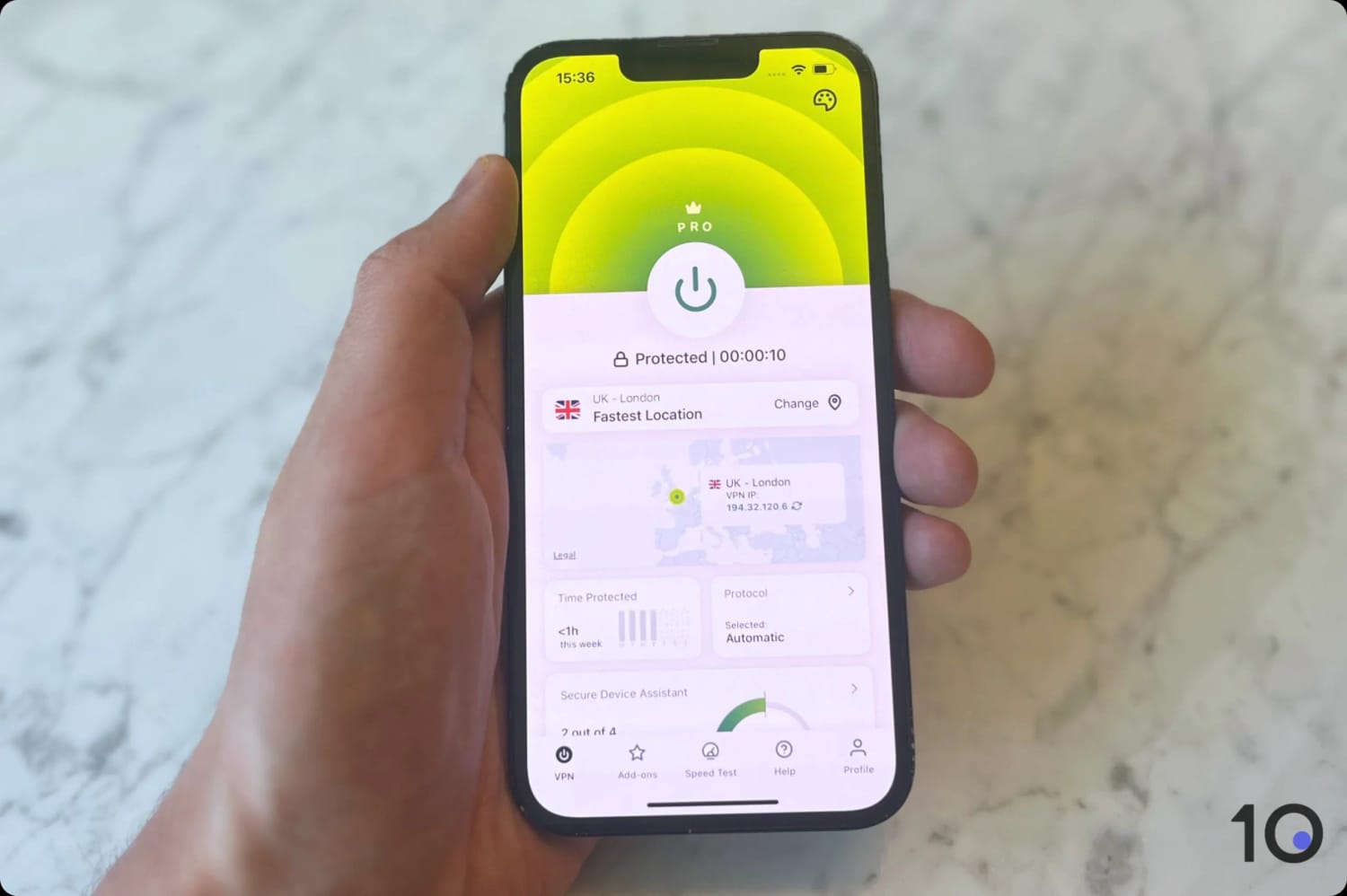
ExpressVPN is my favorite VPN to use.
The difference becomes obvious when I switch to other VPNs, even highly rated ones. Surfshark, for example, frustrated me with constant upgrade pop-ups and minor annoyances. ExpressVPN, by comparison, feels premium from day one.
Most of the time, I just click the large power button and I’m set. I only venture beyond the home screen when connecting to international servers for geo-blocked content.
The only gripe I’ve ever had with ExpressVPN was the frequent CAPTCHAs. Thankfully, this is no longer the case, as ExpressVPN has patched it out.
Torrenting
We calculated this rating by assessing the VPN's torrenting features, including P2P servers and port forwarding support. We also evaluated its average bitrate and stance on file-sharing.
Ranked #3 out of 59 VPNs for Torrenting
In my tests, ExpressVPN downloaded P2P files a lot faster than most of the competition. All 13,360 of ExpressVPN’s servers allow torrenting, and its kill switch and privacy-friendly logging policy will prevent your ISP from seeing your file-sharing activity. The only downside is the lack of port forwarding, but ExpressVPN is fast enough without it.
| Torrenting Attribute | ExpressVPN |
|---|---|
| Permits P2P Traffic | Yes |
| Average Download Bitrate | 9.8MiB/s (2% loss) |
| Countries with P2P Servers | 113 |
| Port Forwarding | No |
| Kill Switch | Yes |
| Logging Policy | No Identifiable Data |
There’s no record of ExpressVPN ever forwarding DMCA requests to its users. You can check this yourself by looking through the service’s transparency reports.
Aside from its privacy features, I love how straightforward it is to torrent with ExpressVPN. With other VPNs, I’ve lost count of the number of times I thought it blocked torrenting, only to discover I hadn’t activated a hidden setting or connected to a specialized server.
You won’t have that problem here, as every server, protocol, and app works for torrenting. Just click and connect, and you’re good to go.
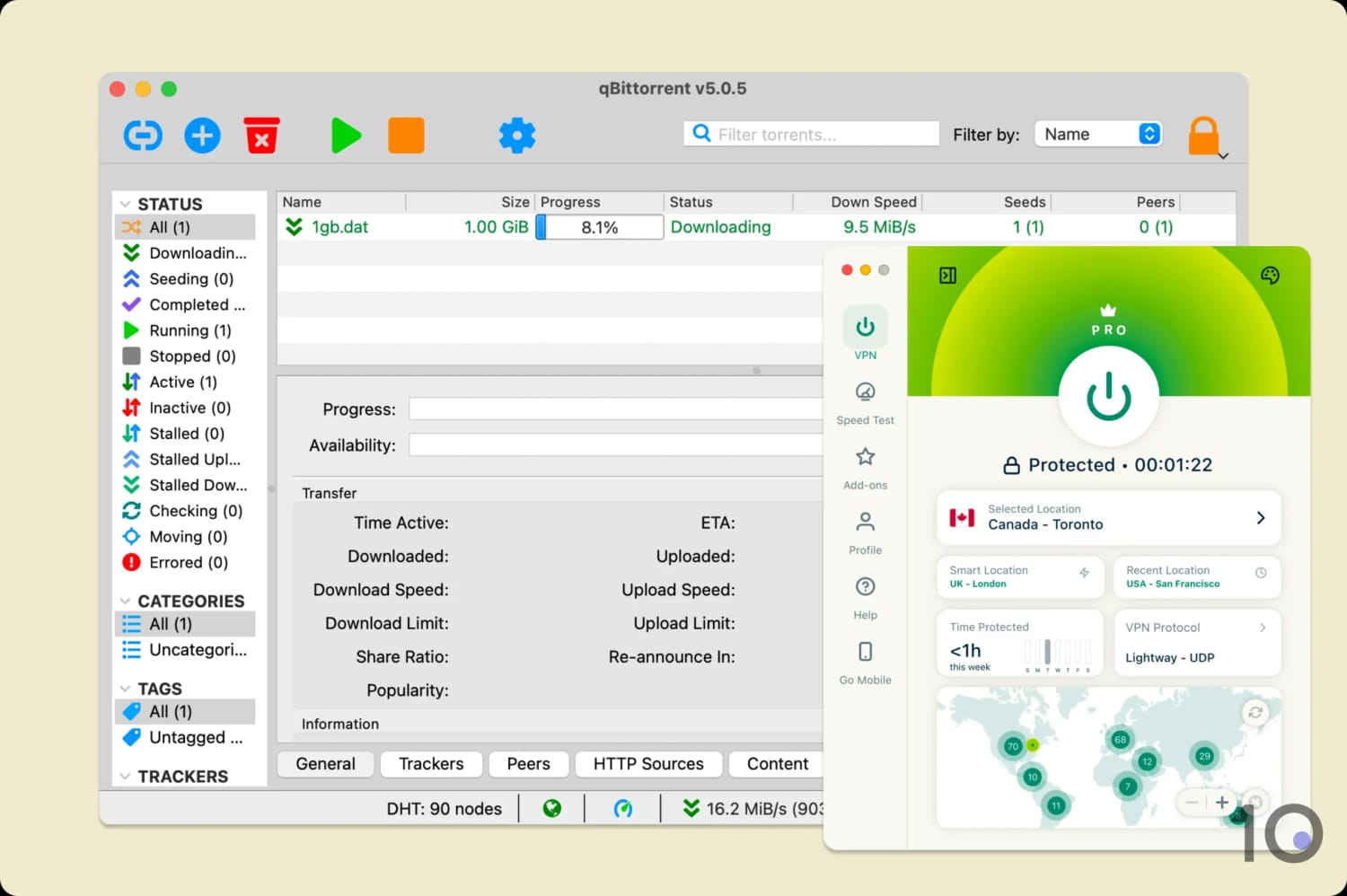
ExpressVPN’s file-sharing speeds are among the best.
One criticism often leveled at ExpressVPN is its lack of port forwarding. Honestly, it’s a nice-to-have feature, but it won’t massively affect your P2P speeds. That said, you can always use PIA if port forwarding is a deal-breaker for you.
To add some context, here’s how quickly I could download a 20GB file using the VPN, compared to other household names:
| VPN Service | Download Bitrate | Time Taken (20GB File) |
|---|---|---|
| No VPN | 10MiB/s | 32 minutes |
| ExpressVPN | 9.8MiB/s | 33 minutes |
| Surfshark | 8.7MiB/s | 37 minutes |
| CyberGhost | 3.9MiB/s | 81 minutes |
Device Compatibility
We calculated this rating by evaluating the VPN's support for various devices. We considered dedicated apps, browser extensions, Smart DNS functionality, and router compatibility.
Ranked #1 out of 59 VPNs for Device Compatibility
ExpressVPN is, without question, the most compatible VPN service available. As well as its standard desktop and mobile apps, it includes a Smart DNS proxy and a dedicated app for its custom router hardware. ExpressVPN allows 10 simultaneous connections, which is the industry average.
| Windows | Yes |
|---|---|
| Mac | Yes |
| iOS | Yes |
| Android | Yes |
| Linux | Yes |
| Amazon Fire TV | Yes |
| Android TV | Yes |
| Apple TV | Yes |
| Router | Yes |
| Chrome | Yes |
| Smart DNS | Yes |
|---|---|
| Unblocks Content From |
|
Simultaneous Connections: 10

You can run ExpressVPN on several devices at once.
If you plan on sharing your subscription with others, be aware that ExpressVPN allows 10 simultaneous connections per account. While this isn’t unusual, cheaper services like PIA and Surfshark don’t impose any limits.
An Outstanding & Unique Router App
I’ve been reviewing VPNs for years, and I’m always shocked at how few review sites highlight ExpressVPN’s extraordinary router app.
It’s the only VPN with a dedicated router app, complete with a bespoke user interface and a full suite of features. It’s browser-based, meaning you can change VPN settings and switch servers through a website as effortlessly as you can on its PC or mobile apps.
Any device that connects to your router is protected, which is an unprecedented level of coverage. The downside is that it only works on ExpressVPN’s custom-made Aircove and Fortify routers.
You can still manually install ExpressVPN on third-party models, like Linksys or ASUS, but this limits you to one server location at a time, with none of the VPN’s features.
Additional Features
We calculated this rating by evaluating the VPN's extra capabilities beyond the basic VPN service. This includes bypassing censorship, additional tools like malware blockers, and customization options like split tunneling.
Ranked #12 out of 59 VPNs for Additional Features
For an elite VPN service, I'm slightly disappointed by ExpressVPN's lack of additional features. Its ad blocker isn't the best, and it's missing multi-hop servers and an Android GPS spoofing tool. That said, I've always appreciated how accessible ExpressVPN's apps are, especially compared to rivals like NordVPN and Surfshark, which overwhelm you with new features and promos.
| Additional Feature | ExpressVPN |
|---|---|
| Split Tunneling | Yes |
| VPN Obfuscation | Yes |
| Multi-Hop Servers | No |
| Dedicated IP | Yes |
| Ad Blocker | Yes |
| Password Manager | Yes |
Anonymous Dedicated IP Feature
This add-on allows you to connect to a server with an IP address that’s exclusive to you, unlike standard VPN IPs that are shared among dozens of users.
When setting up your dedicated IP, ExpressVPN uses zero-knowledge encryption alongside a ‘blind token system’ to maintain your anonymity. In plain English, this prevents the VPN from seeing your unique activation code and linking it to your account.
Unfortunately, this isn’t the industry standard. NordVPN admits in its privacy policy that it links your dedicated IP address to your account.
Threat Manager Performs Adequately
All of ExpressVPN’s apps include an ad and tracker blocker, named Threat Manager.
According to my data, Threat Manager only blocked 60% of ads and trackers. Private Internet Access and NordVPN prevented 100%.

As it stands, Threat Manager is a useful feature that’ll better protect your browsing from data profiling. But there are better alternatives available.
ShuffleIP Makes Tracking Harder
All VPNs assign you a new IP address when you first connect, but ExpressVPN goes one step further by changing your IP every time you use a new website or app.
This feature, known as ShuffleIP, makes it near-impossible for anyone to track your online activity or harvest data about your browsing habits.
You won’t even notice this is happening, as the feature works automatically in the background without interrupting your connection.
ExpressVPN Key Data
| Attribute | ExpressVPN | Typical VPN |
|---|---|---|
| Owner | Kape Technologies | Independent |
| Launch Date | 2009 | 2015 |
| Local Download Speed | 98Mbps (2% loss) | 89Mbps (11% loss) |
| International Download Speed | 85Mbps (15% loss) | 80Mbps (20% loss) |
| Countries with Servers | 113 | 40 |
| Privacy Policy | No Identifiable Data | Identifiable Data |
| Simultaneous Connections | 10 | 10 |
| Netflix Libraries | 18 | 3 |
| Torrenting | Yes | Yes |
| Works In China? | Yes | No |
| Cheapest Price | $2.99/mo over 28 months | $3.87/mo over 24 months |
| Customer Support | 24/7 Live Chat | |
| Apps & Extensions |           | |