



Privacy
TunnelBear collects your account details and device information, which is standard for most VPN services. It also logs how much bandwidth you use every month, which is deleted monthly. I'm disappointed to see that TunnelBear has previously worked with US authorities to confirm an individual’s account details, though it didn’t hand over any other identifiable data.
| Originating IP Address | No |
|---|---|
| Browsing Activity | No |
| Individual Connection Timestamps | No |
| Date of Last Connection | No |
| VPN Server IP | No |
| Device Information | Yes |
| Individual Bandwidth Usage | Yes |
| Account Information | Yes |
You can read TunnelBear's full privacy policy on its website.
TunnelBear collects some data: your email address, device information (OS and app version), whether you’ve been active that month, total data used (deleted at the end of the month), and your approximate geolocation when first connecting.
This level of data collection is relatively common for a VPN service and can be justified, but it holds TunnelBear back from being a top-rated no-logs VPN, like PIA.
TunnelBear is also based in Canada, which is an awful location for user privacy. This was demonstrated in 2020, when the VPN service cooperated with US authorities by confirming a user’s account via their email address.
Crucially, no further identifiable information was handed over to the authorities.
To mitigate against this, I advise you to sign up to TunnelBear using an alias email address. Unfortunately, you can’t completely detach your identity from your account, as the VPN doesn’t support anonymous payment methods.
While I feel assured that TunnelBear doesn’t log your IP address or browsing activity, since they handed no logs over in 2020, I’d like to see the introduction of diskless (RAM-only servers).
These servers run on volatile memory, ensuring no data is ever written to a physical disk and that all information is wiped instantly with every power cycle.
I’d also like to see its transparency reports resumed, given the last one was published in 2023. These are important documents that detail how many data requests TunnelBear receives, and whether the VPN complied.
Who Owns TunnelBear?
TunnelBear was established in 2011 by Daniel Kaldor and Ryan Dochuk. In 2018, it was acquired by antivirus software company McAfee.
The VPN company still operates a separate team within McAfee, meaning the same employees continued to work on the VPN post-acquisition.
Streaming
TunnelBear is a below-average VPN for streaming. The premium version can unblock some popular platforms including US Netflix, HBO Max, and Disney+, but it fails to unblock any other Netflix libraries or Amazon Prime Video. The free version of TunnelBear fails to unblock most geo-restricted streaming services outside the UK.
| Streaming Service | Works with TunnelBear (Free) | Works with TunnelBear |
|---|---|---|
| BBC iPlayer (UK) | Yes | Yes |
| DAZN (Canada) | No | No |
| Disney+ (UK) | No | Yes |
| Hulu (US) | No | No |
| ITVX (UK) | Yes | Yes |
| HBO Max (US) | Yes | Yes |
| Netflix (US) | No | Yes |
| Netflix (UK) | No | No |
| Prime Video (US) | No | No |
| Sky Go (UK) | No | No |
Compared to our top 10 VPNs, TunnelBear is a mixed bag for streaming.
My latest testing confirms it remains a reliable choice for American Netflix, unblocking the service on nine out of 13 US servers, with the San Jose location scoring a 100% success rate.
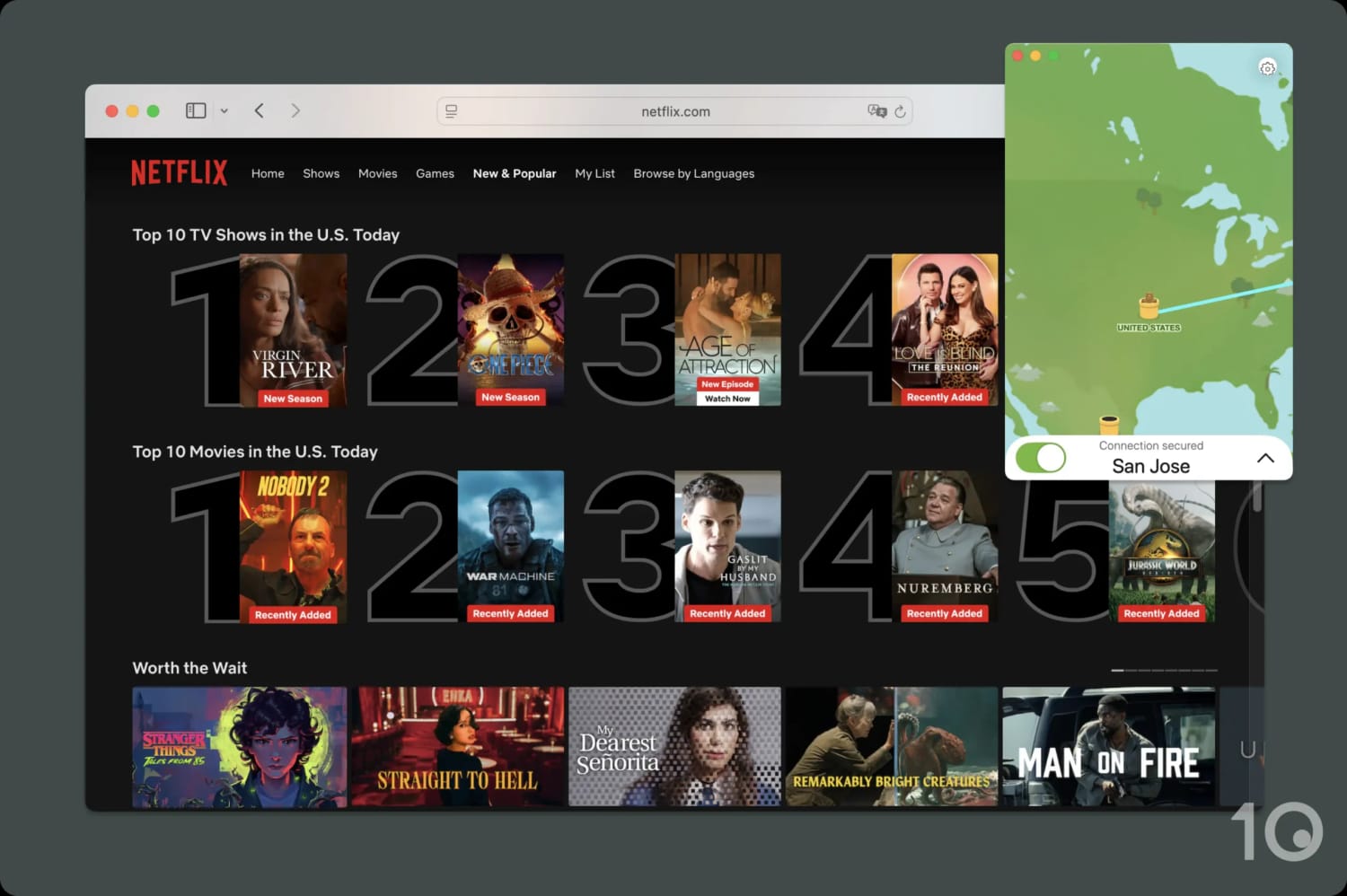
I suggest you use the San Jose server to stream US Netflix.
The VPN also works with a handful of other US streaming services. Using it, I managed to unblock geo-restricted content on Disney+, HBO Max, and YouTube.
With its fast speeds on nearby servers, my video streamed in maximum quality and I never noticed any buffering or blurriness.
Outside the US, TunnelBear streams BBC iPlayer, one of the hardest-to-unblock streaming platforms. Alongside this, it works with ITVX and Channel 4, for both live and on-demand content.
This is where its success ends: I wasn’t able to access a single DAZN library, any Netflix regions besides the US, or any other major streaming services. Glaring gaps in its US coverage include Hulu and Amazon Prime Video, two staples of any VPN for streaming.
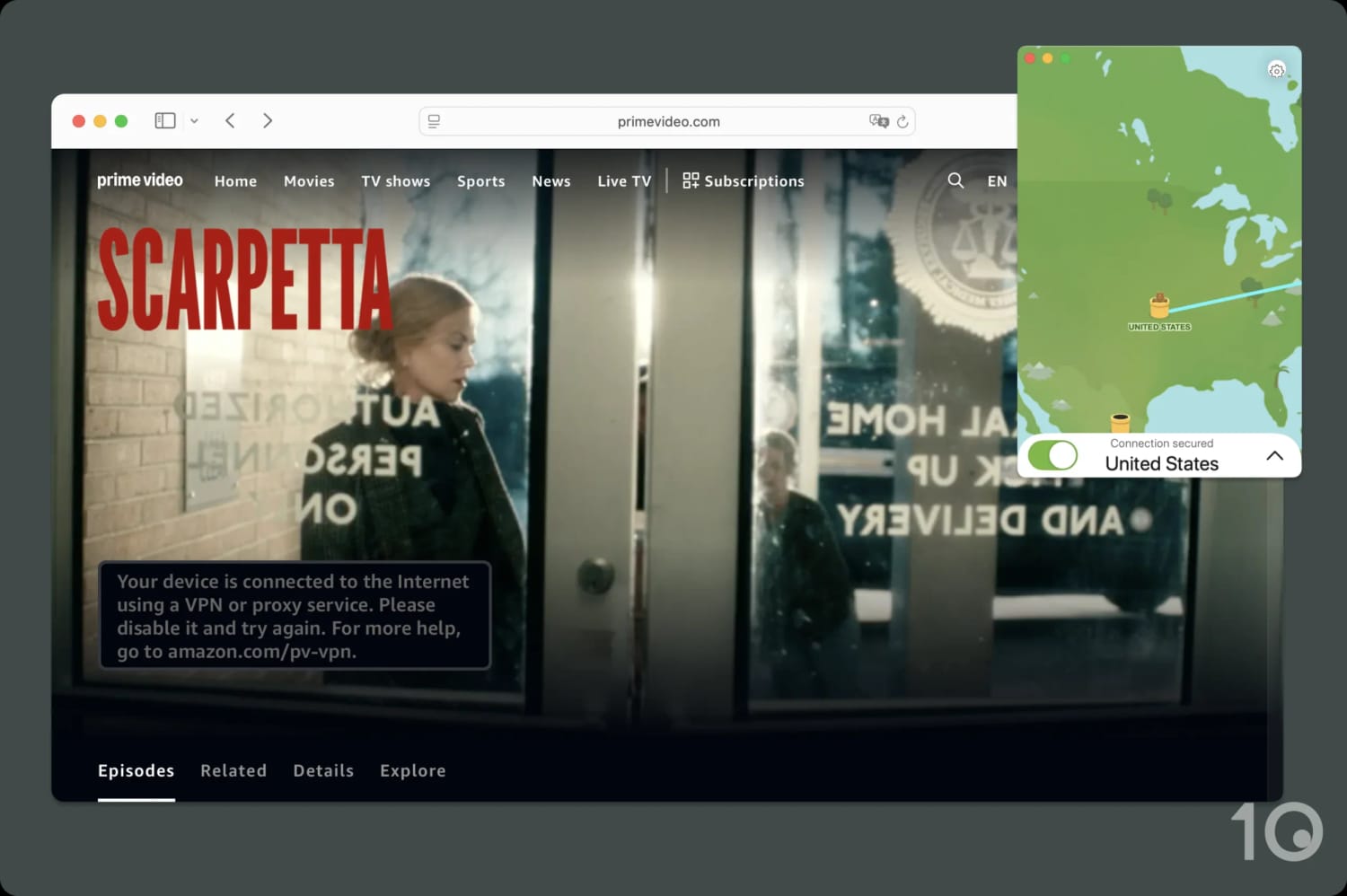
Amazon Prime Video detected my VPN connection on every attempt.
While some review sites might recommend TunnelBear based on its success with BBC iPlayer and US Netflix, my bar is much higher. If you’re looking to regularly access streaming services, then consider a dedicated streaming VPN like Surfshark or ExpressVPN.
Free VPN Is a Poor Choice for Streaming
Before I can even evaluate its unblocking ability, the free VPN is hamstrung by two intentional features: a 2GB monthly data cap and the inability to select a server location.
Such a restrictive data cap won’t let you stream for long, especially in full HD or 4K, and not being able to choose a server location makes bypassing geo-restrictions impossible.
I strongly recommend you try out the free versions of Windscribe or PrivadoVPN instead, since they have higher data caps, unblock more streaming services, and let you choose your server location.
If you’re lucky enough to be assigned a US server, the free version of TunnelBear can stream HBO Max and nothing else. My VPN connection was quickly detected by every US streaming service I tested, including US Netflix, Disney+, and Hulu.
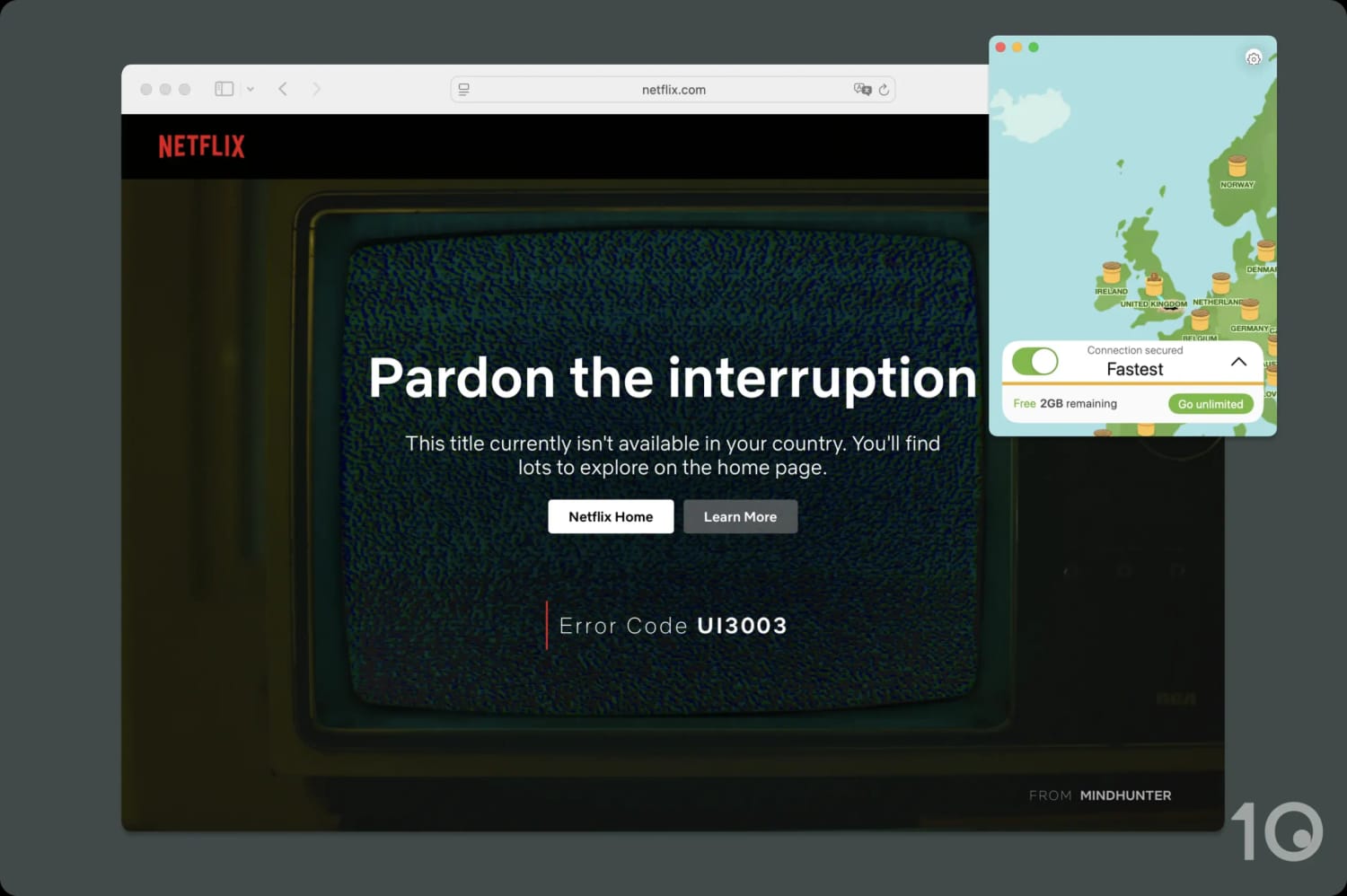
The free version of TunnelBear fails to unblock any Netflix libraries.
If you’re given a UK server, then it performs significantly better. I was able to unblock BBC iPlayer, Channel 4, and ITVX.
Speed
TunnelBear is consistently fast on both local and international servers. We recorded a marginal 4% speed loss on nearby servers. This makes the VPN an above-average performer and is why we score it a favorable 9.3 in our speed evaluation. We're also impressed that its free version is just as fast as the premium one.
As our data shows, TunnelBear causes a negligible speed loss of 4% on same-country connections. You can expect similar results when connecting to nearby servers wherever you’re located.
Throughout testing, we only used WireGuard to collect our results since it provided the fastest and most stable connection. When we tried to use OpenVPN, our connection often faltered and sometimes the VPN refused to turn on.
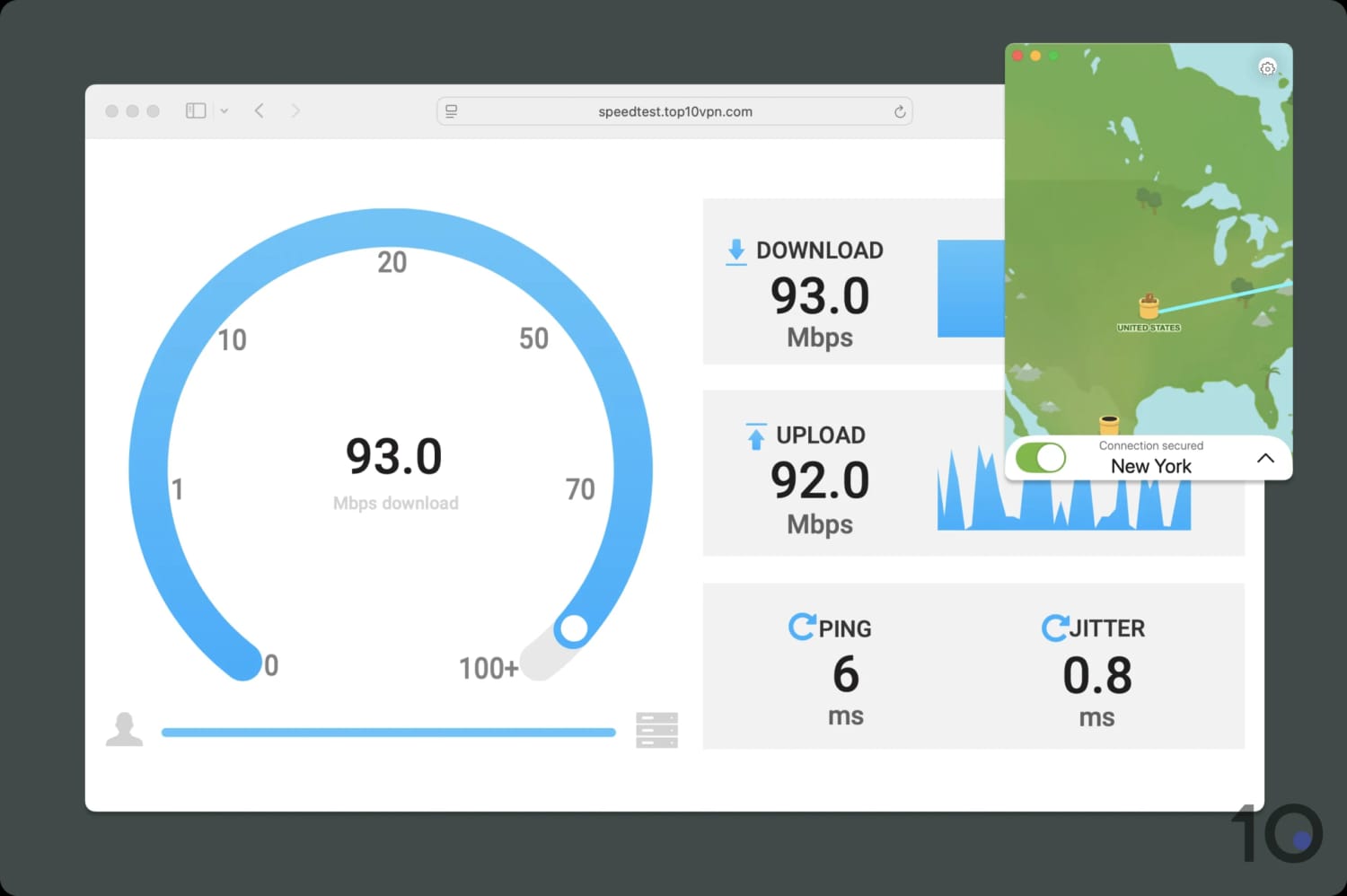
We consistently recorded fast speeds and low ping with TunnelBear.
TunnelBear’s international speeds are also impressive. We experienced an average international speed loss of 12% when connecting to countries overseas.
This is sufficiently fast for online gaming, video calling, and streaming in 4K quality.
You can compare TunnelBear’s short-distance and international speeds to other VPNs in the bar chart below:
Free Version Matches Paid Performance
Since you can’t select your server location on the free version anymore, we can only measure the speed loss on same-country connections.
TunnelBear remains a very fast free VPN. Connected to our nearest server in the US, we measured a download speed loss of just 4% – identical to the paid version.
While long-distance speeds were historically impressive, the new approach to server selection means we can no longer verify this for free users.
Security
TunnelBear is safe, but it’s not watertight. It offers private DNS servers, secure AES-256 encryption, WireGuard protocols, and an effective kill switch. However, it leaks your HTML5 geolocation and is yet to implement post-quantum cryptography.
| Independent Audit | Yes |
|---|---|
| VPN Kill Switch | Yes |
| Leak Protection | Yes |
TunnelBear is a secure VPN, supporting both the AES-256 cipher (OpenVPN) and ChaCha20 (WireGuard). The VPN defaults to OpenVPN, so we recommend switching to WireGuard for faster speeds.
We used Wireshark, a network traffic analyzer, to inspect our VPN connection. The result: TunnelBear encrypted our connection, hiding it from our ISP.
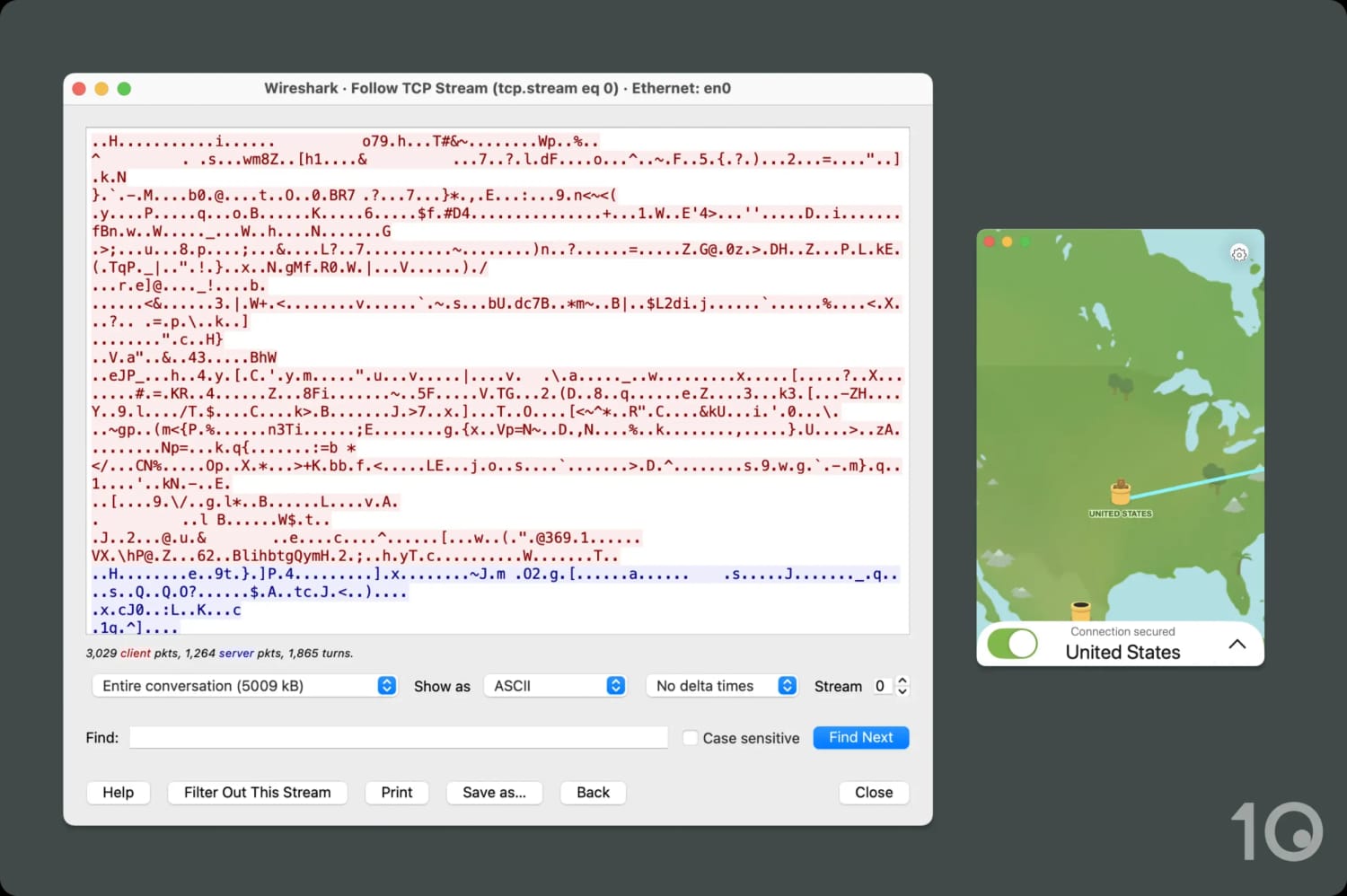
The VPN encrypted our internet connection without any issues.
Alongside its encryption, TunnelBear uses a kill switch to block your internet traffic should the VPN connection be disrupted.
Using the OpenVPN protocol allows you to enable an advanced kill switch called “VigilantBear”, which blocks any traffic from leaving your device until the VPN is reconnected.
We only recommend you enable the latter if you’re handling highly sensitive information, since the normal kill switch works well enough and lets you use WireGuard.
We stress-tested both kill switches using our in-house tool, and they worked exactly as intended.
Our other security tests checked for a variety of data leaks. The VPN passed all of them, except for our HTML5 geolocation.
While any data leak is concerning, an HTML5 geolocation isn’t as severe as your IP address or DNS request. At worst, you’ll be blocked from more streaming services and struggle to unblock some sites.
We suggest you deny permission for any website that asks to collect your HTML5 geolocation, via a pop-up notification, to ensure it won’t leak.
Regular Security Audits Keep TunnelBear Safe
To prove its commitment to transparency and user safety, TunnelBear commissions cybersecurity company Cure53 to carry out a security audit of its software. These audits look into the VPN’s apps, code, and infrastructure.
The latest audit found 10 vulnerabilities of medium severity or higher and three of low severity. Thankfully, TunnelBear has addressed all of these.
While this level of transparency is praiseworthy, we’d like to see TunnelBear open-source its code. This would allow the entire cybersecurity community, not just Cure53, to inspect its apps for potential flaws.
TunnelBear Owns its Bare-Metal Servers
All TunnelBear servers are physical (bare-metal), rather than virtual. They are physically located where you expect them to be.
Furthermore, TunnelBear owns its entire server network, including private DNS servers, so no additional third parties are involved in the maintenance of its servers.
Controlling your server infrastructure goes a long way in preventing security incidents.
A report by the Center for Democracy & Technology revealed that each TunnelBear server is protected by full disk encryption, malware scans, and intrusion protection software.
Not many VPNs own their entire server network, let alone an entire bare-metal server network based in the correct locations, which makes TunnelBear stand out among other mid-tier VPNs.
Server Locations
TunnelBear has increased its network to 8,000 servers in 47 countries, but it still lags behind the very best VPNs like Private Internet Access and IPVanish for quantity and spread of locations. It has also introduced city-level options, but the locations are heavily concentrated in North America.
| Continent | TunnelBear (Free) Countries with Servers | TunnelBear Countries with Servers |
|---|---|---|
| Europe | 27 | 27 |
| Asia | 7 | 7 |
| South America | 5 | 5 |
| North America | 3 | 3 |
| Africa | 3 | 3 |
| Oceania | 2 | 2 |
TunnelBear’s server network is smaller than its competitors, with major gaps in the Southern Hemisphere and parts of Asia.
While it has decent coverage elsewhere, including city-level options in the US and Canada, there are better VPNs that offer upwards of 100 countries. For example, Private Internet Access has servers in 91 countries.
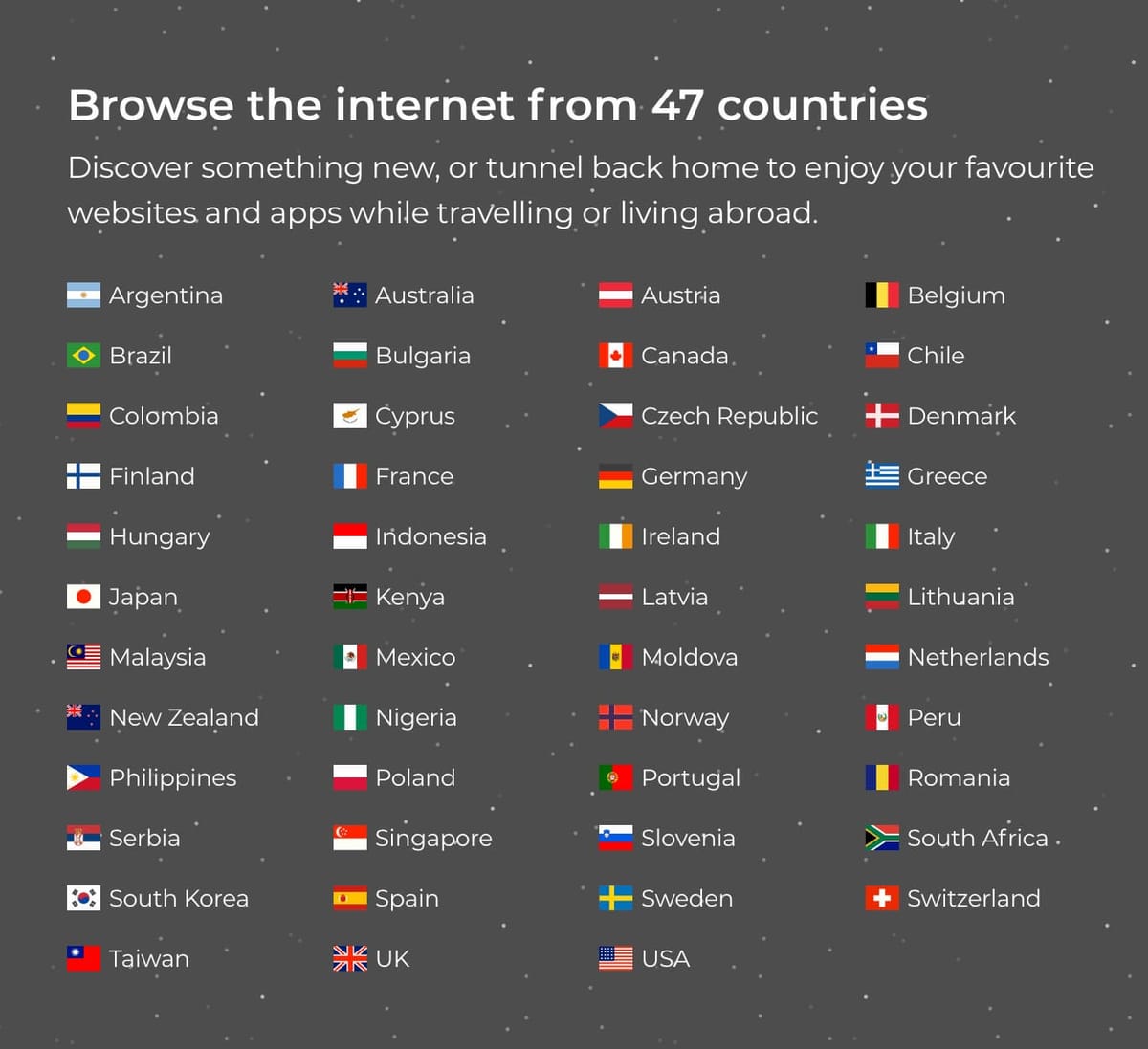
TunnelBear has servers in 47 countries, almost half as many as Surfshark.
The free tier used to lead the industry in offering the same server locations as its paid counterpart, but TunnelBear has put an end to this.
You are now connected to your fastest location, which tends to be whichever server is closest to you. For me, this was always a server in the US.
User Experience
TunnelBear's design is delightful, and the apps are simple to use. They're not very advanced, which is good for usability but bad for power users. While its free VPN has the same user-friendly interface, the lack of manual server selection frustrates me.
Interface & Ease of Use
TunnelBear’s playful design is consistent across all platforms, making it easy to switch between them.
Expand the sections below to read about my user experience with each app:
Desktop & Laptop (Windows & macOS)
TunnelBear’s apps feature a literal interpretation of their brand name, with an animated bear tunneling to your VPN server location following a successful connection.

I don’t mind this. It’s a simple and effective way of contextualizing your connection status and server location, and is more accessible than the map interfaces used by IPVanish, Proton VPN, and many others.
The desktop apps are generally very easy to use: click the toggle, and you’re connected. Each advanced feature is clearly explained, which is often necessary with the bear-themed names, and the apps are straightforward to navigate.
I really like how the server list displays three popular locations out of order (the US, UK, and Canada) and then the remaining countries alphabetically. This is a sensible compromise that balances convenience and consideration for less-popular regions.
My main criticism is aimed specifically at the Windows app. You’re only given two options for its app size: a large window, or a small rectangular strip. Both look ‘off’ to me; I’d prefer the option to resize the app to my preferences.
This is especially frustrating when you realize that the Mac app can be resized freely and even added to the dock.
Another issue I have across all apps is the VPN’s dependence on OpenVPN. As the Windows app has the most features, this problem feels most prominent. You can’t use VigilantBear, TCP override, or GhostBear, unless you switch to OpenVPN.
Mobile (iPhone & Android)
The mobile apps look and feel like their desktop counterparts, with particular resemblance to the Mac app.

It’s quick and simple to start the VPN connection: tap the toggle at the bottom of the screen.
The server list is arranged in the same sensible layout as on desktop (popular locations followed by an alphabetical list).
I did find the Android app slightly less intuitive than I’d like. Tapping the cog icon in the top-right opens the settings menu, but it isn’t obvious you have to swipe right to return to the home screen.
It’s also disappointing that neither mobile app supports a dark mode option. It’s especially strange given you can customize the app icon — a feature no one needs.
Torrenting
Both versions of TunnelBear are awful for torrenting. While the VPN claims to allow torrenting on its servers, my downloads with its paid version were either stalled or very slow, despite fast speeds normally. Interestingly, I recorded a faster download bitrate with its free version, though its 2GB data allowance hindered how much I could download.
| Torrenting Attribute | TunnelBear (Free) | TunnelBear |
|---|---|---|
| Permits P2P Traffic | Yes | Yes |
| Average Download Bitrate | 4.2MiB/s (58% loss) | 2.8MiB/s (72% loss) |
| Countries with P2P Servers | 47 | 47 |
| Port Forwarding | No | No |
| Kill Switch | Yes | Yes |
| Logging Policy | No Identifiable Data | No Identifiable Data |
TunnelBear is an extremely unreliable VPN for torrenting. I tested both paid and free versions with qBittorrent and servers in seven different countries (recommended by TunnelBear).
In each test, my download either stalled or was slower than the average VPN.
TunnelBear recorded an average bitrate of only 4.2MiB/s. This is poor compared to IPVanish’s download bitrate of 9.9MiB/s, and ExpressVPN’s speed of 9.8MiB/s.
Despite TunnelBear claiming to allow torrenting on all of its servers, I suspect torrenting traffic might be throttled or suspended on specific servers. In an email, TunnelBear confirmed that some locations “may have stricter ports for security reasons”.
Only one server and protocol combination worked for me when torrenting: a Sweden server using OpenVPN with VigilantBear turned off. It’s a frustrating workaround, especially as I never recommend torrenting without a kill switch active.
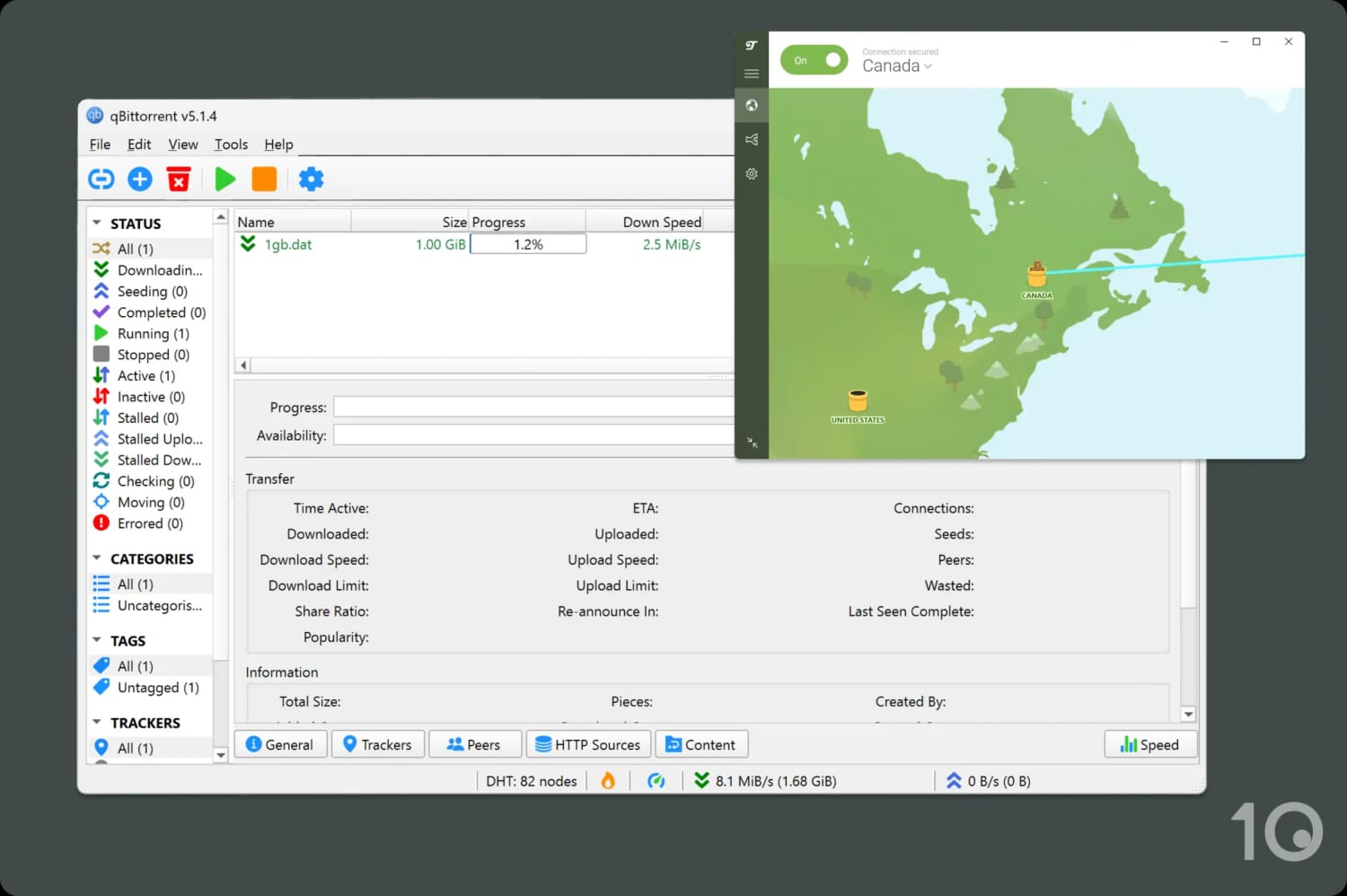
TunnelBear significantly slowed my download bitrate.
Unlike other VPNs, which offer a faster download speed for a paid service, TunnelBear Free was actually 1.4 MiB/s faster while torrenting than its paid counterpart. But the 2GB/month data allowance prevents you from downloading many files.
Even worse, TunnelBear doesn’t support port forwarding on any of its servers, which would make uploading or ‘seeding files’ faster.
If you want to use a free VPN for torrenting, I highly recommend trying out PrivadoVPN’s free tier instead.
Device Compatibility
While no limits on simultaneous connections is great, you can't make the most of it since TunnelBear supports so few platforms. Aside from desktop and mobile, there are no apps for routers or streaming devices, and no Smart DNS proxy. As such, it's impossible to use the VPN on Smart TVs or game consoles.
| Windows | Yes |
|---|---|
| Mac | Yes |
| iOS | Yes |
| Android | Yes |
| Linux | Manual Setup Only |
| Amazon Fire TV | No |
| Android TV | No |
| Apple TV | No |
| Router | No |
| Chrome | Yes |
Simultaneous Connections: Unlimited
Here’s the key takeaway: you can’t use TunnelBear on game consoles, Apple TV, Fire TV, Android TV, Roku, or Smart TVs.
While Linux is supported, it requires manual installation and limits you to a single server location at a time.
If you want a more “plug-and-play” approach, I recommend using ExpressVPN. Its dedicated router app protects every device in your household and is as easy to install as a mobile app.
Additional Features
TunnelBear has a few useful features like basic obfuscation for bypassing censorship, split tunneling, and an ad blocker for its browser extensions. However, it doesn’t compare to more advanced VPNs, lacking multi-hop servers, live chat support, dedicated IP options, and a GPS spoofer.
| Additional Feature | TunnelBear (Free) | TunnelBear |
|---|---|---|
| Split Tunneling | No | Yes |
| VPN Obfuscation | No | Yes |
| Multi-Hop Servers | No | No |
| Dedicated IP | No | No |
| Ad Blocker | No | Yes |
Rudimentary Anti-Censorship Tool
You can enable a feature called “GhostBear” in the Windows and Android apps. It’s designed to mask your VPN traffic as ‘normal’ HTTPS traffic, making it harder for governments, businesses, and ISPs to detect and block your VPN connection. It will slow your traffic, though.
It’s not the most advanced obfuscation we’ve come across and it struggled to unblock China’s Great Firewall in our testing.
You can only use it alongside the OpenVPN protocol, so expect substantially slower speeds.
Split Tunneling Varies by Platform
TunnelBear includes its own version of split tunneling, labeled “SplitBear” within its apps. This feature lets you designate which apps you want to exclude from the VPN connection.
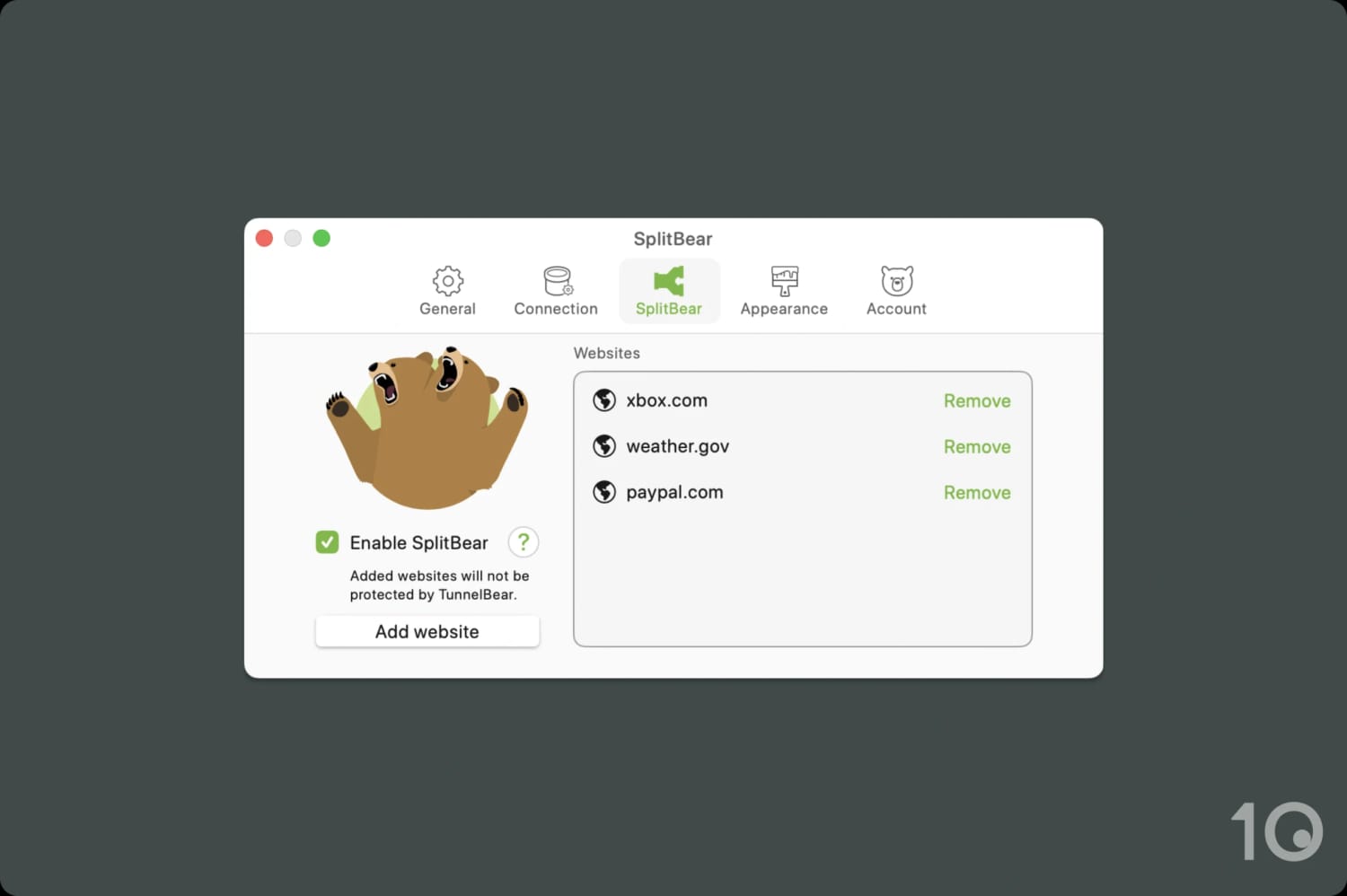
I used SplitBear to exclude some important location-dependent services.
For example, you might want to exclude your banking app since connecting from a new geolocation can seem suspicious.
We’re slightly confused by how TunnelBear implements this feature. On Windows, you can choose to split tunnel apps and websites, on Android, just apps, and on Apple devices (iOS/macOS), just websites.
This is unusual and unnecessarily complex; we’d like to see it fixed.


