



Top10VPN is editorially independent. We may earn commissions if you buy a VPN via our links.
What Is VPN Obfuscation & Do I Need It?
JP Jones
JP Jones is our CTO. He has over 25 years of software engineering and networking experience, and oversees all technical aspects of our VPN testing process. Read full bio
VPN obfuscation disguises your VPN traffic so it looks like regular internet activity. That makes it much harder for governments, ISPs, and firewalls to detect and block it. If you’re in a country with heavy internet censorship, work on a restricted network, or handle sensitive information, obfuscation could be essential.
In highly censored countries, using VPN traffic obfuscation isn’t optional.
In China, Russia, Iran, and a growing number of countries, governments and ISPs actively work to detect and block VPN traffic.
Standard VPN protocols are easy to identify and, without obfuscation, your VPN will simply stop working.
The problem is that “obfuscation” has become a marketing buzzword. VPN services list it as a feature without explaining what it does, how it works, or whether their implementation is any good.
In this guide, we’ll explain exactly how VPN obfuscation works, which techniques are still effective, and which VPNs are worth your money if you genuinely need to bypass censorship.
Unfortunately, VPN obfuscation is not a standard feature in all VPNs, with only a select few services offering it.
We’re fully independent and have been reviewing VPNs since 2016. Our advice is based on our own testing results and is unaffected by financial incentives. Learn who we are and how we test VPNs.
VPNs Tested
61
Total Hours of Testing
30,000+
Combined Years of Experience
50+
Latest Developments in Internet Censorship
There have been a number of developments in the way governments identify and block VPN connections, and how some VPN services are countering these new traffic filtering techniques:
Russia now blocks entire protocols (not just IP addresses). Since late 2025, OpenVPN, WireGuard, and standard TLS proxies are blocked at the ISP level across Russia. Choosing the right protocol is now mandatory, not optional.
China’s firewall got smarter. Machine learning-based deep packet inspection now detects standard Shadowsocks traffic with over 90% accuracy. Servers running standard Shadowsocks are often blocked within hours.
A new gold standard anti-censorship protocol has emerged. The REALITY protocol, which borrows the identity of a real, trusted website, is now the most effective obfuscation method available. It is genuinely difficult to block without collateral damage to normal internet traffic.
What Is VPN Obfuscation?
When you connect to a VPN, your data is encrypted. But your ISP and any firewall monitoring your network can still see that you’re using a VPN, even if they can’t read what you’re doing.
VPN protocols like OpenVPN and WireGuard have recognizable “fingerprints” – distinctive patterns in the way they set up connections and structure their data.
Obfuscation strips out or disguises those fingerprints. The goal is to make your VPN traffic look like something else entirely, usually ordinary HTTPS web browsing.
Done well, a firewall or ISP can’t tell the difference between you visiting a news website and you connecting through a VPN.
Obfuscation is only offered by a small number of VPN services because it’s technically complex. Censors keep improving their detection methods, and providers have to keep updating their approach.
Mimicry vs. Scrambling: The Key Distinction
Most guides treat all obfuscation techniques as roughly equivalent. They are not.
There are two fundamentally different approaches, and understanding the difference explains why some methods are dying out while others are thriving.
Mimicry (New approach)
Tools like VLESS + REALITY, Trojan, NaiveProxy, and Hysteria 2 don’t try to hide what you’re doing by making it look like nothing.
They make it look like something real and trusted: a Chrome browser connecting to Microsoft.com, or a standard HTTPS session with a major tech company.
A censor cannot block that without breaking the internet for everyone. This is why these tools are dramatically more effective in high-censorship environments today.
Scrambling (Old approach)
Tools like XOR Scramble and obfs4 transform VPN traffic into what looks like random noise, with no recognizable protocol pattern. The theory is that if a firewall can’t identify it, it won’t block it.
The problem is that the randomness is itself a fingerprint. Modern deep packet inspection (DPI) flags high-entropy traffic as suspicious, because legitimate traffic (HTTPS, video streaming) isn’t random.
Normal web traffic has recognizable structure. Anything that looks like junk is now actively throttled or blocked in China and Russia.
Unobfuscated vs Obfuscated VPN Traffic
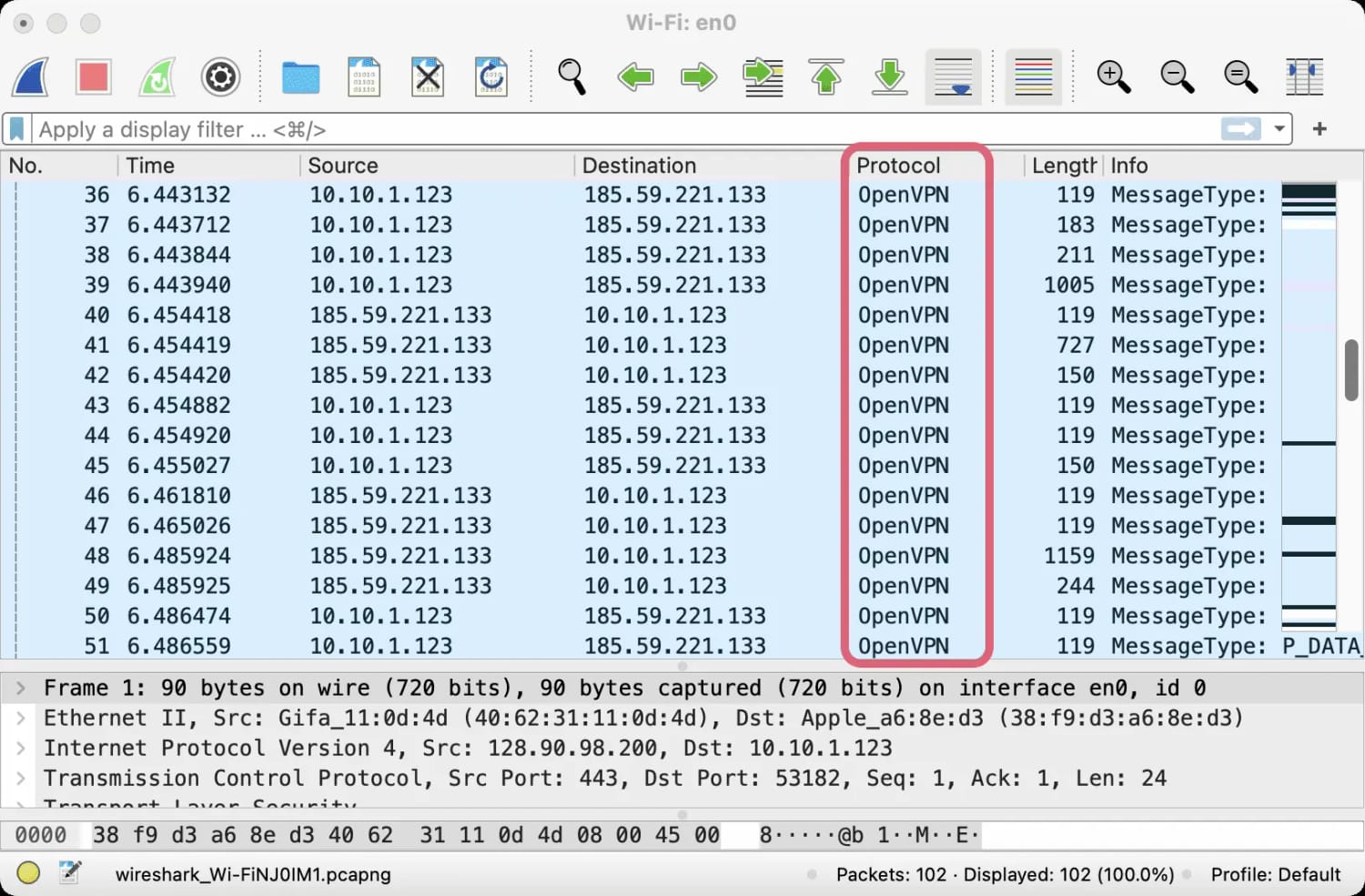
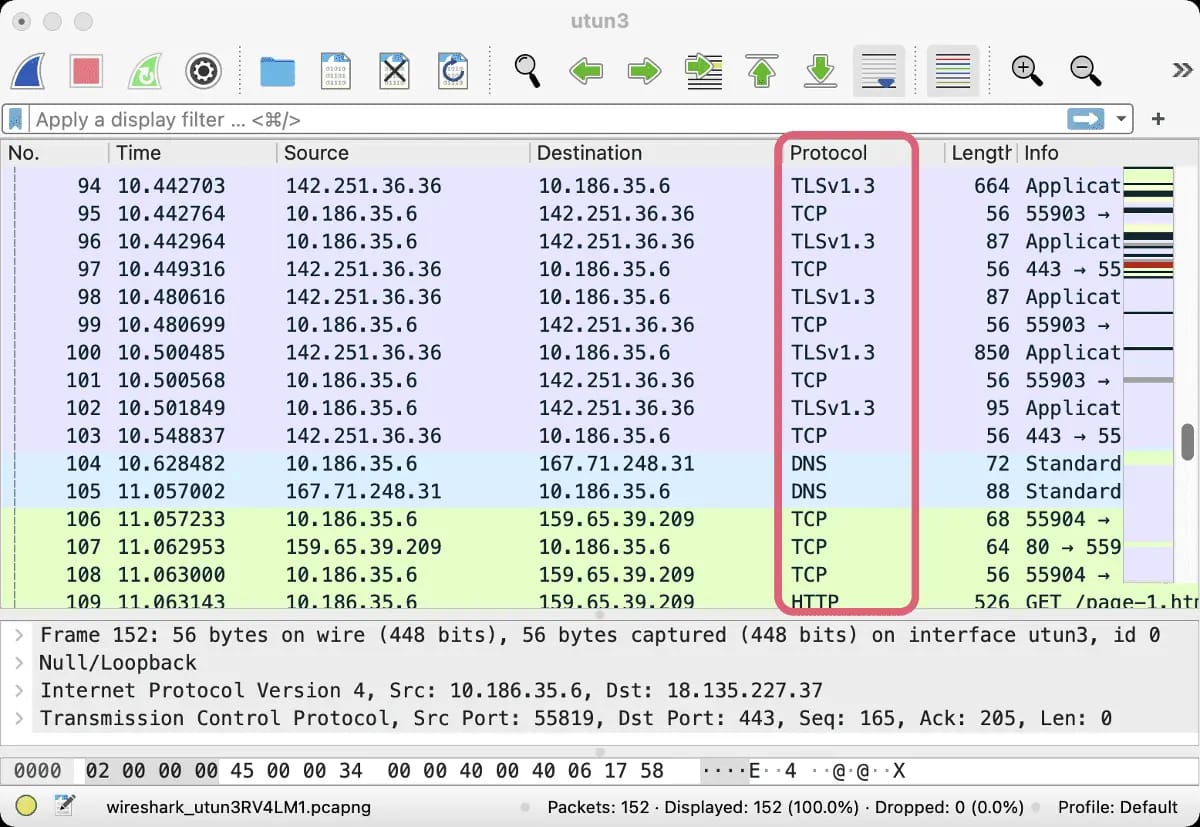
To illustrate the difference between unobfuscated and obfuscated VPN traffic, we used Wireshark, a powerful deep packet inspection software.
Here’s what VPN traffic looks like without obfuscation:
OpenVPN traffic was visible without obfuscation.
And here’s what VPN traffic looks like with obfuscation:
OpenVPN traffic camouflaged as TLS and TCP.
How Internet Censors Detect VPN Traffic
To understand which obfuscation methods work, you first need to understand what they are up against. Censorship technology has evolved fast – especially in China and Russia.
Deep Packet Inspection (DPI)
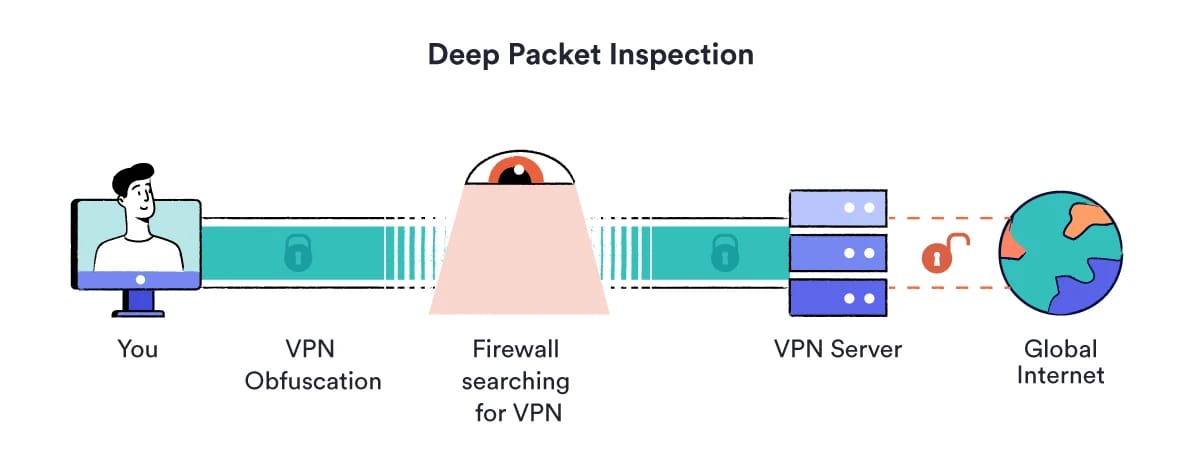
Deep packet inspection means a firewall doesn’t just look at where your traffic is going. It reads the contents and structure of each data packet to determine what kind of connection it is.
Standard VPN protocols are trivially identifiable this way. OpenVPN and WireGuard both have well-documented packet structures.
How Deep Packet Inspection (DPI) works.
China’s Great Firewall and Russia’s Roskomnadzor now use machine learning-based DPI, trained on millions of real traffic samples, that can identify VPN usage from statistical patterns alone, without decrypting anything.
Standard Shadowsocks, even with modern AEAD cipher encryption, is now detected with over 90% accuracy by the Great Firewall.
Active Probing: Why Your VPN Can Die After 10 Minutes
Active probing is the most misunderstood part of how censorship works. It’s the number one reason a VPN might work when you first set it up, then suddenly stop working 10-20 minutes later.
Here’s what happens:
The firewall notices something suspicious. Based on DPI, it suspects a server might be a VPN.
Instead of blocking it immediately, it sends test traffic. The firewall probes your VPN server to see how it responds.
The server responds like a VPN. Most servers do, by default. The firewall confirms it’s a VPN and blocks it within minutes.
What this means for obfuscation is that modern tools must include a fallback response: when an active probe hits the server, it serves back an innocent-looking web page instead of responding like a VPN.
Without this, even technically strong obfuscation methods get blocked within hours. REALITY and Trojan both include this by design. Standard Shadowsocks and obfs4 don’t, which is why servers using them get burned so quickly.
This is also why commercial VPN IP addresses burn fast. They are well-known targets. Once probed and confirmed, they are gone.
Server rotation (switching IP addresses faster than the firewall can block them) is part of how services like Astrill stay ahead. But protocol choice matters just as much.
Obfuscation Techniques Compared
Not all obfuscation is created equal and techniques evolve rapidly in response to advances in VPN detection and blocking.
The table below compares every major technique, from the cutting-edge to the almost obsolete, with our assessment of effectiveness based on our testing:
In the sections below we’ve explained how the new obfuscation techniques work and why they’re currently successful in bypassing strict traffic filtering.
VLESS + REALITY
REALITY is a transport layer for the VLESS protocol and it represents the most significant advance in anti-censorship technology in years.
Unlike every other method, it doesn’t try to fake a secure connection. Instead, it borrows a real one.
Your VPN server relays the TLS handshake of a legitimate, widely-trusted website, such as microsoft.com or apple.com. To any firewall, your traffic appears to be a genuine connection to one of the most-visited sites on the internet.
Blocking it would mean breaking the internet for millions of real users, giving censors no good move.
It handles active probing correctly by design: probes receive a real web page in response. This combination makes VLESS + REALITY the hardest method to detect and block with current technology.
VLESS + REALITY is mainly available via self-hosted setups using tools like 3X-UI. Commercial VPN services are beginning to incorporate components of this approach. Astrill is most likely the furthest along.
Hysteria 2
Hysteria 2 takes a completely different approach. Instead of mimicking HTTPS over TCP, it is built on QUIC (the protocol behind HTTP/3), which runs over UDP.
This matters because most ISP throttling and packet inspection is designed around TCP. Hysteria 2 sidesteps it entirely.
Its congestion control algorithm ignores fake congestion signals. This is the trick ISPs use to throttle VPN connections by artificially dropping packets.
Hysteria 2 pushes through this, maintaining near-full speeds even in heavily throttled networks.
It also includes uTLS, which lets it precisely mimic the TLS fingerprint of a specific browser or app (Chrome on Android, Firefox on Windows, and so on). This makes it very difficult for ML-based DPI to classify as VPN traffic.
We suspect Astrill’s StealthVPN protocol uses QUIC/UDP-based acceleration and obfuscation in line with Hysteria 2’s approach. The VPN service doesn’t label it “Hysteria”, though, as doing so would make it an easy block target.
NaiveProxy
Most obfuscation methods imitate a browser’s network traffic. NaiveProxy uses the actual Chromium network stack – the same code that powers Google Chrome.
To a firewall’s DPI system, NaiveProxy traffic is indistinguishable from someone using Chrome to browse the web.
NaiveProxy also handles active probing well: probes see a legitimate-looking web server.
That being said, NaiveProxy is almost exclusively available in self-hosted setups, not commercial VPN apps.
Trojan
Trojan routes VPN traffic through port 443 (the standard HTTPS port) using a TLS connection that closely mimics a legitimate HTTPS server.
Unlike Shadowsocks, which wraps traffic in its own distinct protocol, Trojan traffic is so similar to real HTTPS that blocking it would cause widespread collateral damage to normal web traffic.
It handles active probing with a fallback web server response. It’s less sophisticated than REALITY in that it uses its own TLS certificate rather than borrowing a real site’s handshake, but it’s still one of the most effective options right now.
When & When Not to Use Obfuscation
In case you’re still unsure whether you should use VPN obfuscation or not, here are a few scenarios to help you decide:
Use VPN Obfuscation If
You’re in, or traveling to, a high-censorship country.
You’re a journalist, activist, or handle sensitive information.
Your workplace or institution blocks VPN traffic.
Your ISP throttles VPN connections.
Don’t Use VPN Obfuscation If:
You’re in a country with no VPN restrictions.
Your main use is bypassing streaming geo-restrictions.
Your internet connection is already slow.
Trusted VPNs with Obfuscated Servers
Many VPN services claim to provide obfuscation technology, but only a select few truly conceal your VPN traffic from restrictive governments, institutions, and workplaces.
Of the 61 VPNs we’ve tested, only a small number have obfuscation that holds up under real-world conditions. Here are our three picks, each with a distinct use case.
Fast supercharged servers even with obfuscation enabled
Based in privacy-friendly Liechtenstein
Very expensive subscription plans
Doesn’t unblock BBC iPlayer, Prime Video, or Disney+
No refund policy
No free trial
Less necessary in moderate-censorship countries
Pricing Plans
$30.00/mo
$15.00/mo over 12 months
$12.50/mo over 24 months
Local Download Speed
93Mbps (7% loss)
Countries with Servers
57
Servers
107
Logging Policy
Identifiable Data
Jurisdiction
Liechtenstein
Simultaneous Connections
5
Support
24/7 Live Chat
Compatible with
Windows
Mac
iOS
Android
Linux
Amazon Fire TV
Android TV
Apple TV
Router
Chrome
Astrill is the most effective VPN service we’ve tested for consistently bypassing censorship in excessively restrictive countries. Its StealthVPN protocol is what sets it apart.
We suspect that the current version of StealthVPN uses QUIC/UDP-based obfuscation and congestion control, using the same technical approach as Hysteria 2, layered on top of its core obfuscation.
StealthVPN produces traffic that looks like normal traffic from a legitimate app, with no random patterns, which makes it much harder for DPI to flag.
At the same time, it pushes through ISP throttling that cripples TCP-based VPN connections, maintaining strong speeds even in congested networks. We had to connect to its supercharged servers to reach the best speeds.
The results couldn’t be clearer: out of all the VPNs we tested in China, Astrill has the highest sustained success rate of any commercial VPN service. We also saw very similar results testing the VPN in Russia.
We used Astrill VPN to unblock YouTube in China.
Let’s be clear, though, no VPN is immune to intensive crackdowns. During major political events in particular, even Astrill experiences disruption in China.
The difference is that Astrill recovers faster and requires less user intervention than any other VPN we’ve tested.
How to Enable Obfuscation with Astrill
Open the Astrill app and click the protocol name shown in the main interface.
Select ‘StealthVPN’ from the protocol list. QUIC-based obfuscation activates automatically.
Connect to a server. For China and Russia, we recommend combining StealthVPN with supercharged servers.
When it comes to VPN traffic obfuscation, ExpressVPN’s big advantage is simplicity.
Obfuscation activates automatically on all its 13,360 servers, across every platform. You won’t need to change protocols, connect to specific servers, or configure anything.
This plug-and-play approach is ideal for travelers and remote workers in countries with moderate internet restrictions. In fact, the VPN works reliably in Turkey, Qatar, Indonesia, Singapore, and the UAE.
Unlike Astrill, ExpressVPN is predominantly known for entertainment use, such as unblocking streaming content and torrenting. If these are the reasons for getting a VPN, then ExpressVPN is a very good choice.
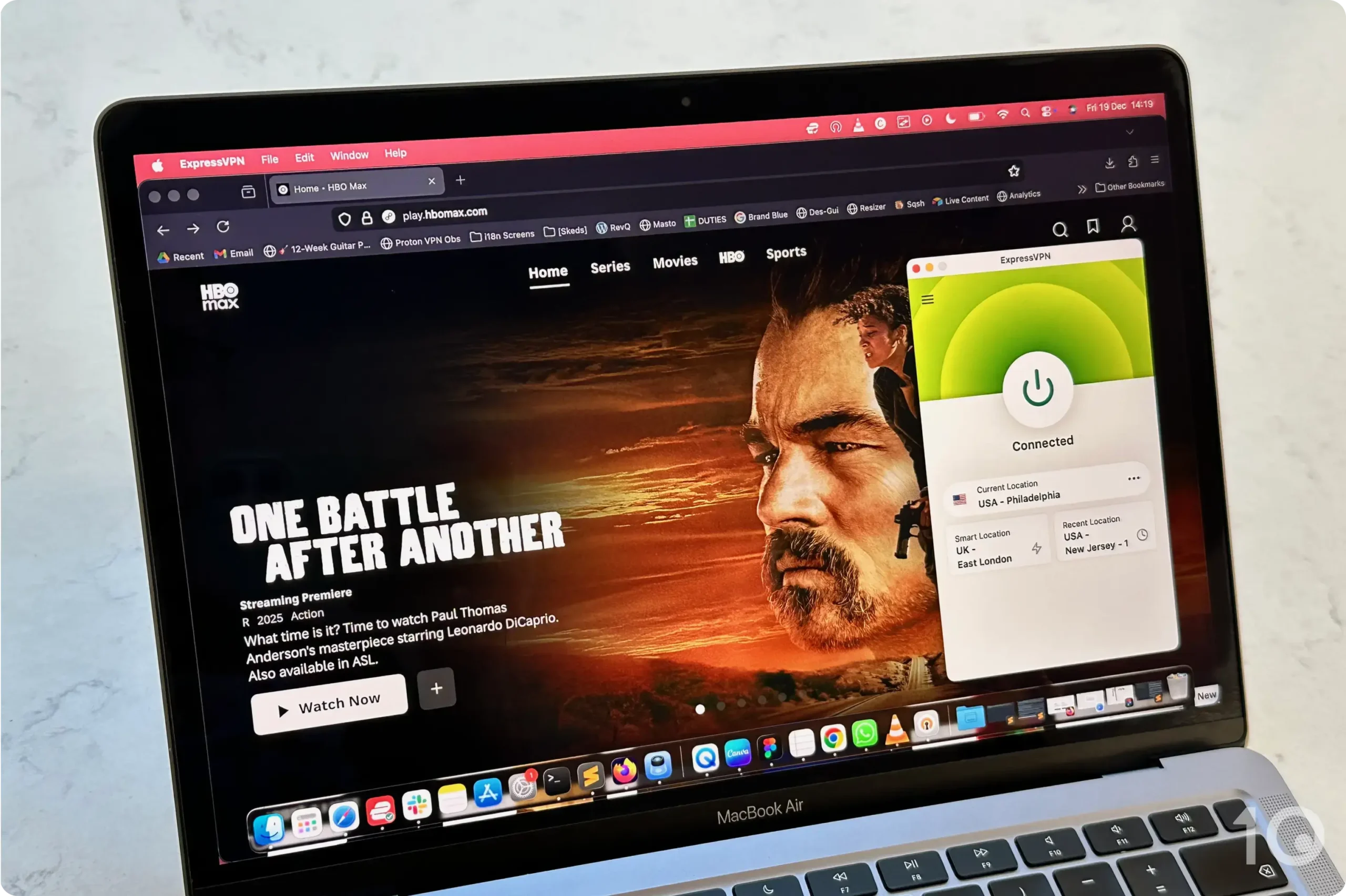
We watched HBO Max USA smoothly from abroad.
Importantly, we don’t recommend using ExpressVPN in China or Russia. Its success rate in both countries has been declining for years, and the VPN is unlikely to work there.
Unlike Astrill, the service doesn’t use QUIC-based acceleration, or publish any details of its obfuscation architecture.
Put simply, ExpressVPN works fine to beat moderate internet censorship, or bypass workplace firewalls, but it can no longer beat the world’s most sophisticated firewalls.
Windscribe is the only free VPN we genuinely recommend for use in countries with real internet censorship.
Its Stealth protocol wraps OpenVPN in a TLS layer using Stunnel, while its WStunnel option wraps it in WebSocket instead.
Windscribe also offers the effective anti-censorship AmneziaWG protocol, but it’s only available through paid plans.
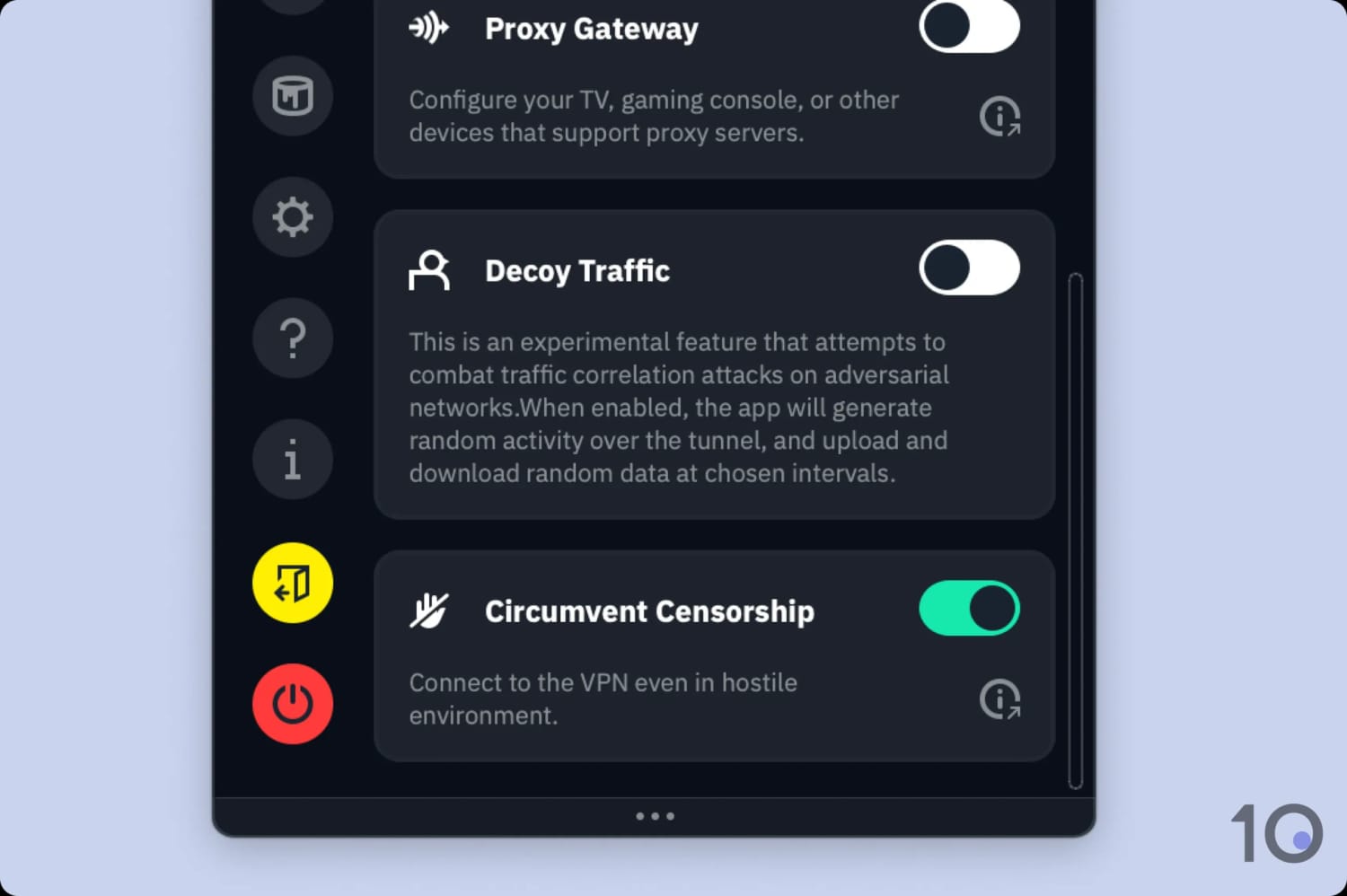
Both options are available on the free plan, and are reliable tools for bypassing most country firewalls. You can activate obfuscation by turning on the ‘Circumvent Censorship’ toggle.
It takes seconds to activate the anti-censorship mode.
Alternatively, you can find the stealth protocols in: Connection > Connection Mode > Manual.
The amazing stat is that Windscribe’s free service works far better than other well-known paid VPNs in countries like China. For instance, its 85% success rate is vastly superior to Surfshark’s 35% and Proton VPN’s 0%.
Windscribe has its faults, though. Its powerful obfuscation capabilities are slightly hindered by its inconsistent international speeds and small number of free servers.
You’ll also find the 10GB monthly bandwidth limit frustrating if you’re planning on using the VPN regularly.
Overall, we’ve been surprised by this free VPN’s obfuscation capabilities. If you want to trial VPN obfuscation before committing to a paid subscription, this is a great place to start.
How to Enable Obfuscation with Windscribe
Open Windscribe and go to ‘Settings’, then ‘Connection’.
Set ‘Connection Mode’ to ‘Manual’.
Click ‘Protocol’ and select either ‘Stealth’ (TLS-wrapped) or ‘WStunnel’ (WebSocket-wrapped). Stealth is the better option for most restricted environments.
Or, you can turn on the ‘Circumvent Censorship’ toggle in ‘Settings’ which enables the most appropriate stealth protocol.Connect to a server.
Yes, obfuscation slows down your internet speed. Modern mimicry-based methods are quicker than older scrambling ones, but your speed will still dip.
Hysteria 2 is built to push through throttled connections, so in heavily throttled environments, it tends to be much faster than standard VPN protocols.
Is VPN Obfuscation Legal?
In most countries, yes. Obfuscation is a privacy and security technology with legitimate uses.
That said, in countries like China, Russia, Iran, and North Korea, using a VPN at all, obfuscated or not, may violate local law.
Does Obfuscation Make My VPN More Secure?
Obfuscation improves your privacy by hiding the fact you’re using a VPN from your ISP and firewalls. It doesn’t change your underlying encryption strength, though.
Can I Use Tor Instead of an Obfuscated VPN?
Tor uses obfuscation too, via Pluggable Transports including obfs4 and Snowflake. But Tor is significantly slower than a VPN and its exit nodes are frequently blocked.
For day-to-day internet use in a censored country, an obfuscated VPN will give you a much better experience on the web.
Tor is better suited for maximum anonymity in high-risk, low-bandwidth situations.