Top10VPN is editorially independent. We may earn commissions if you buy a VPN via our links.
VPN Port Forwarding: What It Is & How to Set It Up
Simon Migliano
Simon Migliano is a recognized world expert in VPNs. He's tested hundreds of VPN services and his research has featured on the BBC, The New York Times and more. Read full bio
VPN port forwarding routes incoming traffic through a specific port on your VPN server, allowing external devices to bypass your firewall and connect directly to your device. It’s used to improve torrenting speeds, host game servers, and enable remote desktop access. It’s only supported by a handful of VPNs, though, and it comes with security trade-offs worth understanding before you set it up.
Your VPN is connected. You fire up your torrent client. Downloads have slowed to a crawl.
Or you’ve spent an hour trying to host a game server, and your friends still can’t join. Maybe you’re trying to access your home PC remotely, and you keep hitting a wall.
These are frustrating problems. And in each case, VPN port forwarding is likely the fix.
The trouble is, there’s a lot of confusing and outdated information out there, including claims that popular VPNs like ExpressVPN support it
In this guide, we’ll cut through the noise. We’ll explain exactly what VPN ports are, what port forwarding does, whether you actually need it, and how to set it up safely.
We’ll solely focus on port forwarding through a VPN. If you want to forward ports on your home router without a VPN, that’s a separate process we won’t cover here.
Why Trust Us?
We’re fully independent and have been reviewing VPNs since 2016. Our ratings are based on our own testing results and are unaffected by financial incentives. Learn who we are and how we test VPNs.
VPNs Tested
61
Total Hours of Testing
30,000+
Combined Years of Experience
50+
VPN Ports: The Basics
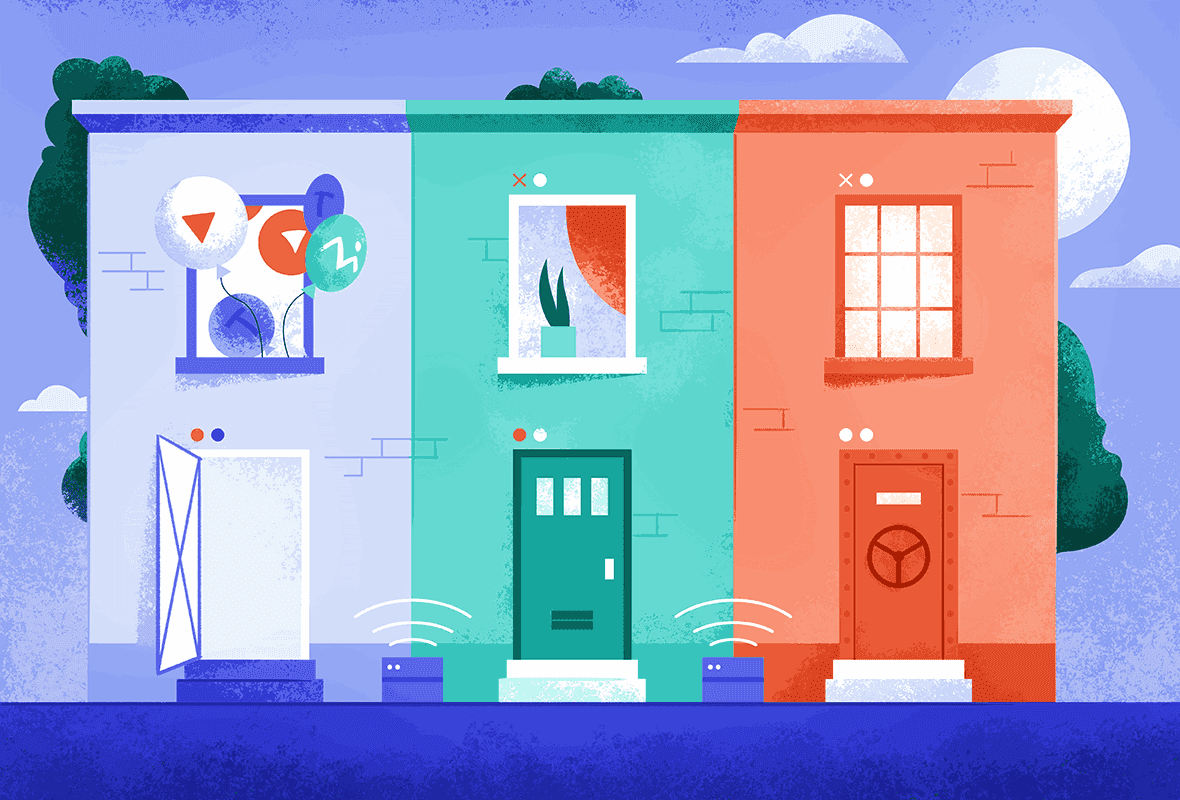
Think of your router as an apartment building. Your IP address is the building’s street address: it tells traffic where to go.
Ports are the individual apartment numbers that direct that traffic to the right place once it arrives.
Your router can have up to 65,000 ports, but only around 1,000 are regularly used. Each is assigned to a specific type of activity. For example:
By default, unused ports are closed. Traffic that arrives at a closed port is automatically blocked by your router’s firewall. That’s exactly how it should be.
When you use a VPN, it creates an encrypted tunnel between your device and a VPN server. That tunnel runs through a specific port, depending on which VPN protocol you’re using:
You don’t need to memorize any of this. Your VPN handles port selection automatically. But understanding which port your VPN uses matters if your connection is being blocked (more on this further down).
For now, here’s the key takeaway: ports direct traffic to the right destination.
And by default, your VPN blocks most incoming traffic from reaching you. That’s a feature, not a bug. Unless you actually want that incoming traffic, which is where port forwarding comes in.
VPN Port Forwarding Explained
Back to the apartment building analogy. Normally, the building has a strict front desk: visitors who don’t have a confirmed appointment can’t get through.
That’s your NAT (Network Address Translation) firewall doing its job: keeping unsolicited outside connections away from your devices.
Port forwarding is like leaving standing instructions with the front desk: “Anyone asking for apartment 8080 — send them straight to unit 4B, no questions asked.”
It bypasses the normal filtering and lets specific outside connections reach a specific device on your network.
In other words, when you connect to a VPN, the VPN server acts like a router for your traffic. By default, it rejects almost all incoming connections.
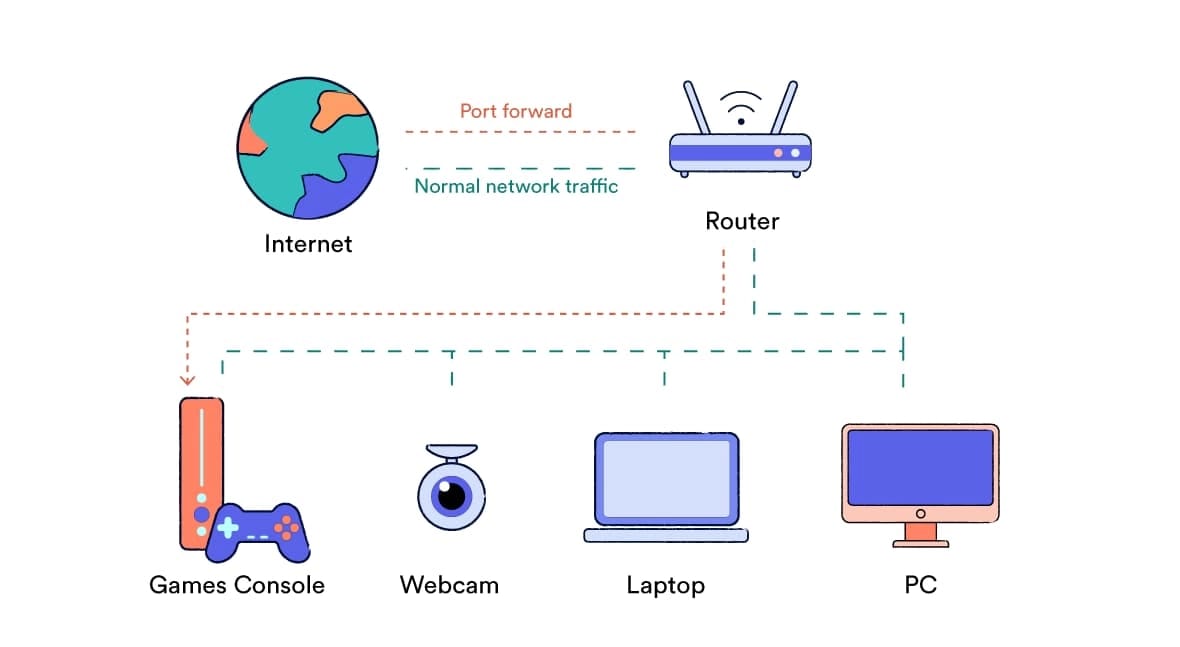
Port forwarding creates a mapped pathway: from a specific port on the VPN server’s public IP address directly to a port on your local device.
Port forwarding allows devices on the internet to access specific devices within your local area network.
This bypasses your NAT firewall, which is why it’s so useful. It’s also why it requires careful setup.
The Three Types of Port Forwarding
There are three types of port forwarding, although VPN port forwarding typically uses remote or dynamic port forwarding.
VPN providers handle the type of port forwarding for you, so you don’t need to worry about them. Just in case, we’ve added more information below:
Local Port Forwarding
This is the most common type of port forwarding. A local port is forwarded to a remote host, rerouting your traffic from your device to another. It’s often used with SSH encryption to access services that aren’t directly available to you.
Remote Port Forwarding
A remote port is forwarded back to a local host, enabling connections to your device from the other end of a tunnel. This is what most VPN port forwarding uses. It’s how remote desktop access and server hosting work.
Dynamic Port Forwarding
Acts like a proxy, routing traffic through a trusted third-party server. The port number is assigned automatically at connection. This is used by VPNs like Private Internet Access (PIA).
Do You Actually Need Port Forwarding?
Now that you know what port forwarding is, the honest answer for most VPN users is: you probably don’t need it. Here’s a quick table to help you find out:
What Is Port Forwarding Used For?
We’ve outlined below the main reasons why you may want to port forward using your VPN:
Torrenting and P2P File Sharing
By default, VPN services reject incoming connections to your torrent client. This slows down file sharing and can make seeding torrents difficult or impossible.
Port forwarding allows your torrent client to receive the necessary data packets to connect directly to other users, which can have a significant impact on your download and upload speeds.
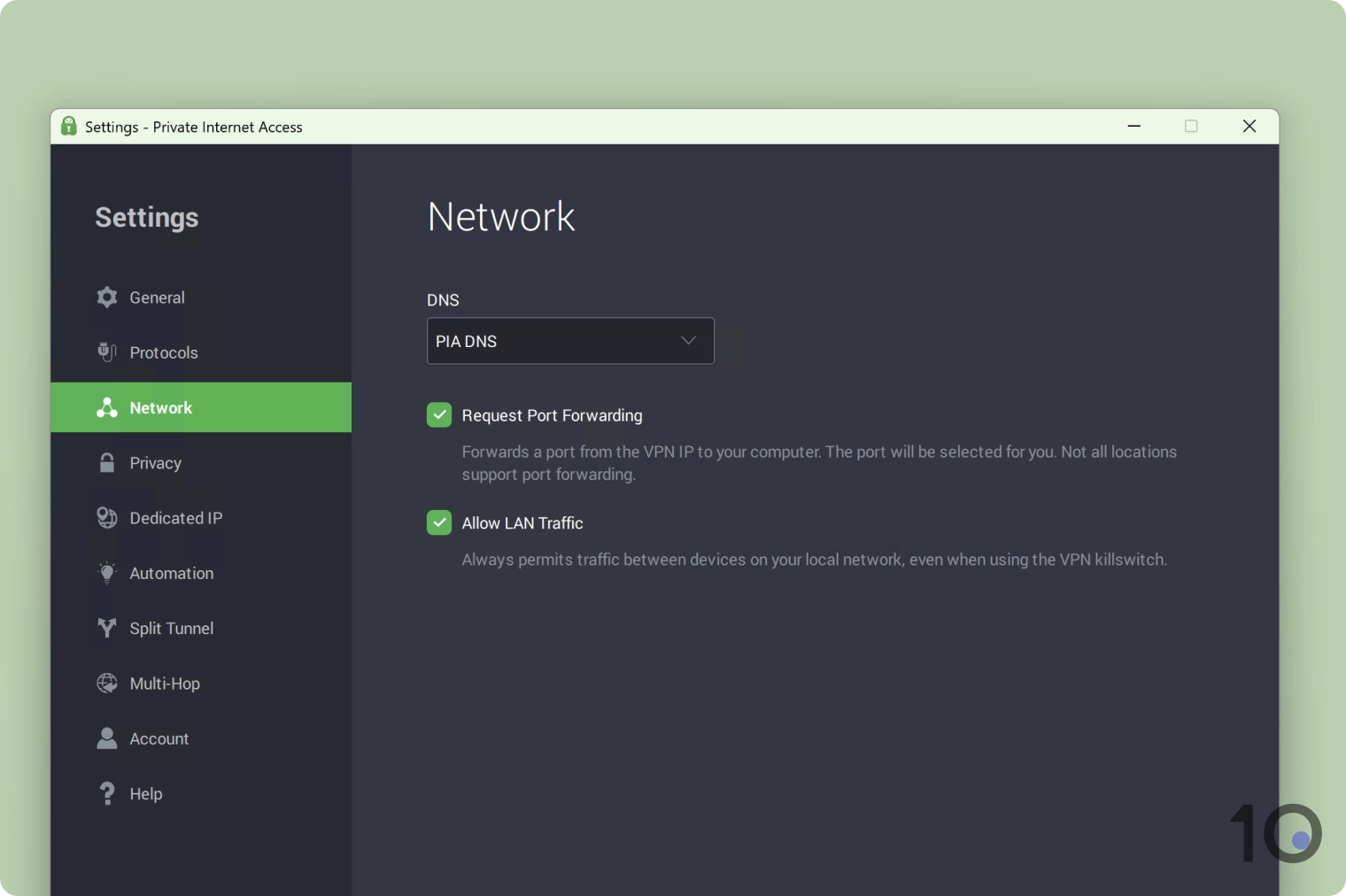
You can easily enable port forwarding in PIA’s Windows app.
Multiplayer Gaming
If your VPN applies a strict NAT type by default, it can prevent incoming peer-to-peer connections from working properly.
Port forwarding bypasses this, allowing you to host a game server and reducing lag caused by your VPN firewall.
Most major consoles and platforms support it, including PS5, Xbox Series X|S, Nintendo Switch, and PC.
Remote Desktop Access
VPNs can sometimes interrupt remote desktop connections.
Port forwarding lets you establish a direct line between your local device and the remote machine, without your VPN’s firewall getting in the way.
Only do this if you completely trust the remote device. A malicious actor could use an open port to gain direct access to your machine.
Hosting a Website
If you want to run a web server from your device while connected to a VPN, you’ll need a port forward to direct incoming traffic to the right local port.
Without it, users outside your local network won’t be able to reach your site at all.
Is Port Forwarding with a VPN Safe?
The honest answer: it can be, if you set it up carefully. But there are real risks involved, and you must understand them before proceeding.
Port forwarding selectively disables your NAT firewall, which normally shields your device from unsolicited outside connections.
You’re intentionally opening a route to your device. That’s useful, but it comes with trade-offs.
Open ports can be exploited. Unless they’re properly configured, open ports give attackers a potential entry point to probe your device, attempt brute-force password attacks, or look for known vulnerabilities in the software that’s listening on that port.
Port forwarding can cause IP leaks when torrenting. If your real IP address is exposed on a public torrent swarm, that’s both a privacy and a security risk. Always check for leaks before connecting to any publicly visible torrents.
The “port fail” vulnerability. This is a known attack (identified in 2015) that can reveal the true IP address of someone with port forwarding enabled. It’s relatively uncommon and requires a deliberate, targeted attack. That said, reputable VPNs patched against it quickly. It’s one of several reasons we strongly recommend sticking to well-established providers.
How to Port Forward Safely
If you follow these precautions, port forwarding is very unlikely to put you at serious risk:
✅ Only open the ports you actually need. More open ports means more exposure. Don’t forward ports speculatively.
✅ Close ports when you’re done. Don’t leave them open indefinitely.
✅ Use strong passwords on any game servers or remote desktop software, and change them regularly. This guards against brute-force attacks.
✅ Keep your software up to date. Patches fix known vulnerabilities. An unpatched app listening on an open port is an easy target.
✅ Never share your public IP address or port number in public forums or chats.
✅ Protect your anonymity. Some VPN services assign you a static or dedicated IP for port forwarding, which can be a privacy risk when combined with a known open port. Use a private payment method, and change your forwarded port number regularly. VPNs like PIA automatically assign a random port to help with this.
How to Set Up Port Forwarding on Your VPN
The setup process varies between VPN services. Some let you do it directly in the app; others require you to log into their website first. We’ve picked two trustworthy VPNs — Private Internet Access (PIA) and AirVPN — to show you these two different methods.
How to Port Forward with PIA (via App)
This is the simplest setup experience we’ve tested, ideal for VPN users that have never forwarded ports before.
We’ve created a separate guide on how to port forward with PIA VPN, but here’s a quick video run down followed by brief step-by-step instructions:
Instructions: How to Port Forward with PIA VPN
Open the Private Internet Access app.
Go to Settings > Network.
Check ‘Request Port Forwarding’.
Connect to a VPN server.
The assigned port number appears beneath your VPN IP address on the app’s main screen. Copy it.
Paste that port number into the ‘Listening Port’ field in your torrent client (or whichever application needs the port forward).
Once enabled, port forwarding activates automatically whenever you connect to a compatible server.
How to Port Forward with AirVPN (via Website)
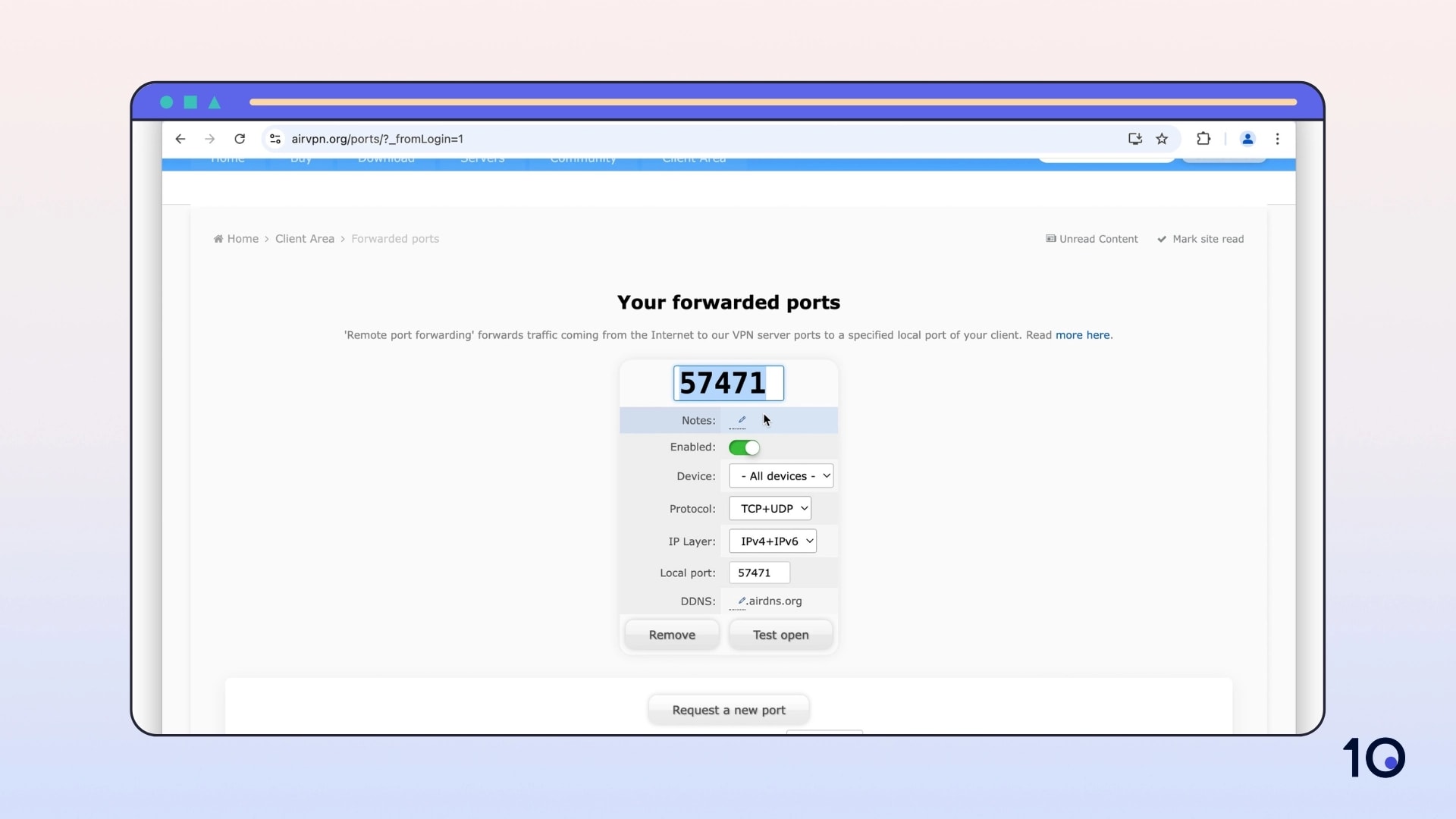
Some VPNs, including AirVPN, require you to configure port forwarding through your online account.
Here’s a brief video of us setting up port forwarding with AirVPN:
Instructions: How to Port Forward with AirVPN
Open a web browser and go to the AirVPN client area.
Click ‘Request a new port’ to have AirVPN assign one automatically, or enter a preferred port number manually (must be above 2048).
Leave the protocol and IP layer settings as they are unless you have a specific reason to change them.
Copy the port number and paste it into the ‘Listening Port’ field in your torrent client or other software.
AirVPN is one of the best choices for VPN port forwarding since it allows new users up to five port forwards, including dynamic port forwarding.
And unlike other VPN services, AirVPN allows you to request any port over 2048.
How to Find the Local IP Address On a Device
You’ll need to know your device’s local IP address to set up a port forward. The process varies between devices, but it is always straightforward.
You can find step-by-step instructions for every major platform and device below:
Windows
Open Command Prompt.
Type ipconfig /all
Your IP address will be displayed.
macOS
Go to System Preferences > Network.
Select your current network connection.
Select Advanced > TCP/IP.
Your Mac IP address will be displayed here.
Android
Open Settings.
Select About Device > Status.
The device IP address will be listed on this page.
iOS
Open Settings.
Select WiFi then tap on the network you’re connected to.
Your device IP address will be listed under ‘IPv4 Address’.
PS5
Navigate to Settings.
Scroll down and select Network
Select View Connection Status.
Your PS5 IP address will be displayed here.
Xbox Series X|S
Press the Xbox button on your controller.
Select Profile & System > Settings.
Select General > Network Settings > Advanced Settings.
You can see your Xbox IP address on the right hand side of the screen.
Which VPNs Allow Port Forwarding?
Most VPNs don’t allow port forwarding because of the security vulnerabilities associated with it. There’s also a significant overhead in maintaining the functionality.
Out of the 61 VPNs we’ve reviewed, only 12 VPNs offer port forwarding.
Here’s a list of VPN services that offer a port forwarding feature:
AirVPN: Allows up to 20 port forwards and dynamic DNS, configured via the AirVPN website.
Astrill: Supports WireGuard and OpenVPN port forwarding on specific servers, marked with a star in the VPN client.
AzireVPN: Allows up to 5 port forwards per server on WireGuard connections.
Hide.me: Supports Up to 10 dynamic port forwards.
Perfect Privacy: Up to three dynamic and five static port forwards, via OpenVPN.
Private Internet Access: Supports one dynamic port forward via OpenVPN or WireGuard.
PrivateVPN: Allows one open port per server, chosen automatically.
PureVPN: Port forwarding is available but only through PPTP, which is not safe to use.
TorGuard: Allows up to 10 port forwards via OpenVPN or WireGuard.
Trust.zone: Port forwarding is enabled, but only in some countries.
VPNSecure: Available on dedicated IP connections via OpenVPN IPv4 or IPv6.
Windscribe: Available with a static IP address add-on.
All of these VPNs only offer port forwarding on premium subscriptions; in some cases they even require an additional fee. There are no free VPNs that support port forwarding.
Many popular paid services – including NordVPN and ExpressVPN – block access to all ports except those that are absolutely necessary for the VPN to function.
What If Your VPN Port Is Being Blocked?
Sometimes the problem isn’t incoming traffic. It’s that your VPN connection itself is being blocked.
This happens on certain networks: college campuses, workplaces, and countries with strict internet controls sometimes prevent VPN use by blocking the specific ports that VPN protocols rely on.
For example, a network administrator could block all traffic on port 1194, which would stop OpenVPN (UDP) from working entirely.
The fix in most cases is simple: switch to port 443.
Port 443 is used for all HTTPS traffic, meaning every secure website on the internet runs through it. Blocking port 443 would break online banking, e-commerce, and virtually every major website.
As a result, almost no network blocks it. And because multiple VPN protocols support it, switching is usually straightforward.
EXPERT ADVICE: If your VPN connection is being blocked on campus or at work, try switching from OpenVPN UDP to OpenVPN TCP on port 443. It’s the single most effective workaround for firewall restrictions.
The protocols that support port 443 include OpenVPN (TCP), SoftEther, and SSTP (although we don’t recommend SSTP due to security concerns).
VPN Port Forwarding & Deep Packet Inspection (DPI)
If you’re in a country with very strict VPN controls, switching ports may not be enough.
Deep packet inspection (DPI), an internet filtering technique often used in high-censorship nations, can identify VPN traffic even when it’s encrypted, regardless of which port you use.
In that case, you’ll need a VPN with obfuscation — a feature that disguises your traffic to look like regular HTTPS browsing.
FAQs
What Is the Default Port for a VPN?
It depends on the protocol: OpenVPN UDP uses port 1194; OpenVPN TCP uses 1194, 443, or 80; WireGuard uses 51820; IKEv2/IPSec uses 500 and 4500; and SoftEther uses 443, 992, and 5555.
The exact port your VPN uses is set automatically, so you don’t need to configure it manually.
Can I Change the Port My VPN Uses?
The easiest way is to switch protocols. If WireGuard is being blocked, try OpenVPN TCP: it can run on port 443, which is almost never blocked.
Some VPN providers also let you manually set your port in the app’s advanced settings.
Is Port Forwarding Legal?
Yes, port forwarding is a standard networking practice and there’s nothing illegal about using it.
That said, what you do with an open port is a separate matter. Any activity that would be illegal without port forwarding remains illegal with it.
Does Port Forwarding Slow Down My VPN?
Quite the opposite. In most cases, port forwarding speeds things up, not down.
For torrenting in particular, port forwarding can have a significant positive impact on download and upload speeds by allowing direct connections to other peers.
Do I Need a Static IP Address for Port Forwarding?
Since your VPN provider handles the server-side IP address for you, you don’t need a static IP on your home connection.
Why Don't More VPNs Support Port Forwarding?
Two reasons: security and infrastructure.
Port forwarding introduces risks that VPN services would rather not take on (both for their users and for their network).
It also requires static or dedicated IP infrastructure and ongoing technical maintenance.