



The Bottom Line
Hide.me is one of the longest-standing VPNs available and one of the few to maintain its independence. It’s built a reputation as a fast, secure, and affordable option with highly customizable, if slightly utilitarian, apps. While its free tier is safe and ad-free, there is a catch: it’s painfully slow, you can’t unblock any streaming services, and the server choice is pitiful. Despite this, it’s still one of our favorite free VPNs due to its unlimited data and premium security features.
1.0/10 1.3/10 8.9/10 8.5/10 2.1/10 0.0/10 7.0/10 7.0/10 4.1/10
Hide.me Pros & Cons
- Doesn’t keep identifiable data
- Same robust security as paid version
- No ads or data cap
- Throttled speeds
- Only 7 countries
- Unable to access streaming sites
- Doesn’t support torrenting
- Includes less advanced features
9.8/10 8.4/10 8.9/10 8.5/10 6.0/10 9.0/10 7.0/10 7.5/10 7.7/10
Hide.me Pros & Cons
- Logs no identifying data
- One of the fastest VPNs we've tested
- Natively supports IPv4 & IPv6
- Generous 5-day free trial on PC
- Plenty of advanced features
- Effective against online censorship
- Kill switch isn’t on by default
- No Smart DNS
- Fewer server locations than rivals
- Struggles with international streaming sites
- Apps look slightly dated
Owned by its original developers, eVenture Ltd, Hide.me remains free from affiliations with rival providers or software conglomerates — a rare feat nowadays.
Paradoxically, this independence is both a strength and a hindrance: its modest background prevents it from matching the popularity of well-marketed behemoths like NordVPN and Surfshark.
While not as well known, Hide.me hit the levels we expect from an elite VPN — especially for its speed and torrenting performance. We think its panel-based app design is too function over form, but we accept that this comes down to personal preference.
Its other USP is its freemium model, since the VPN offers both paid and free plans. In the case of the Windows app, you can trial the full premium version for five days with no payment details or account registration required. This is unlike anything we’ve come across, with only CyberGhost’s 24-hr free trial coming close.
The actual free VPN is light years away from its paid counterpart. While it doesn’t impose a data cap, its intentional speed throttling makes it a poor choice for daily use.
🔄 Recent Updates
We’ve updated our review to include Hide.me’s RAM-only servers and 5-day PC free trial, as well as providing analysis on its reworked desktop apps.
Pricing Plans
$$$$| 1 month | $11.99 |
|---|---|
| 12 months | $54.96 ($4.58/mo) |
| 26 months | $69.94 ($2.69/mo) |
Free Trial Options
| Money-Back Guarantee | 30 days |
|---|---|
| Free Trial | 5 days (PC only) |
| 100% Free Plan | Yes |
| Data Cap | Unlimited |
Privacy
We calculated this rating by examining the VPN's logging policy, jurisdiction, ownership, and privacy features. We also evaluated its history of handling user data and responding to legal requests.
We calculated this rating by examining the VPN's logging policy, jurisdiction, ownership, and privacy features. We also evaluated its history of handling user data and responding to legal requests.
The VPN does not log anything that can be used to identify you, and its RAM-only (diskless) server network periodically wipes your activity data. This is supported by yearly transparency reports that detail every law enforcement and DMCA request received by the VPN service. All that's missing is that final stress test of a real-world incident, like a court case, to 100% prove its logging policy.
| Originating IP Address | No |
|---|---|
| Browsing Activity | No |
| Individual Connection Timestamps | No |
| Date of Last Connection | No |
| VPN Server IP | No |
| Device Information | No |
| Individual Bandwidth Usage | Yes |
| Account Information | Yes |
| Jurisdiction | Malaysia (Privacy Haven) |
|---|---|
| Privacy Policy | No Identifiable Data |
| Transparency Reports | Yes |
| Diskless Servers | Yes |
| Anonymous Payment Options | Yes |
You can read Hide.me's full privacy policy on its website.
Hide.me does not log your sensitive data or online activity. The only personal identifier collected is the email address you used upon sign-up, which can be bypassed entirely since the free version requires no personal details. Alternatively, you can just subscribe to the VPN using a throwaway email.
Outside of this, the VPN allocates a randomly generated username and an internally-assigned IP address each time you connect. This maintains a temporary log of connection data for troubleshooting purposes, which is erased every few hours. While we’d like further clarity on which usage data is logged, there’s nothing alarming or overly intrusive about this practice.
Working lockstep with this privacy policy is Hide.me’s diskless server network — these are servers built on RAM, instead of physical hard drives, that wipe your activity data every time they reboot.
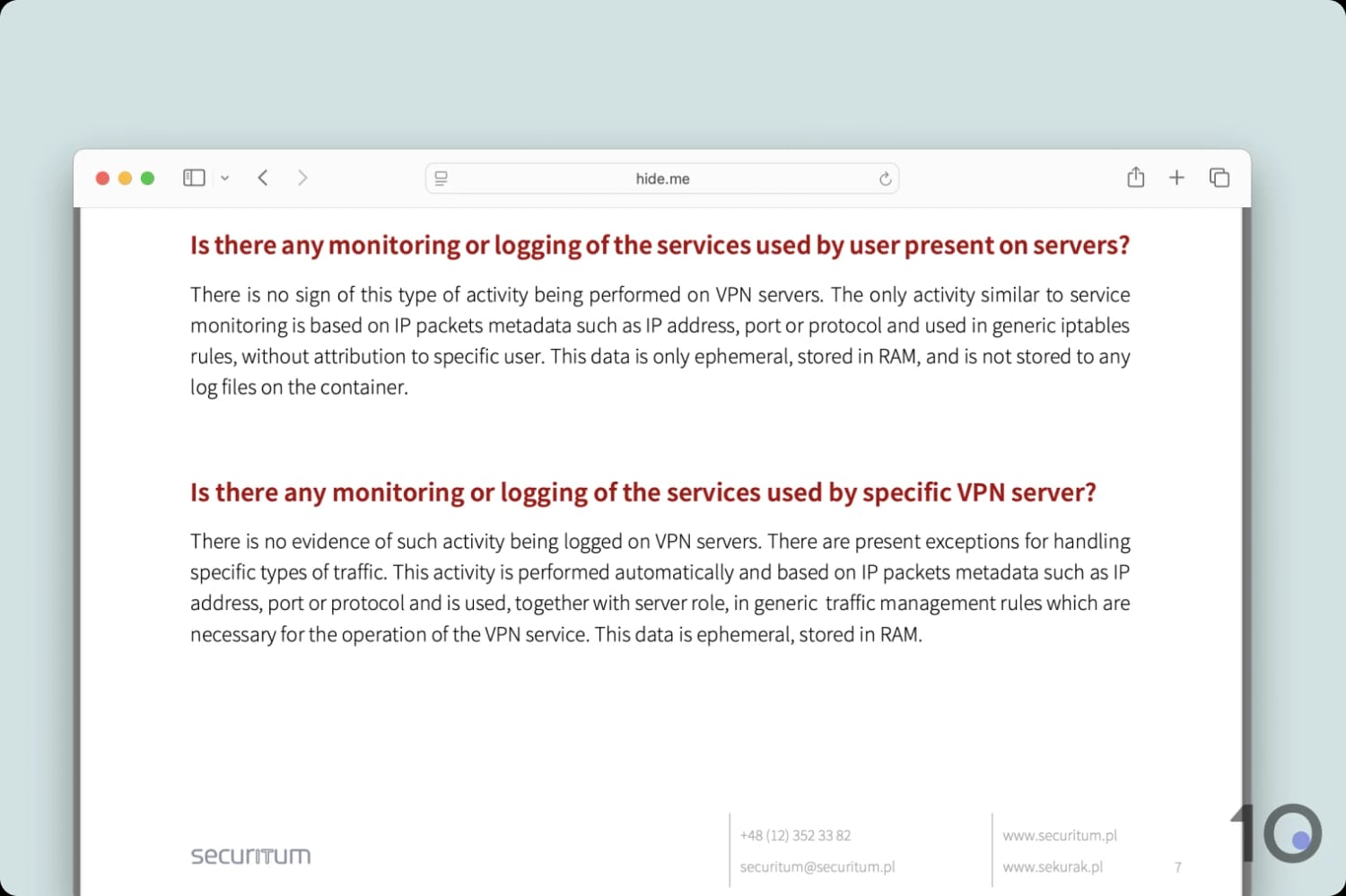
Hide.me’s latest audit confirms it uses RAM servers.
Further privacy measures include annual transparency reports stretching back to 2012 and multiple independent audits, which help validate the VPN’s claims. The VPN service also supports anonymous payment methods, like cryptocurrency, to ensure a paper trail can never be established to your account.
All that’s missing is a real-world test, like a server seizure, to provide the ultimate verification of the VPN’s logging practices. Rest assured, though, Hide.me has never given us a reason to doubt its claims and its various privacy initiatives underscore its trustworthiness.
Streaming
We calculated this rating by identifying which streaming services the VPN could unblock and measuring how consistently it could access them.
We calculated this rating by identifying which streaming services the VPN could unblock and measuring how consistently it could access them.
Hide.me is a dark horse for streaming, as long as you use its paid version and connect to a streaming-optimized server. By doing so you can unblock 11 Netflix libraries and almost every popular content platform available. Conversely, the free tier doesn't include these dedicated servers and fails to unblock any streaming sites.
| Streaming Service | Works with Hide.me (Free) | Works with Hide.me |
|---|---|---|
| BBC iPlayer (UK) | No | Yes |
| DAZN (Canada) | No | No |
| Disney+ (UK) | No | Yes |
| Hulu (US) | No | Yes |
| ITVX (UK) | No | Yes |
| HBO Max (US) | No | Yes |
| Netflix (US) | No | Yes |
| Netflix (UK) | No | Yes |
| Prime Video (US) | No | Yes |
| Sky Go (UK) | No | Yes |
Following year-on-year improvement, Hide.me is now among the most consistent VPNs for streaming, yet it’s rarely ever mentioned by other review sites. We suspect this is a byproduct of the industry: as an independent VPN service, Hide.me can’t match the affiliate rates that guarantee its larger competitors’ visibility.
There are two major caveats to our claims: you must use the paid version of Hide.me and connect to a streaming-optimized server; otherwise, you’re far less likely to bypass the geo-blocks. For instance, we tried connecting to Peacock five times using a standard US server and only accessed the site on the fourth attempt — a far cry from what we’re used to with ExpressVPN.
Using its dedicated servers, Hide.me unblocks 11 Netflix libraries including the US, UK, and Canada. While this is fewer regions than the totals for ExpressVPN and NordVPN, it still outperforms PIA, Surfshark, and CyberGhost.
Aside from Netflix, the VPN unblocks almost every US-based streaming service, including notoriously hard-to-access platforms like HBO Max and Amazon Prime Video.
It works just as well for over-the-top streaming services outside of the US, like Hotstar, BBC iPlayer, Now TV, and Movistar+. However, Hide.me is unable to bypass the geo-blocks on RaiPlay or Mediaset Infinity, despite providing servers optimized for Italian platforms.
The VPN also struggles with Korean services, although this isn’t as surprising given it lacks a dedicated streaming server, which meant we were unable to stream Coupang Play or Wavve.
On the topic of specialist servers, we actually prefer if every server had this technology built-in by default. It’s quite strange to have two separate server lists, and we find that it adds unnecessary setup to an otherwise seamless streaming experience.
Free Plan Doesn’t Unblock Any Streaming Sites
The free version of Hide.me is completely different to Hide.me Pro: it was detected by every international streaming site we tested it with, making it one of the worst free VPNs for streaming.
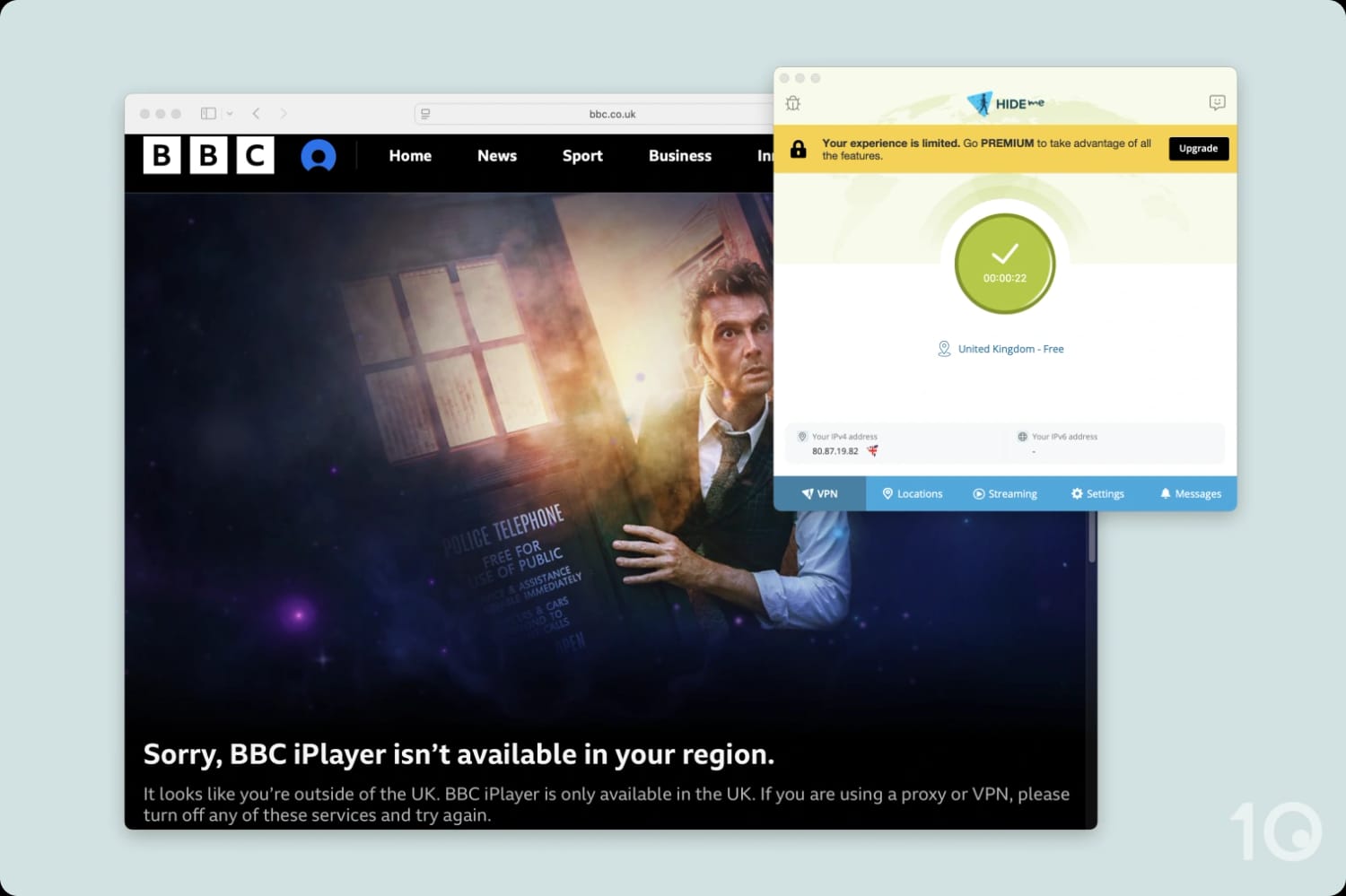
Hide.me’s free tier fails to bypass VPN detection on most streaming sites.
Hide.me Free doesn’t work with US Netflix, HBO Max, Hulu, or BBC iPlayer. This means we don’t recommend Hide.me Free if you’re looking to stream content regularly, despite unlimited data. We recommend Windscribe instead.
Speed
We calculated this rating using our proprietary tests of download, upload, and ping speeds across servers in 10 countries.
We calculated this rating using our proprietary tests of download, upload, and ping speeds across servers in 10 countries.
Hide.me is one of the fastest VPNs in the world, with an average speed loss of 13% across all locations. To achieve similar results, make sure you activate Bolt in its Windows app, or select the WireGuard protocol on all other platforms.
The numbers don’t lie: Hide.me maintains impressive download speeds on short and long distance connections, making it one of the fastest VPNs on the market.
When connected to a server near us, the VPN reduced our connection speeds by just 3%. In practice, this slowdown is too minute to notice and means you can browse or stream without interruption.
To put these results in context, you can use the bar chart below to compare Hide.me’s speeds with other fast VPNs, like NordVPN and Surfshark:
Barring our two absolute fastest VPNs — Hotspot Shield and IPVanish — no other VPN service can come close to these figures.
Something to keep in mind, is that these speeds can fluctuate slightly by operating system. While our speeds were still very fast on Mac and mobile, the ‘Bolt’ proxy on Windows scored highest.
Free Plan Throttles Your Connection
We love how fast Hide.me is, so you can imagine our disappointment when we learned that its free version throttles your internet connection.
It’s really disheartening to see this, as it’s the kind of practice we expect from a far less reputable provider and its completely nullifies the free plan’s unlimited data.
You can still use the free version for basic browsing, but expect video content to buffer and torrents to stall.
Security
We calculated this rating by testing the VPN's security protocols, encryption, leak protection, and kill switch reliability. We also assessed the provider's track record and any past security incidents.
We calculated this rating by testing the VPN's security protocols, encryption, leak protection, and kill switch reliability. We also assessed the provider's track record and any past security incidents.
Hide.me covers all of the security essentials: secure protocols, best-in-class AES-256 and ChaCha20 encryption, and an effective kill switch. Where it falls short compared to big-name VPNs is its lack of advanced initiatives, such as post-quantum cryptographic encryption (PQC) and open-source apps. That said, Hide.me is safe to use and keeps your personal data secure.
| Independent Audit | Yes |
|---|---|
| VPN Kill Switch | Yes |
| Leak Protection | Yes |
| OpenVPN (TCP/UDP) | Yes |
|---|---|
| WireGuard | Yes |
| ChaCha20 | Yes |
| AES-256 | Yes |
Hide.me gives you the choice between OpenVPN and the AES-256 cipher, or WireGuard with ChaCha20. You can use either to reliably encrypt your connection, but we recommend WireGuard for the best performance unless you’re on Windows, where we advise you use the Bolt proxy. The latter is based on OpenVPN TCP, so your connection is still securely encrypted.
For peace of mind, we tested all of the protocols and ciphers ourselves using a data packet analyzer, Wireshark. You can see below that our internet traffic was properly encrypted and displayed unreadable ciphertext.
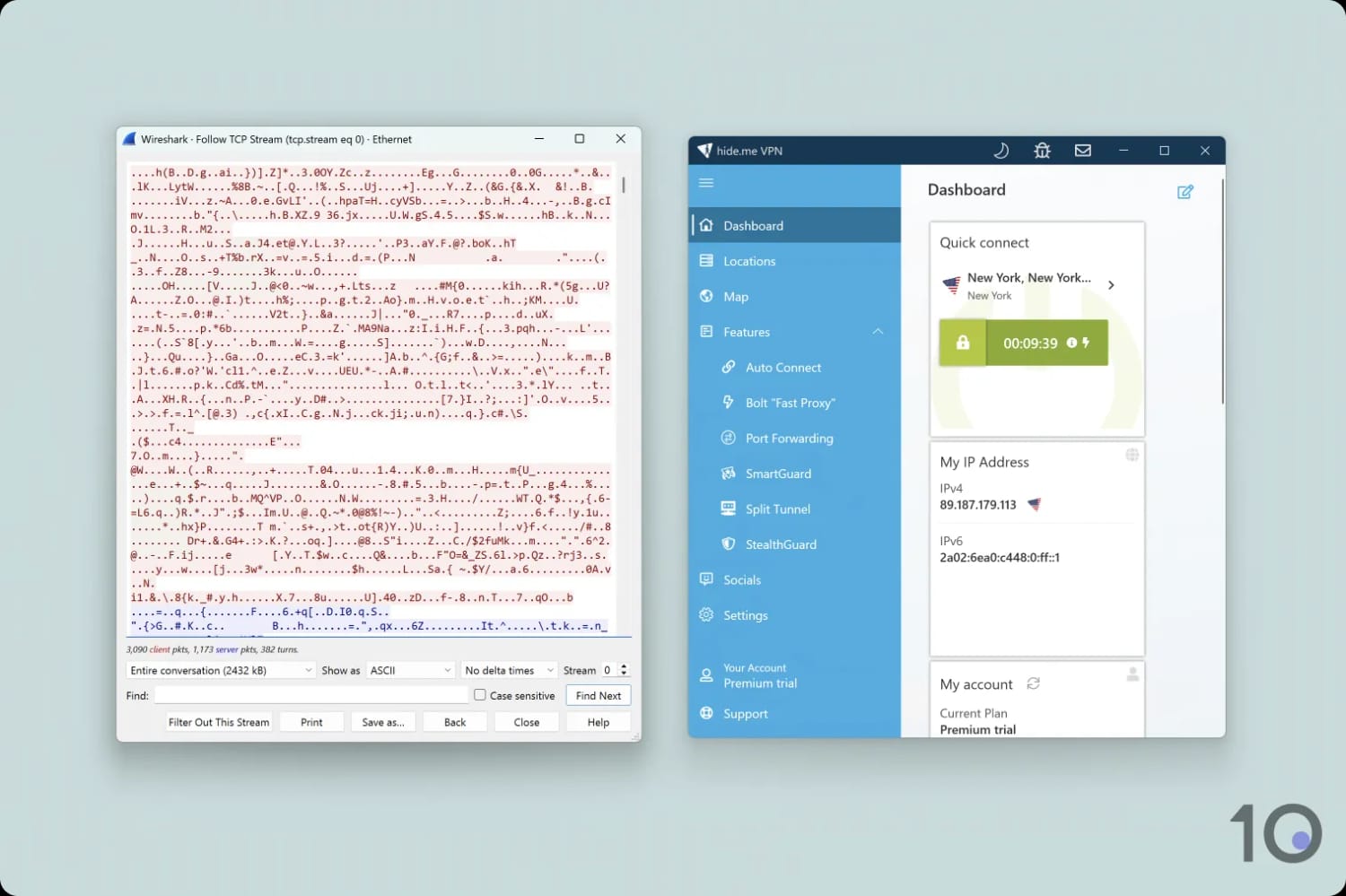
Hide.me encrypts your internet traffic, making it indecipherable.
Beyond this, the VPN’s other security features include built-in leak protection, first-party DNS servers to ensure only Hide.me handles your DNS requests, and a kill switch to cut your internet connection should your VPN suddenly disconnect. We tested all of these and detected no data leaks of any kind, including WebRTC, DNS, or IP.
Unlike most VPNs, Hide.me supports IPv6 addresses so you don’t need to worry about your internet connection being blocked or, even worse, your real IP being leaked.
What did really bother us is having to manually turn on the kill switch in the app settings. A feature this crucial needs to be enabled by default.
Our other criticism relates to some of the missing ‘extras’ from Hide.me’s security suite. Post-quantum protection is becoming increasingly important to protect against more advanced cyber attacks, and has already been adopted by ExpressVPN and NordVPN. We’d also welcome open-source VPN apps so anyone can inspect their source code and spot vulnerabilities to be fixed.
Server Locations
We calculated this rating by assessing the number of countries and cities available, their geographic spread, and availability in popular regions.
We calculated this rating by assessing the number of countries and cities available, their geographic spread, and availability in popular regions.
Hide.me has a middling server network of 2,600 physical servers in 57 countries, mostly in Europe and Asia. You also have city-level options in seven countries, if you require greater precision. The free version has servers in 7 countries, which is fairly standard.
| Continent | Hide.me (Free) Countries with Servers | Hide.me Countries with Servers |
|---|---|---|
| Europe | 6 | 30 |
| North America | 1 | 3 |
| Asia | 0 | 14 |
| South America | 0 | 5 |
| Africa | 0 | 3 |
| Oceania | 0 | 2 |
In the past, this server network would’ve been considered quite large, but recent developments in the VPN industry means that Hide.me’s total becomes average.
To put this into context, it covers the lowest amount of server locations in our top 10, with 55 fewer countries than IPVanish and 70 fewer than NordVPN.
This means you’re quite limited in where you can get IP addresses from. The biggest gaps are in Africa with only South Africa and the northernmost part of the continent (Egypt, Morocco) covered and in Central America where there are no locations whatsoever.
Despite its relatively small server network, Hide.me provides city-level server choice in seven countries. Most exciting for us were its US options, letting you connect to servers across 14 states. While this isn’t comparable to ExpressVPN’s or PIA’s full coverage of all 50 states, we were still able to use them to bypass blackouts on sports broadcasts.
Australia is also notably represented, with six city servers available. This makes Hide.me a good choice if you want to get an Australian IP address.
Hide.me Offers 7 Free Server Locations
With the exception of a single US location, all of the free servers are concentrated in Western Europe. This is limiting, but it’s not as restrictive as other free VPNs we’ve tested, which are often restricted to a few server locations only, like Hotspot Shield Basic and ZoogVPN.
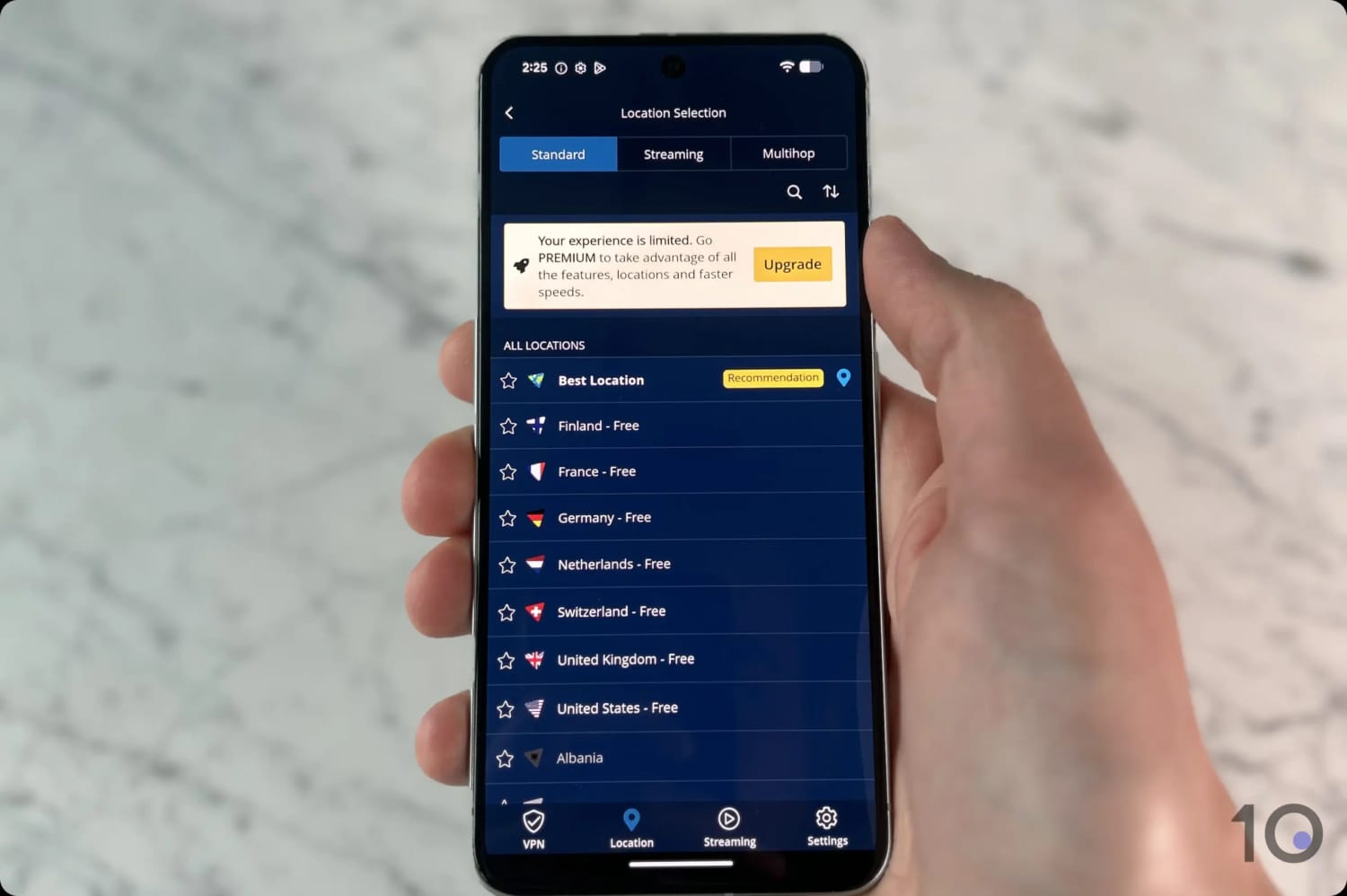
Interestingly, Hide.me provides a free Finnish server location.
For a more generous selection, Tunnelbear is unique in that its paid and free plans cover the same number of countries: a generous 47.
User Experience
We calculated this rating by assessing the VPN’s ease of use, interface design, and setup process across multiple platforms.
We calculated this rating by assessing the VPN’s ease of use, interface design, and setup process across multiple platforms.
Hide.me has come a long way from its buggy past, providing a polished and reliable VPN experience. Its apps are well-designed, with enough customization for advanced users while remaining approachable for beginners. That said, streamlining the Windows app and adding more cross-platform consistency would elevate it even further. For most users, Hide.me is a solid choice, particularly on macOS and mobile devices.
Hide.me has significantly improved its apps over the years, offering an intuitive interface across all platforms. The design is user-friendly, with clearly labeled tabs and helpful explanations for advanced features like split tunneling and Stealth Guard. These features, paired with descriptions for each VPN protocol, make the app accessible to both novices and tech-savvy users.
Expand the sections below to see how our user experience differed with Hide.me by platform:
Desktop & Laptop (Windows & Mac)
Aside from a shared color palette, the Windows and Mac apps look nothing alike.
The PC app sports a user interface made up of customizable widgets that can be rearranged or deleted. For example, we added a widget that displays a US streaming server for convenient access.
You can also toggle between a standard and advanced view, with the latter revealing more complex settings.
The Windows app also includes an interactive map view, which looks absolutely terrible and reminiscent of early 2000s clip art. That said, it is a simple way to select a server location.
Overall, it’s simultaneously one of the most intuitive VPN apps we’ve reviewed and one of the ugliest looking.
In contrast, the macOS app offers a more streamlined experience. It retains essential features but simplifies the interface, making it less intimidating while still providing access to advanced tools.
Mobile (iPhone & Android)
The mobile apps look similar to their Mac counterpart, featuring a large central power button on a blue and white background.

Everything is sensibly spaced in the mobile apps, suggesting that Hide.me has taken the time to properly optimize for the operating systems.
We also love that the bottom navigation bar just focuses on the essentials: VPN, Location, Streaming, and settings. We much prefer this over other VPNs — like NordVPN and Surfshark — that fills these spaces with promos.
We also appreciate the search functionality and the option to favorite servers to make finding a server location easy.
On our test iPhone, we also created a widget using Hide.me and selected the ‘medium’ sized option. This let you quickly set-and-forget the VPN, while on the move.
Torrenting
We calculated this rating by assessing the VPN's torrenting features, including P2P servers and port forwarding support. We also evaluated its average bitrate and stance on file-sharing.
We calculated this rating by assessing the VPN's torrenting features, including P2P servers and port forwarding support. We also evaluated its average bitrate and stance on file-sharing.
Hide.me has everything that you need to torrent safely: an unintrusive logging policy, a working kill switch, and fast P2P speeds across all servers. In direct contrast, the free version of the VPN doesn't permit torrenting and actively throttles your connection.
| Torrenting Attribute | Hide.me (Free) | Hide.me |
|---|---|---|
| Permits P2P Traffic | No | Yes |
| Average Download Bitrate | N/A | 9.6MiB/s (4% loss) |
| Countries with P2P Servers | 0 | 57 |
| Port Forwarding | No | Yes |
| Kill Switch | Yes | Yes |
| Logging Policy | No Identifiable Data | No Identifiable Data |
We were mightily impressed by the paid version of Hide.me in our torrenting tests. All of its servers are P2P-optimized, and you can really tell since we measured an average download bitrate loss of just 4%. This is so negligible that you won’t notice a massive difference in your download times unless you torrent something in excess of 50GB.
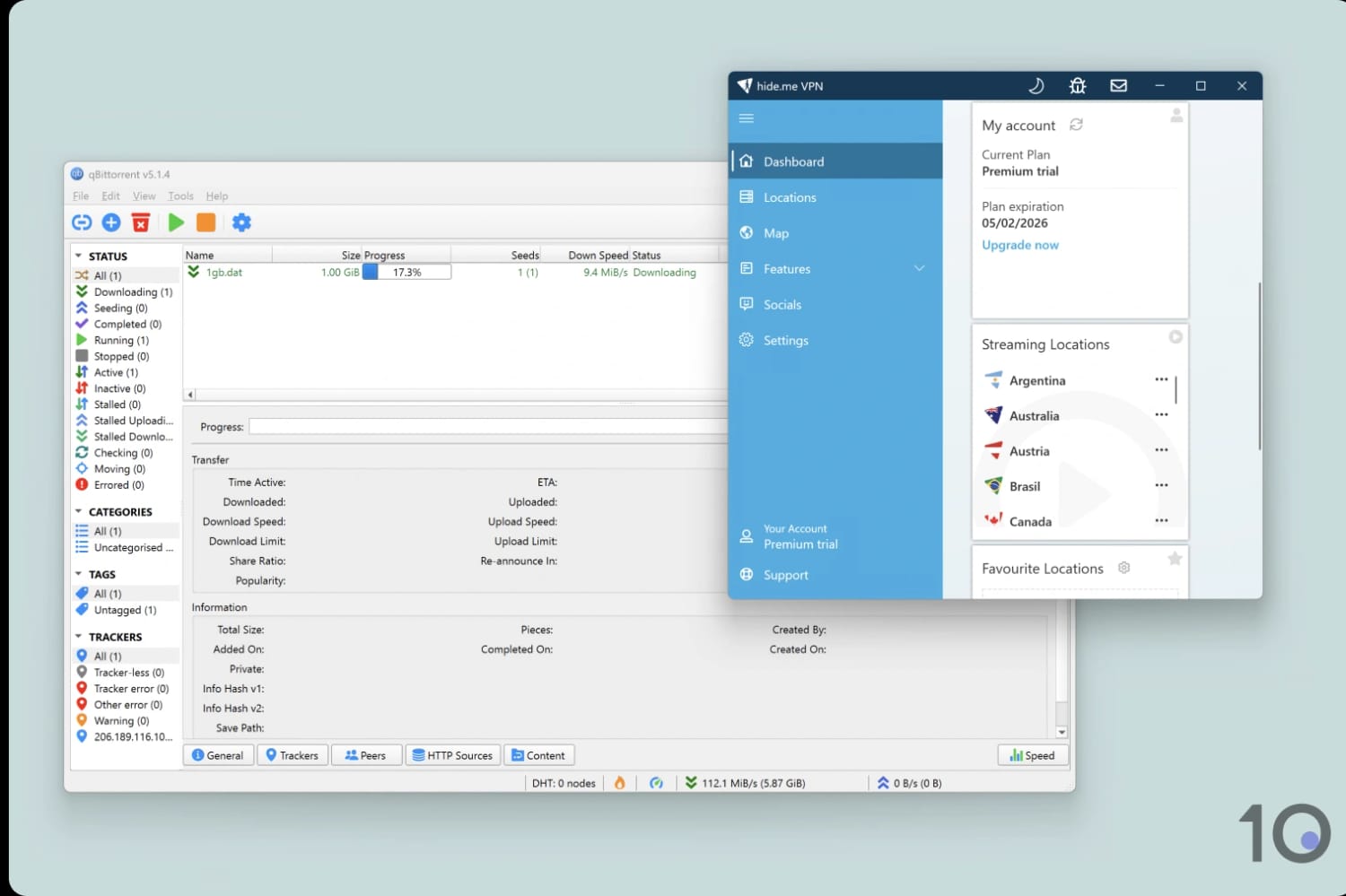
Hide.me downloaded our 1GB torrent test file in under two minutes.
Beyond its fast speeds, you can be sure that the VPN won’t compromise your anonymity while torrenting. Its logging policy doesn’t retain any data that can be used to identify you and its kill switch means your real IP address won’t be exposed to the torrent swarm.
Another aspect of torrenting we consider is the availability of port forwarding, since it can boost your file-sharing speeds. Hide.me does not permit regular (static) port forwarding for security reasons, instead it has developed a safer Dynamic Port Forwarding (UPnP), which you can manually install via the Members Area.
Torrenting Isn’t Permitted on Free Servers
The free version of Hide.me blocks BitTorrent traffic on all servers. This isn’t a great loss considering its throttled speeds and limited server options.
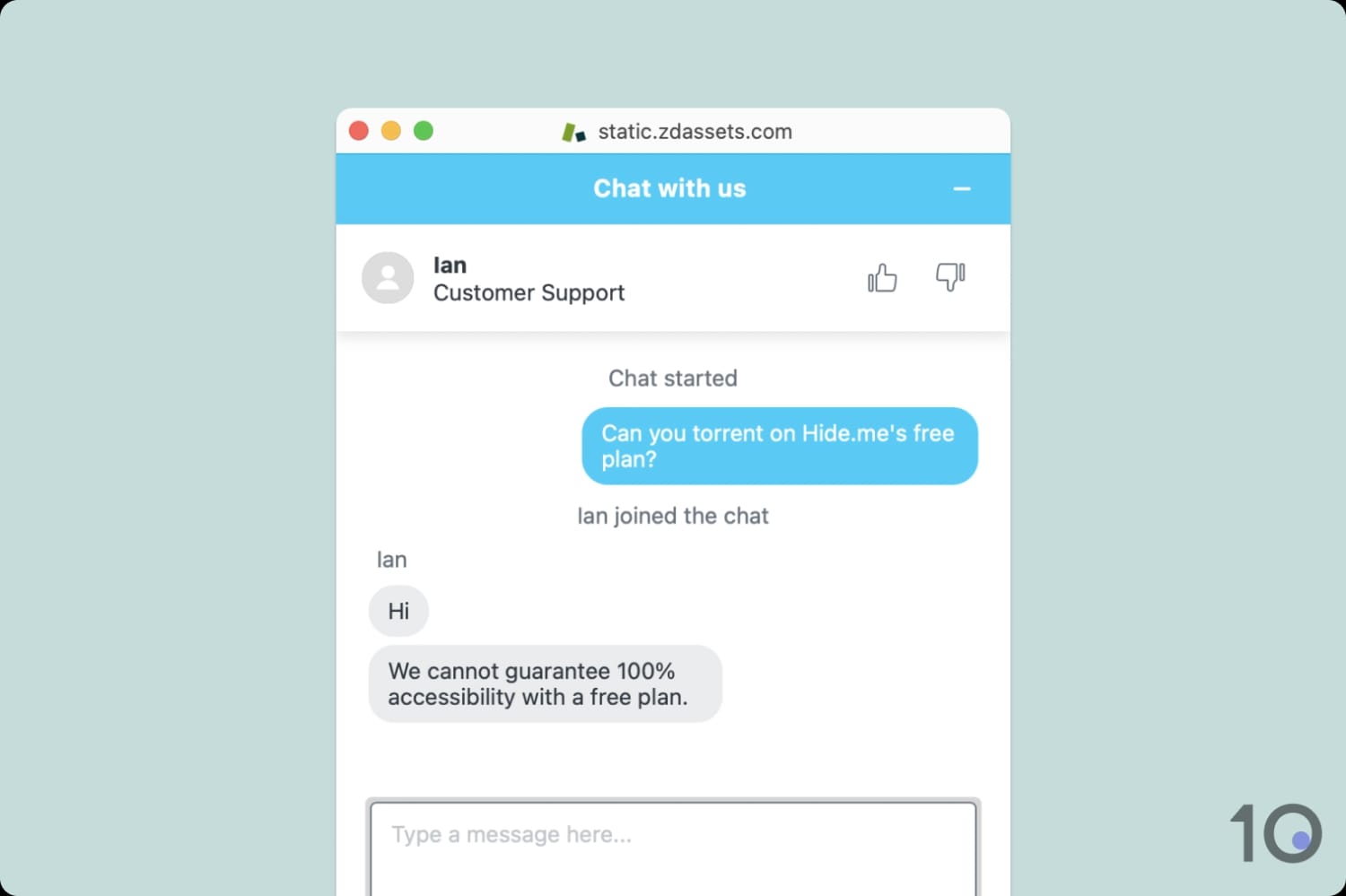
The VPN provider admits that the free plan isn’t a reliable choice for file-sharing.
Even when its free plan used to permit torrenting, we recorded an average speed loss of 55%, which isn’t great.
Device Compatibility
We calculated this rating by evaluating the VPN's support for various devices. We considered dedicated apps, browser extensions, Smart DNS functionality, and router compatibility.
We calculated this rating by evaluating the VPN's support for various devices. We considered dedicated apps, browser extensions, Smart DNS functionality, and router compatibility.
You can use Hide.me on the most popular platforms: desktop, mobile, Fire TV, Android TV, and Apple TV. That's mostly where the good news ends since it doesn't have a Smart DNS proxy, its browser extensions don't fully encrypt your traffic, and it only supports manual router setup. You can use it on up to 10 devices at once, which is the industry average nowadays.
| Windows | Yes |
|---|---|
| Mac | Yes |
| iOS | Yes |
| Android | Yes |
| Linux | Yes |
| Amazon Fire TV | Yes |
| Android TV | Yes |
| Apple TV | Yes |
| Router | Manual Setup Only |
| Chrome | Yes |
| Smart DNS | No |
|---|
Simultaneous Connections: 10
Without Smart DNS, the only way you can use Hide.me on devices that don’t support VPN apps — like games consoles — is to manually install it on your router. We really advise against doing this unless you’re tech-savvy, otherwise you run the risk of bricking your router. To be frank, it’s not worth doing full stop since you’re limited to a single server location at a time and won’t have access to a graphical user interface.
We’re not a massive fan of its browser extensions either. While we appreciate their availability on Chrome, Edge, and Firefox, we don’t view them as extending Hide.me’s compatibility as they don’t work properly.
They are effectively proxies that spoof your IP address, without encryption, to one of three locations: the US, Switzerland, and the Netherlands. The provider’s website claims that enabling SOCKS in the extension’s settings encrypts your browser traffic, but in our experience it just prevented us from loading any web pages.
Additional Features
We calculated this rating by evaluating the VPN's extra capabilities beyond the basic VPN service. This includes bypassing censorship, additional tools like malware blockers, and customization options like split tunneling.
We calculated this rating by evaluating the VPN's extra capabilities beyond the basic VPN service. This includes bypassing censorship, additional tools like malware blockers, and customization options like split tunneling.
We're really impressed by the additional features offered by Hide.me, and we rank it above most VPNs for this category. Standout features include a multi-hop configuration that lets you choose the entry and exit point, as well as a specialist protocol that works in China. There's less features in the free plan — as you might expect — but still more than most free VPNs.
| Additional Feature | Hide.me (Free) | Hide.me |
|---|---|---|
| Split Tunneling | Yes | Yes |
| VPN Obfuscation | Yes | Yes |
| Multi-Hop Servers | No | Yes |
| Dedicated IP | No | No |
| Ad Blocker | No | Yes |
Easy-to-Use Split Tunneling
Available on: Windows, macOS & Android
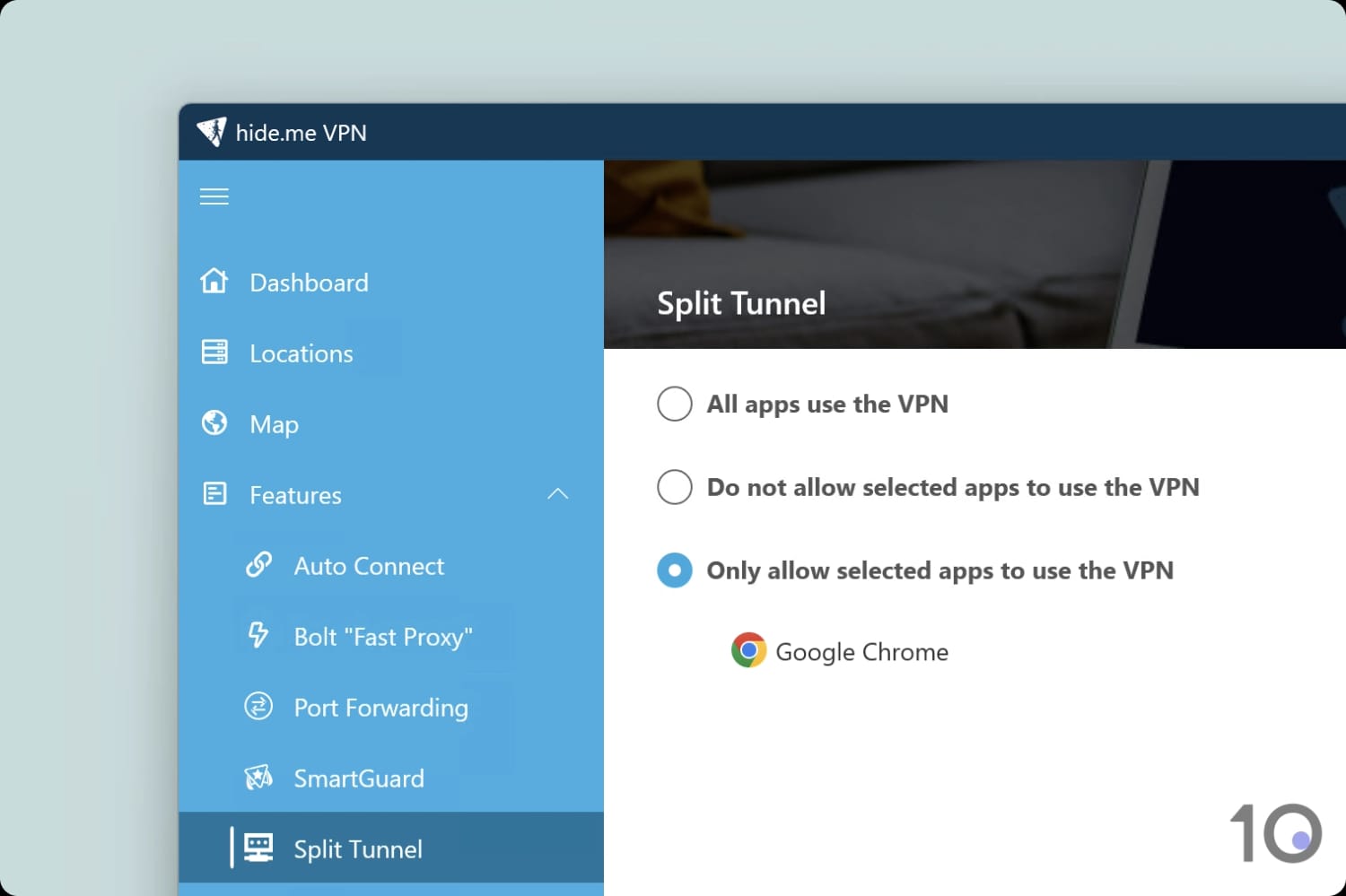
The in-app text explains how to use split tunneling.
You use split tunneling to specify which apps enter the VPN tunnel. The use cases are endless, but a common one is to exclude your video game launcher from the VPN to maintain a low ping.
We loved using this feature in Hide.me’s apps as they give you the option to include or exclude apps from the tunnel. This level of flexibility is only matched by a few other VPNs and lets you tailor the VPN to your exact requirements.
Dynamic Multi-Hop (Double VPN) Servers
Available on: Windows, macOS, Android & iOS
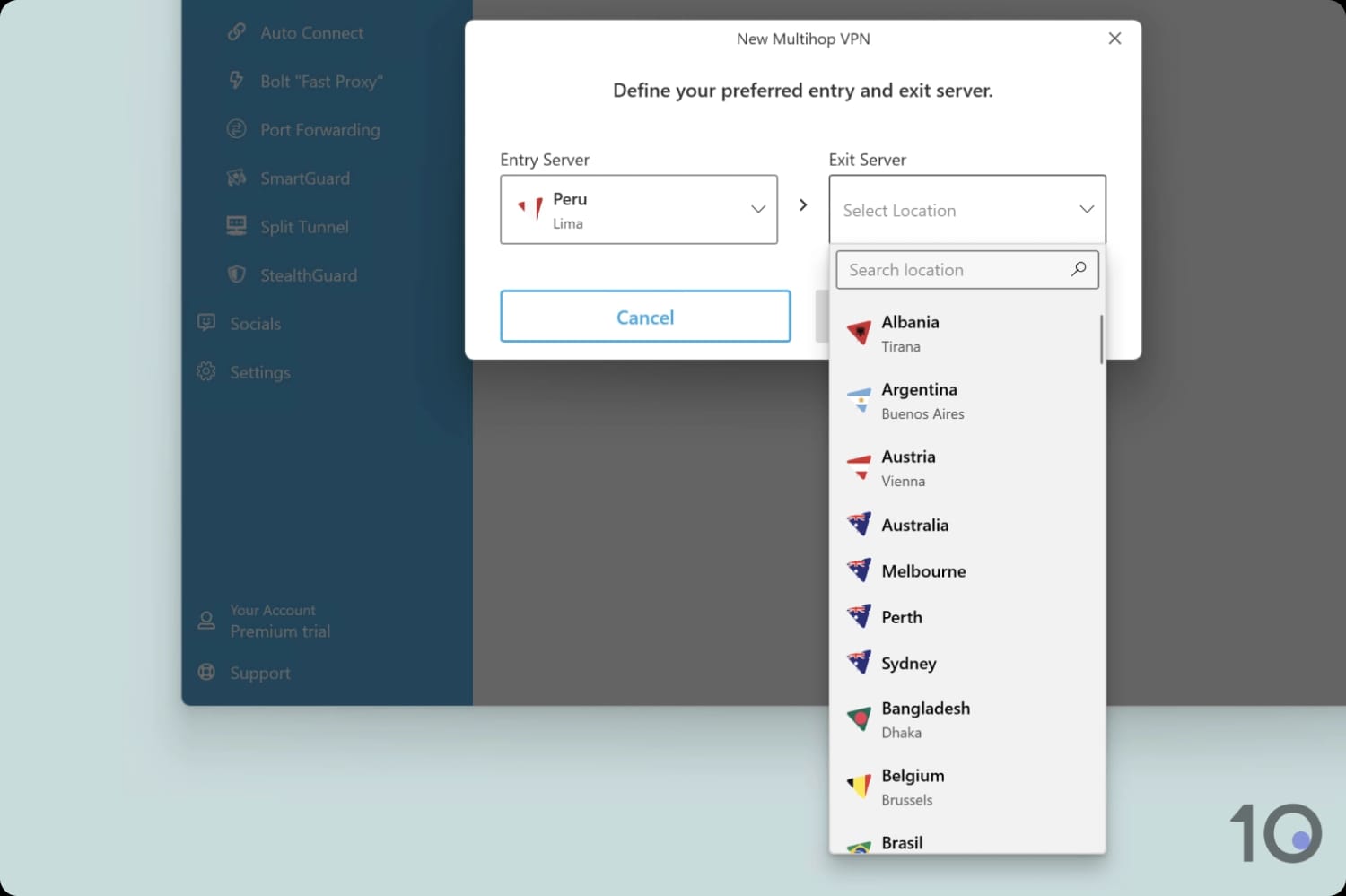
You can combine any of the VPN’s 57 server locations.
Hide.me has multi-hop servers, which allow you to route your internet traffic through two VPN servers, encrypting it twice and making you even harder to track.
While this feature is becoming increasingly common in the VPN industry, Hide.me joins a select group that lets you choose your entry and exit servers. This is unlike NordVPN, for example, which limits you to preset server combinations.
SmartGuard Doesn't Work
Available on: Windows, macOS, Android & iOS
Hide.me recently released an ad and tracker blocker integrated into the VPN app called SmartGuard. It includes whitelist and blacklist options and a parental filter toggle.
It looks impressive, but our tests reveal that SmartGuard often stopped our internet working altogether. We couldn’t access third-party ad block testers and we were frequently presented with an error code.
As a result, we were unable to block any ads or trackers with SmartGuard, making it the worst VPN ad blocker we’ve tested.
Hide.me Now Works to Bypass Strict Censorship
Every week, we test dozens of popular VPN services using a test server in Shanghai. These tests are designed to identify which VPNs work to unblock restricted websites in China and other highly-censored countries.
Our tests reveal that Hide.me works in China 84% of the time, making it the 4th most effective VPN for bypassing censorship.
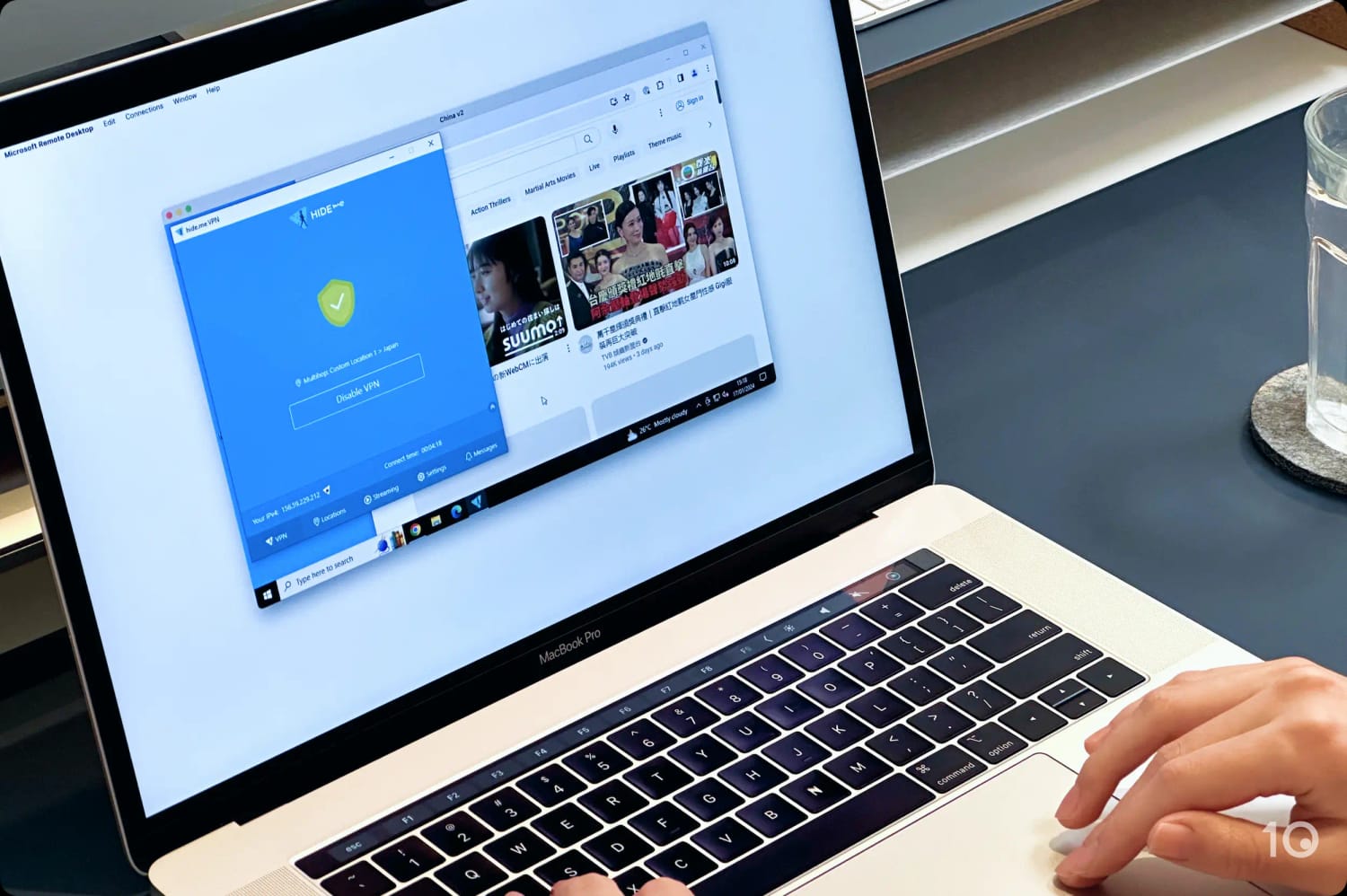
We used Hide.me’s multihop feature to bypass the Great Firewall in our tests.
We found Hide.me to be particularly effective in China when using its multi-hop tool, but it requires you to set up a ‘Custom Location’ designed to get around China blocks, which is provided by the Hide.me team. You can follow instructions on how to do this in our VPN recommendations for China.
The SoftEther protocol is also available on Hide.me’s Windows app. It’s a protocol designed to penetrate censorship firewalls, using HTTPS to mask your VPN traffic.
Despite its improved performance, there are still better VPNs than Hide.me for circumventing censorship. For example, Astrill VPN always works to unblock websites in the most censored countries in the world.
Hide.me (Free) Key Data
| Attribute | Hide.me | Typical Free VPN |
|---|---|---|
| Owner | eVenture Ltd | Independent |
| Launch Date | 2012 | 2015 |
| Safe to Use | Yes | No |
| Data Cap | Unlimited | 10GB per month |
| Payment Details Required | No | No |
| Account Required | No | Yes |
| Contains Ads | No | Yes |
| Local Download Speed | 2Mbps (98% loss) | 61Mbps (39% loss) |
| International Download Speed | 1Mbps (99% loss) | 55Mbps (45% loss) |
| Countries with Servers | 7 | 4 |
| Privacy Policy | No Identifiable Data | Identifiable Data |
| Simultaneous Connections | 1 | 1 |
| Manually Select Server Location | Yes | Yes |
| Netflix Libraries | 0 | 0 |
| Torrenting | No | No |
| Works In China? | No | No |
| Customer Support | Live Chat | Online Resources |
| Apps & Extensions |           | |
Hide.me Key Data
| Attribute | Hide.me | Typical VPN |
|---|---|---|
| Local Download Speed | 97Mbps (3% loss) | 89Mbps (11% loss) |
| International Download Speed | 86Mbps (14% loss) | 80Mbps (20% loss) |
| Countries with Servers | 57 | 40 |
| Privacy Policy | No Identifiable Data | Identifiable Data |
| Simultaneous Connections | 10 | 10 |
| Netflix Libraries | 11 | 3 |
| Torrenting | Yes | Yes |
| Works In China? | Yes | No |
| Cheapest Price | $2.69/mo over 26 months | $3.87/mo over 24 months |
| Customer Support | Live Chat | |
| Apps & Extensions | | |