



The Bottom Line
Hotspot Shield stands out for its record-breaking download speeds, adding virtually zero overhead to your internet connection. That aside, it remains a limited, mid-tier VPN that does little to break away from the pack. Most concerning are the security flaws we uncovered and a privacy policy that logs more than I’m comfortable with. I view its free VPN more favorably, as it’s one of the few to unblock US Netflix without imposing a data cap.
9.8/10 3.5/10 3.2/10 7.4/10 1.5/10 5.6/10 7.7/10 6.4/10 4.2/10
Hotspot Shield Basic Pros & Cons
- No data cap
- Unblocks US Netflix
- Fast speeds without throttling
- P2P file-sharing allowed
- No account required
- Secure encryption
- Mobile apps contain unskippable ads
- Servers in only 3 countries
- Logs too much data
- Fewer advanced features than paid VPN
- 1-device limit
- No recent transparency reports or audits
10/10 6.0/10 3.2/10 7.4/10 6.7/10 5.3/10 7.7/10 6.4/10 4.1/10
Hotspot Shield Pros & Cons
- Fastest VPN on the market
- Access to HBO Max, US Netflix & Hulu
- Servers in 85 countries
- User-friendly, simple apps
- Good option for gamers
- Logs too much data
- Based in the US
- No kill switch on macOS
- No recent audits or transparency reports
- Missing apps for router, Linux & Apple TV
- Slow torrenting speeds
Part of Point Wild’s catalog of VPNs, Hotspot Shield is a legitimate service, but it raises serious privacy concerns.
It logs a lot of your personal data, which it claims is kept separate from your online identity. This isn’t great in itself, but what troubles me most is the lack of third-party verification. Coupled with a US jurisdiction, you’re taking a risk using this VPN.
If you simply don’t care about privacy, then Hotspot Shield is worth trying out for its industry-leading connection speeds. At first, I thought it was all marketing hype, but it’s genuinely the fastest VPN I’ve tested.
When you also take into account its relatively large server network, then it’s a great choice for lag-free online gaming and 4K streaming from anywhere in the world.
That said, I wish Hotspot Shield worked with more streaming services, and I’m a little surprised by its slow torrenting speeds given its reputation.
The free version suffers from the same privacy policy, but overall, it continues to go from strength to strength. Most impressive is its consistency with US Netflix and its ability to match the speed performance of the paid version.
If you don’t want to take the privacy trade-off for the world-class speeds, or simply want to access more streaming platforms, then consider reading my IPVanish review. It’s safer to use, unblocks 11 more Netflix libraries, and finished second place in our speed tests.
🔄 Recent Updates
Re-assessed Hotspot Shield’s privacy stance in light of its ownership merger and published updated speed test results.
Pricing Plans
$$$$| 1 month | $12.99 |
|---|---|
| 12 months | $95.88 ($7.99/mo) |
| 3 years | $107.64 ($2.99/mo) |
Free Trial Options
| Money-Back Guarantee | 45 days |
|---|---|
| Free Trial | 7 days |
| 100% Free Plan | Yes |
| Data Cap | Unlimited |
Privacy
We calculated this rating by examining the VPN's logging policy, jurisdiction, ownership, and privacy features. We also evaluated its history of handling user data and responding to legal requests.
We calculated this rating by examining the VPN's logging policy, jurisdiction, ownership, and privacy features. We also evaluated its history of handling user data and responding to legal requests.
Hotspot Shield can't be trusted with your online privacy: it's US-based, and its no-logs claims have never been verified by a real-world seizure or court order. It logs your bandwidth, the domains you access (aggregated), and your original IP address (deleted after you disconnect). The free tier is worse, handing over your IP, a device advertising ID, and device details to ad networks, though that IP is the VPN's, not yours.
| Originating IP Address | Yes |
|---|---|
| Browsing Activity | Yes |
| Individual Connection Timestamps | No |
| Date of Last Connection | No |
| VPN Server IP | No |
| Device Information | Yes |
| Individual Bandwidth Usage | Yes |
| Account Information | Yes |
| Jurisdiction | US (Five Eyes Member) |
|---|---|
| Privacy Policy | Identifiable Data |
| Transparency Reports | No |
| Diskless Servers | No |
| Anonymous Payment Options | No |
You can read Hotspot Shield's full privacy policy on its website.
While the VPN service logs a lot of information, it takes some steps to mitigate the risk to your privacy.
Your real IP address is collected at the start of your VPN session, but it is immediately encrypted and deleted upon disconnection. Similarly, while the VPN logs the domain names you visit, it doesn’t store the full URL and it aggregates the data.
The rest of the data collected isn’t as sensitive, but there’s no clearly defined retention window. This includes: bandwidth usage, VPN server location, and originating location.
The free version is even less private, as it shares your device information with third-party advertisers when in use.
My issue here is less the logging itself, and more that it’s all self-reported. Hotspot Shield has never had its privacy tested by a real-world event, like a court case, so I have no idea if it’s telling the truth.
I do have the results from a third-party audit in 2023, but this doesn’t offer the same standard of proof since a VPN provider can prepare for it and limit the scope of an investigation — unlike a sudden server seizure. Nor has the VPN released a transparency report since 2019, and that was under different ownership.
Until Hotspot Shield faces an unannounced server seizure or court order, I can’t fully verify its claims. In the meantime, I want to see it reinstate transparency reports, commission regular audits, and move towards a fully diskless server network.
Owned by Point Wild, Based in the US
Hotspot Shield is operated by Pango, now part of Point Wild (formerly Pango Group, which merged with antivirus maker Total Security in December 2024).
Pango is the entity that controls your data and would be subject to any legal demands. As a US-based operation, that’s a problem, since US authorities can compel it to retain and share your information.
The US is also a founding member of the Five Eyes network of countries that work together to collect, share, and analyze mass surveillance data. None of this is good for privacy. Ideally, Hotspot Shield would be based in a jurisdiction with no mandatory data retention laws, like the British Virgin Islands.
Streaming
We calculated this rating by identifying which streaming services the VPN could unblock and measuring how consistently it could access them.
We calculated this rating by identifying which streaming services the VPN could unblock and measuring how consistently it could access them.
Hotspot Shield reliably unblocks popular streaming platforms like US Netflix, HBO Max, and BBC iPlayer, though this still isn't enough to compete with top-tier streaming VPNs. The VPN is let down by its failure to access DAZN, Paramount+, JioHotstar, and many European services. Its free version is a completely different story, as it's one of the few free VPNs to unblock US Netflix.
| Streaming Service | Works with Hotspot Shield Basic (Free) | Works with Hotspot Shield |
|---|---|---|
| BBC iPlayer (UK) | No | Yes |
| DAZN (Canada) | No | No |
| Disney+ (UK) | No | No |
| Hulu (US) | No | Yes |
| ITVX (UK) | No | Yes |
| HBO Max (US) | Yes | Yes |
| Netflix (US) | Yes | Yes |
| Netflix (UK) | Yes | Yes |
| Prime Video (US) | No | Yes |
| Sky Go (UK) | No | Yes |
Hotspot Shield is a mixed bag for streaming, with most of its value coming from Netflix.
While it can only unblock 6 Netflix regions, the VPN takes a quality-over-quantity approach with consistent access to some of the most popular content libraries, namely: the US, the UK, Australia, Canada, Germany, and India.
The VPN often worked on the first or second attempt, but you can also switch to streaming-optimized servers for guaranteed access. Annoyingly, this feature isn’t available on macOS, so you’ll need to keep cycling through the standard servers until it works.
In general, the VPN is a solid option for US and UK-based streaming services. This includes two platforms that use some of the strictest geo-blocks: BBC iPlayer and Hulu.
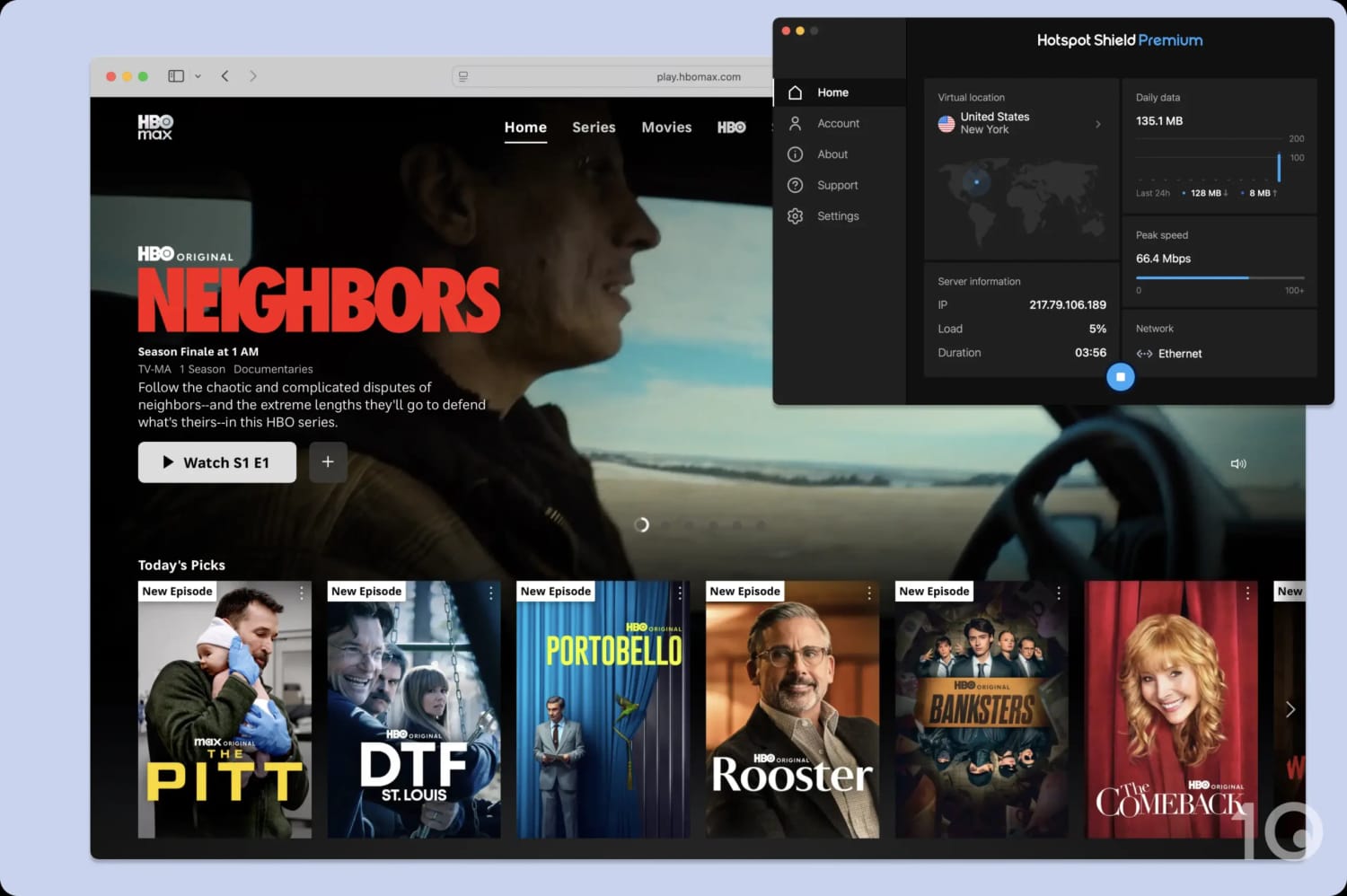
HBO Max never detected my VPN connection.
Hotspot Shield is held back by the simple reason that it can’t match the breadth of streaming catalogs of rival VPNs. Most notably, DAZN detected my VPN connection across every single region that I tried. This is multiple countries’ worth of streaming content you’re missing out on.
I recommend switching to IPVanish or NordVPN if you want a broader selection of content. It’s a much smoother experience too, since both VPNs optimize their entire server network for streaming by default.
Free Version Unblocks US Netflix
Hotspot Shield Basic is among a select group of free VPNs that can unblock US Netflix. Combined with its industry-leading speeds and unlimited data, this makes it a great free VPN for streaming.
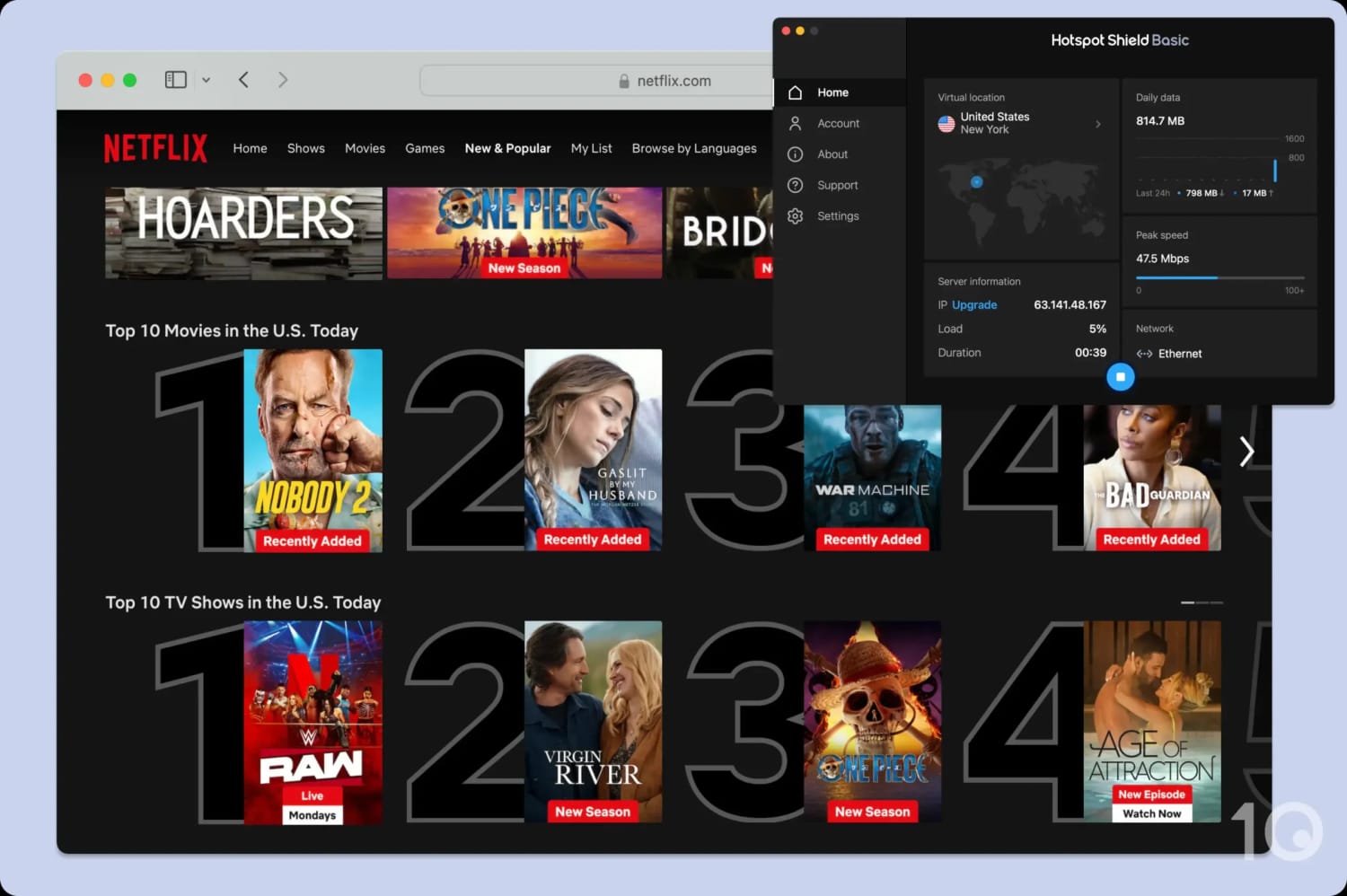
Hotspot Shield’s free app works with US Netflix.
I also found success using its free Singapore server to unblock Netflix Singapore and other local streaming services.
Speed
We calculated this rating using our proprietary tests of download, upload, and ping speeds across servers in 10 countries.
We calculated this rating using our proprietary tests of download, upload, and ping speeds across servers in 10 countries.
Hotspot Shield is the gold standard when it comes to VPN speed, thanks to its Hydra protocol. It’s the fastest VPN we’ve tested, with almost no speed difference between a Hotspot Shield VPN connection and your normal internet. This is the case wherever in the world you connect to. Its free version achieves near-identical results, albeit across a smaller server network.
As our data shows, there is virtually no difference in download speed between your normal connection and a Hotspot Shield connection.
Connecting to an Australian VPN server, we experienced a speed loss of 1%. For long-distance connections, it doesn’t get better than that.
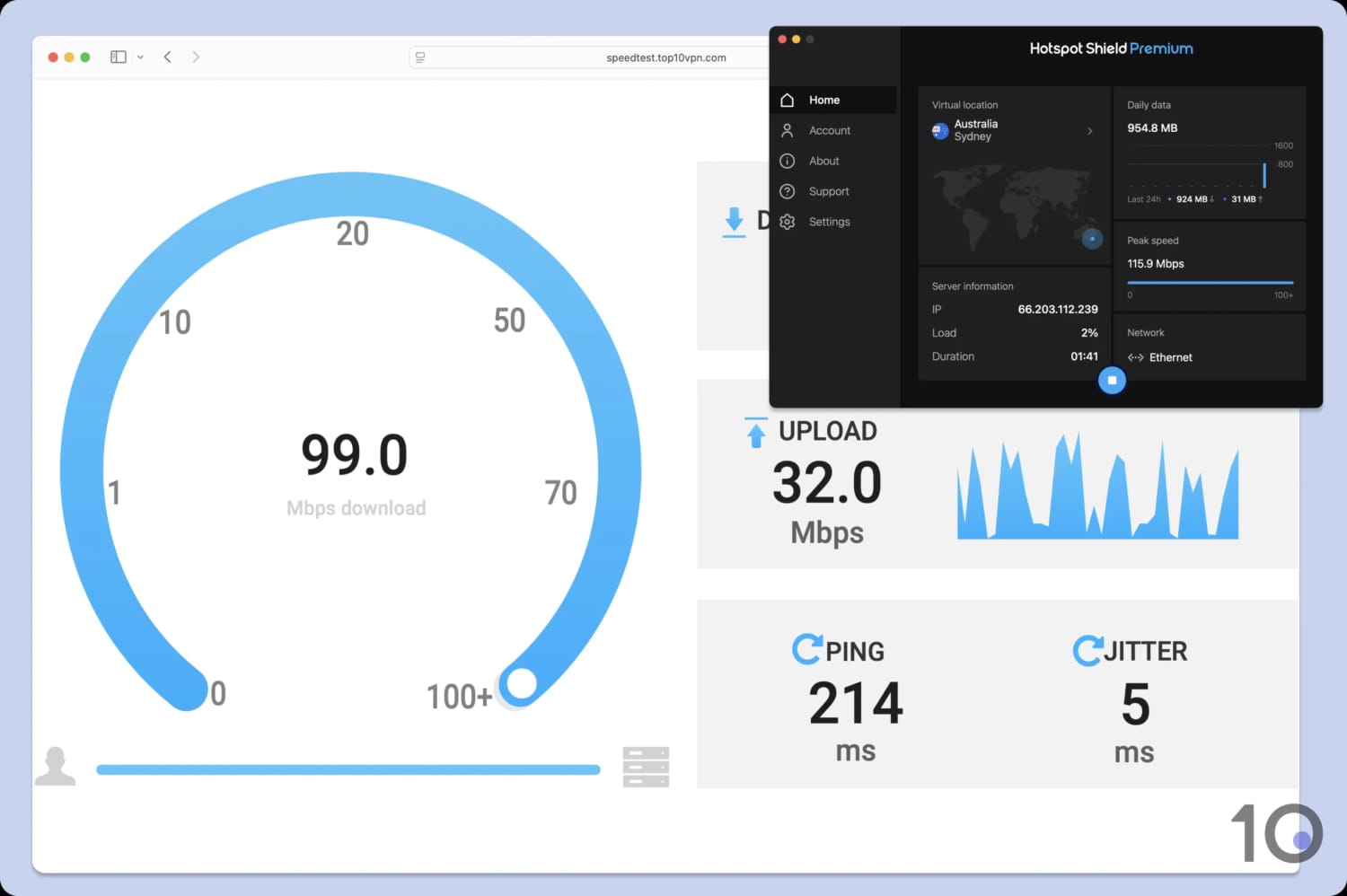
Hotspot Shield maxed out our baseline connection speed.
While we can’t guarantee identical results, we’re certain Hotspot Shield is fast enough for any online activity.
Personally, I’ve used it for years to access easier lobbies on PUBG, and in all that time I’ve never experienced any lag or disconnects, even across continents.
To put these results in context, use the bar chart below and compare Hotspot Shield’s speeds to other fast VPNs, including ExpressVPN, NordVPN, and Hide.me:
Hotspot Shield achieves these speeds through its exclusive connection protocol, Hydra VPN. You must go into your app settings and change the protocol from ‘Auto’ to ‘Hydra’, otherwise you may experience slower speeds.
Free Version Is in a League of Its Own
The free VPN is just as fast as the paid version, but it’s limited to 3 servers.
The free and paid VPNs only seriously differed in our tests when connecting to the US West Coast, where we recorded a 28% speed loss, which is considerably slower compared to the paid version’s result of less than 1%.
Despite this small hiccup, Hotspot Shield Basic is still miles ahead of every other free VPN.
Security
We calculated this rating by testing the VPN's security protocols, encryption, leak protection, and kill switch reliability. We also assessed the provider's track record and any past security incidents.
We calculated this rating by testing the VPN's security protocols, encryption, leak protection, and kill switch reliability. We also assessed the provider's track record and any past security incidents.
Hotspot Shield adequately covers the security basics. It comes with an industry-standard security suite, including the AES-256 encryption cipher and the leading connection protocol, WireGuard. However, there is no kill switch on macOS, its browser extensions leak identifying data, and it's missing post-quantum cryptography.
| Independent Audit | No |
|---|---|
| VPN Kill Switch | Yes |
| Leak Protection | No |
| OpenVPN (TCP/UDP) | No |
|---|---|
| Hydra | Yes |
| WireGuard | Yes |
| ChaCha20 | Yes |
| AES-256 | Yes |
| Post-Quantum Cryptography | No |
Hotspot Shield includes WireGuard and IKEv2 protocols, but also its own proprietary protocol called Hydra (formerly Catapult Hydra).
Hydra is safe to use: it’s based on TLS 1.2, uses 256-bit AES encryption and 2048-BIT RSA certificates for server authentication, and incorporates perfect forward secrecy.
We tested to see whether Hydra actually encrypts your traffic by running it through the packet-analyzer, Wireshark. As you can see in the image below, all of our outgoing internet traffic was left encrypted:
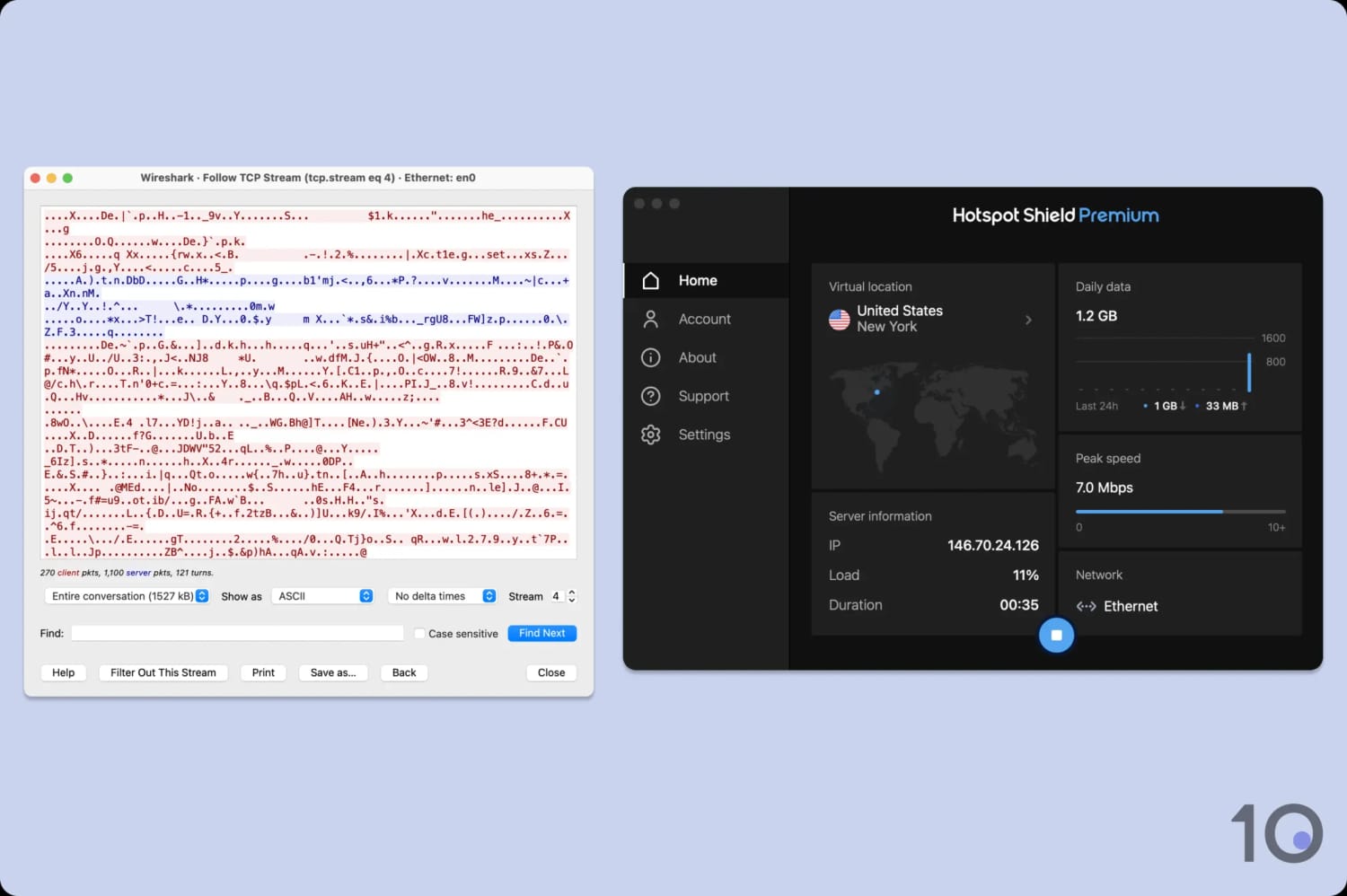
The Hydra protocol successfully encrypted our internet connection.
Despite this, Hydra remains a closed-source technology, meaning there’s no way for independent experts to thoroughly test it. Hotspot Shield claims the code has been assessed by cybersecurity firms like BitDefender and McAfee. If you trust this, you should use Hydra without concern. If not, it’s better to use WireGuard.
As part of our testing process, we also check for IP, DNS, and WebRTC leaks, which Hotspot Shield passed. However, we learned it doesn’t support IPv6 addresses, opting to block them instead.
If you use an IPv6 address, your personal IP may be leaked. To avoid this, switch to a VPN that offers a dual-stack solution, like Hide.me.
While the Hotspot Shield apps came back leak-free, the same isn’t the case for its Chrome browser extension. Our tests showed that the Chrome extension leaks DNS requests – even with the WebRTC leak blocker enabled.
This means that your ISP can still see the websites you visit when connected to the Chrome extension. We caution against using this browser extension.
Another security shortcoming concerns the VPN’s kill switch. This is an essential feature that works by blocking your internet in the event of an unintended disruption to your VPN connection.
Our issue here is two-fold: the macOS app doesn’t have a kill switch, and on other apps it’s not turned on by default.
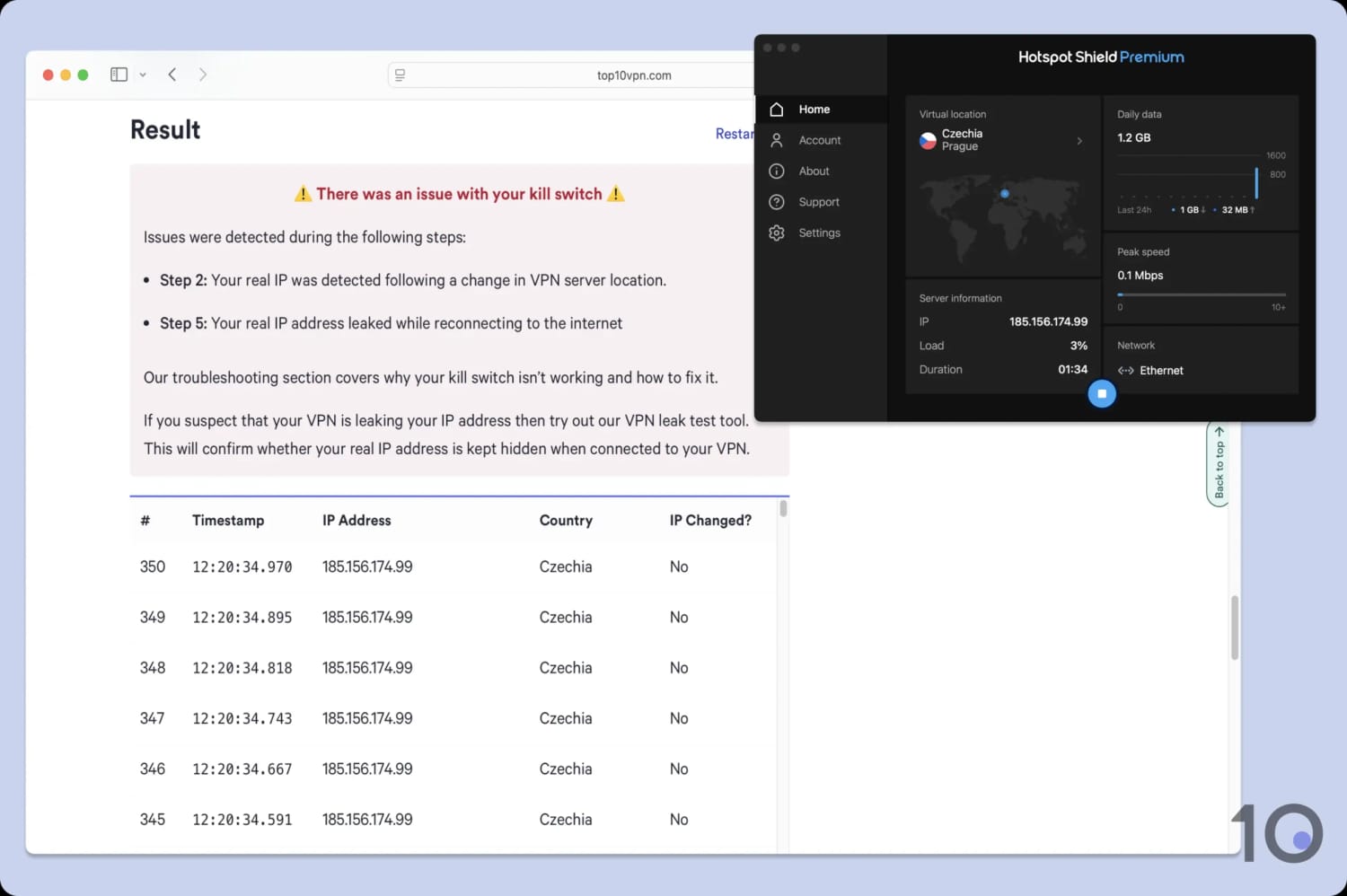
There isn’t a kill switch in Hotspot Shield’s Mac app or running in the background.
Our advice is to avoid handling sensitive data on macOS, or upgrade to a VPN with a working kill switch (like PIA).
Server Locations
We calculated this rating by assessing the number of countries and cities available, their geographic spread, and availability in popular regions.
We calculated this rating by assessing the number of countries and cities available, their geographic spread, and availability in popular regions.
Hotspot Shield lets you connect to servers from 85 countries. The network is less Western-centric than most other VPN services, with South America, the Middle East, and Asia relatively well represented. Still, other VPNs like ExpressVPN offer more IP addresses in a greater number of countries. Hotspot Shield Basic, on the other hand, is restricted to only 3 countries.
| Continent | Hotspot Shield Basic (Free) Countries with Servers | Hotspot Shield Countries with Servers |
|---|---|---|
| Europe | 1 | 39 |
| Asia | 1 | 26 |
| North America | 1 | 7 |
| South America | 0 | 8 |
| Africa | 0 | 3 |
| Oceania | 0 | 2 |
Like most VPNs, the majority of Hotspot Shield’s servers are situated in North America and Europe. However, there are more options in Asia, the Middle East, and Africa than usual. It’s refreshing to see servers in countries like Algeria, Bhutan, Pakistan, Nepal, and Peru, for instance.
There are city-level options in six countries, including Australia, Canada, Italy, Spain, the UK, and the US.
It’s a shame that Hotspot Shield’s city servers are all in Western countries, but it’s still a good number of options, especially in the US, where there are 24 available cities.
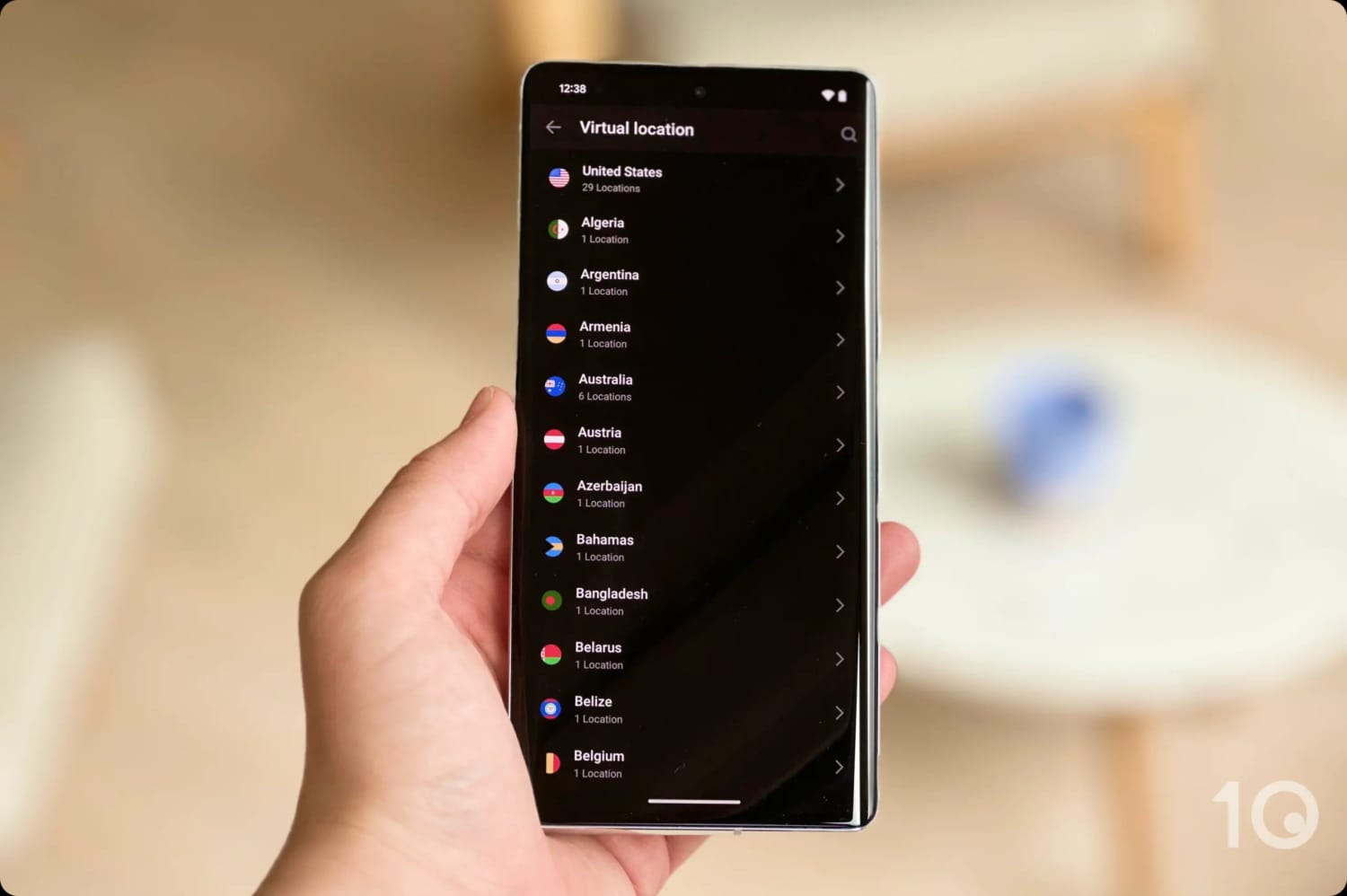
Hotspot Shield has a large and diverse server network.
Hotspot Shield does not disclose how many individual IP addresses it maintains, but it’s able to offer IP addresses in various parts of the globe because it uses virtual servers. This means it doesn’t have physical hardware in the country, but it’s still able to unblock geo-restricted content.
Hotspot Shield Basic Limited to 3 Countries
Hotspot Shield Free’s server network is a lot smaller than the paid version’s. It has servers on the US East Coast (New York), US West Coast (Los Angeles), UK, and Singapore.
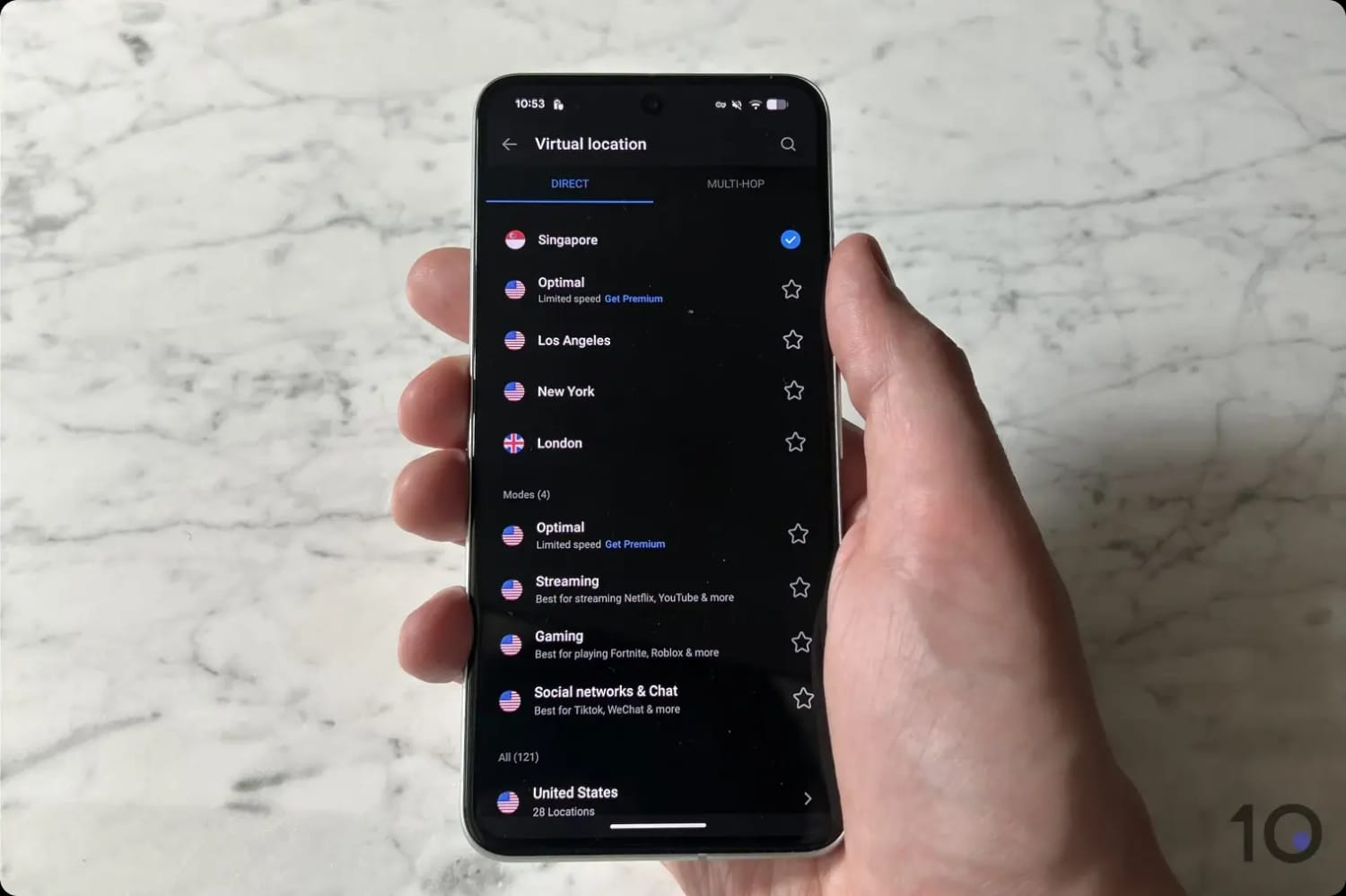
It’s rare to see a free VPN provide a Singaporean server location.
This is very limited, well below the 10 free countries on offer from Windscribe’s free VPN.
User Experience
We calculated this rating by assessing the VPN’s ease of use, interface design, and setup process across multiple platforms.
We calculated this rating by assessing the VPN’s ease of use, interface design, and setup process across multiple platforms.
Hotspot Shield’s apps are a pleasure to use due to its simple interface and sleek design. Nothing is complicated, and the apps are mostly consistent with each other in terms of design. However, each platform offers slightly different features, and the free version forces you to watch periodic ads.
Interface & Ease of Use
Hotspot Shield’s apps are simple, well designed, and mostly consistent across devices.
Here’s an overview of my experience using Hotspot Shield on different devices and operating systems:
Desktop (Windows & Mac)
While the desktop apps look identical, the Windows app is the more advanced of the two.
There’s more scope for customization, with options for auto-connect, minimization, and start on launch.
There are also useful shortcut options available on Windows, such as for VPN connection and disconnection (Ctrl + Shift + C). This is a rare feature that makes the user experience more efficient.

The macOS app has none of these features and is a lot more minimal. It consists of a main connect button, a list of servers, and a settings menu that includes protocol choices and split tunneling. Outside of split tunneling, there are no customization options and you can’t resize the window.
This might appeal to users who want a simple click-and-protect experience, but seasoned users wanting full control of their experience might want to consider the Windows version, or a different VPN altogether.
Mobile (iPhone & Android)
Hotspot Shield’s mobile apps buck the trend of desktop apps being the flagship of any VPN service.

On iOS, you can connect to specialized servers for streaming and gaming. While I find them effective, I wish the standard servers came with these optimizations built-in.
The Android app is even more advanced, since it’s the only one of Hotspot Shield’s apps to include multi-hop servers. Again, I love using this feature, but it’s frustrating to see it relegated to a single platform.
You also have the option to switch between light and dark mode, access the internet via Hotspot Shield’s browser, and connect to VPN servers optimized for social media platforms. I want to see all of these features added to desktop and iOS.
My biggest criticism of Hotspot Shield’s user experience is undoubtedly the decision to lock usage behind ads on its free plan.
You must watch an unskippable ad in exchange for 15 minutes of VPN uptime. This is incredibly annoying, but the Android app at least has a timer so you can see when the next ad is due.
Torrenting
We calculated this rating by assessing the VPN's torrenting features, including P2P servers and port forwarding support. We also evaluated its average bitrate and stance on file-sharing.
We calculated this rating by assessing the VPN's torrenting features, including P2P servers and port forwarding support. We also evaluated its average bitrate and stance on file-sharing.
While P2P traffic is permitted on all of Hotspot Shield’s servers, I'm concerned about the VPN’s intrusive logging policy and the absence of a kill switch on macOS. Its average download bitrate is much slower compared to other VPNs, and there’s no port forwarding option.
| Torrenting Attribute | Hotspot Shield Basic (Free) | Hotspot Shield |
|---|---|---|
| Permits P2P Traffic | Yes | Yes |
| Average Download Bitrate | 5.3MiB/s (47% loss) | 4.3MiB/s (57% loss) |
| Countries with P2P Servers | 3 | 85 |
| Port Forwarding | No | No |
| Kill Switch | Yes | Yes |
| Logging Policy | Identifiable Data | Identifiable Data |
Hotspot Shield openly endorses torrenting on its service, but I don’t recommend it due to the VPN’s slow average download bitrate, its intrusive logging policy, and the absence of a kill switch on macOS. Torrenting with Hotspot Shield isn’t without risk.
When testing Hotspot Shield with torrent clients like qBittorrent and uTorrent, we recorded an average download bitrate of 4.3MiB/s. This is a low result that can lead to slow file-sharing, especially when compared to the top-rated torrenting VPNs.
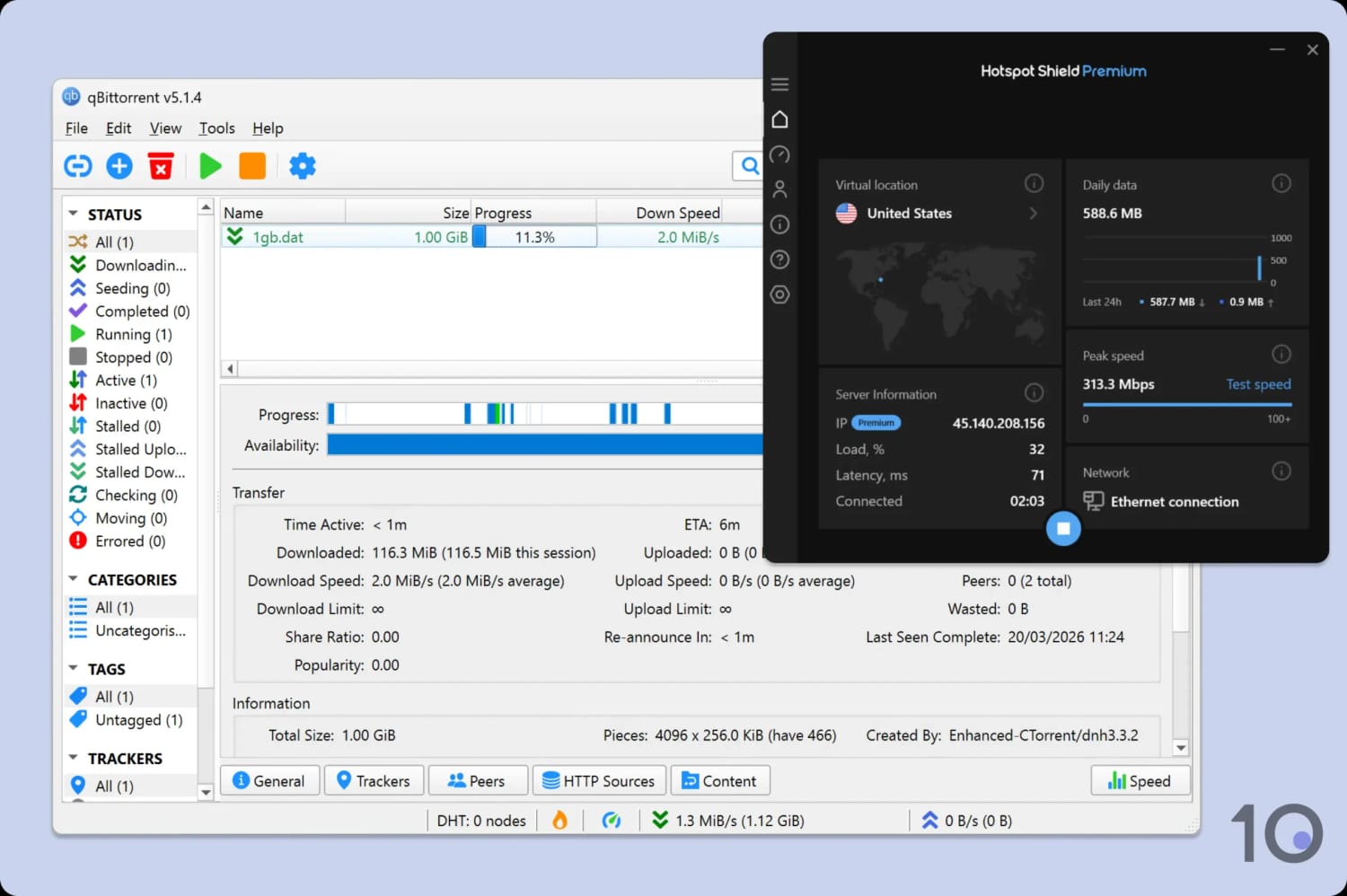
Despite its reputation, Hotspot Shield is slow for torrenting.
From a privacy standpoint, I’m concerned by Hotspot Shield’s intrusive logging policy that collects lots of user data. I have no idea how many DMCA requests Hotspot Shield receives and responds to, since it has stopped publishing transparency reports.
Furthermore, there is no kill switch on macOS, so your real IP may get accidentally exposed. Finally, Hotspot Shield doesn’t offer port forwarding or a SOCKS5 proxy, yet another reason to avoid it if you’re an advanced torrenter.
Device Compatibility
We calculated this rating by evaluating the VPN's support for various devices. We considered dedicated apps, browser extensions, Smart DNS functionality, and router compatibility.
We calculated this rating by evaluating the VPN's support for various devices. We considered dedicated apps, browser extensions, Smart DNS functionality, and router compatibility.
Hotspot Shield has apps for what is increasingly becoming the bare minimum: desktop, mobile, Android TV, and Fire TV Stick. The lack of a dedicated tvOS app is disappointing, and no router or Smart DNS support means you can't use the VPN on game consoles. There is a 10-device limit to each Hotspot Shield subscription, which is less than leading VPNs like Surfshark and PIA.
| Windows | Yes |
|---|---|
| Mac | Yes |
| iOS | Yes |
| Android | Yes |
| Linux | No |
| Amazon Fire TV | Yes |
| Android TV | Yes |
| Apple TV | No |
| Router | No |
| Chrome | Yes |
| Smart DNS | No |
|---|
Simultaneous Connections: 10
Hotspot Shield’s device compatibility is one of the reasons we still classify it as a mid-tier VPN. Compare it to our top 10 VPN services, all of which have apps for Apple TV, a CLI or app for Linux, and router support. Put simply, the gap is getting wider and wider.
Most troubling is the continued absence of a Smart DNS proxy and the removal of router configuration files from the account dashboard. This means you can’t use Hotspot Shield on any devices that don’t support native VPN apps, which includes Smart TVs, game consoles, and any other internet-connected devices.
Additional Features
We calculated this rating by evaluating the VPN's extra capabilities beyond the basic VPN service. This includes bypassing censorship, additional tools like malware blockers, and customization options like split tunneling.
We calculated this rating by evaluating the VPN's extra capabilities beyond the basic VPN service. This includes bypassing censorship, additional tools like malware blockers, and customization options like split tunneling.
Hotspot Shield offers almost no additional features except for split tunneling and basic obfuscation. I’d like to see an ad blocker, multi-hop servers for desktop and iOS, and a more reliable anti-censorship mode. These missing features put Hotspot Shield well behind the competition.
| Additional Feature | Hotspot Shield Basic (Free) | Hotspot Shield |
|---|---|---|
| Split Tunneling | No | Yes |
| VPN Obfuscation | Yes | Yes |
| Multi-Hop Servers | Yes (Android only) | Yes (Android only) |
| Dedicated IP | No | No |
| Ad Blocker | No | No |
Not Reliable Against Censorship
Unlike other VPN websites, we actually test VPNs against the most sophisticated web censorship in the world: The Great Firewall of China.
Using our server in Shanghai, we can report that, over a yearly period, Hotspot Shield has only worked to access the free internet within China 9% of the time.
This is surprising, as Hotspot Shield claims to have obfuscation technology for its proprietary Hydra protocol, designed to make VPN traffic look like normal web traffic and bypass blocks.
It’s possible that Hotspot Shield will work in countries where web censorship is less aggressive, like Russia and Iran. However, our data tells us that there are more dependable VPNs available.
Astrill VPN, for example, has a 100% success rate for bypassing Chinese censorship and it remains the best VPN for China.
On the flip side, if you want to connect into China and use the Chinese internet, Hotspot Shield is one of the few services that has a virtual China server location that gives you a Chinese IP address.
Split Tunneling for PC & Android Only
Unlike most other VPNs, Hotspot Shield limits its split tunneling feature to Windows and Android only.
This is disappointing as it’s a useful feature for customizing which apps and websites enter the VPN tunnel.
Hotspot Shield lets you include or exclude apps, providing a level of granular control that isn’t the case with other VPN services.
Hotspot Shield Basic Key Data
| Attribute | Hotspot Shield Basic | Typical Free VPN |
|---|---|---|
| Owner | Point Wild (Pango) | Independent |
| Launch Date | 2008 | 2015 |
| Safe to Use | Yes | No |
| Data Cap | Unlimited | 10GB per month |
| Payment Details Required | No | No |
| Account Required | No | Yes |
| Contains Ads | Yes | Yes |
| Local Download Speed | 98Mbps (2% loss) | 61Mbps (39% loss) |
| International Download Speed | 97Mbps (3% loss) | 55Mbps (45% loss) |
| Countries with Servers | 3 | 4 |
| Privacy Policy | Identifiable Data | Identifiable Data |
| Simultaneous Connections | 1 | 1 |
| Manually Select Server Location | Yes | Yes |
| Netflix Libraries | 3 | 0 |
| Torrenting | Yes | No |
| Works In China? | No | No |
| Customer Support | Online Resources Only | Online Resources |
| Apps & Extensions |           | |
Hotspot Shield Key Data
| Attribute | Hotspot Shield | Typical VPN |
|---|---|---|
| Local Download Speed | 99Mbps (1% loss) | 89Mbps (11% loss) |
| International Download Speed | 99Mbps (1% loss) | 80Mbps (20% loss) |
| Countries with Servers | 85 | 40 |
| Privacy Policy | Identifiable Data | Identifiable Data |
| Simultaneous Connections | 10 | 10 |
| Netflix Libraries | 6 | 3 |
| Torrenting | Yes | Yes |
| Works In China? | Sometimes | No |
| Cheapest Price | $2.99/mo over 36 months | $3.87/mo over 24 months |
| Customer Support | 24/7 Live Chat | |
| Apps & Extensions | | |