



The Bottom Line
Proton VPN is a safe pair of hands to trust with your personal data. It’s a high-quality VPN, built by a respected software company that is renowned for its commitment to user privacy and security. There are, of course, drawbacks — namely pricey subscriptions and inconsistent speeds — but it’s worth it for guaranteed online anonymity. Its free tier is the best free VPN available: it’s safe to use, extremely fast, and you can use it without data limits — although it doesn’t work for streaming or torrenting.
9.4/10 0.0/10 9.5/10 9.8/10 1.6/10 0.0/10 7.8/10 7.2/10 3.5/10
Proton VPN Pros & Cons
- Unlimited data
- Fastest free VPN available
- Same privacy protections as paid tier
- No payment details upon sign-up
- Only free VPN to work on routers
- Can’t choose server location
- Doesn’t work with any streaming services
- Doesn’t allow torrenting traffic
- Only 1 simultaneous connection
8.6/10 6.5/10 9.5/10 9.8/10 9.7/10 9.2/10 8.3/10 7.9/10 6.2/10
Proton VPN Pros & Cons
- Genuine no-logs VPNs
- Best-in-class security features
- Servers in 126 countries
- Works with US Netflix, Disney+ & BBC iPlayer
- Supports port forwarding for fast torrenting
- Secure Core servers offer added protection
- No Smart DNS proxy
- Inconsistent download speeds
- Struggles with international streaming platforms
Developed by Proton AG, a Swiss-based software company run by former CERN scientists, Proton VPN is part of a widely respected digital ecosystem that includes Proton Mail, Drive, Calendar, and more. These are high-end products, all recognized as offering best-in-class privacy and security.
Unlike other VPNs that rely on expensive marketing campaigns, Proton VPN’s claims are backed by action: it uses a genuine no-logs policy, was the first to open-source its apps, and makes all audit results public.
It’s also become renowned for its investment in its server network, now matching and exceeding the biggest names in the VPN industry.
Beyond this, the VPN is a perfectly decent option for most use cases. It’s naturally well-suited for torrenting, thanks to its privacy features, and it can stream a range of UK and US platforms.
It’s different from most other top VPNs in that it has both a paid and free version, giving you the option to test out the service first before committing to a paid subscription.
However, we feel that Proton VPN might be increasingly focusing on monetizing its freemium model. We’ve noticed a gradual decline in the quality of its free version — a move we suspect is to push users towards upgrading.
That said, Proton VPN remains the best free VPN on the market because it offers unlimited data per month and is actually safe to use. It has the exact same privacy policy and security guarantees as its paid counterpart.
🔄 Recent Updates
We’ve updated our review with our analysis on Proton VPN’s reworked Windows app, expanded server network, and newly-added post-quantum protection.
Pricing Plans
$$$$| 1 month | $9.99 |
|---|---|
| 12 months | $47.88 ($3.99/mo) |
| 24 months | $71.76 ($2.99/mo) |
Free Trial Options
| Money-Back Guarantee | 30 days |
|---|---|
| Free Trial | No |
| 100% Free Plan | Yes |
| Data Cap | Unlimited |
Privacy
We calculated this rating by examining the VPN's logging policy, jurisdiction, ownership, and privacy features. We also evaluated its history of handling user data and responding to legal requests.
We calculated this rating by examining the VPN's logging policy, jurisdiction, ownership, and privacy features. We also evaluated its history of handling user data and responding to legal requests.
Proton VPN champions digital privacy and is renowned for its privacy-focused initiatives. As you expect, it operates a no-logs policy, commissions both internal and third-party audits, and, most importantly, has passed a real-world test of its logging practices. In sum, this is one of the most private and trustworthy VPNs we have reviewed.
| Originating IP Address | No |
|---|---|
| Browsing Activity | No |
| Individual Connection Timestamps | No |
| Date of Last Connection | No |
| VPN Server IP | No |
| Device Information | No |
| Individual Bandwidth Usage | No |
| Account Information | Yes |
| Jurisdiction | Switzerland (Privacy Haven) |
|---|---|
| Privacy Policy | No Logs |
| Transparency Reports | Yes |
| Diskless Servers | No |
| Anonymous Payment Options | Yes |
You can read Proton VPN's full privacy policy on its website.
Proton VPN is part of a select group of VPN services that actually use a zero-logs policy, meaning nothing you do, stream, or download while connected to the VPN is logged.
All that the VPN collects about you is the email used to create your account, but this can be avoided entirely by creating an alias email address.
We can claim this with complete confidence as Proton VPN is part of an even smaller number of VPNs to have had its privacy policy corroborated by a real-world test. Specifically, the VPN was unable to hand over any user data when ordered by a Swiss court in 2019.
Further privacy credentials include: an annual third-party audit of its logging practices, regular transparency reports, a Swiss jurisdiction, and the option to sign up with anonymous payment methods.
If we had to nitpick, the service is missing diskless (RAM-only) servers to periodically wipe activity data, but Proton VPN claim that their full-disk encryption is just as secure.
Streaming
We calculated this rating by identifying which streaming services the VPN could unblock and measuring how consistently it could access them.
We calculated this rating by identifying which streaming services the VPN could unblock and measuring how consistently it could access them.
Following a marked improvement, Proton VPN is now a solid option for streaming geo-restricted content. It works with 6 Netflix regions, most US platforms, and some international services. Its main weaknesses are an inability to unblock foreign-language services, and you must be a paid subscriber, as its free version cannot bypass any geo-restrictions.
| Streaming Service | Works with Proton VPN (Free) | Works with Proton VPN |
|---|---|---|
| BBC iPlayer (UK) | No | Yes |
| DAZN (Canada) | No | Yes |
| Disney+ (UK) | No | Yes |
| Hulu (US) | No | Yes |
| ITVX (UK) | No | No |
| HBO Max (US) | No | Yes |
| Netflix (US) | No | Yes |
| Netflix (UK) | No | Yes |
| Prime Video (US) | No | Yes |
| Sky Go (UK) | No | Yes |
Using the VPN’s paid version, we accessed US Netflix and 5 other libraries. While a massive improvement on how it used to perform, the VPN still can’t unblock several popular regions like the UK, Canada, Australia, or Japan.

Proton VPN works well with US Netflix.
We had a similar experience with DAZN, where Proton VPN unblocked the Canadian library without issue, but failed with the European, South American, and Japanese versions.
Compared to a top VPN like NordVPN, which unblocks all DAZN regions and 17 Netflix libraries, the gulf feels as wide as ever.
The picture is far more positive for US streaming services: Proton VPN works with all of them, except DAZN and Peacock. Likewise, the VPN unblocks all UK streaming platforms (apart from ITVX), and even works with hard-to-unblock Sky Go.
In fact, here’s a list of Proton VPN’s servers that unblock popular US and UK platforms:
Proton VPN’s inconsistency isn’t limited to its unblocking capabilities, as we found its effect on our video quality fluctuated too. Most of the time we streamed in maximum video quality, but on several occasions we picked up on some buffering and choppiness.
It wasn’t enough to aggravate us, but we suspect it could be quite annoying if it coincided with a live sports broadcast.
Free Version Doesn’t Work with Streaming Services
Since Proton VPN’s free plan no longer lets you select your server location, instead selecting your nearest location from 10 possible countries, it’s near-impossible to use for bypassing geo-restrictions.
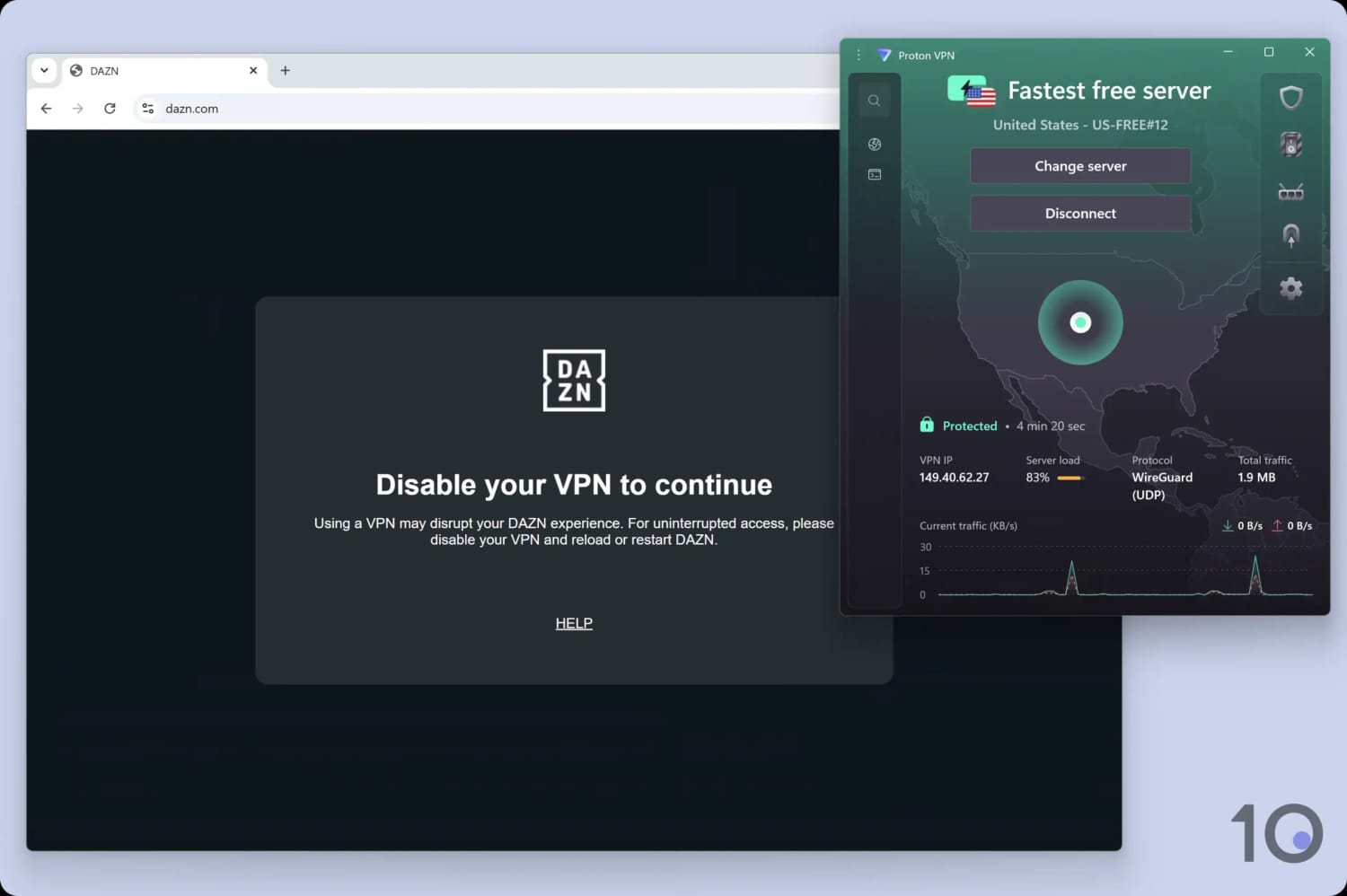
Unlike its paid counterpart, the free version of Proton VPN isn’t great for streaming.
Even if you’re lucky enough to land on a server in the location that you’re trying to access, the limited number of IP addresses on the free version means that the streaming service will likely recognize and block your connection.
This is extremely disappointing, given it used to unblock streaming services like F1TV for free.
If you want a free VPN for streaming, we recommend checking out Windscribe or PrivadoVPN, instead.
Speed
We calculated this rating using our proprietary tests of download, upload, and ping speeds across servers in 10 countries.
We calculated this rating using our proprietary tests of download, upload, and ping speeds across servers in 10 countries.
Proton VPN has a negligible impact on your internet speed, with an average speed loss of 15% across all locations. The main area it needs to improve is, curiously, connection speeds to nearby servers — as opposed to different countries or continents. Its free plan, though, ranks as the fastest free VPN on the market.
Despite testing from New York, Proton VPN actually produced faster download speeds on several other test servers located farther from us than its New York one.
There’s a chance that its New York servers may just be slower or more congested than others, and that the download speeds you get on a server near you will be faster. Having said that, we test over several weeks, and at different times of the day, to minimize the influence of server congestion on our results.
As you might expect, our internet speed slowed down when connected to Proton VPN servers located extremely far away. An average download speed loss of 36% in South Africa, and 24% in Australia is nothing to be embarrassed about, but it doesn’t quite match up to Hotspot Shield or IPVanish’s connection times.
EXPERT ADVICE: To get the fastest speeds, make sure to turn on the VPN Accelerator in Settings > Connection.
Proton VPN Is the Fastest Free VPN
On a more positive note, Proton VPN’s free app really impressed us. In fact, Proton VPN is the fastest free VPN we’ve ever tested.
Not only are its raw upload and download speeds praiseworthy, but Proton VPN is the only reputable free VPN with no data cap.
This means you’ll never run out of bandwidth for downloading, streaming, gaming, or anything else.
Just beware that with only 2,000 free servers available to connect to (versus 15,370 for the paid app), your speeds might not be as consistent due to server congestion.
Security
We calculated this rating by testing the VPN's security protocols, encryption, leak protection, and kill switch reliability. We also assessed the provider's track record and any past security incidents.
We calculated this rating by testing the VPN's security protocols, encryption, leak protection, and kill switch reliability. We also assessed the provider's track record and any past security incidents.
Proton VPN has world-class security credentials that have been verified by third-party audit. Its open-source apps use industry-standard VPN protocols and encryption, and it easily passed our IP, DNS, and WebRTC leak tests on all platforms. Proton VPN can be trusted to mask your true IP address and encrypt your data.
| Independent Audit | Yes |
|---|---|
| VPN Kill Switch | Yes |
| Leak Protection | Yes |
| OpenVPN (TCP/UDP) | Yes |
|---|---|
| WireGuard | Yes |
| ChaCha20 | Yes |
| AES-256 | Yes |
As is the case with all Proton products, its VPN service is highly secure and it breezed through our stringent security tests.
It supports both OpenVPN with AES-256 encryption and WireGuard with ChaCha20 — two open-source protocols backed by security experts.
To ensure their correct implementation, we used a packet analyzer (Wireshark) to inspect our network traffic. The tool confirmed that our connection was fully encrypted and unreadable.
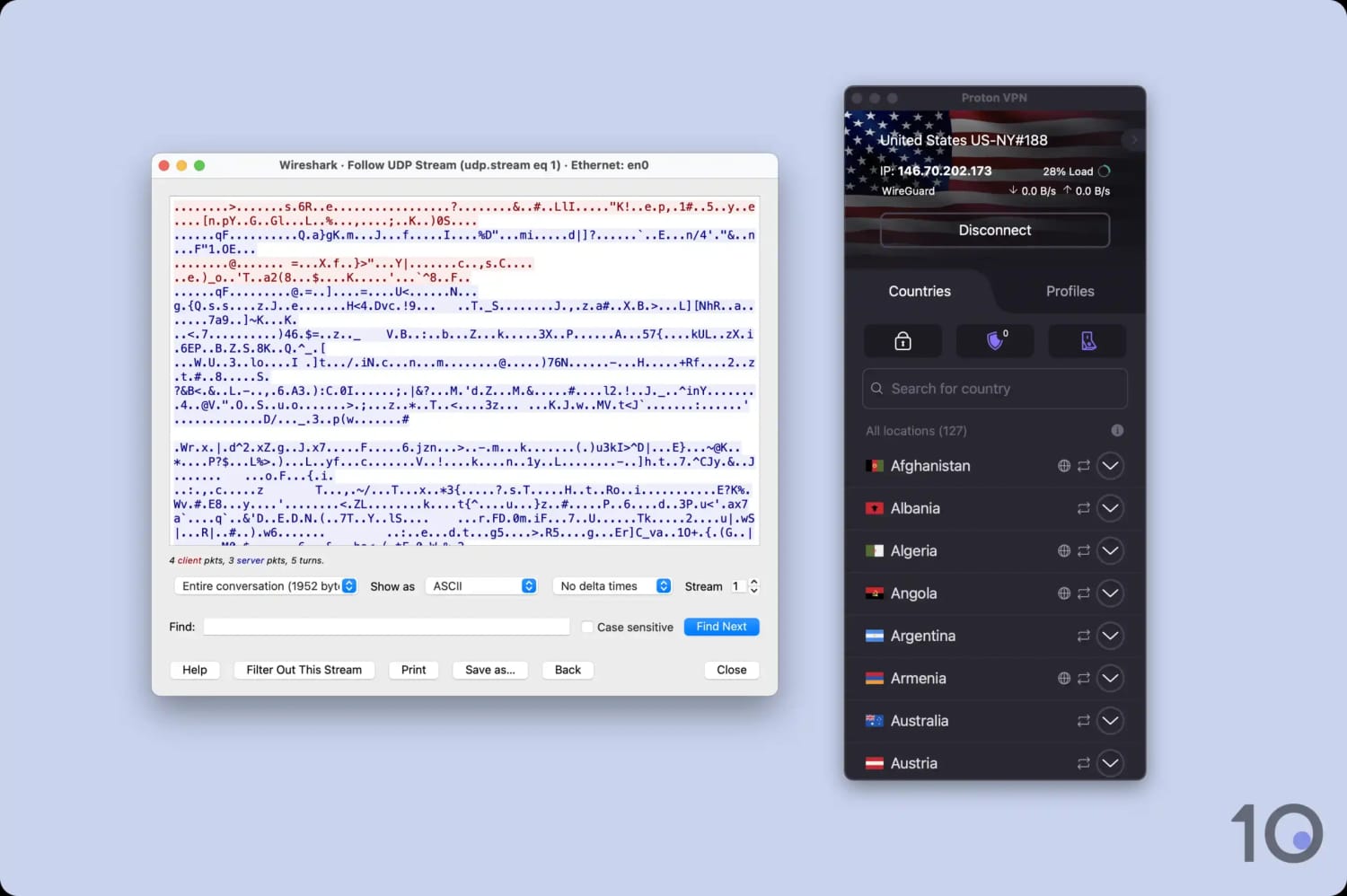
Proton VPN encrypted our test data transfers.
On top of this, the VPN service uses Perfect Forward Secrecy (PFS) to ensure a unique encryption key is used for every VPN session. Most tech review sites highlight this feature as an example of bleeding-edge security, but it’s honestly quite standard.
One way the VPN does stand out is its use of open-source apps for desktop and mobile — an industry-first that has since been copied by competitors. The full source code is freely available on GitHub, allowing anyone to identify vulnerabilities.
This, combined with Proton VPN’s bug bounty program, improves the app’s security due to the error-checking of a larger community.
We’re also delighted to see that Proton VPN has added post-quantum protection to its VPN architecture, allowing it to keep pace with its rivals and safeguard against more advanced attacks.
Outside of encryption, we also tested the VPN for IP, DNS, and WebRTC leaks. As expected, Proton VPN passed all of these tests thanks to its built-in DNS and IPv6 leak protection.
It’s also not that surprising given the VPN operates it own DNS servers, thereby eliminating the risk of leaks from third-parties.
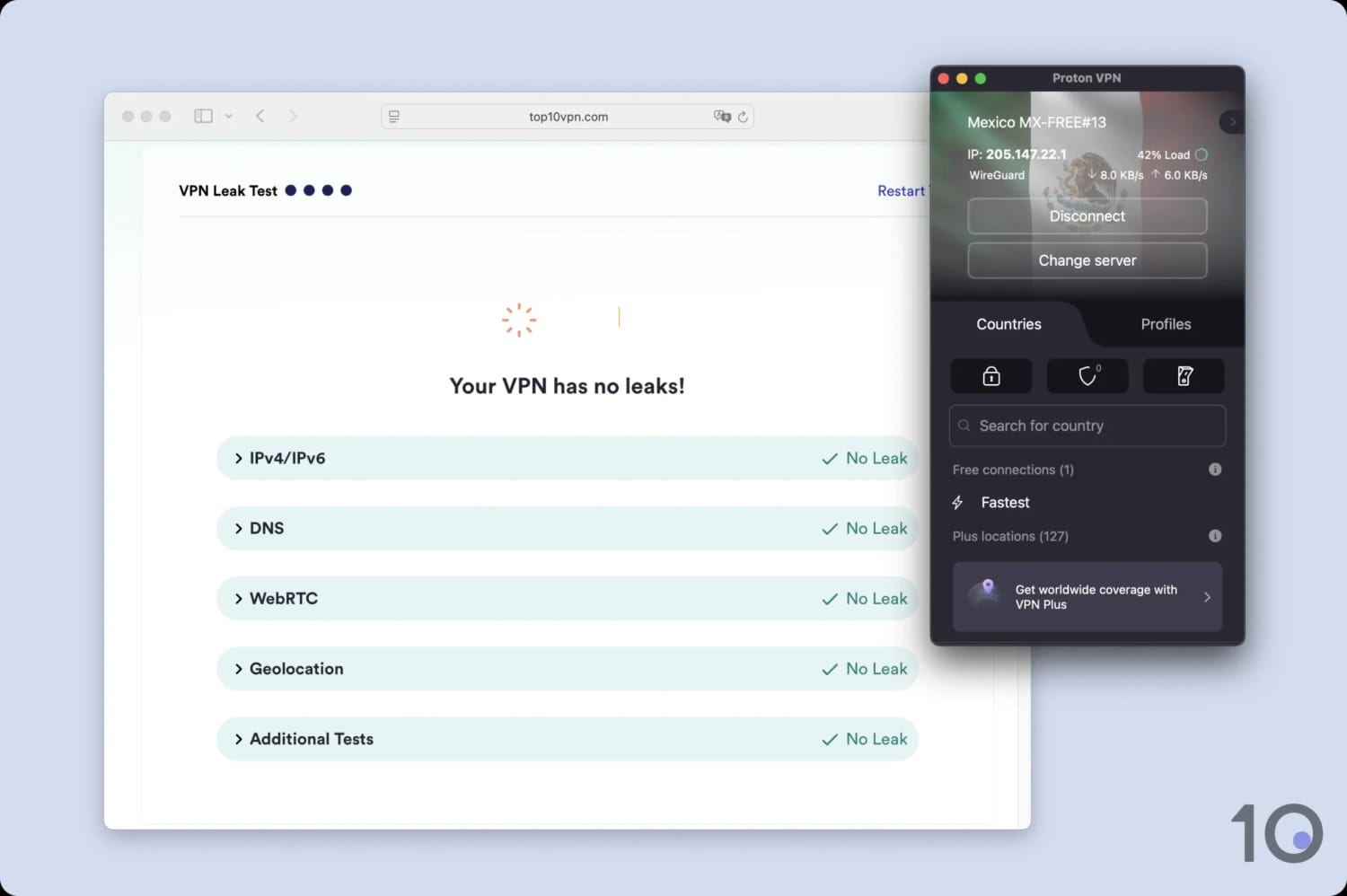
We tested both the paid and free versions of Proton VPN for network leaks.
Lastly, we stress tested its kill switch: a vital security feature that cuts your internet should the VPN suddenly disconnect. Although it worked perfectly on all platforms, it isn’t enabled by default and must be manually activated.
Considering the kill switch’s importance, this is a slight blot on Proton VPN’s otherwise flawless security suite.
Server Locations
We calculated this rating by assessing the number of countries and cities available, their geographic spread, and availability in popular regions.
We calculated this rating by assessing the number of countries and cities available, their geographic spread, and availability in popular regions.
Proton VPN leads the industry with a total of 15,370 servers across 126 countries. No other VPN has more, including NordVPN, ExpressVPN, and Private Internet Access. Equally impressive is the availability of 15 server locations with city-level choice, offering even more granular options for your IP address. However, the free version only lets you connect to the nearest server out of 10 possible locations.
| Continent | Proton VPN (Free) Countries with Servers | Proton VPN Countries with Servers |
|---|---|---|
| Europe | 5 | 41 |
| North America | 3 | 11 |
| Asia | 2 | 40 |
| South America | 0 | 7 |
| Africa | 0 | 26 |
| Oceania | 0 | 2 |
In recent years Proton VPN has invested heavily into its server network, transforming it from fairly standard to industry-leading.
There are no gaps in its coverage, but if we were to be picky there could be more options in South America: the center is quite sparse as Bolivia, Uruguay, and Paraguay are all missing servers.
Similarly, the Southern half of Africa is comparatively overlooked, given there’s no servers in Botswana, Madagascar, Malawi, Nambia, Zambia, or Zimbabwe.
We must emphasize that this is still one of the best server networks on the market, and that you’re likely to have a Proton VPN server nearby, regardless of your location.
Tied with ExpressVPN, ProtonVPN provides city-level choice in 15 locations including the US, UK, and Australia. The US has the most options, covering 16 states and Washington DC, allowing you to access localized content like news broadcasts or live sports.
Free Tier Doesn’t Let You Choose Server Location
As is the case with all freemium VPNs, the free version of Proton VPN supports less server locations (10, in total).
We have no issue with this; where we are disappointed is the removal of the ability to choose which server location you connect to. Instead, the app now automatically picks the fastest available server.

Proton VPN (Free) disappointingly doesn’t let you pick a server location.
We played around with this feature over multiple hours of testing and found ourselves connected to a variety of locations, including some surprisingly distant ones, like Japan.
This change is a significant downgrade, since we can no longer reliably use the VPN to get a Japanese IP address or change our location for streaming services.
User Experience
We calculated this rating by assessing the VPN’s ease of use, interface design, and setup process across multiple platforms.
We calculated this rating by assessing the VPN’s ease of use, interface design, and setup process across multiple platforms.
Proton VPN looks great on every platform, and it’s very straightforward to use if you just want to ‘set and forget’ the app. Despite offering so many advanced features, the app does a great job of explaining what each feature means with the help of various labels and tooltips. While some items could benefit from even further clarification, we believe you'll be able to use it without ever running into a serious issue.
Interface & Ease of Use
Proton VPN’s purple, black, and white color palette has a distinct modern and sleek feel to it. It was a much-needed upgrade from its previous green and black combination, which looked dull and outdated in comparison.
We also love that you can install its free version across all platforms, without needing to enter any payment details. This makes sign-up so much easier.
You can read more about how Proton VPN looks and feels to use on each platform, below:
Desktop & Laptop (Windows & Mac)
Proton VPN’s apps are dominated by a large world map from which you can browse all of its server locations and connect to the one you want.
If you don’t like map interfaces (we think it’s a bit confusing and a waste of space) then you can resize the app down to a slim window that’s similar to its mobile app.

The Windows app has recently added a red background gradient that changes to green when connected. While we don’t love this break with Proton’s purple branding, we admire its boldness since most of its competitors stick to the same neutral color palettes.
With the addition of split tunneling on macOS, both desktop apps offer the same advanced features which makes switching between platforms a breeze.
Another feature we like on both apps, is the option to view server load. This meant we always had the best possible connection speeds, as we were able to avoid heavily-congested locations.
We also noticed that if you enable port forwarding, the app will notify you every time your port number changes. This is an amazing quality of life feature that we wish PIA could introduce, as it meant we were never caught out while torrenting.
Proton VPN is just an all-round good-looking app that feels like a premium product when you’re using it — something we think a lot of VPNs miss the mark with. The free version also looks and feels exactly the same.
Mobile (iPhone & Android)
Although we liked using Proton VPN on both our iPhone and Google Pixel, it performed particularly well on the former.

Both of Proton VPN’s mobile apps are well-designed and feel responsive to use.
Its iOS app includes a number of useful features like the ability to connect and disconnect your VPN with Siri, or the option to create a widget.
There’s a choice of three different widget sizes; while the larger ones display more information, we found the medium-sized one struck the best balance between screen space and utility.
In contrast, the Android app is far less integrated into its OS. For instance, it doesn’t have a custom kill switch and instead relies on Android’s native ‘Always-on’ feature, which is prone to IP leaks.
Our user experience was far worse using Proton VPN’s free version, as it doesn’t let you choose your server location and makes you wait 90 seconds if you want to change location.
Swiping up on the free VPN app also reveals a carousel promoting paid features. This was especially annoying as it took up a lot of screen space and is quite easy to accidentally click on.
Streaming Devices (Apple TV, Android TV & Fire TV)
Proton VPN has well-designed and intuitive apps for Apple TV, Android TV and Fire TV. Countries are conveniently categorized by continents, making it quick and easy to locate the location you want to get an IP address from.

For logging in, Proton VPN requires you to manually input a URL on a device where you’re already using it. We prefer the login method of other VPNs, like ExpressVPN and NordVPN, where you can scan a QR code using your phone’s camera.
All three apps use WireGuard and ChaCha20 encryption. However, one major downside is that they don’t include a kill switch.
That means if you’re torrenting or streaming while using Proton VPN on your Firestick, Apple TV or Android TV box, your IP address could be exposed should the connection drop.
Torrenting
We calculated this rating by assessing the VPN's torrenting features, including P2P servers and port forwarding support. We also evaluated its average bitrate and stance on file-sharing.
We calculated this rating by assessing the VPN's torrenting features, including P2P servers and port forwarding support. We also evaluated its average bitrate and stance on file-sharing.
A strictly no-logs policy combined with a range of P2P-friendly features, make Proton VPN a sensible choice for torrenting. It also delivers fast download times, with our BitTorrent traffic slowing down by just 3%. The free version of the VPN cannot be used for torrenting, though — it’s blocked on all servers.
| Torrenting Attribute | Proton VPN (Free) | Proton VPN |
|---|---|---|
| Permits P2P Traffic | No | Yes |
| Average Download Bitrate | N/A | 9.7MiB/s (3% loss) |
| Countries with P2P Servers | 0 | 124 |
| Port Forwarding | No | Yes |
| Kill Switch | Yes | Yes |
| Logging Policy | No Logs | No Logs |
Over our years of reviewing Proton VPN, we’ve seen an overall improvement, particularly in its approach to torrenting. P2P support across its server network has expanded drastically: starting at 33% of its servers in 2021, that figure increased to 93% in 2023, and now stands at 98%.
The only two server locations which don’t support BitTorrent traffic are North Macedonia and Myanmar. This doesn’t significantly harm your user experience, as any attempt to torrent in one of these two countries causes your traffic to be automatically redirected to a P2P-friendly location.
In all of its supported locations, the VPN provides P2P-optimized servers that allegedly boost performance. However, we tested these for ourselves and saw zero difference in download bitrate between the boosted servers and standard ones.
Thankfully, we had the complete opposite experience when testing the VPN’s port forwarding tool. Using this, you can bypass the NAT firewall on your router and transfer file faster — a remarkable 10% faster, according to our in-house tests.
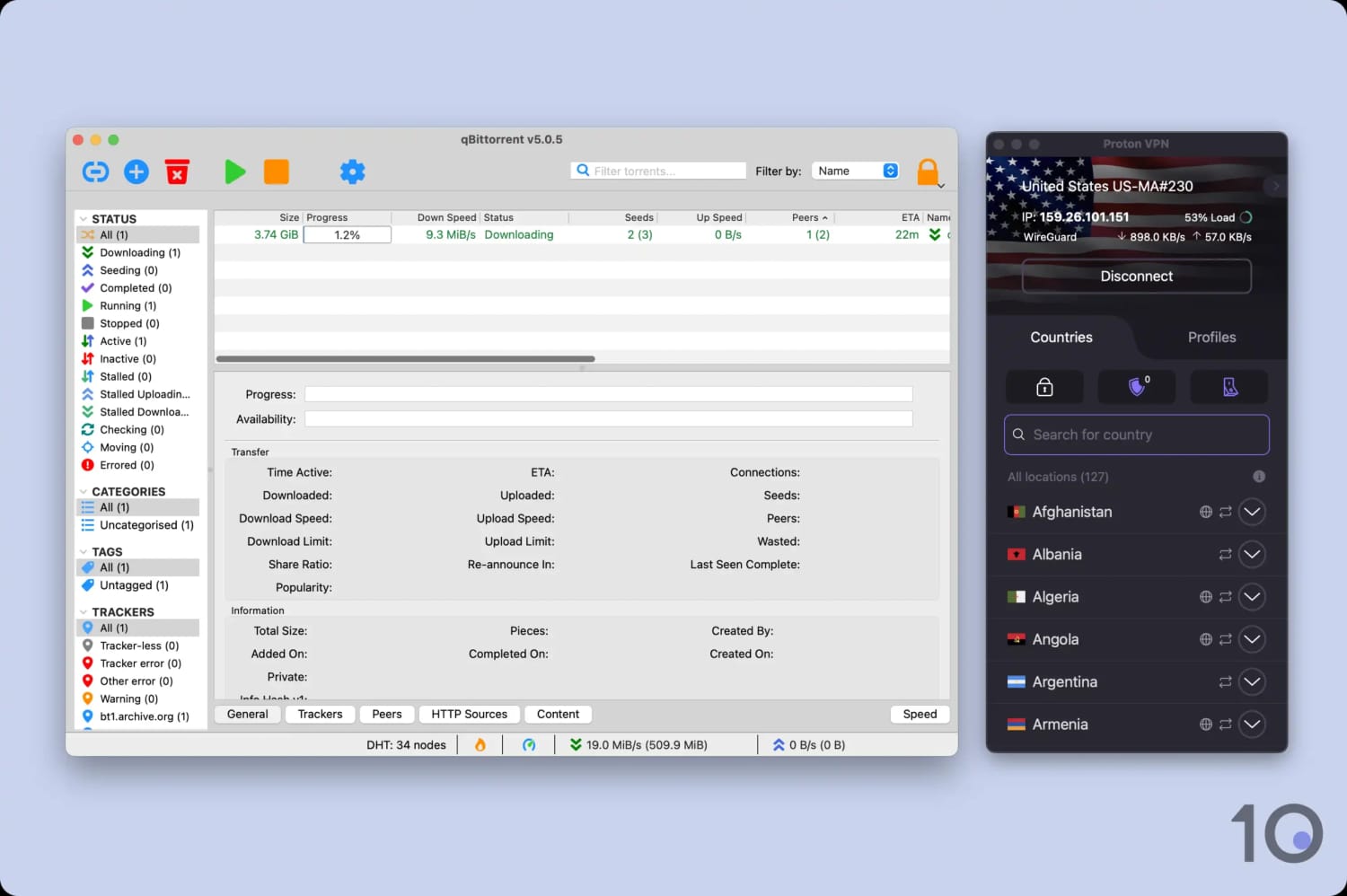
Proton VPN’s port forwarding feature boosted our P2P speeds.
We only recommend enabling it if you’re tech-savvy, but if you’re feeling confident then you can find all the relevant instructions in our guide on how to torrent with Proton VPN safely.
Device Compatibility
We calculated this rating by evaluating the VPN's support for various devices. We considered dedicated apps, browser extensions, Smart DNS functionality, and router compatibility.
We calculated this rating by evaluating the VPN's support for various devices. We considered dedicated apps, browser extensions, Smart DNS functionality, and router compatibility.
The VPN has apps for all major platforms including mobile, desktop, and streaming devices. You can use it on up to 10 devices at once on its paid plan, which is standard, or 1 devices on its free plan, which is unusually restrictive. Its lack of a dedicated router app or Smart DNS is another limitation, making it difficult to use Proton VPN on devices that don't support native VPN apps.
| Windows | Yes |
|---|---|
| Mac | Yes |
| iOS | Yes |
| Android | Yes |
| Linux | Yes |
| Amazon Fire TV | Yes |
| Android TV | Yes |
| Apple TV | Yes |
| Router | Manual Setup Only |
| Chrome | Yes |
| Smart DNS | No |
|---|
Simultaneous Connections: 10
Manually installing the VPN onto your WiFi router is the only workaround to using Proton VPN on game consoles and Smart TVs. This process works with a limited amount of router models, and the runs the risk of bricking your router.
You can buy a router pre-flashed with Proton VPN to remove the difficult set-up, but it is very expensive.
If you really want to use a VPN on a platform that doesn’t support native VPN apps, then we suggest using ExpressVPN since it has both a Smart DNS proxy and a dedicated router app.
Our analysis for Proton VPN’s free plan is mixed: while we commend it for being the only free VPN to work on routers, it also makes the strange decision to limit you to one active connection at a time.
We suspect this is to encourage you to upgrade to the plan; however, it comes at the cost of a much worse user experience.
Additional Features
We calculated this rating by evaluating the VPN's extra capabilities beyond the basic VPN service. This includes bypassing censorship, additional tools like malware blockers, and customization options like split tunneling.
We calculated this rating by evaluating the VPN's extra capabilities beyond the basic VPN service. This includes bypassing censorship, additional tools like malware blockers, and customization options like split tunneling.
The VPN's breadth of advanced features is impressive, but they're mostly limited to the paid version and don't always work properly. For example, we still encountered plenty of ads while connected to its ad blocker, and its multi-hop servers slowed our speeds significantly. The standout feature is 'Profiles', which allows you to set custom presets for your VPN connection.
| Additional Feature | Proton VPN (Free) | Proton VPN |
|---|---|---|
| Split Tunneling | Yes | Yes |
| VPN Obfuscation | Yes | Yes |
| Multi-Hop Servers | No | Yes |
| Dedicated IP | No | No |
| Ad Blocker | No | Yes |
Profiles Feature Is Useful & Convenient
This feature, unique to Proton VPN, lets you create a custom preset of servers and settings to exactly suit your needs.
Profiles allows you to choose the type of server (standard, Secure Core, P2P, or Tor), the server location, the specific server, and the protocol (WireGuard, WireGuard TCP, IKEv2, or Stealth).
For example, if you know there is a particular server that always works with UK Netflix, Profiles lets you create a shortcut to it from the home screen.
While we consider this an advanced feature, it’s really easy to set up and start using. Everything is labelled and explained in-app, so we recommend giving it a go.
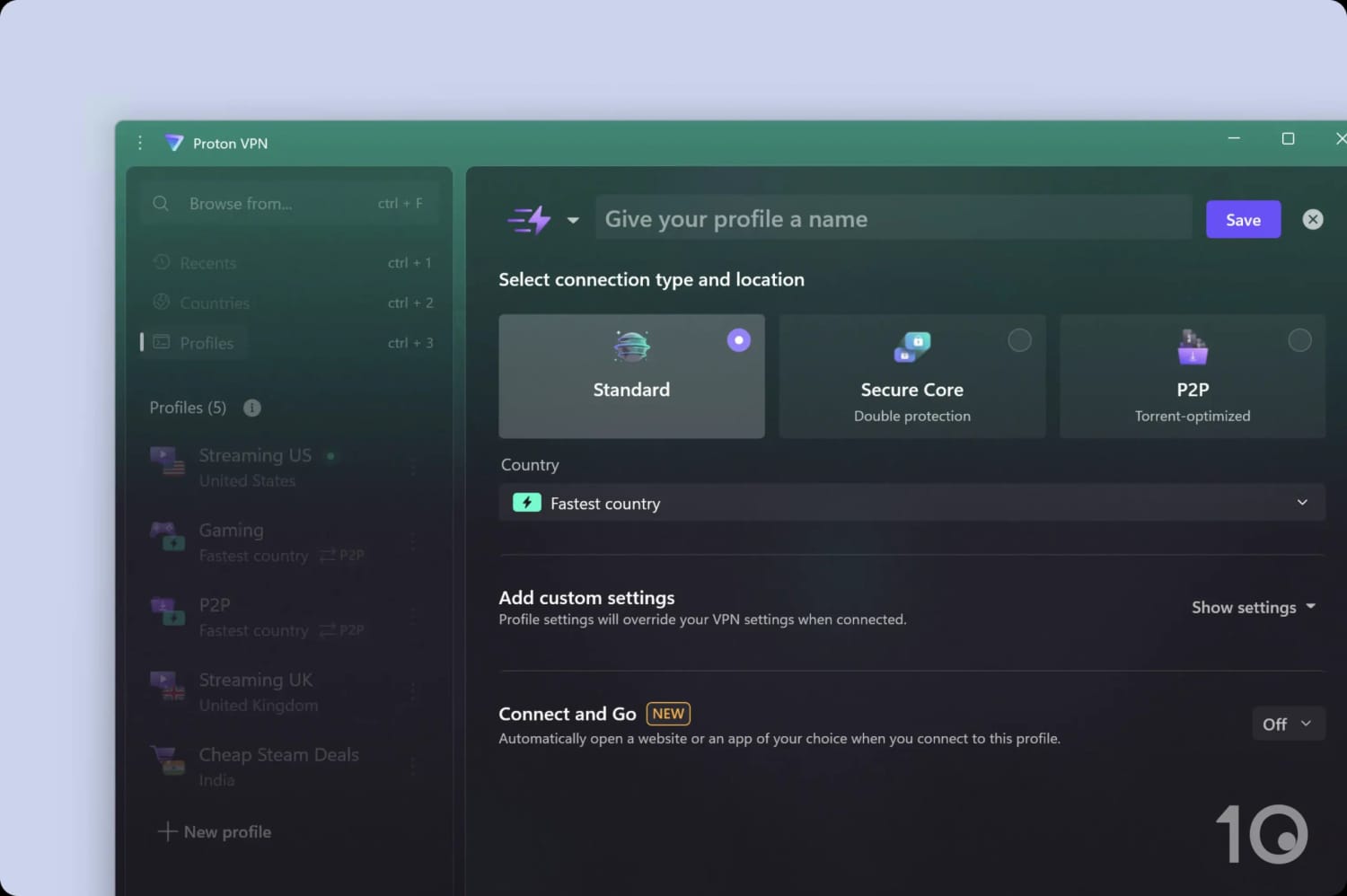
We used Profiles to create server presets for streaming, shopping, and more.
Split Tunneling Works as Intended
With split tunneling, your VPN creates a separate tunnel that goes directly through your ISP, just like you weren’t using a VPN at all.
This feature is particularly useful for retaining compatibility with devices and services that require a local IP address, like a wireless printer, for example.
Proton VPN includes split tunneling on its Windows, Android, Android TV, and Mac apps, but omits it from every other platform. To use it, go to your VPN app’s settings and choose the app or IP address you want excluded from the encrypted tunnel.
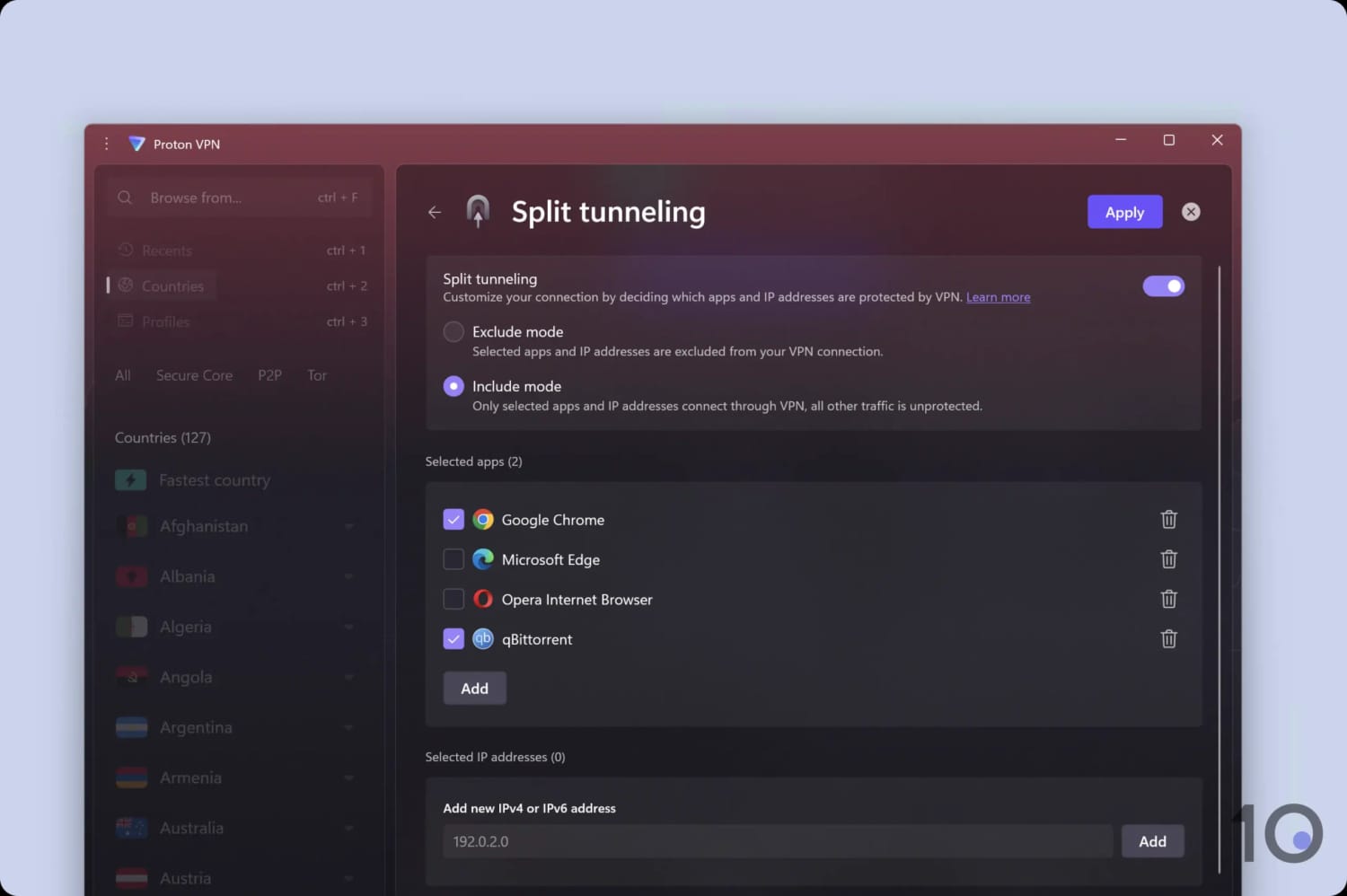
Split tunneling is easy to set up in the Windows app.
Mixed Results with NetShield
Proton VPN Plus and Unlimited subscribers have access to NetShield, the company’s ad, malware, and tracker blocker. You can enable this by clicking on the shield icon from the app home screen.
We found NetShield stops malware and trackers effectively, but it was very poor at blocking ads.
Unlike other ad blockers, NetShield doesn’t fully prevent advertising elements from showing on web pages. Instead, it replaces them with a gray box, which is an eyesore.
Moreover, NetShield only works when you’re connected to a Proton VPN server. Therefore, you’ll have to stay constantly connected to Proton VPN to stop ads from showing.
Secure Core Servers Work like Multi-Hop
Proton VPN owns servers in 68 of its locations, which form the ‘Secure Core’ network.
On paid plans only, you can select one of these locations in-app, which will send your traffic to a Secure Core server and then a standard Proton VPN server.
These two stops, or ‘hops’, are more commonly known as Double VPN or Multi-Hop. This is an advanced feature that routes your traffic through two servers, encrypting it twice.
Given Proton VPN owns and has sole access to these servers, Secure Core is even more secure than the multi-hop connections offered by rivals like NordVPN or IPVanish.
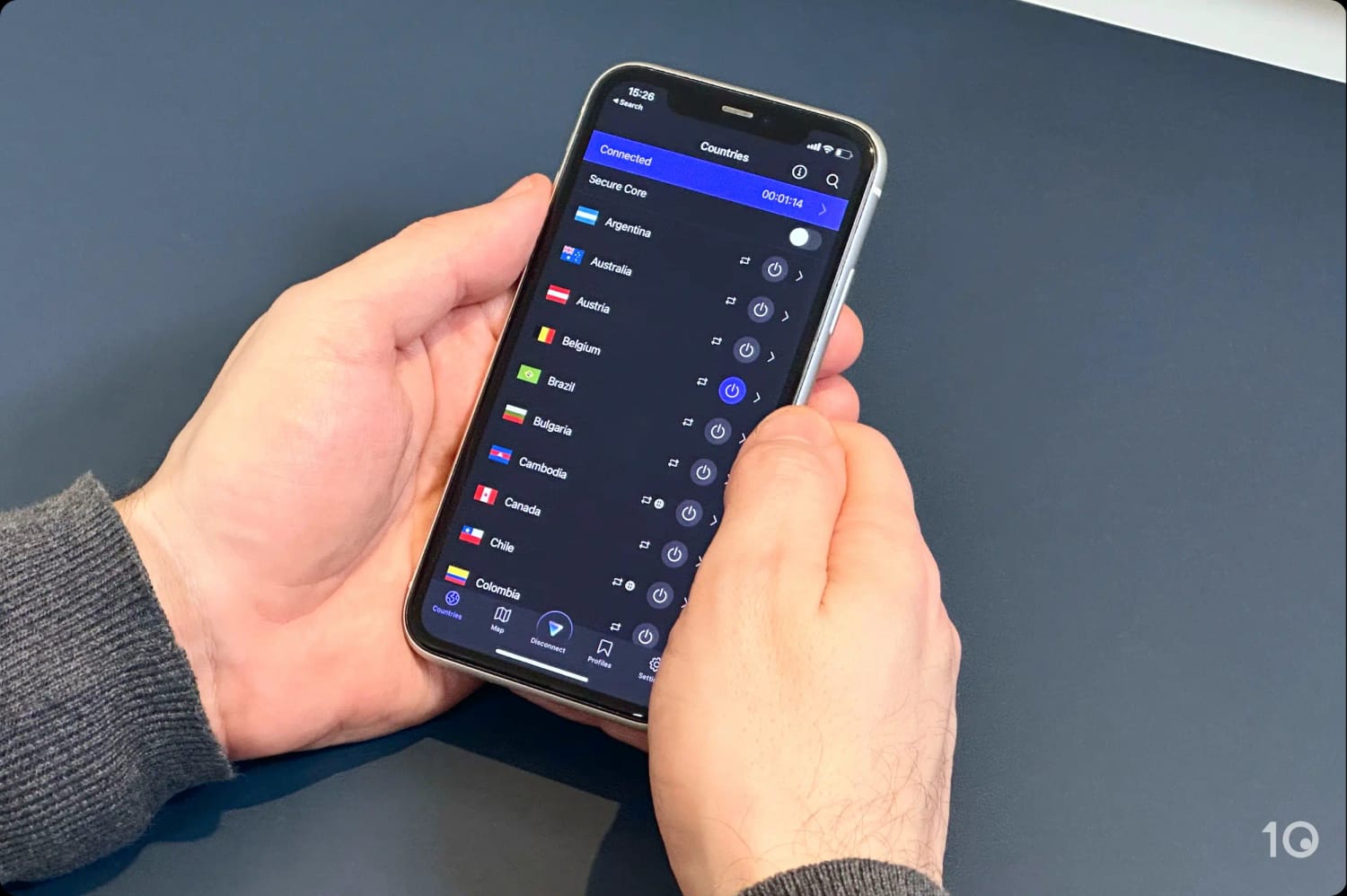
Proton VPN’s Secure Core servers setting in the iOS app.
This implementation has its drawbacks: it doesn’t let you choose the location of the first server in the multi-hop, like Surfshark does, and it massively slows down your download speed.
Compared to our average download speed loss of 11% when connected to a standard Proton VPN UK server, we recorded a 82% decrease when sent via a Secure Core location.
As such, we don’t recommend you use this feature for any bandwidth-intensive activities, like gaming, video-calling, or streaming.
Proton VPN (Free) Key Data
| Attribute | Proton VPN | Typical Free VPN |
|---|---|---|
| Owner | Proton | Independent |
| Launch Date | 2017 | 2015 |
| Safe to Use | Yes | No |
| Data Cap | Unlimited | 10GB per month |
| Payment Details Required | No | No |
| Account Required | Yes | Yes |
| Contains Ads | No | Yes |
| Local Download Speed | 99Mbps (1% loss) | 61Mbps (39% loss) |
| International Download Speed | 85Mbps (15% loss) | 55Mbps (45% loss) |
| Countries with Servers | 10 | 4 |
| Privacy Policy | No Logs | Identifiable Data |
| Simultaneous Connections | 1 | 1 |
| Manually Select Server Location | No | Yes |
| Netflix Libraries | 0 | 0 |
| Torrenting | No | No |
| Works In China? | No | No |
| Customer Support | Email & Online Resources Only | Online Resources |
| Apps & Extensions |           | |
Proton VPN Key Data
| Attribute | Proton VPN | Typical VPN |
|---|---|---|
| Local Download Speed | 88Mbps (12% loss) | 89Mbps (11% loss) |
| International Download Speed | 84Mbps (16% loss) | 80Mbps (20% loss) |
| Countries with Servers | 126 | 40 |
| Privacy Policy | No Logs | Identifiable Data |
| Simultaneous Connections | 10 | 10 |
| Netflix Libraries | 6 | 3 |
| Torrenting | Yes | Yes |
| Works In China? | No | No |
| Cheapest Price | $2.99/mo over 24 months | $3.87/mo over 24 months |
| Customer Support | Live Chat | |
| Apps & Extensions | | |