



Privacy
Ranked #38 out of 59 VPNs for Privacy
VPN 360 logs aggregated browsing activity and your real IP address, although it deletes the latter upon disconnection. However, the main weakness is the free plan's monetization model: it shares your advertising ID, device details, and IP address with third-party ad and attribution partners, led by Google. Combined with its US jurisdiction, that's enough to label this VPN unsafe.
| Originating IP Address | Yes |
|---|---|
| Browsing Activity | Yes |
| Individual Connection Timestamps | No |
| Date of Last Connection | No |
| VPN Server IP | No |
| Device Information | Yes |
| Individual Bandwidth Usage | Yes |
| Account Information | Yes |
You can read VPN 360's full privacy policy on its website.
Previously, VPN 360 didn’t have its own privacy policy. We had to read Aura’s privacy policy and the privacy policy in the Android and iOS apps.
VPN 360 has now published its own privacy policy on its website, and we can see that it does protect the privacy of its users somewhat. For example, all domain names that users visit are aggregated on a monthly basis. But a truly private VPN wouldn’t be storing domain names at all.
However, we’re extremely disappointed to see that VPN 360 allows its advertisers to access user IP addresses and device information. VPN 360 also uses customer IP addresses to identify internet service providers, which it deems as unidentifiable information.
To make the situation even worse, VPN 360’s privacy policy isn’t as clear or detailed as we’d like it to be. Compared to actual no-logs VPNs like Private Internet Access and PrivateVPN, VPN 360’s privacy policy seems cobbled together with perplexing contradictions and vague answers.
It’s also confusing that the privacy policy claims to be applicable to Hotspot Shield, Betternet, and Ultra VPN as well, despite all these other VPNs having their own separate privacy policies.
Here is how VPN 360’s logging policy compares to other top-tier cheap and free VPNs:
Streaming
Ranked #33 out of 59 VPNs for Streaming
In our tests, VPN 360 unblocked just one streaming service: HBO Max. Even with that, its download speeds are so bad that we experienced severe buffering issues and poor video quality. It also wasn’t able to access international Netflix libraries, Amazon Prime Video, Hulu, or BBC iPlayer.
| Streaming Service | Works with VPN 360 (Free) |
|---|---|
| BBC iPlayer (UK) | No |
| DAZN (Canada) | No |
| Disney+ (UK) | No |
| Hulu (US) | No |
| ITVX (UK) | No |
| HBO Max (US) | Yes |
| Netflix (US) | No |
| Netflix (UK) | No |
| Prime Video (US) | No |
| Sky Go (UK) | No |
We’ve reviewed VPN 360 for many years, so we can say with confidence that it’s a terrible choice for streaming.
HBO Max (US) remains the only streaming service it can unlock with consistency. Even then, VPN 360’s download speeds are so slow that the video quality barely made it above 480p, making for a disappointing viewing experience.
We found the Los Angeles US server to be the most reliable when unblocking HBO Max, with the New York server often triggering an error message.
This is where the very limited success ends. VPN 360 fails to unblock the US, UK, and Singapore Netflix libraries — the only three regions where it has servers.
We weren’t able to log in, so even Netflix Originals were inaccessible. It’s unusual to see a VPN reduce the amount of content you can access.
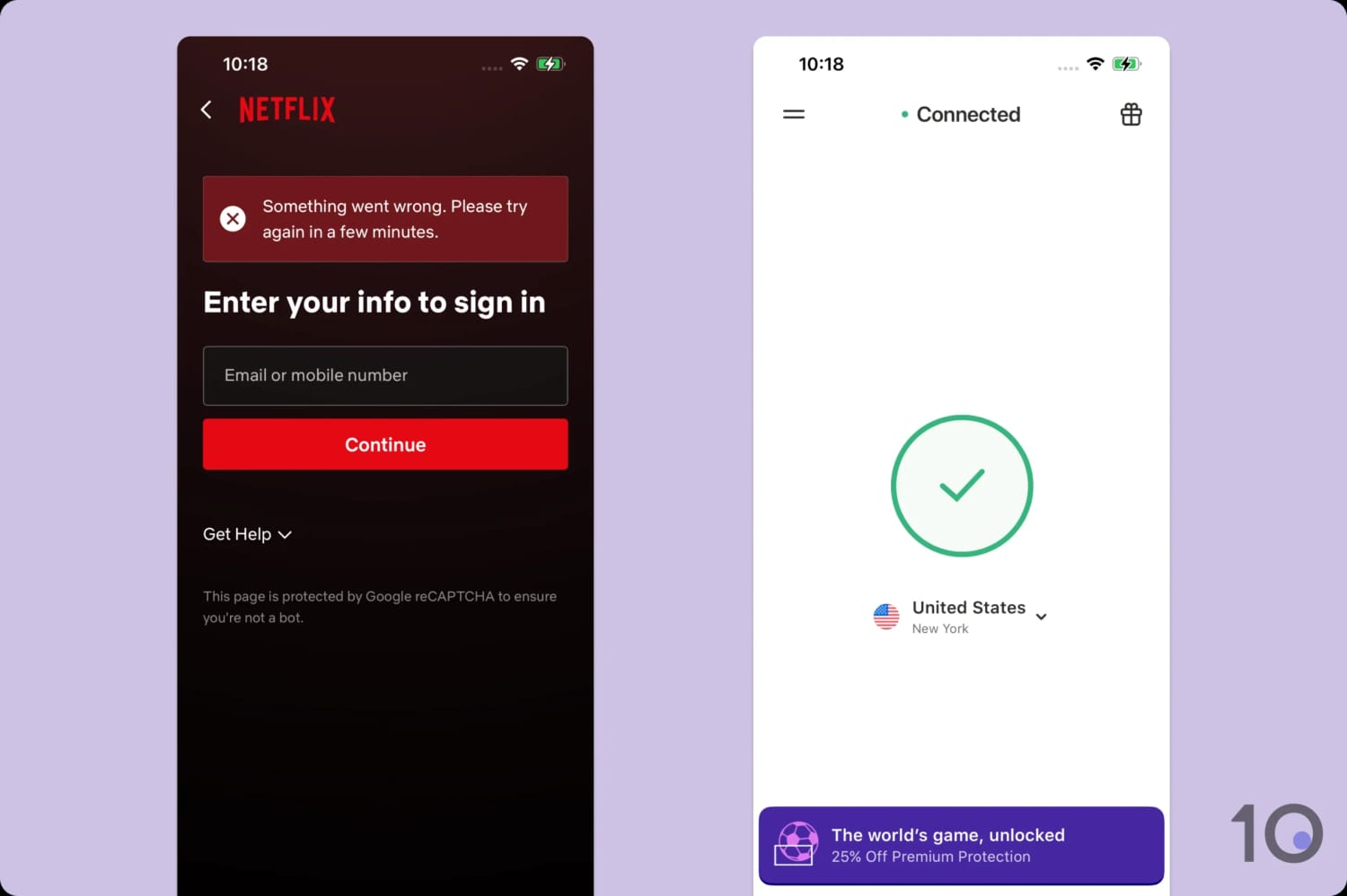
Neither of VPN 360’s US servers worked with Netflix.
While it’s not unusual for free VPNs to struggle with Netflix, there are a handful that work. For example, PrivadoVPN’s free plan can unblock US Netflix and Windscribe streams UK Netflix easily.
We’re also disappointed to see that it failed to unblock any UK streaming services. We couldn’t access BBC iPlayer, ITVX, or Channel 4 during our testing.
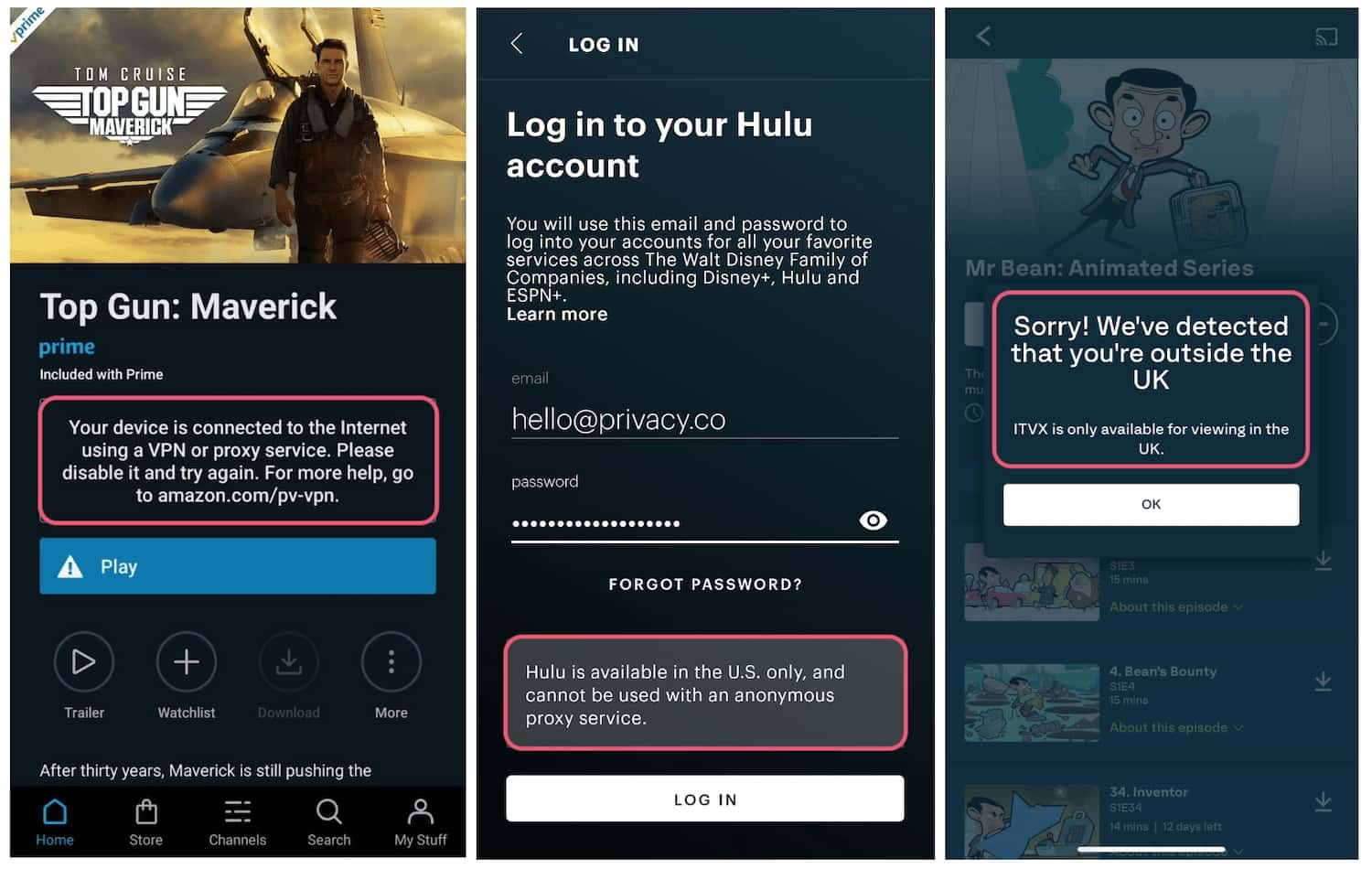
VPN 360 was detected and blocked by most streaming services.
VPN 360’s Streaming Performance Compared to Other Free VPNs
None of the free VPNs we’ve tested are as good as their premium counterparts when it comes to streaming. But there are some free VPNs that perform better than others:
Speed
Ranked #56 out of 59 VPNs for Speed
VPN 360 is very slow. We tested it on all of its available servers and experienced consistent speed loss of up to 95%. This will disrupt all types of internet activity.
As you can see, VPN 360 dramatically slowed down our internet by 95% on local New York connections. This is truly terrible, even for a free VPN.
Connecting farther away to the UK, we measured near-identical speed losses of 95%, which suggests VPN 360 implements a speed cap.
This makes VPN 360 virtually unusable for streaming or online gaming, and extremely frustrating for us to test and use.
Security
Ranked #36 out of 59 VPNs for Security
On paper, VPN 360 meets the bare minimum for security: AES-256 encryption, WireGuard support, and a VPN kill switch. However, its kill switch doesn't work properly on iOS, there's no post-quantum encryption, and it includes an unproven VPN protocol.
| Independent Audit | No |
|---|---|
| VPN Kill Switch | Yes |
| Leak Protection | No |
VPN 360 offers a choice between WireGuard, an open-source protocol that supports ChaCha20 encryption, and Hydra, its proprietary closed-source alternative.
We recommend going to ‘Connection Mode’ in the VPN’s settings and manually switching to WireGuard since it’s proven to be secure.
That said, Hydra is safe to use: it uses TLS 1.2, AES-256 encryption, and Perfect Forward Secrecy.
One of Hydra’s selling points is its delivery of the fastest VPN speeds we’ve tested when using another Pango product: Hotspot Shield.
Despite this, Hydra doesn’t actually perform well with VPN 360, most likely due to the VPN’s speed cap.
Given this disappointing performance and Hydra’s lack of independent oversight, WireGuard remains the definitive choice for peace of mind.
Kill Switch Leaks on iOS
In our tests, VPN 360 prevented IP address leaks on Android, but it leaked our IP address on iOS, leaving it exposed when we reconnected to the internet.
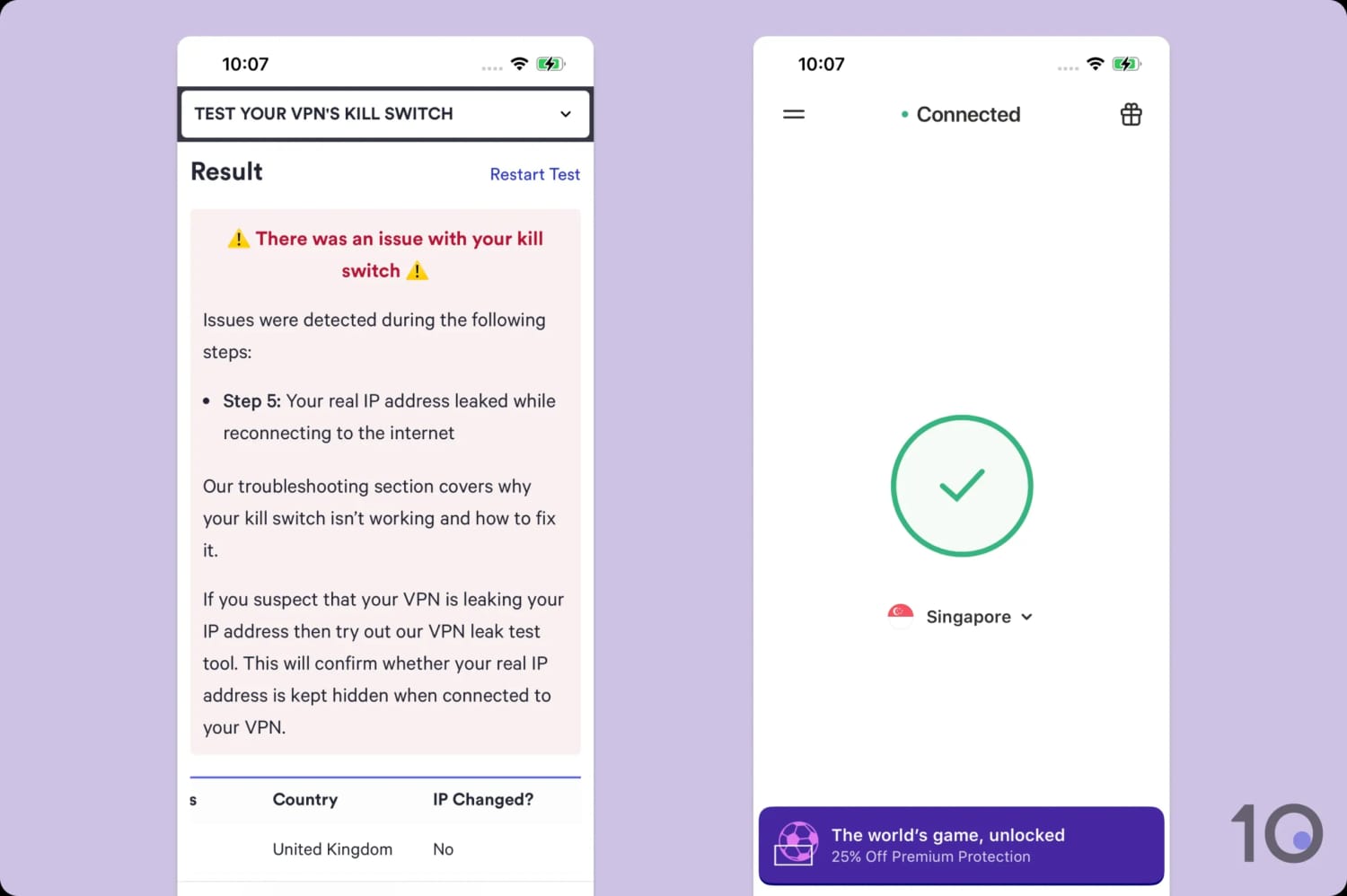
The VPN kill switch won’t fire correctly on the iOS app.
We’re hugely disappointed with this outcome as it renders the kill switch pointless.
No IPv4, IPv6, or WebRTC Leaks
We’re pleased that we didn’t experience any IPv4, DNS, WebRTC, or geolocation leaks while connected to a VPN 360 server in Singapore.
We tested both Android and iOS to ensure that VPN 360 wasn’t leaking any of these data points. Thankfully, both times the VPN was able to protect our details and real location.
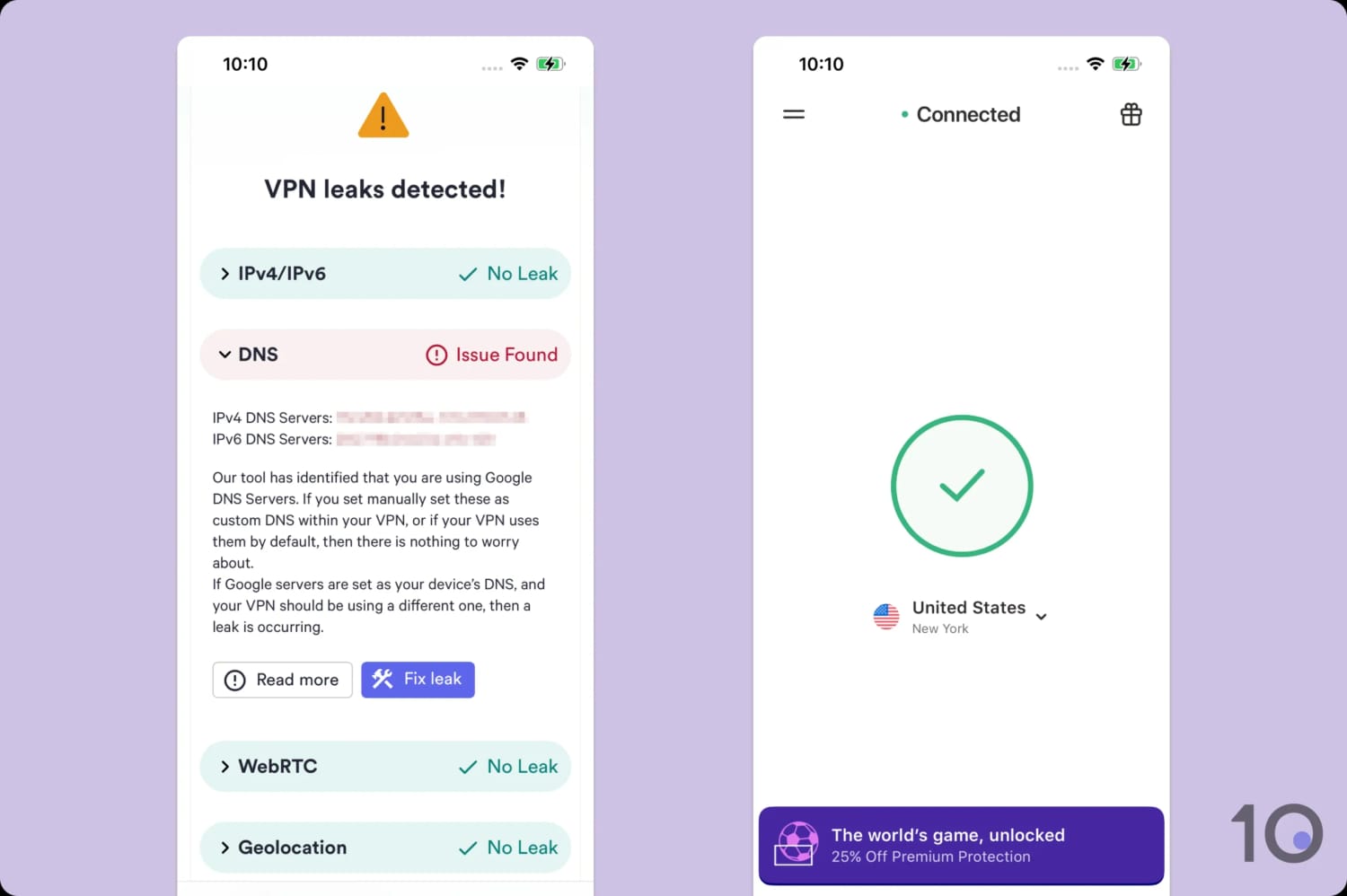
Despite the DNS issue, VPN 360 doesn’t leak your data.
Our tool did flag that VPN 360 uses Google’s DNS servers. While we’d prefer it used its own private DNS servers, this doesn’t qualify as a leak as your DNS requests will be one of millions.
Server Locations
Ranked #52 out of 59 VPNs for Server Locations
VPN 360 has four server locations in three countries: the US, the UK, and Singapore. This server network is focused in English-speaking countries, and excludes the entire Southern Hemisphere. While VPN 360 doesn't disclose the actual number of IP addresses, we suspect the VPN's painfully slow speeds are due to server congestion.
| Continent | Countries with Servers |
|---|---|
| Europe | 1 |
| Asia | 1 |
| North America | 1 |
| South America | 0 |
| Africa | 0 |
| Oceania | 0 |
In the past, VPN 360’s server network would be considered acceptable for a free VPN, but it’s now one of the worst we’ve reviewed.
While we appreciate having options on the US East Coast (New York) and West Coast (Los Angeles), it doesn’t make up for the limited coverage.
Competitors like Windscribe offers free servers in 10 countries. The gap is even greater if you compare VPN 360 to paid services like NordVPN, which cover 137 countries.
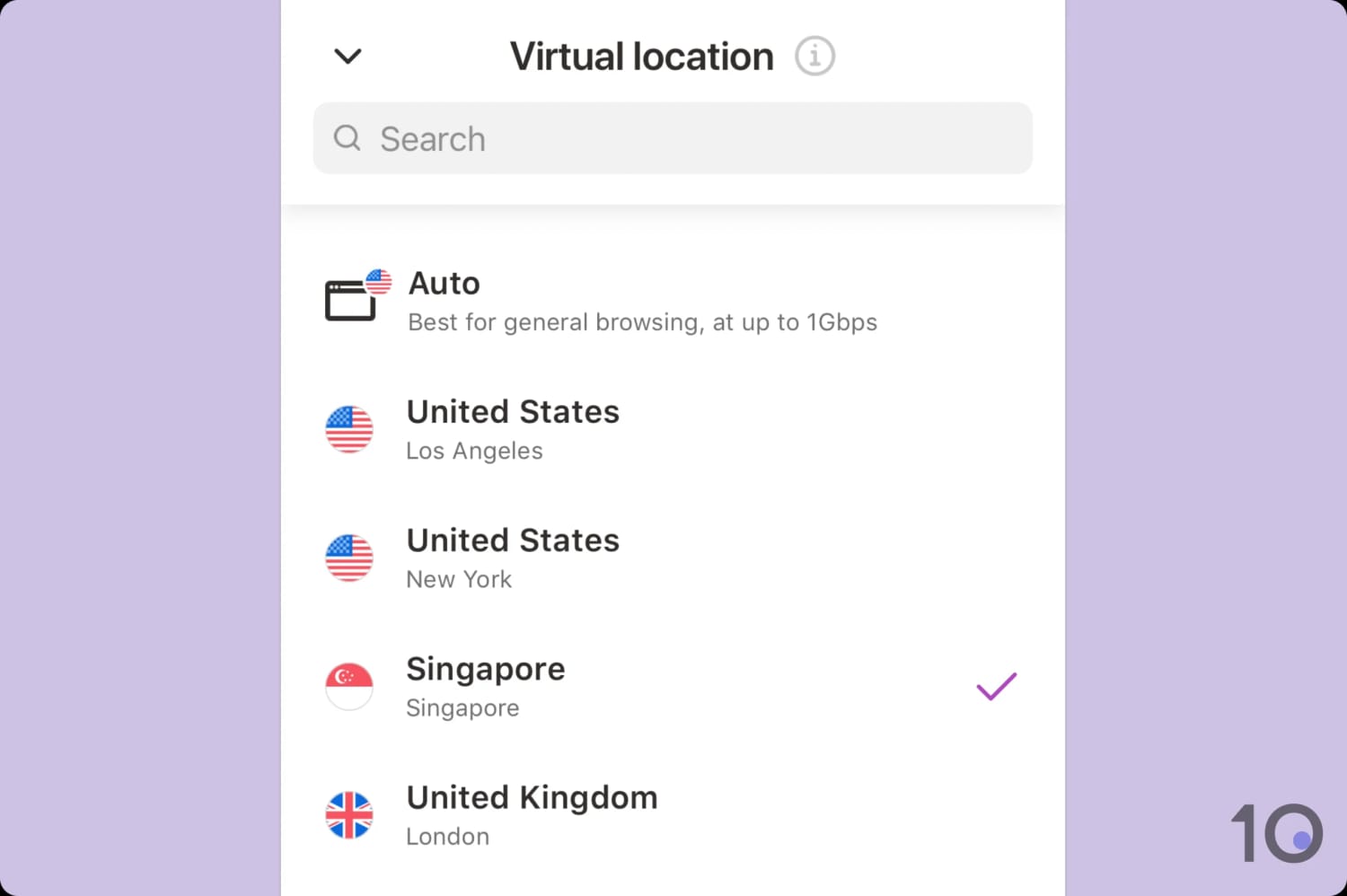
You are restricted to four server locations in the VPN 360 app.
The lack of server options not only restricts where you can get an IP address from, but your connection speeds too. Multiple users connecting to the same server causes congestion and lowers your top download speed.
User Experience
Ranked #48 out of 59 VPNs for User Experience
VPN 360's apps are very limited and, as a result, easy to use. However, the user experience on mobile is hamstrung by two major obstacles: a total lack of customization and intrusive, mandatory pop-up ads. While the Windows app doesn't include ads, it fails to connect whatsoever.
Before you even use the VPN, there are UX issues. When first launching the app, activating the free plan requires you to tap a link labeled “Proceed with ads and limits.”
This prompt is deliberately hidden in tiny, grey font that blends into the background, encouraging you toward accidentally clicking one of the larger, brightly colored subscription buttons. This made us instantly distrust the VPN service.
Once you get past this, the VPN 360 apps are near-identical across platforms. There’s a large purple connect button, a settings menu, and a server list widget imposed on a simple white background.
Desktop (Windows)
The Windows installer didn’t work when I tried to download the VPN 360 app; instead I had to use a direct download link when prompted.
This isn’t the flawless setup that I’ve come to expect from top-name VPNs like ExpressVPN and IPVanish, and it further underlined VPN 360’s unreliability.
The app itself looks exactly like its mobile counterparts in design and features, including split tunneling, a kill switch, and the Hydra protocol.

It’s impossible for me to give you a review of my day-to-day with VPN 360 as the desktop app doesn’t work. Regardless of which protocol or server I tried, the app failed to connect.
Mobile (iPhone & Android)
VPN 360 is nicest to use on mobile, which is unsurprising given it started off as a mobile-only service.
The app uses the same white and purple color palette, with a central power button that changes to a green tick to indicate a successful connection.

Annoyingly, there’s no dark mode option, so you’ll have to make do with the white background in low-light environments.
To access the server list, simply tap on the drop-down menu next to the current server location. The free servers are located at the top of the list to save you scrolling down.
Both apps give you the option to disable and reject permissions for in-app advertisements. This greatly reduces the number of adverts.
We also like the option to enable push notifications for when you connect to an unsecured WiFi network. It’s a small touch, but it gave us peace of mind.
One crucial difference is the implementation of the kill switch. The iOS app uses its own integrated kill switch, although it doesn’t work well, whereas the Android app relies on Android’s built-in ‘always-on’ functionality.
Torrenting
Ranked #49 out of 59 VPNs for Torrenting
VPN 360 blocks all P2P traffic on its free servers, so you can’t use it for torrenting. Even if you could, the VPN service isn’t private enough to use, doesn’t offer desktop apps, and would be too slow for regular file sharing anyway.
| Torrenting Attribute | VPN 360 (Free) |
|---|---|
| Permits P2P Traffic | No |
| Average Download Bitrate | N/A |
| Countries with P2P Servers | 0 |
| Port Forwarding | No |
| Kill Switch | Yes |
| Logging Policy | Identifiable Data |
VPN 360 doesn’t explicitly ban torrenting in its terms of service, privacy policy, or in its knowledge base, but we weren’t able to torrent with it in our P2P tests. Even worse, we encountered annoying pop-up ads while connecting to VPN 360 in order to torrent.
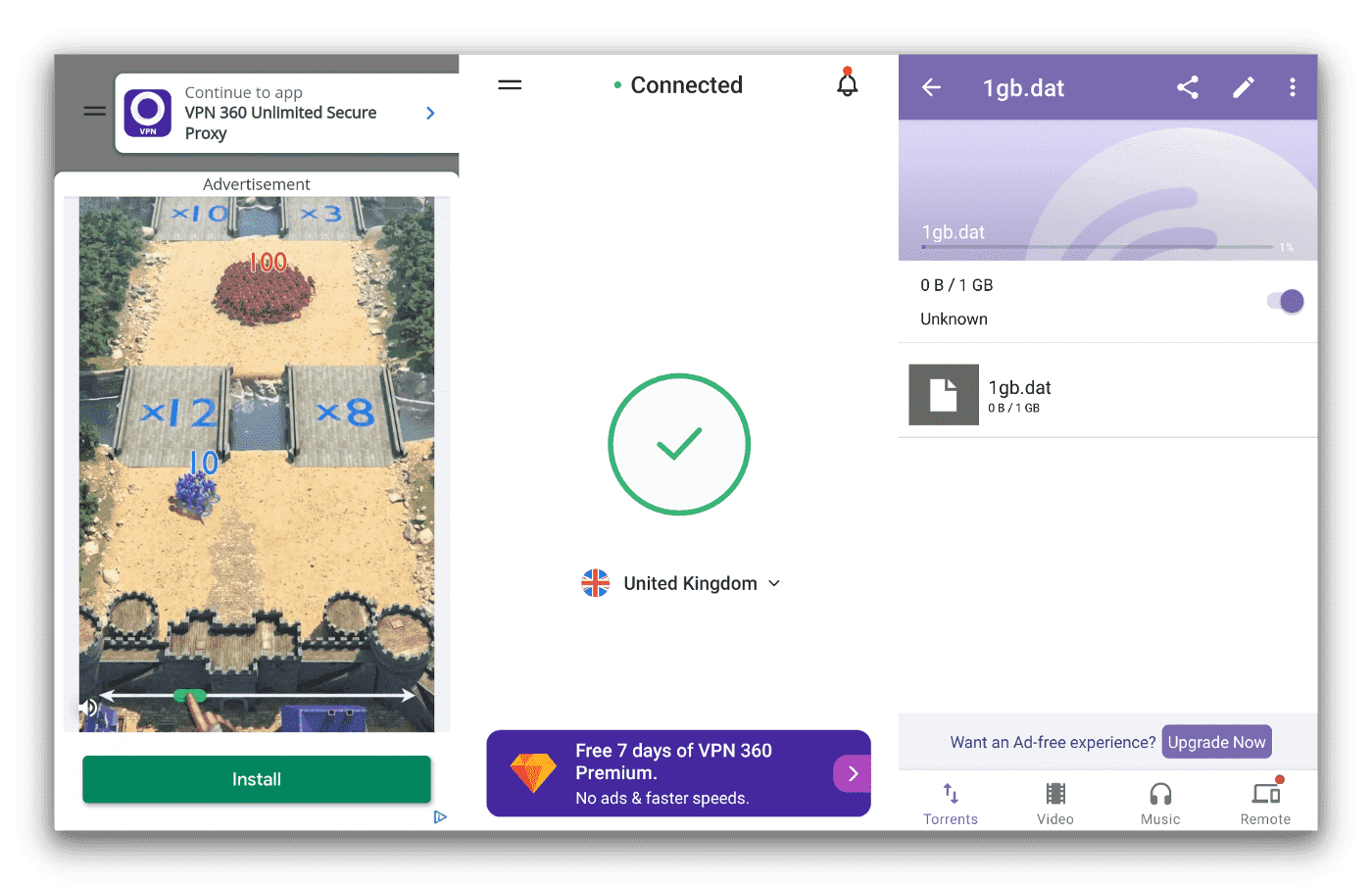
In our torrenting tests on Android, VPN 360 refused to permit downloads using BitTorrent.
Even if it was able to torrent, judging from its download speeds, it would be frustratingly slow to use. The service’s privacy-unfriendly logging policy is also extremely concerning, and another reason to not use VPN 360 for P2P activities.
Instead of using VPN 360, consider trying our recommended free VPN for torrenting: PrivadoVPN. It’s overall a much better free VPN and doesn’t make you sacrifice your privacy or user experience.
Device Compatibility
VPN 360 only provides apps for mobile and Windows. As such, its device compatibility rating is capped at 3.5.
| Windows | Yes |
|---|---|
| Mac | No |
| iOS | Yes |
| Android | Yes |
| Linux | No |
| Amazon Fire TV | No |
| Android TV | No |
| Apple TV | No |
| Router | No |
| Chrome | No |
Simultaneous Connections: Unlimited
VPN 360 is lagging behind a lot of its competitors in device compatibility. Even the other VPNs owned by its parent company, like Hotspot Shield and Betternet, include a macOS app.
The lack of router support and Smart DNS tool also makes it impossible to use the VPN on devices that don’t have native VPN apps, like game consoles and Smart TVs.
Additional Features
VPN 360 provides virtually no extra functionality beyond the base VPN. Though it's recently added split tunneling, it still doesn’t work in China or other censored regions, it doesn’t have multi-hop servers, and it doesn't block ads.
| Additional Feature | VPN 360 (Free) |
|---|---|
| Split Tunneling | Yes |
| VPN Obfuscation | No |
| Multi-Hop Servers | No |
| Dedicated IP | No |
| Ad Blocker | No |
Split Tunneling Is Available on All Apps
One of the few extra features VPN 360 offers is split tunneling, which allows certain traffic to pass through the VPN while other data is routed via the local network.
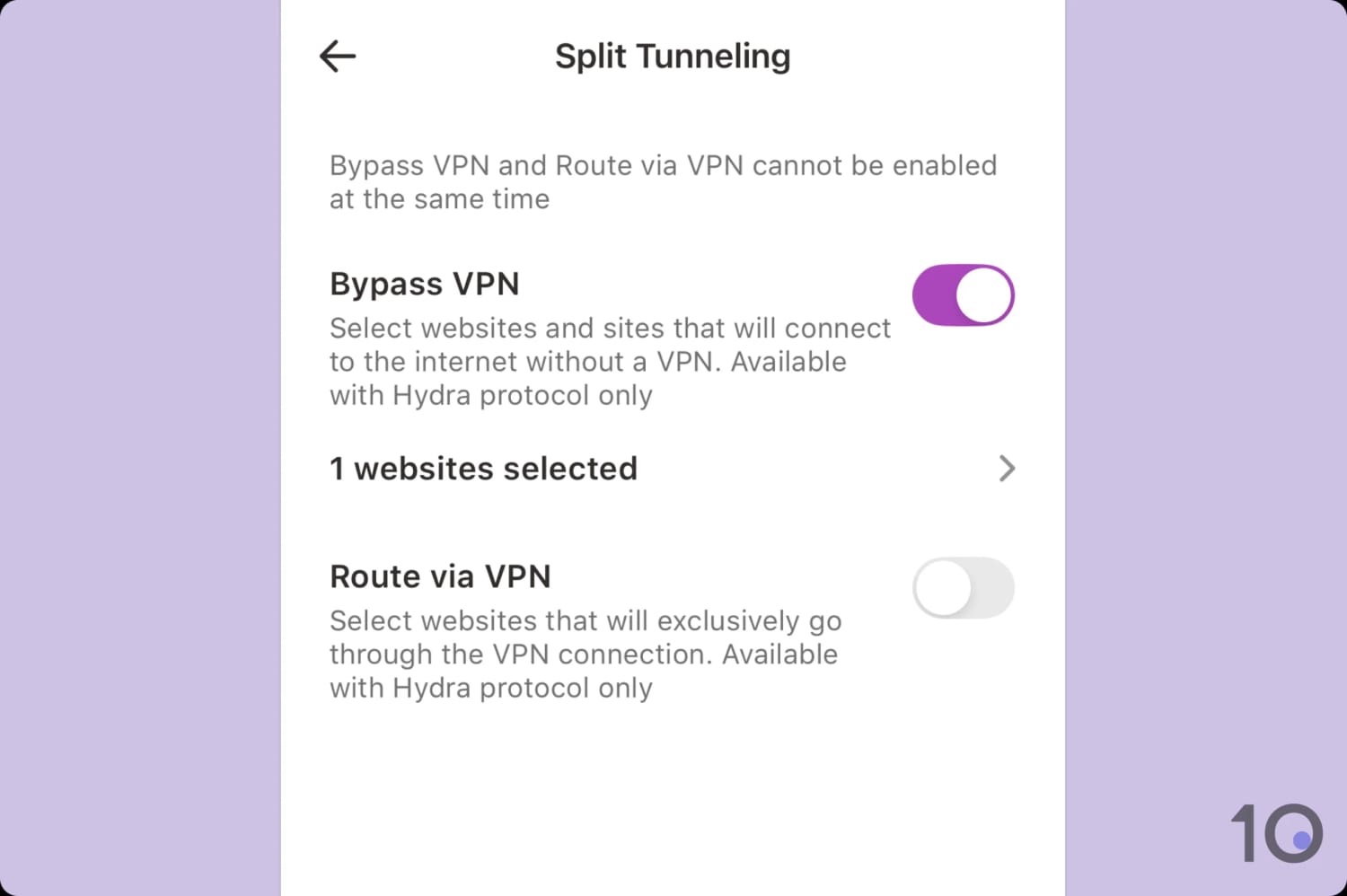
Surprisingly, VPN 360 supports inverse split tunneling.
In our testing, the split tunneling function performed well, allowing us to maintain access to local services like a banking app while connected to a VPN server in Singapore.
Unlike some competitors, VPN 360 offers the flexibility to either include or exclude specific apps from the VPN tunnel, which adds a welcome level of control.


