



The Bottom Line
Windscribe specializes in streaming and bypassing strict internet filters — including unblocking more Netflix libraries than any other VPN. In all other areas, including privacy and security, it ranges from average to excellent with only its (relatively) small server network requiring work. Its free VPN is among the best available, with access to UK Netflix and HBO Max. However, it’s let down by its 10GB data cap.
8.8/10 5.7/10 9.1/10 8.3/10 2.3/10 0.0/10 7.0/10 7.5/10 6.8/10
Windscribe Pros & Cons
- 100% free with no payment details required
- Servers in 10 countries
- Works with 5 Netflix libraries, HBO Max, Hulu & more
- Unlimited simultaneous connections
- No heavy upsell to the paid plan
- Doesn’t work with US Netflix
- Limited to 10GB data per month
- Can’t be installed on routers
- Slower speeds than other top free VPNs
- Doesn't allow torrenting
9.3/10 8.6/10 9.1/10 8.3/10 6.7/10 8.2/10 7.0/10 7.5/10 7.1/10
Windscribe Pros & Cons
- Logging policy safeguards users' privacy
- Unblocks 32 Netflix libraries
- Open-sourced apps & post-quantum encryption
- Works in China and other censored regions
- Unlimited simultaneous connections
- Fast speeds on nearby servers
- Servers in fewer countries than alternatives
- Often fails to load video content in HD or 4K
- Expensive
- Based in Canada (Five Eyes nation)
- Smart DNS not included with a VPN subscription
- No human live chat support
Unlike many other top-rated VPNs, Windscribe is completely independent and isn’t owned by a larger cybersecurity company.
Windscribe offers a free and a paid service. While the paid subscription (Windscribe Pro) is better, the free plan remains one of the best free VPNs available.
If you’re looking specifically for a VPN that bypasses geo-blocks on every streaming site and accesses the highest number of Netflix libraries, then Windscribe Pro is an excellent choice.
However, its limitations in other departments make it a good — not great — overall VPN. Its 12-month plan is quite expensive, its torrenting speeds are slow, and it doesn’t have servers in many countries.
With just a few tweaks, Windscribe Pro could be the best VPN on the market. But, as things stand, it falls slightly short. For a cheaper alternative that also includes a free tier, we’d recommend Proton VPN: its P2P speeds are much faster and it has servers in 79 more countries.
On the other hand, Windscribe Free is one of the best free VPNs we’ve reviewed, and we highly recommend it. The only real downsides are its low monthly data cap and lack of P2P support, but this is expected from a 100% free VPN service.
🔄 Recent Updates
We’ve reevaluated Windscribe’s torrenting performance after it blocked P2P traffic on free servers and restricted it on paid ones.
Pricing Plans
$$$$| 1 month | $9.00 |
|---|---|
| 12 months | $69.00 ($5.75/mo) |
Free Trial Options
| Money-Back Guarantee | 3 days |
|---|---|
| Free Trial | No |
| 100% Free Plan | Yes |
| Data Cap | 10GB per month |
Privacy
We calculated this rating by examining the VPN's logging policy, jurisdiction, ownership, and privacy features. We also evaluated its history of handling user data and responding to legal requests.
We calculated this rating by examining the VPN's logging policy, jurisdiction, ownership, and privacy features. We also evaluated its history of handling user data and responding to legal requests.
Windscribe logs your bandwidth usage and your most recent connection timestamp, but this data can't be used to personally identify you. Although the company is based in a Five-Eyes jurisdiction, Windscribe has never complied with requests for user data — as proven when a server seizure by Dutch authorities revealed nothing.
| Originating IP Address | No |
|---|---|
| Browsing Activity | No |
| Individual Connection Timestamps | No |
| Date of Last Connection | Yes |
| VPN Server IP | No |
| Device Information | No |
| Individual Bandwidth Usage | Yes |
| Account Information | Yes |
| Jurisdiction | Canada (Five Eyes Member) |
|---|---|
| Privacy Policy | No Identifiable Data |
| Transparency Reports | Yes |
| Diskless Servers | Yes |
| Anonymous Payment Options | Yes |
You can read Windscribe's full privacy policy on its website.
As you can see, Windscribe does log some data, which it claims is necessary for maintenance purposes. This isn’t ideal as other true no-log VPN services, like Private Internet Access, function without retaining anything. We wish Windscribe would do the same.
The important takeaway is that none of the information collected can be used to link you to your online activity. This has been verified many times by real-world events — most recently in February 2026 when Dutch police seized a Windscribe server but found no user data.
Windscribe also maintains a page documenting the 100+ law enforcement data requests it’s received since 2018. In every case, the VPN service hasn’t shared any sensitive user data as it doesn’t have access to it.
All of this is made possible by Windscribe’s diskless server network. By running entirely on RAM — volatile memory that erases itself every reboot — the VPN’s server network can’t permanently store any data.
For additional privacy, Windscribe allows you to sign up using cryptocurrency if you don’t want to provide a name or address. We love this feature and think more VPNs should follow suit.
Streaming
We calculated this rating by identifying which streaming services the VPN could unblock and measuring how consistently it could access them.
We calculated this rating by identifying which streaming services the VPN could unblock and measuring how consistently it could access them.
Windscribe Pro outperforms almost every other VPN for bypassing geo-blocks on streaming content, especially for Netflix. Uniquely, its free VPN unblocks a similar amount of streaming services, except, US Netflix.
| Streaming Service | Works with Windscribe (Free) | Works with Windscribe |
|---|---|---|
| BBC iPlayer (UK) | Yes | Yes |
| DAZN (Canada) | Yes | Yes |
| Disney+ (UK) | Yes | Yes |
| Hulu (US) | Yes | Yes |
| ITVX (UK) | Yes | Yes |
| HBO Max (US) | Yes | Yes |
| Netflix (US) | No | Yes |
| Netflix (UK) | Yes | Yes |
| Prime Video (US) | Yes | Yes |
| Sky Go (UK) | Yes | Yes |
We used Windscribe Pro with Netflix to access more libraries than any other VPN.
In our most recent tests, it unblocked 32 international Netflix libraries — including the US, UK, and Japan — which is easily the best result we’ve recorded and three times as many libraries as some of the biggest names in the industry (e.g. Proton VPN).
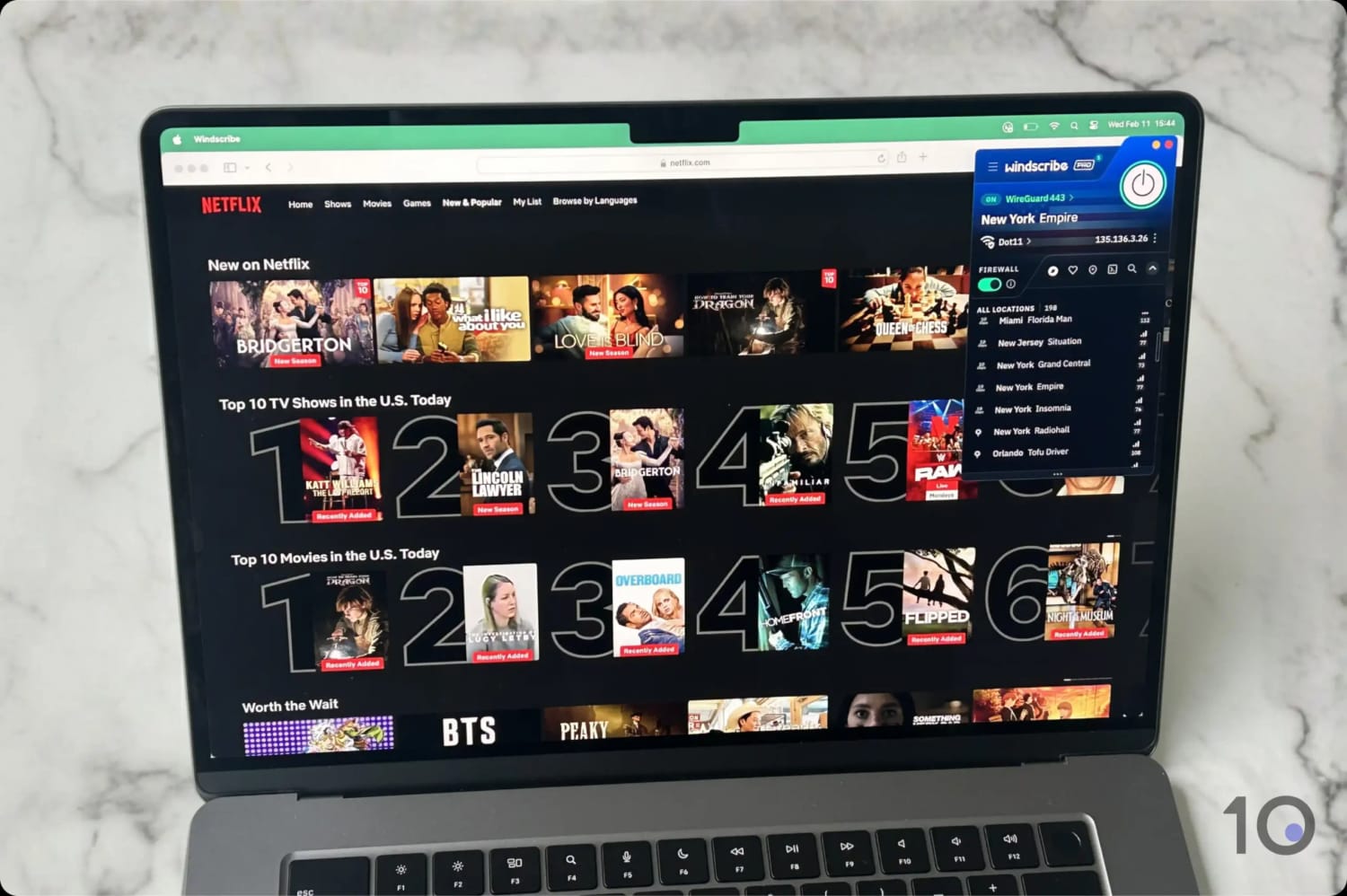
Windscribe is in a league of its own for accessing Netflix.
We can’t heap the same praise on its user experience, though, as we noticed some slight buffering at times and occasional drops in streaming quality. We suspect this happens because Windscribe has fewer VPN servers in many international locations.
The free version can’t stream US Netflix, but it remains an excellent for choice for other regions. Most recently, it unblocked 5 Netflix regions, including the UK, France, and Germany.
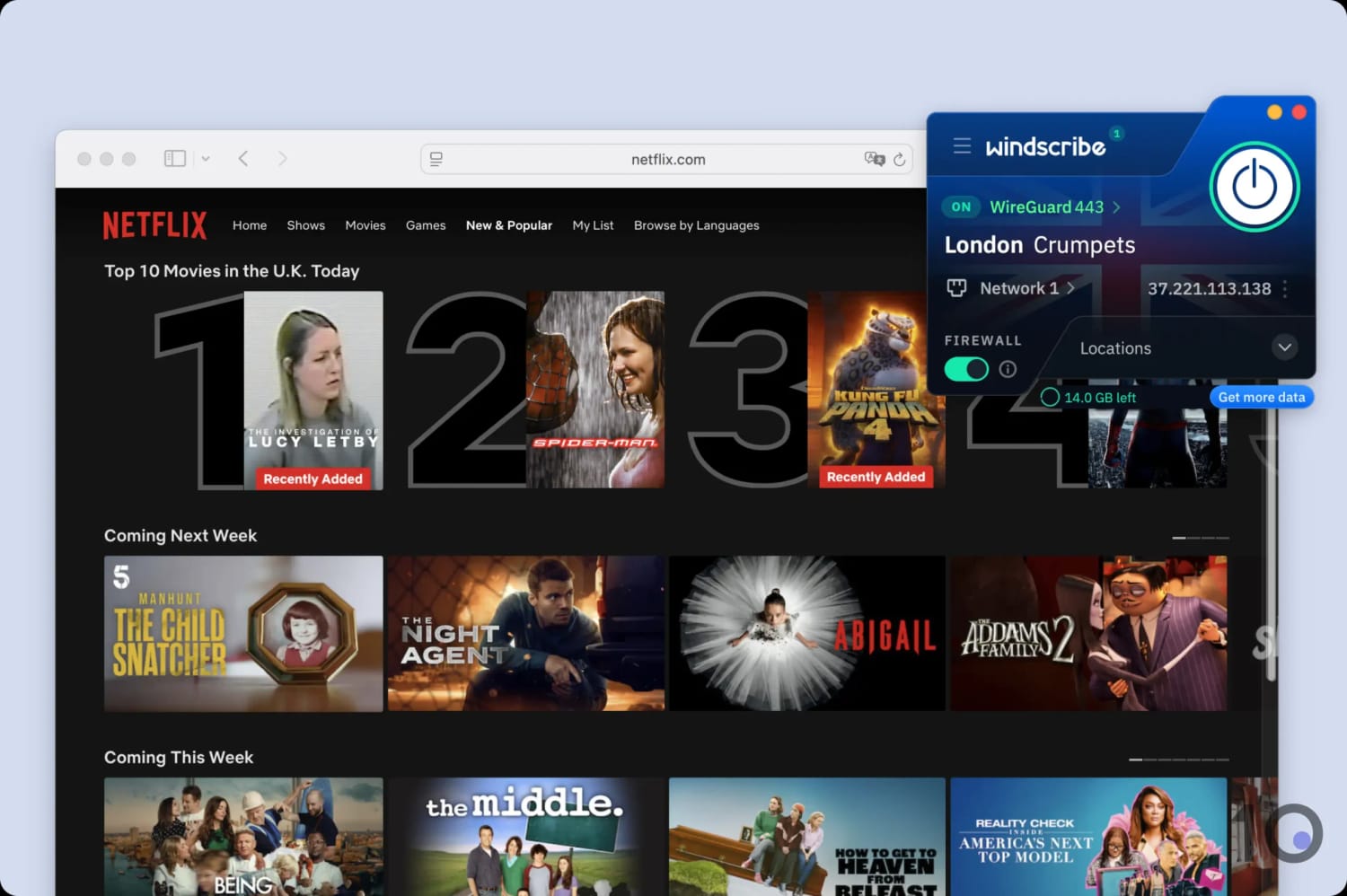
Windscribe’s free tier works with UK Netflix.
Aside from Netflix, Windscribe is one of the best VPNs for accessing US streaming services from abroad. The Pro and Free versions of the VPN always work with popular content platforms, like Hulu and HBO Max, whenever we test them. Unlike with international Netflix libraries, we didn’t experience any buffering as the VPN offers 45 server locations in the US.
In a similar fashion, Windscribe almost always streams BBC iPlayer — a notoriously difficult platform to unblock — on any of its five UK server locations, though we suggest using the London – Custard server for the best quality due to its 10Gbps bandwidth.
Unsurprisingly, Windscribe’s free plan is the only free VPN that always works with BBC iPlayer. The other free VPNs we test, like PrivadoVPN and Hotspot Shield, are either unreliable or don’t work at all.
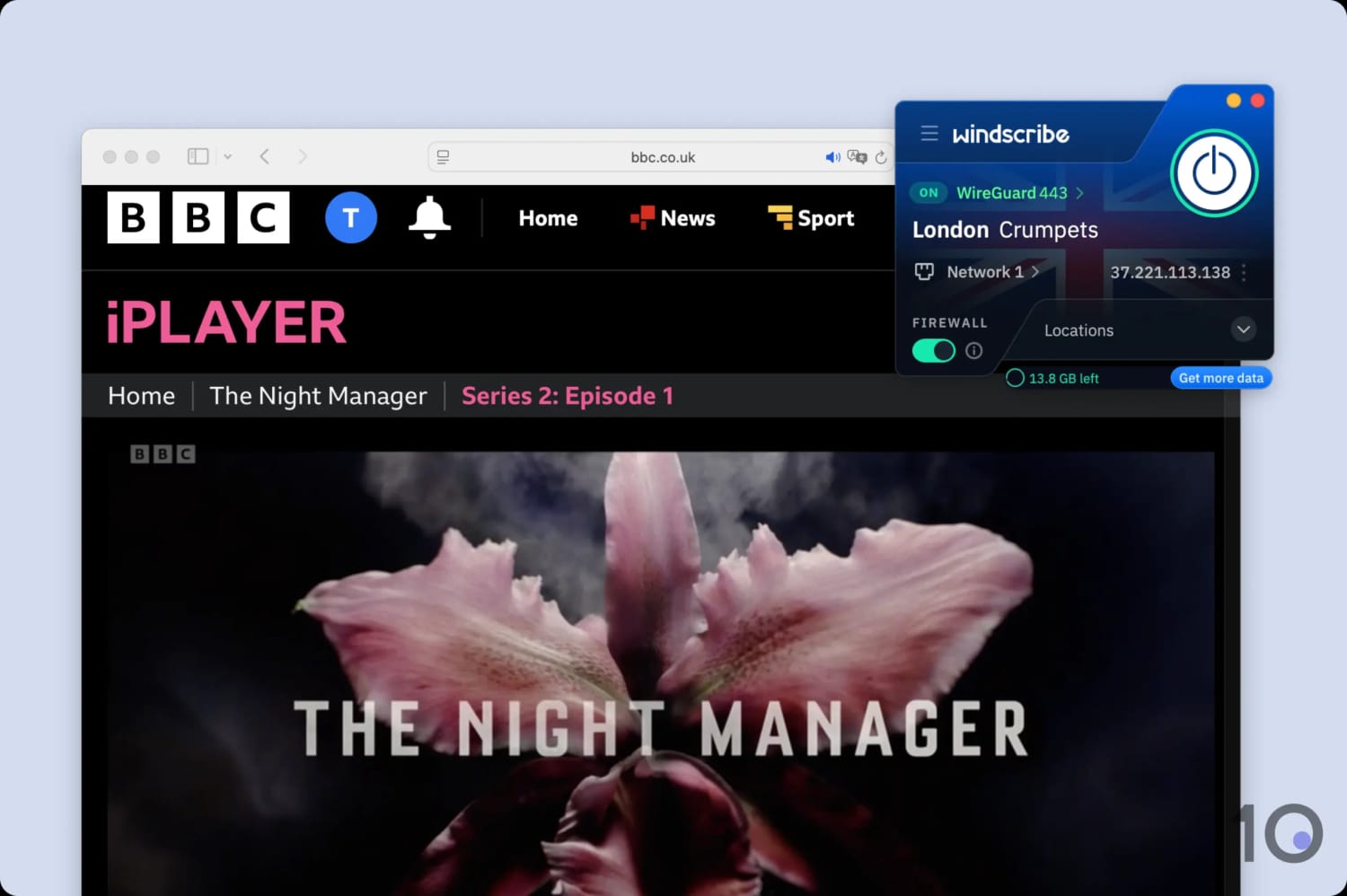
All of Windscribe’s free UK servers worked with BBC iPlayer.
Both versions of the VPN worked with all other UK streaming services we test, including being able to bypass Sky Go’s strict VPN blocks and geo-restrictions.
Speed
We calculated this rating using our proprietary tests of download, upload, and ping speeds across servers in 10 countries.
We calculated this rating using our proprietary tests of download, upload, and ping speeds across servers in 10 countries.
Windscribe Pro VPN's download speeds are fast on nearby connections, but its performance is less impressive when connecting to servers located far away. Both the free and paid versions of the VPN offer sufficient speeds for HD streaming and gaming, but there are faster alternatives available.
We saw download speeds decrease from 100Mbps to 97Mbps connecting to a same-city server. This is a drop of only 3%, which is very fast and among the best results of any VPN we’ve tested. Speeds were very consistent from one test to the next. We didn’t experience any connection drops while connected to Windscribe servers, either.
But, as you can see, Windscribe’s international speeds are slower than its short-distance ones. Despite being ranked as the joint third-fastest VPN for local connections, it falls to the sixteenth position when it comes to international speeds.
We recorded a download speed loss of 20% connecting to South Africa and 16% connecting to Australia.
To put this in context, you can compare Windscribe’s international speeds to other top VPNs in the chart below.
That said, these speeds have improved a lot recently thanks to Windscribe’s addition of the WireGuard protocol. Previously, using OpenVPN, we recorded a 4x slower download speed on the Australia and Japan servers. We hope Windscribe can continue to optimize its app to deliver faster speeds.
EXPERT ADVICE: Windscribe’s fastest servers are labeled with a 10Gbps badge in the app. Connect to these for the best speed performance.
Fast Speeds with the Free Tier
Though impressive for a free VPN, it falls short when compared to the top-performing free VPNs such as Hotspot Shield and Proton VPN. Both VPNs are over 8% faster on local connections. More notably, Hotspot Shield exceeds Windscribe’s international connection speeds by an average of 12%.
Security
We calculated this rating by testing the VPN's security protocols, encryption, leak protection, and kill switch reliability. We also assessed the provider's track record and any past security incidents.
We calculated this rating by testing the VPN's security protocols, encryption, leak protection, and kill switch reliability. We also assessed the provider's track record and any past security incidents.
Windscribe is a safe VPN service, using industry-standard AES-256/ChaCha20 encryption and trusted VPN protocols, like WireGuard. The VPN’s desktop and mobile apps are open-source, allowing public scrutiny to verify their security. While the service experienced a minor security breach in the past, it responded well by commissioning a security audit and increasing transparency.
| Independent Audit | Yes |
|---|---|
| VPN Kill Switch | Yes |
| Leak Protection | Yes |
| OpenVPN (TCP/UDP) | Yes |
|---|---|
| WireGuard | Yes |
| ChaCha20 | Yes |
| AES-256 | Yes |
| Post-Quantum Cryptography | Yes |
Both the free and paid versions of Windscribe allow you to choose between AES-256 encryption (via the OpenVPN protocol) or ChaCha20 (via WireGuard). Either method is secure and industry-backed, but we prefer WireGuard as it offers superior connection speeds.
Using Wireshark, a packet analyzer, we verified that Windscribe securely encrypts web traffic. It concealed our incoming and outgoing data packets:
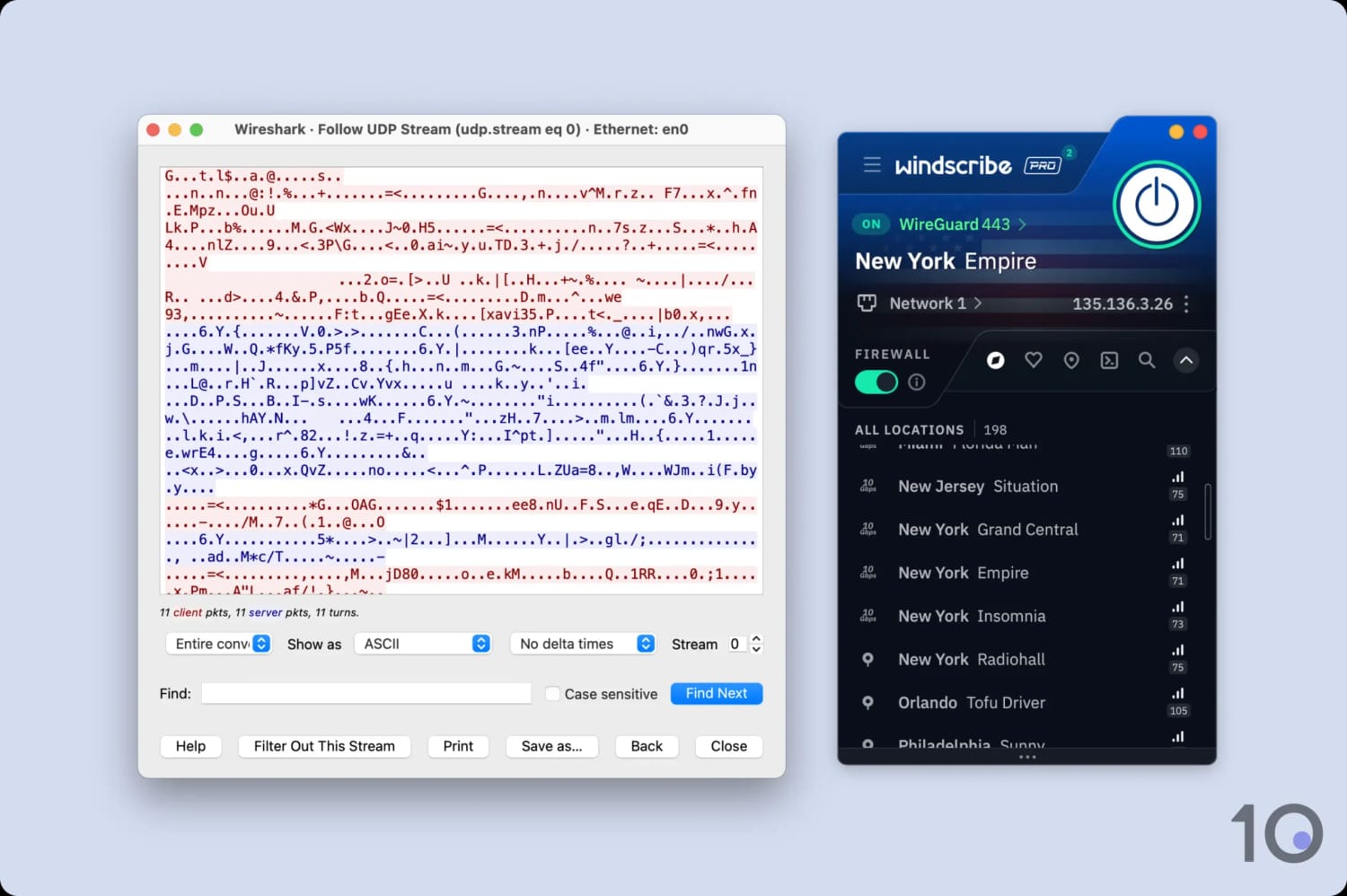
Windscribe securely encrypts network traffic.
Alongside this, the VPN uses SHA512 for authentication during the handshake. We’re pleased to see this, as it offers a higher level of data integrity than the SHA-256 standard used by many other VPNs.
Another standout feature is the “Firewall” setting, exclusive to Windscribe’s desktop apps. Unlike a standard kill switch, which only blocks your internet once it detects a VPN connection drop, the Firewall blocks all connectivity outside of the VPN tunnel. Put simply, your real IP address can never leak, as the Firewall renders it impossible.
The VPN’s apps themselves include two excellent security features on desktop and mobile: open-sourced software, and post-quantum encryption. The former lets anyone inspect the source code behind Windscribe’s apps so any vulnerabilities can be flagged and patched, whereas the latter offers blanket protection from future quantum cyberattacks.
In plain English, Windscribe’s apps are extremely well protected and will remain so in the future.
Unencrypted Ukrainian Servers
Although we rate Windscribe as a highly secure VPN, its security rating is hampered due to a historic server breach.
In June 2021, two of Windscribe’s servers were seized by the Ukrainian government. These servers were unencrypted as Windscribe incorrectly didn’t consider Ukraine a “high sensitivity region”.
However, despite the claims of many other VPN review websites, there is no evidence that Windscribe user traffic was monitored.
For traffic monitoring to be possible, a user had to be connected to Ukraine through a manual configuration file while using OpenVPN and a legacy DNS resolver. It is very unlikely that all of these conditions were met.
Server Locations
We calculated this rating by assessing the number of countries and cities available, their geographic spread, and availability in popular regions.
We calculated this rating by assessing the number of countries and cities available, their geographic spread, and availability in popular regions.
Windscribe Pro has servers in fewer locations than many other top VPNs. Using it, you can connect to 120+ locations in 69 countries. Other options, like Surfshark and PIA, let you get an IP address from up to 31 more countries.
| Continent | Windscribe (Free) Countries with Servers | Windscribe Countries with Servers |
|---|---|---|
| Europe | 7 | 38 |
| Asia | 2 | 14 |
| North America | 2 | 6 |
| South America | 0 | 7 |
| Africa | 0 | 3 |
| Oceania | 0 | 2 |
As you can see, most of Windscribe Pro’s servers are concentrated in Europe. Instead of offering joke locations, like ‘Troll Antarctica’, we’d like to see it add servers in popular locations elsewhere, like Egypt and Pakistan.
That said, the VPN provides city-level choice in 14 different countries — a total surpassed only by ExpressVPN. This allows you to select an IP address in a specific part of the country, rather than being limited to one location or assigned an IP randomly. In particular, we were impressed that Windscribe lets you connect to different cities in Bosnia and Cyprus.
Windscribe’s free service offers IP addresses from far more countries than other highly-rated free VPNs. This is because it has free servers in 10 countries, while rivals like Hide.me and ZoogVPN only cover 7 and 5 respectively.
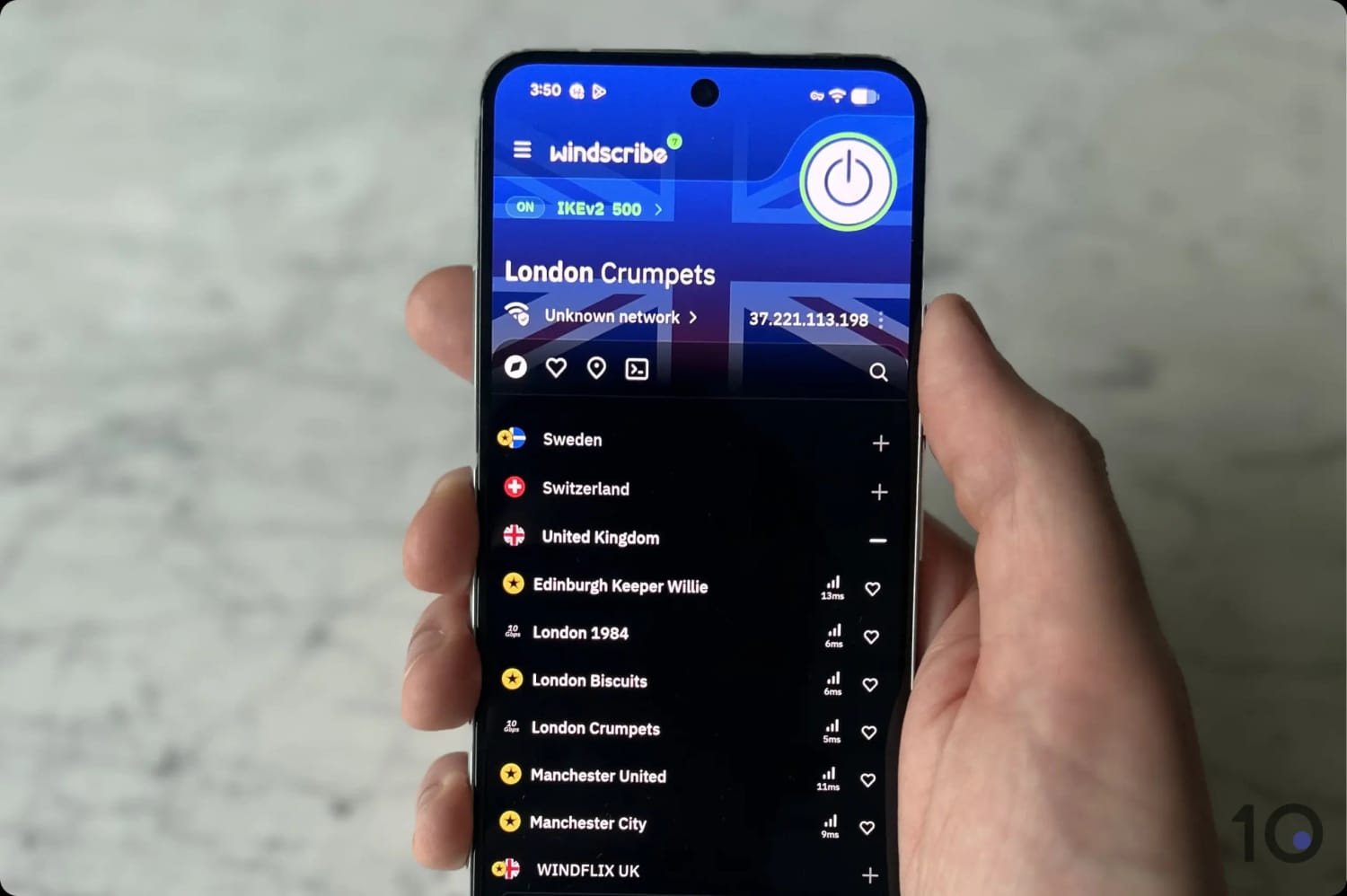
Windscribe has two free UK servers.
Many of these locations, like the UK, are usually behind a paywall. We’re also glad that Windscribe offers free servers in Hong Kong, to give non-paying users a fast choice when connecting from China.
Disappointingly, even after contacting it, Windscribe refused to reveal the total number of individual VPN servers it maintains. It also wouldn’t say how many of its servers are rented, which could mean that Windscribe is entrusting your data to third parties.
The Windscribe website features an excellent page with real-time updates of server status and capacity. This is great when you’re trying to find a quick server or want to troubleshoot a slow connection, but it’d be good to see this added to the Windscribe app instead.
User Experience
We calculated this rating by assessing the VPN’s ease of use, interface design, and setup process across multiple platforms.
We calculated this rating by assessing the VPN’s ease of use, interface design, and setup process across multiple platforms.
Using Windscribe since its launch in 2016, we’ve found its apps to be consistently easy to use and customizable. Its updated UI (March 2022) addressed earlier criticisms of being too basic, making it more visually appealing and informative. However, its app window size and some minor interface issues prevent us from using it on a daily basis.
Interface & Ease of Use
Windscribe’s apps use a consistent design across platforms, which made switching between desktop, mobile, and TV apps straightforward.
Desktop & Laptop (Windows & Mac)
We found Windscribe’s Windows and Mac apps to look and feel identical, which made switching between platforms seamless. Both apps are relatively easy to use. The country search bar made it much easier for us to select the country we wanted to connect to, especially given the number of server options available.
However, the app window was very small compared to other VPNs like ExpressVPN or NordVPN. Some members of our team struggled with the small buttons and in-app text, particularly on lower-resolution monitors.

The desktop apps also offered us plenty of room for customization. We could change the latency display between a performance bar or specific measurement and toggle the app between a window and tray or menu bar. While we preferred the windowed mode, we liked having the choice.
Mobile (iPhone & Android)
We found Windscribe’s iOS and Android apps to be just as easy to use as the desktop clients. The app layout was the same, with a large connect button in the top-right and the server list in the bottom half.
This user-friendly mobile interface is one of the reasons why Windscribe is one of our favorite free VPNs for iPhone and Android.

The app’s network whitelisting feature allowed us to select certain networks for Windscribe not to activate over, like our home network. This was especially useful on mobile, where it’s easy to move between cellular and Wi-Fi networks without noticing.
Unique to mobile, we also found a dark/light mode toggle. However, we were disappointed that it didn’t automatically match our device settings, requiring us to manually change it twice a day.
The app also vibrated our phones when scrolling through lists or clicking buttons, which we found more distracting than useful. Thankfully, we were able to disable this by toggling off the “Haptic Feedback” setting.
Streaming Devices (Fire TV, Apple TV & Android TV)
Windscribe’s approach to its TV app design leaves much to be desired. The oversized text and UI elements feel awkward and unnecessarily clunky on larger screens, detracting from the overall user experience.
Frankly, we hate this design and would appreciate it if they reconsidered this aesthetic direction.

Additionally, the lack of a search bar is particularly frustrating. Manually scrolling through server lists using a remote control is cumbersome and time-consuming, making the app less user-friendly than its competitors.
Day-to-Day Experience
Given its price and excellent performance in other areas, we wish Windscribe was more pleasurable to use from day-to-day.
The app’s attempt at humor through notifications — like references to “Rebecca Black’s Friday” or “Unhinged Updates from Jordan Peterson” — are unfunny, and felt extremely out of place for a paid product.
Plus, when using it as our daily VPN, we were routinely frustrated by the free version’s data cap. Regularly having to open the VPN app to disconnect detracts from the seamless experience many competitors provide.
Even with the paid version, the app feels more like a networking tool rather than an app you want to engage with.
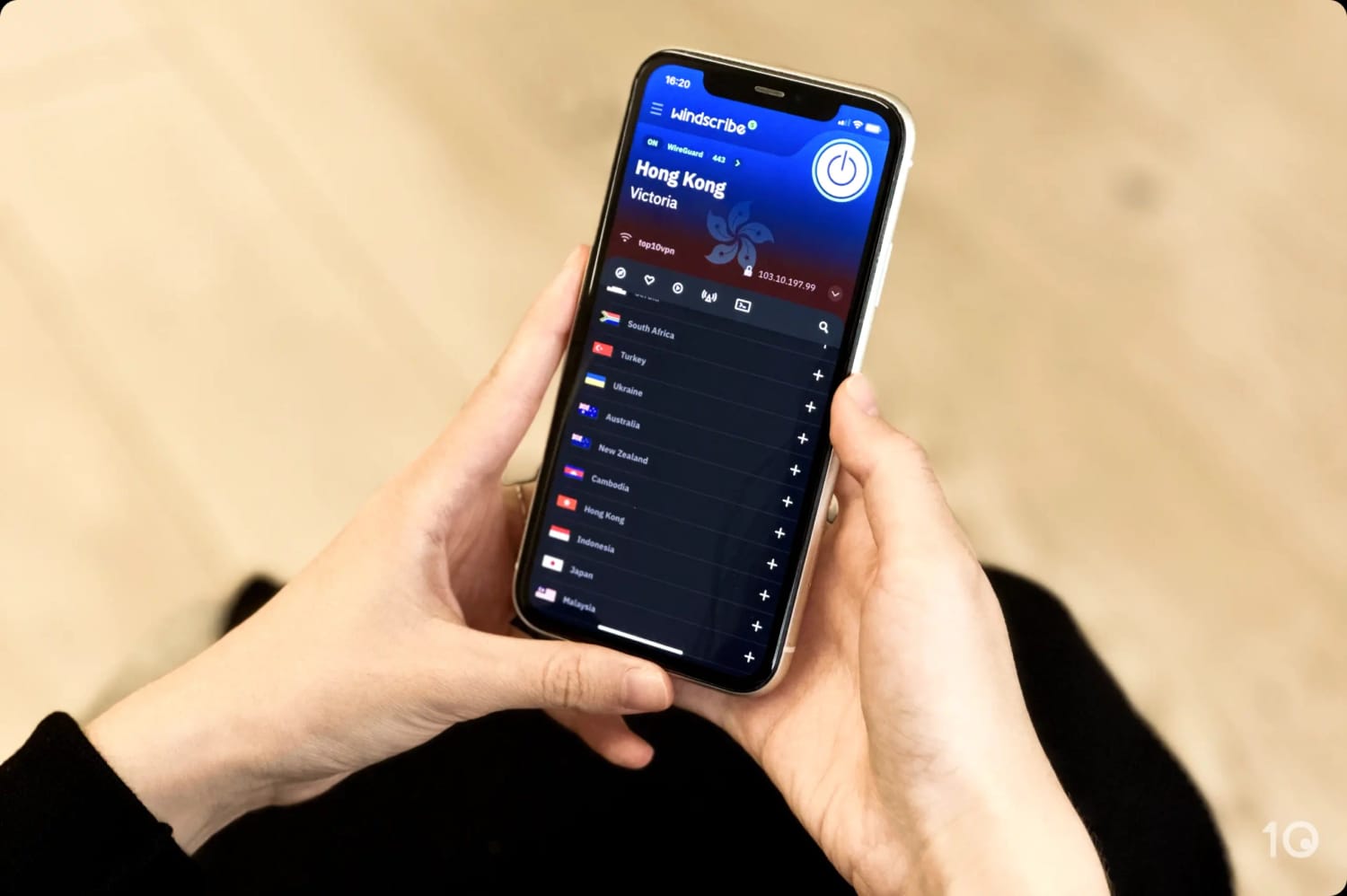
Using Windscribe’s clunky apps every day ended up feeling like a chore.
Using Windscribe on streaming devices or iOS is particularly underwhelming. The apps feel clunky, and some of the design choices seem baffling, adding to the frustration.
In short, unless you really want a specific feature that Windscribe provides, Windscribe is likely to leave you frustrated.
Torrenting
We calculated this rating by assessing the VPN's torrenting features, including P2P servers and port forwarding support. We also evaluated its average bitrate and stance on file-sharing.
We calculated this rating by assessing the VPN's torrenting features, including P2P servers and port forwarding support. We also evaluated its average bitrate and stance on file-sharing.
Windscribe Pro is a safe pair of hands for torrenting. Its apps feature an advanced kill switch to prevent IP leaks, and the provider has never forwarded DMCA requests to users. However, it blocks P2P traffic in 11 countries, several US cities, and on North American residential IPs, while the free version doesn't allow torrenting full stop.
| Torrenting Attribute | Windscribe (Free) | Windscribe |
|---|---|---|
| Permits P2P Traffic | No | Yes |
| Average Download Bitrate | N/A | 7.2MiB/s (28% loss) |
| Countries with P2P Servers | 0 | 58 |
| Port Forwarding | No | Yes |
| Kill Switch | Yes | Yes |
| Logging Policy | No Identifiable Data | No Identifiable Data |
You can trust Windscribe to hide your torrenting activity from your ISP. It doesn’t collect any personally identifiable logs and it encrypts network traffic using ChaCha20. There’s no way for a third party to see the torrent files you’re downloading.
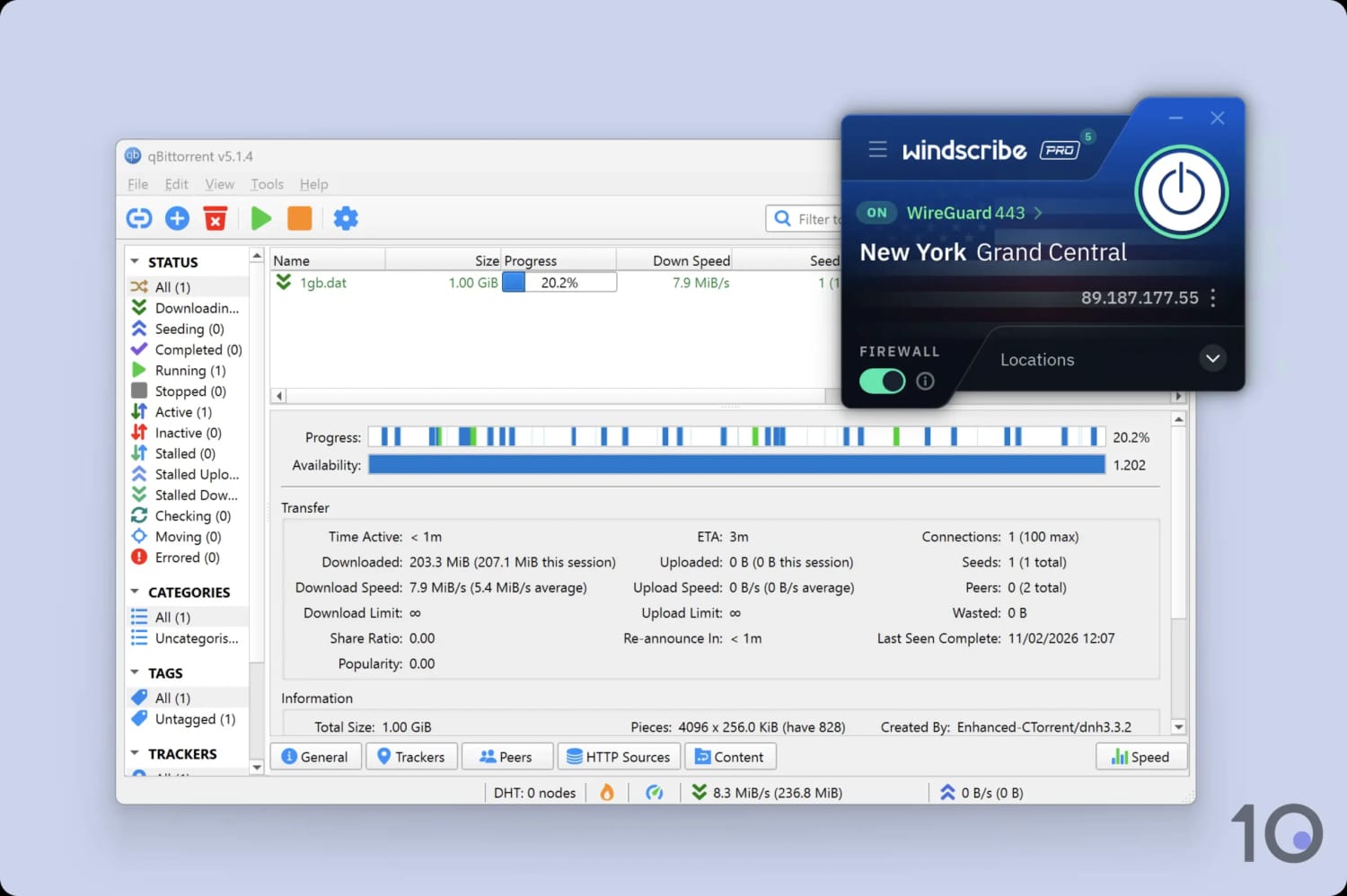
You can only use the paid version of Windscribe for torrenting.
While undoubtedly secure, we’re disappointed to see Windscribe reinstate its previous policy of blocking torrenting traffic in certain locations. This includes the following 11 countries:
- Albania
- Bosnia
- Cyprus
- India
- Indonesia
- Lithuania
- Philippines
- Russia
- South Africa
- South Korea
- Thailand
The situation is far worse for the free version, since it no longer supports torrenting on any of its servers.
Although Windscribe Pro supports port forwarding, we found that its torrenting speeds are slower than other top VPNs.
It’s also complicated to set up port forwarding using Windscribe. You’ll have to configure it using its website, which took us more than 10 minutes from start to finish. With other VPNs, like Proton VPN, it took just a few seconds by ticking a checkbox in the app.
Here’s how long it took to download a 20GB torrent file with the paid version of Windscribe compared to other VPNs:
| VPN Service | Download Bitrate | Time to Download 20GB Torrent File |
|---|---|---|
| No VPN | 10MiB/s | 32 minutes |
| Windscribe Pro | 7.2MiB/s | 44 minutes |
| ExpressVPN | 9.8MiB/s | 33 minutes |
| Private Internet Access | 9.6MiB/s | 34 minutes |
Device Compatibility
We calculated this rating by evaluating the VPN's support for various devices. We considered dedicated apps, browser extensions, Smart DNS functionality, and router compatibility.
We calculated this rating by evaluating the VPN's support for various devices. We considered dedicated apps, browser extensions, Smart DNS functionality, and router compatibility.
Windscribe can be installed on a wide range of devices, including iOS, Android, PC, and Mac. Though we wish its Smart DNS feature was included in the VPN subscription, the VPN itself can be installed onto a router, to use with smart devices or games consoles. Windscribe also allows unlimited simultaneous connections, which is a rare feature.
| Windows | Yes |
|---|---|
| Mac | Yes |
| iOS | Yes |
| Android | Yes |
| Linux | Yes |
| Amazon Fire TV | Yes |
| Android TV | Yes |
| Apple TV | Yes |
| Router | Yes |
| Chrome | Yes |
| Smart DNS | No |
|---|
Simultaneous Connections: Unlimited
Though the apps are similarly easy to use on each platform, not every feature is available on each app. Here’s a summary of the key differences between Windscribe applications:
Windscribe does offer a separate DNS service called Control D. Though it’s discounted for Windscribe subscribers, it still requires a separate subscription.
We’d like to see it included for free. This would vastly increase the number of devices that Windscribe could work with.
Alternatively, you can use Windscribe’s ‘Secure Hotspot’ feature if you have a Windows computer. This allows you to create a virtual router within the app to share your VPN connection with other devices.
Additional Features
We calculated this rating by evaluating the VPN's extra capabilities beyond the basic VPN service. This includes bypassing censorship, additional tools like malware blockers, and customization options like split tunneling.
We calculated this rating by evaluating the VPN's extra capabilities beyond the basic VPN service. This includes bypassing censorship, additional tools like malware blockers, and customization options like split tunneling.
Windscribe provides a lot of additional functionality beyond the standard VPN. It’s one of the most reliable VPNs for bypassing censorship in countries like China, it spoofs GPS location, and its paid app includes one of the most effective ad and tracker blockers we’ve used.
| Additional Feature | Windscribe (Free) | Windscribe |
|---|---|---|
| Split Tunneling | Yes | Yes |
| VPN Obfuscation | Yes | Yes |
| Multi-Hop Servers | Yes (requires browser extension) | Yes (requires browser extension) |
| Dedicated IP | No | Yes (additional fee) |
| Ad Blocker | Yes (requires browser extension) | Yes |
| GPS Spoofer | Yes | Yes |
Stealth VPN Feature Works in China & Russia
Many VPNs for China, including Windscribe, counter web censorship by employing obfuscation technologies that make it harder for censors to identify VPN traffic.
Windscribe uses a “Stealth protocol” to avoid detection by the censors. This protocol uses the open-source Stunnel algorithm to route your OpenVPN traffic through an additional TLS tunnel. In short, this conceals the fact you are using a VPN.
For the best possible results, first enable the Stealth protocol and then toggle on “Circumvent Censorship” in the app settings.
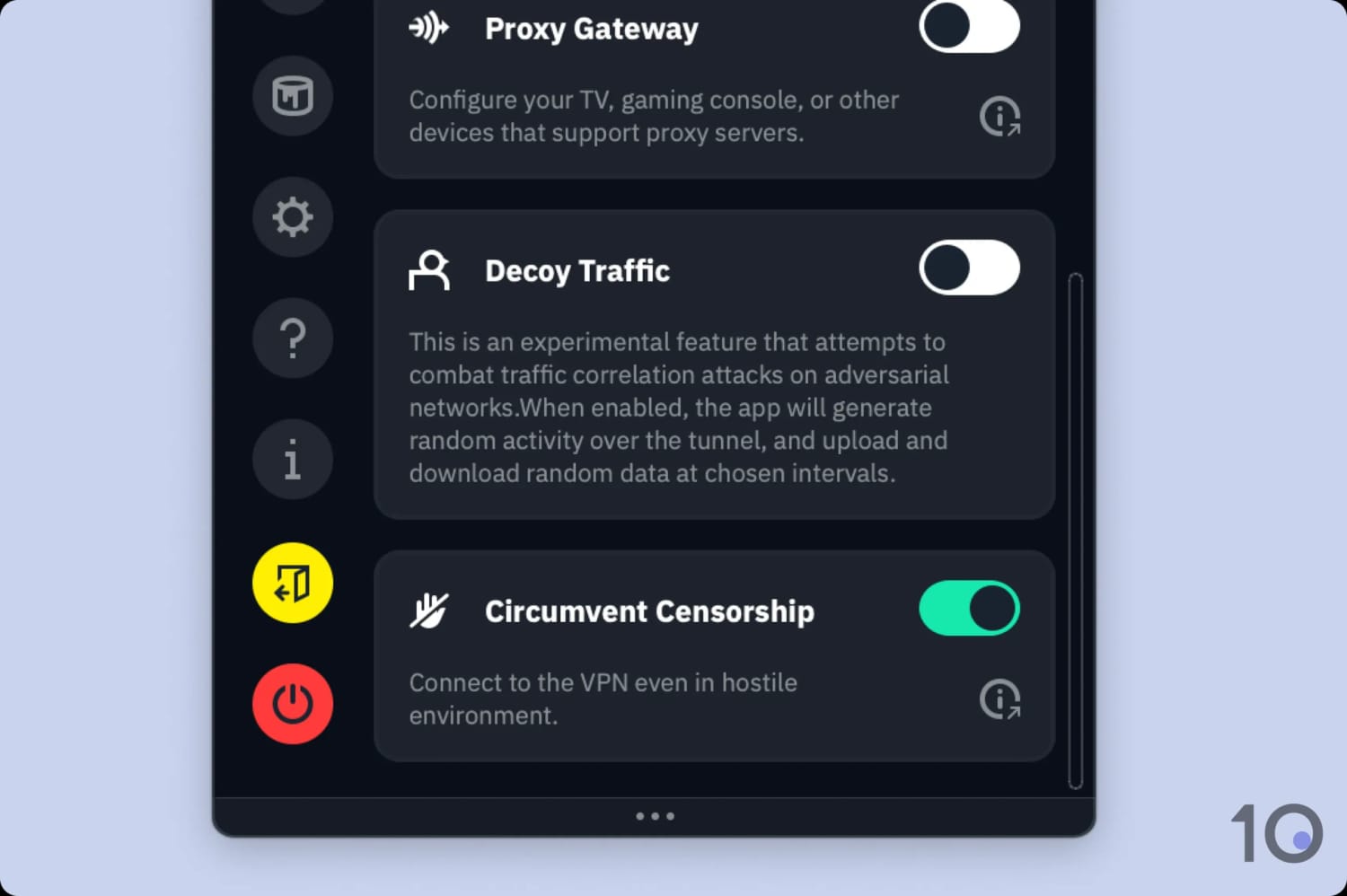
It takes seconds to activate the anti-censorship mode.
We’ve seen it working first-hand in China, using our test server in Shanghai. Windscribe bypassed China’s firewall 82% of the time over the past year. Even many top VPNs, like NordVPN, can’t match that uptime.
Moreover, Windscribe’s free software also worked in China by connecting to the Hong Kong > Victoria server.
Static & Residential IP Addresses
With Windscribe, you can get a static IP address from 13 different locations. A static IP connects you to the same IP address every time you connect. This comes with a few benefits like reducing the chance of websites blacklisting your IP.
Windscribe is one of only a few VPNs that offer a residential IP address. Although this costs an extra $96.00 per year, the US residential IP we purchased has always worked for streaming over years of testing.
Effectively Blocks Many Ads & Trackers
“ROBERT” is Windscribe’s ad and malware blocker. It’s a DNS-level malware and ad blocker integrated into the VPN apps.
ROBERT performed exceptionally well in our tests. According to our data, it blocked 80% of ads and 100% of analytic trackers. Using it, we bypassed ads on many popular websites, including YouTube and Google.
The only other VPNs that blocked more ads were IVPN and TunnelBear, but these are far inferior to Windscribe overall.

Though great, we’d like to see Windscribe include its ad and malware blocker on its free app as well. As it stands, you have to download a separate browser extension, which makes it less user-friendly and incompatible with mobile devices.
Well-Made Split Tunneling Tool
Available on desktop and Android, Windscribe’s split tunneling feature lets you customize which apps and IP addresses enter the VPN tunnel.
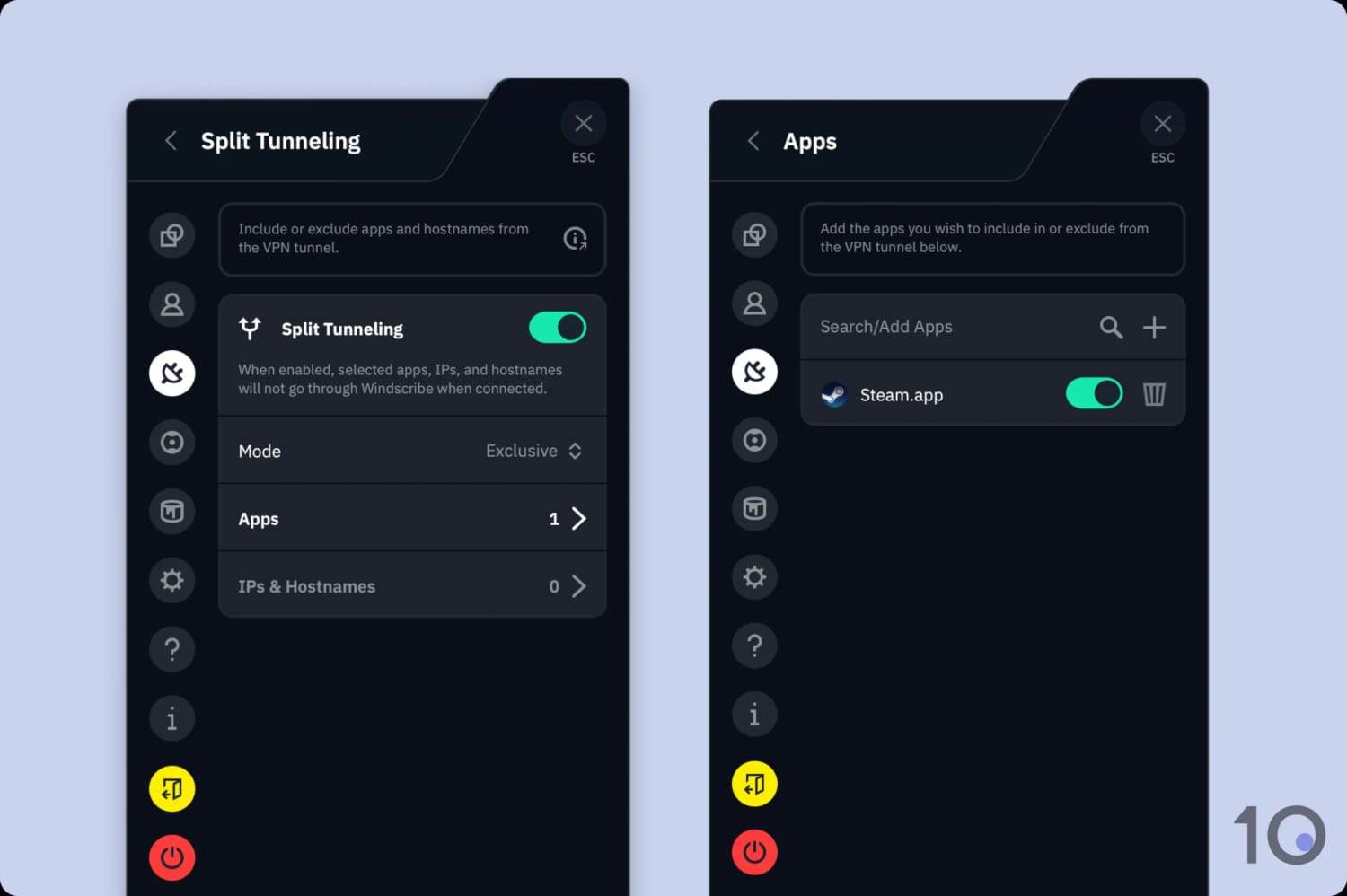
To reduce ping, we used split tunneling to bypass the VPN for Steam.
It’s so simple to do, you just need to activate it in your in-app settings and select if you want to include or exclude the targeted app. We suggest using the “Exclusive” mode as it ensures everything is kept protected aside from whatever you specify as not needing encryption.
GPS Spoofing Bypasses Strictest Geo-Blocks
The VPN includes a GPS spoofing feature to bypass geo-blocks that detect your location based on your device’s GPS. This worked well to stream out-of-market NFL games and for bypassing NBA blackouts, but is only available on the Android app and desktop browser extensions.
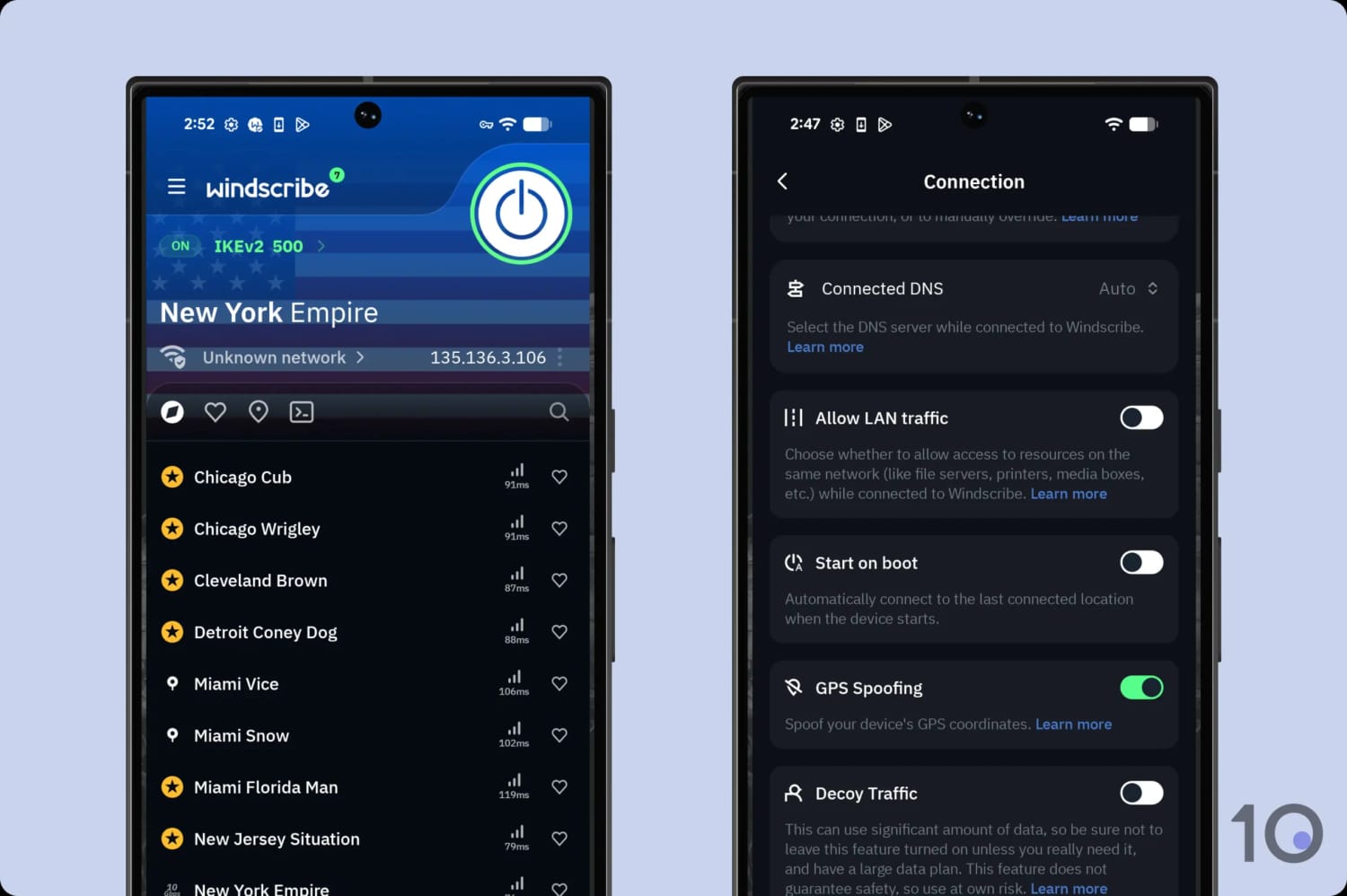
You need to activate developer mode to use the GPS tool on Android.
Apart from Surfshark, Windscribe is the only VPN to support this useful workaround.
Windscribe (Free) Key Data
| Attribute | Windscribe | Typical Free VPN |
|---|---|---|
| Owner | Windscribe Limited (Independent) | Independent |
| Launch Date | 2016 | 2015 |
| Safe to Use | Yes | No |
| Data Cap | 10GB per month | 10GB per month |
| Payment Details Required | No | No |
| Account Required | Yes | Yes |
| Contains Ads | No | Yes |
| Local Download Speed | 91Mbps (9% loss) | 61Mbps (39% loss) |
| International Download Speed | 87Mbps (13% loss) | 55Mbps (45% loss) |
| Countries with Servers | 10 | 4 |
| Privacy Policy | No Identifiable Data | Identifiable Data |
| Simultaneous Connections | Unlimited | 1 |
| Manually Select Server Location | Yes | Yes |
| Netflix Libraries | 5 | 0 |
| Torrenting | No | No |
| Works In China? | Yes | No |
| Customer Support | Email & Online Resources Only | Online Resources |
| Apps & Extensions |           | |
Windscribe Key Data
| Attribute | Windscribe | Typical VPN |
|---|---|---|
| Local Download Speed | 97Mbps (3% loss) | 89Mbps (11% loss) |
| International Download Speed | 86Mbps (14% loss) | 80Mbps (20% loss) |
| Countries with Servers | 69 | 40 |
| Privacy Policy | No Identifiable Data | Identifiable Data |
| Simultaneous Connections | Unlimited | 10 |
| Netflix Libraries | 32 | 3 |
| Torrenting | Yes | Yes |
| Works In China? | Yes | No |
| Cheapest Price | $5.75/mo over 12 months | $3.87/mo over 24 months |
| Customer Support | Email & Online Resources Only | |
| Apps & Extensions | | |