



The Bottom Line
Astrill VPN specializes in bypassing internet censorship in regions like China and, to a lesser extent, anonymous torrenting. Outside of these two niches, it’s a distinctly average VPN with one of the steepest price tags on the market. While we recommend it for those living in, or traveling to, heavily censored countries, it should be avoided by beginners.
7.8/10 5.0/10 8.3/10 8.3/10 6.2/10 9.2/10 7.8/10 4.5/10 7.2/10
- 100% reliability in China, the UAE & Turkey
- OpenVPN, WireGuard & custom protocols
- Extra features like ad blocker, leak protection and kill switch
- Servers optimized for torrenting
- Works with US Netflix
- Most expensive VPN we review & no refunds
- Slower than other popular VPNs
- Doesn’t unblock HBO Max, Amazon Prime, or Disney+
- No transparency reports, warrant canary, or audit
- Smaller server network than competitors
- No web browser extensions or mobile kill switch
Founded in 2009, Astrill VPN is one of the longest-running VPN services available. It’s owned and maintained by Veloxee Corp, and its development team is headed by cryptographers. While all of this builds trust, the VPN remains without an audit or real-world proof of its logging policy.
Astrill is the most expensive VPN on the market, but it’s also indisputably the best VPN for bypassing strict censorship and website blocks. In our opinion, it’s only worth the price if you need to regularly bypass web censorship.
We regularly test the VPN using our server in China, and its StealthVPN protocol continues to bypass the Great Firewall of China on every attempt.
It’s also good for hiding torrenting activity from your ISP. The VPN has P2P-optimized servers and fast download bitrate. We were able to download a 10GB torrent file in just 32 minutes — the fastest of any VPN we’ve tested.
There is no doubt that Astrill intentionally focuses on these use cases, since it performs poorly elsewhere. It doesn’t unblock anywhere near as many streaming services as its competitors, and we were frequently limited to a 720p video quality.
Its desktop apps are difficult to use for beginners, and many of its advanced features require an extra subscription in addition to an already high price tag. Conversely, PIA includes many of the same extra features, but it’s part of its regular subscription package, and it’s a fraction of the price.
🔄 Recent Updates
We’ve updated our Astrill VPN review with new insights into its hidden iOS kill switch and complicated split tunneling feature. We’ve also re-evaluated its server network against recent competitor expansions and included new images of its VPN apps in action.
Pricing Plans
$$$$| 1 month | $30.00 |
|---|---|
| 12 months | $180.00 ($15.00/mo) |
| 2 years | $300.00 ($12.50/mo) |
Free Trial Options
| Money-Back Guarantee | No |
|---|---|
| Free Trial | No |
| 100% Free Plan | No |
Privacy
We calculated this rating by examining the VPN's logging policy, jurisdiction, ownership, and privacy features. We also evaluated its history of handling user data and responding to legal requests.
Ranked #19 out of 61 VPNs for Privacy
In our view, Astrill is a private VPN service with several areas for improvement. It temporarily logs some identifying data, like your IP address, though this information is permanently deleted upon disconnection. While the VPN's use of diskless RAM servers makes logging extremely difficult, we'd like to see its privacy policy verified by a real-world event, like a server seizure, or at the very least, a third-party audit.
| Originating IP Address | Yes |
|---|---|
| Browsing Activity | No |
| Individual Connection Timestamps | Yes |
| Date of Last Connection | No |
| VPN Server IP | No |
| Device Information | Yes |
| Individual Bandwidth Usage | Yes |
| Account Information | Yes |
| Jurisdiction | Liechtenstein |
|---|---|
| Privacy Policy | Identifiable Data |
| Transparency Reports | No |
| Diskless Servers | No |
| Anonymous Payment Options | Yes |
You can read Astrill's full privacy policy on its website.
While IP logging normally sounds the death knell for a VPN’s reputation, Astrill mitigates this by permanently deleting this metadata immediately upon disconnection.
The VPN service claims it tracks IPs to regulate simultaneous connections — a poor excuse when competitors like ExpressVPN and PrivateVPN do the same without logging your IP address.
The VPN also collects your last 20 connection records to help with troubleshooting; this includes: connection time, connection duration, country, device type, and Astrill client version number. While not personally identifiable, this contradicts their “no-logs” claims.
To clear a few things up, it’d be helpful to see the VPN’s claims publicly proven by a real-world event, like a court case. Obviously, Astrill has no control over whether this happens or not, but in the meantime, we’d like to see regular transparency reports, a warrant canary, or a third-party audit.
It’s not all bad, though: the VPN uses a RAM-only server network, which makes it difficult for anyone to log your activity data. This works by running the servers on volatile memory, instead of physical hardware, which wipes your data upon every reboot.
We were also impressed by its support for anonymous payment methods, including cryptocurrencies Bitcoin and Monero.
This isn’t as watertight as Mullvad VPN’s approach of allowing customers to send cash to its office, but it’s still impressive.
Astrill VPN Is Owned by Veloxee Corp
Astrill VPN is currently under the ownership of a corporate entity called Veloxee Corp.
The subsidiary company, Astrill Systems Corp., was built and continues to be run by a team of cryptographers, programmers, and networking engineers.
The company isn’t particularly transparent, but it has serious security credentials: there’s never been a server breach, security leak, or controversy surrounding the company.
Streaming
We calculated this rating by identifying which streaming services the VPN could unblock and measuring how consistently it could access them.
Ranked #17 out of 61 VPNs for Streaming
While Astrill unblocks some streaming services, it's easily detected by the vast majority of services and limits you to a single Netflix library. Worse, its speeds are often too slow for streaming in 4K, and occasionally 1080p — a substantial disadvantage compared to rivals.
| Streaming Service | Works with Astrill |
|---|---|
| BBC iPlayer (UK) | Yes |
| DAZN (Canada) | No |
| Disney+ (UK) | No |
| Hulu (US) | Yes |
| ITVX (UK) | Yes |
| HBO Max (US) | No |
| Netflix (US) | Yes |
| Netflix (UK) | No |
| Prime Video (US) | No |
| Sky Go (UK) | No |
While Astrill takes itself seriously as an anti-censorship tool, it comes at the cost of its streaming capabilities. There’s no mention of streaming across the entirety of its provider’s website and it doesn’t have a Smart DNS proxy.
If this is understandably a deal-breaker, then consider using Surfshark. It’s a streaming powerhouse and much cheaper than Astrill — otherwise, read on.
Back to Astrill, it came as a complete surprise to us when it unblocked the US Netflix library on its first attempt. Combined with its strong long-distance speeds, this makes it a viable (but expensive) option for streaming US Netflix from overseas.
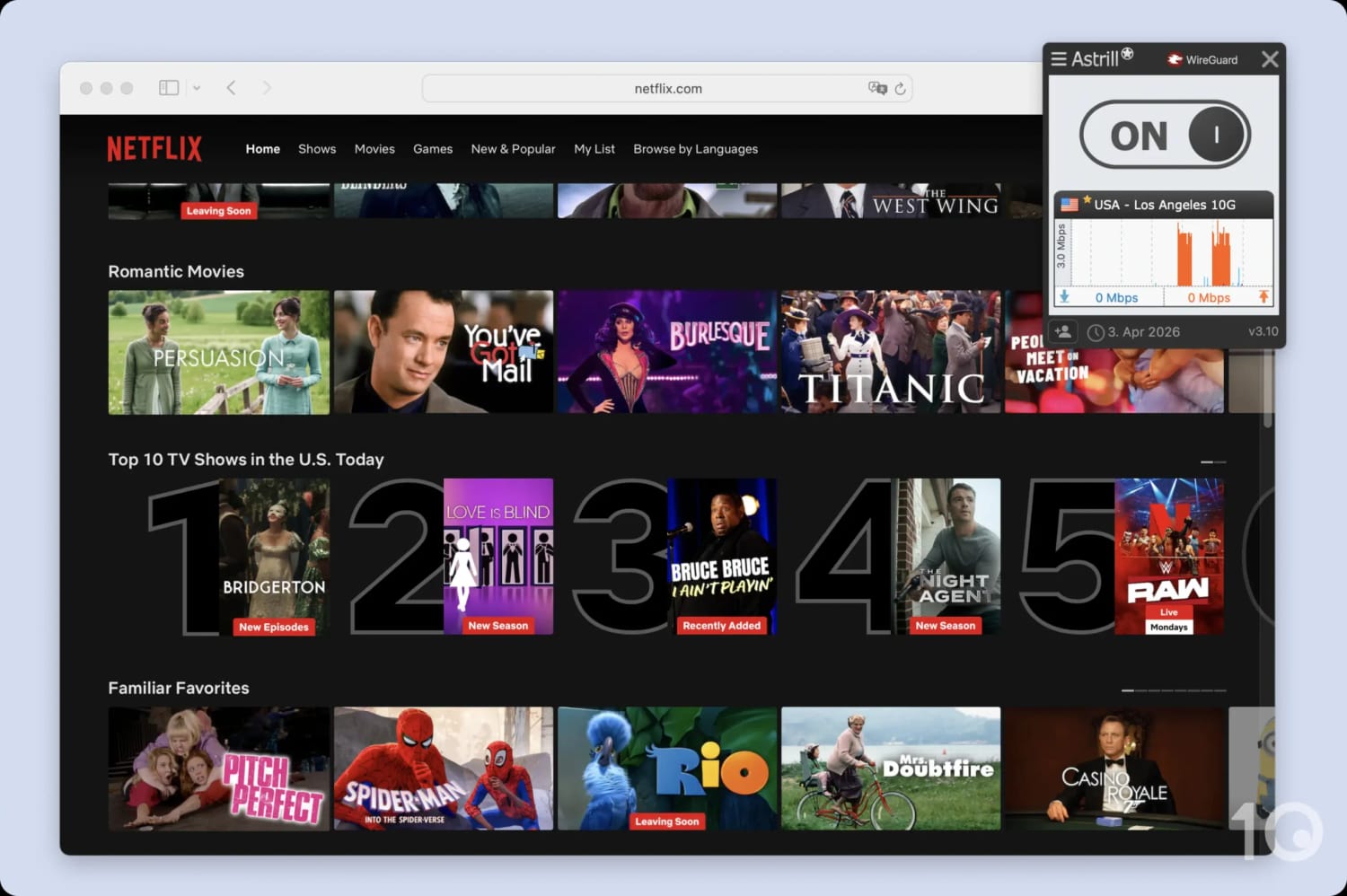
We recommend using one of Astrill’s “10G” server locations for streaming.
The VPN won’t work with any other Netflix region, by design. When we asked its support team why we kept getting US Netflix on its Australian servers, we were told that Netflix is not supported on them and so the traffic is automatically redirected towards the US.
This applies every time you want to access any other library that isn’t the US.
Interestingly, Astrill consistently unblocked Hulu, Peacock, and Paramount+ on all of its US servers. In each instance, our video loaded without any buffering and no discernible change in video quality.
Using its London server location, we streamed BBC iPlayer, Channel 4, and ITVX, but with frequent bouts of blurriness. ITVX, in particular, took a few minutes to load and was too blurry to watch on our iPhone.
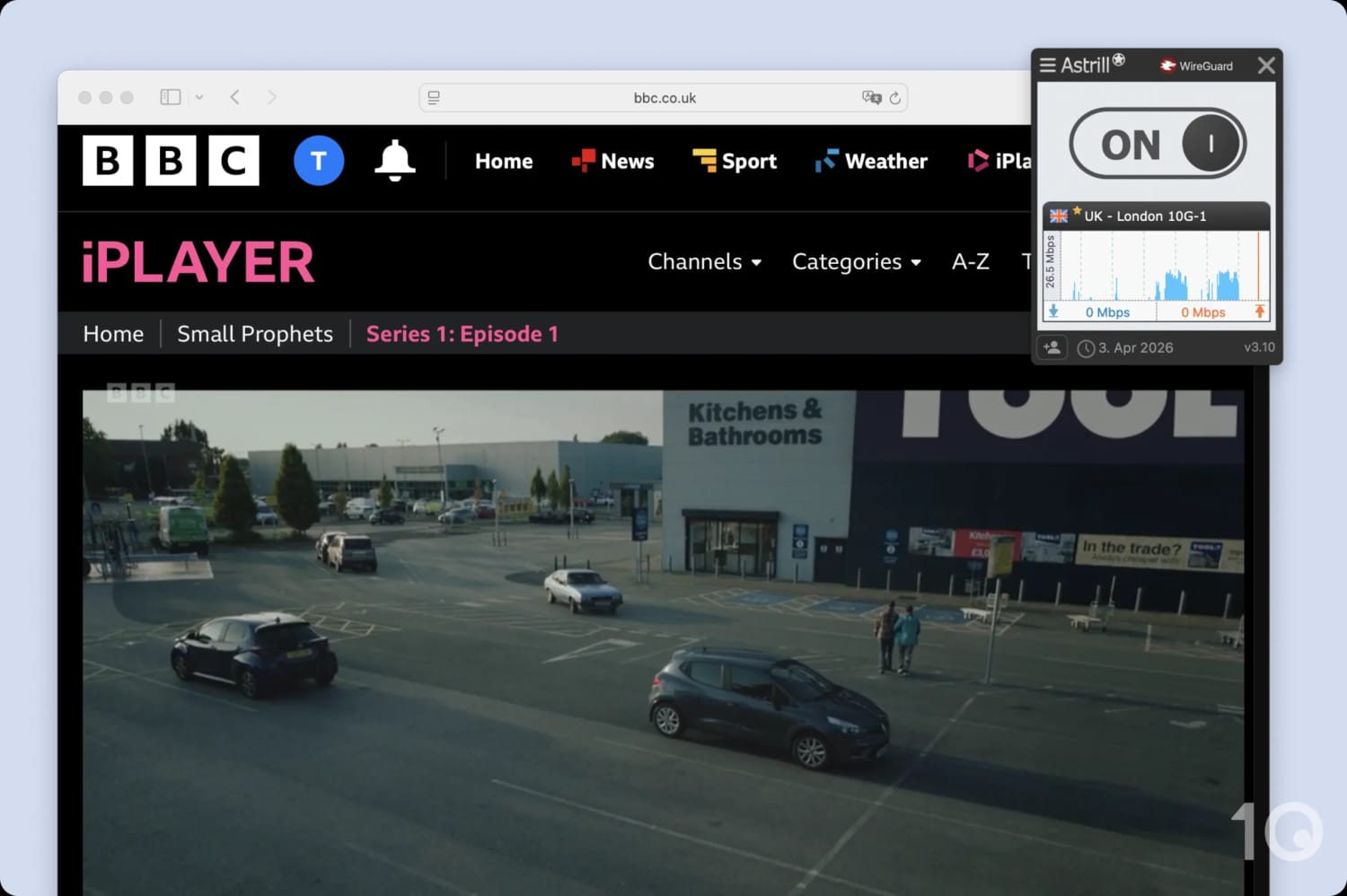
Astrill unblocks BBC iPlayer, but the video quality regularly depreciates.
We suspect this is down to our testing location being further away from the UK than the US.
For every other streaming service that we test, Astrill was hit-and-miss, with more misses than hits. Sometimes it worked to unblock a streaming service on its third or fourth attempt, but most of the time it was simply unable to do so.
Speed
We calculated this rating using our proprietary tests of download, upload, and ping speeds across servers in 10 countries.
Ranked #40 out of 61 VPNs for Speed
Astrill performs well over short-to-medium distances, with our download speed decreasing by just 7% on nearby servers. We had no issues downloading large files, streaming videos, or playing online games. Over longer distances our connection speeds dropped substantially, and our ping was noticeably high across all testing locations. Overall, Astrill is fast, but it's not quite there with the big-names.
EXPERT ADVICE: If OpenVPN, StealthVPN, or WireGuard speeds are slow, try switching your connection to UDP. If this doesn’t work, you can lower the MTU value to 1400 or 1300 via Settings > VPN Options.
Astrill slowed our normal internet speeds by 7% when connected to a nearby server, which means it’s marginally slower than many of the top VPN services we’ve tested. However, its speeds are rarely too slow, and they do not fluctuate unpredictably.
When connecting to countries farther away, Astrill is consistent and quite fast compared to other VPNs of a similar size. It’s unlikely you’ll notice an impact on your day-to-day browsing, but some tasks (like gaming or 4K streaming) may suffer. You can see how Astrill compares to faster rivals below.
One strange quirk we noticed from our testing is that an average speed of 95Mbps when connecting to a server in Canada is actually faster than what we logged when connecting to a nearby server in New York, US.
Security
We calculated this rating by testing the VPN's security protocols, encryption, leak protection, and kill switch reliability. We also assessed the provider's track record and any past security incidents.
Ranked #17 out of 61 VPNs for Security
Astrill VPN is undoubtedly safe to use. It uses the AES-256 encryption cipher with the option of four different tunneling protocols (including OpenVPN and WireGuard), an effective kill switch, and leak protection. However, there is still room for improvement. We would prefer Astrill to make its apps and proprietary protocol open-source, or commission an independent audit of its server security.
| Independent Audit | No |
|---|---|
| VPN Kill Switch | Yes |
| Leak Protection | Yes |
| OpenVPN (TCP/UDP) | Yes |
|---|---|
| Proprietary | Yes |
| WireGuard | Yes |
| ChaCha20 | Yes |
| AES-256 | Yes |
Alongside the open-sourced protocols OpenVPN and WireGuard, Astrill adds two proprietary options: StealthVPN and OpenWeb.
StealthVPN is the VPN’s flagship protocol that wraps your encrypted traffic in an extra layer of obfuscation, which is why it bypasses firewalls so effectively. Meanwhile, OpenWeb is a TCP-based protocol that only tunnels browser traffic, in return for faster speeds.
All four protocols use robust and trusted encryption ciphers in the form of AES-256 (OpenVPN, StealthVPN, and OpenWeb) and ChaCha20 (WireGuard). Using Wireshark, a data packet analyzer, we tested all four configurations and detected no leaks whatsoever.
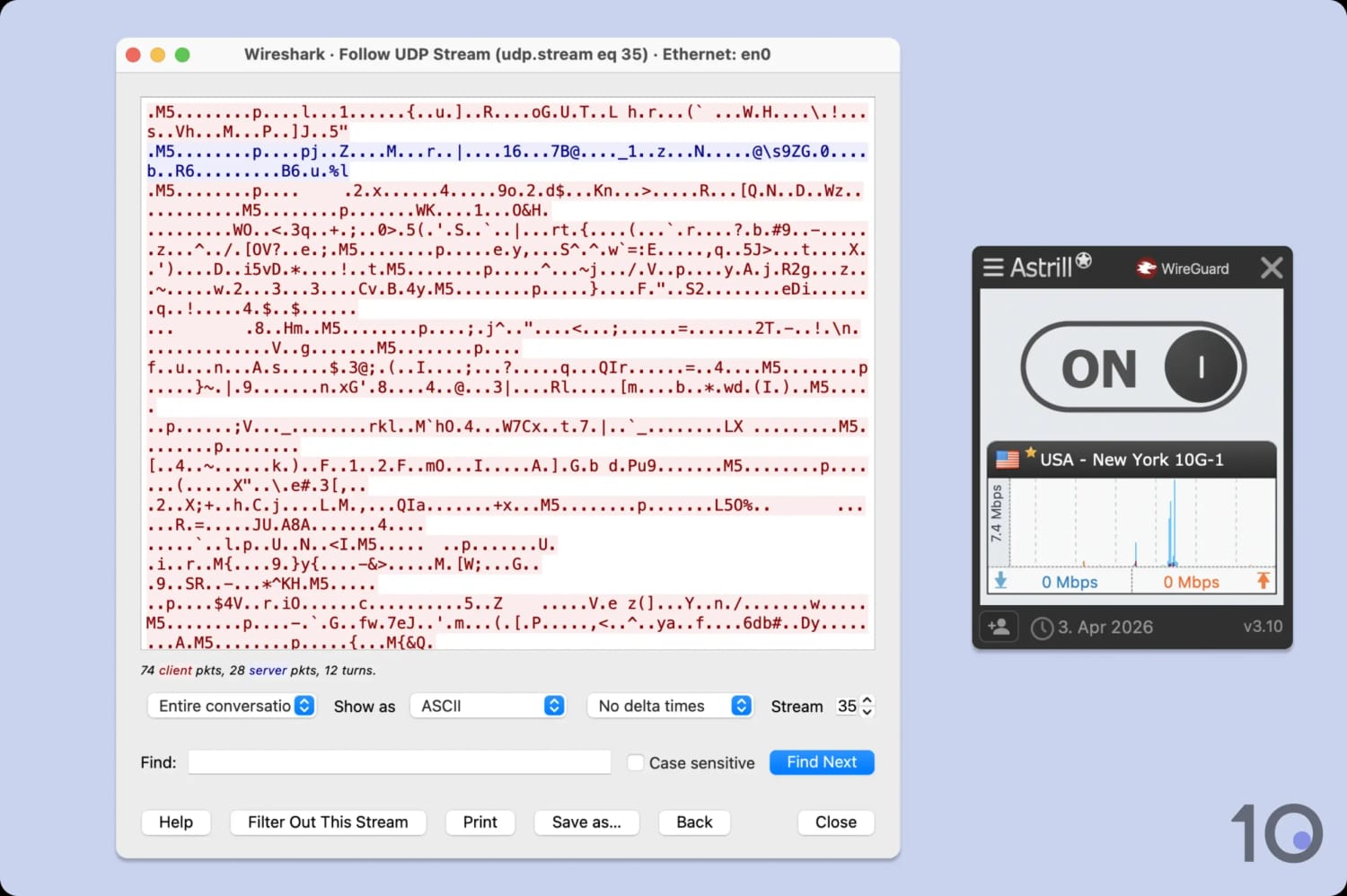
Astrill successfully encrypted our internet traffic.
We also tested its kill switch, which worked to keep our real IP hidden during a sudden VPN disconnection.
But there’s a catch: it doesn’t activate when you manually switch servers, leaving your IP address exposed.
Windows users have a fix: App Guard, Astrill’s enhanced kill switch. It lets you block specific apps from connecting to the internet during any VPN disruption, and it runs even when the desktop app is closed. We recommend enabling it by default.
Although Astrill’s mobile apps lack a visible App Guard or kill switch toggle, a VPN kill switch operates automatically in the background.
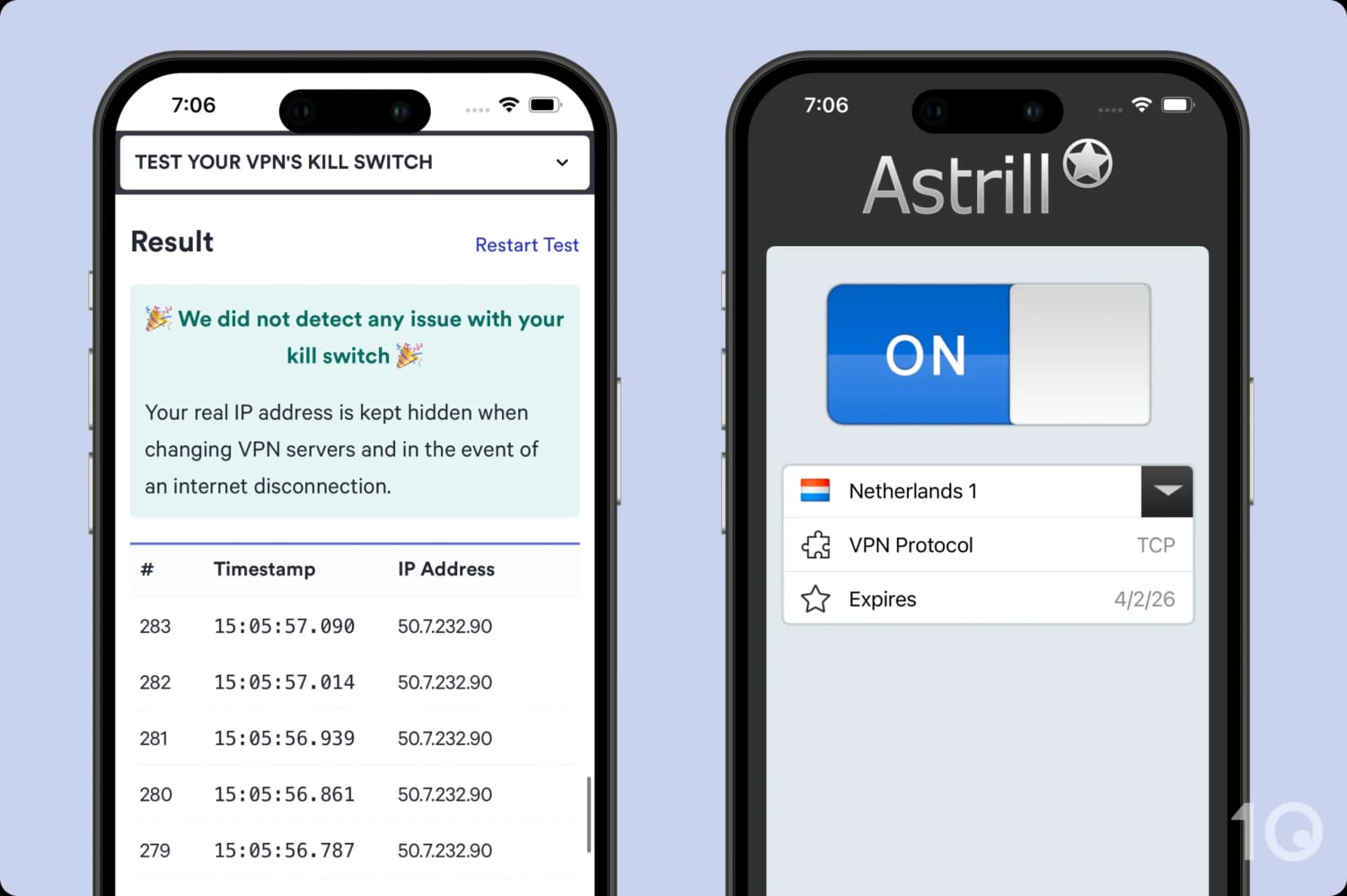
Our custom-built testing tool confirms that Astrill includes a functional kill switch on mobile.
No Audit or Open-Source Code
There’s one thing we can’t overlook: Astrill has never commissioned an independent security audit, and both StealthVPN and OpenWeb remain closed source. You’re being asked to trust a proprietary protocol you can’t verify, which is a harder sell when VPNs like ExpressVPN and Mullvad have made independent audits routine.
We’re not saying Astrill is insecure. The company’s development team is led by cryptographers, and there has never been a documented breach or security incident in 15+ years of operation. But “trust us” isn’t the same as “here’s the proof.”
An audit would eliminate all doubt.
Server Locations
We calculated this rating by assessing the number of countries and cities available, their geographic spread, and availability in popular regions.
Ranked #18 out of 61 VPNs for Server Locations
You can connect to Astrill VPN servers in 57 countries, mostly in Europe and Asia. At 107 not the largest VPN server network, but we have never encountered any congestion problems.
| Continent | Astrill Countries with Servers |
|---|---|
| Europe | 34 |
| Asia | 14 |
| North America | 3 |
| South America | 2 |
| Africa | 2 |
| Oceania | 2 |
Due to its censorship focus, Astrill’s server network prioritizes access over breadth. This is reflected in its high density of server locations surrounding China (e.g. Hong Kong, Japan, and Taiwan), instead of adding more locations to the Americas or Africa.
By sticking to physical, bare-metal servers for maximum security, the VPN avoids the “virtual server” shortcuts used by competitors. You won’t find 100+ countries here, but the servers you connect to are less likely to be compromised and risk exposing your online identity in a heavily censored country.
The raw numbers don’t lie, though: Astrill has servers in 69 fewer countries than Proton VPN and 34 fewer than PIA. Both of these VPNs also have the necessary security measures to mitigate any risk attached to using virtual servers, so there’s no trade-off.
Having said that, Astrill offers more city-level choice than almost any VPN we review. For instance, if you are looking for a US IP address you can connect to 26 different cities across 24 states.
This is incredibly useful if you need to bypass highly localized geo-restrictions, like state-level news broadcasts or regional sports blackouts.
User Experience
We calculated this rating by assessing the VPN’s ease of use, interface design, and setup process across multiple platforms.
Ranked #15 out of 61 VPNs for User Experience
Astrill VPN isn’t visually appealing, but it has created a good balance between technically-advanced desktop apps and lightweight mobile apps. Its desktop apps are nicely consistent across devices, with little to no variation between Windows and macOS versions. Beginners may be put off, but advanced users will appreciate all the options and customization features.
Interface & Ease of Use
Astrill has separate designs for its desktop and mobile apps, with the latter opting for a more minimal and beginner-friendly interface. Following an ‘app redesign contest‘ in 2019, Astrill hasn’t updated its GUI across any of its apps for several years now.
We’ve detailed our user experience with each app in the sections that follow:
Desktop & Laptop (Windows & Mac)
Astrill’s desktop apps are intuitive and simple to use – if you can understand the features on offer.
There is a learning curve but once you understand its proprietary features, and become familiar with the layout of the apps, the user experience becomes far easier on Astrill.

Using the desktop apps, you’ll notice that the settings change based on which protocol you’re using. With four protocols to choose from, this means that there are countless variables to familiarize yourself with.
Astrill has attempted to make its app easier through shortcuts, a hot-key to toggle Astrill on and off, and the ability to restore it to default factory settings.
The apps themselves are stripped-back, prioritizing functionality over aesthetic. Most features are enabled through a toggle or checkbox, and the black and white color palette is as back-to-basics as you can get.
Finding the right server is incredibly easy, too. Servers marked with a yellow star support P2P and port forwarding, you can favorite servers, sort them alphabetically, and find P2P servers by typing an asterisk (*) into the search bar.
While we don’t love the network traffic graph, it’s still a compact and streamlined app that won’t take up too much space on your screen.
The only difference between the Windows and macOS clients is that the former comes with additional Windows-specific leak protections and app guard. This makes Astrill on Windows slightly more advanced, but it’s impressive that the desktop apps are almost exactly identical.
Mobile (iPhone & Android)
Astrill on mobile is extremely functional — essentially a ‘click and protect’ service that is quite different to its Windows and macOS version.

On both apps, there’s a giant toolge for connecting while the bottom two-thirds of the home screen is empty space. While we almost admire the simplicity, it looks awkward and poorly sized.
On Android specifically, the server list doesn’t have a search function and is listed in what appears to be an arbitrary order. US and UK servers are at the top and African nations, such as South Africa and Egypt, are at the bottom, which must be scrolled down to.
This makes it frustrating to find specific server locations, so we’d like Astrill to implement a search function in the future.
Astrill’s iOS client is even more sparse than its Android app. There’s very little to it other than the on/off toggle, a server location drop-down menu, and a button you tap to switch between UDP and TCP.
We personally didn’t find it that obvious that tapping changed the protocol to use. We think a drop-down menu would work better here.
Weirdly, the iOS app’s server list does come with a search function and a favorite toggle, but there are no optimized servers for streaming or torrenting. Supercharged and China optimized servers are present, but this is far removed from the fully-featured desktop apps.
On mobile, Astrill delivers a simple, functional VPN experience. While suitable for quick on/off protection, it lacks the depth and flexibility of the desktop version.
Torrenting
We calculated this rating by assessing the VPN's torrenting features, including P2P servers and port forwarding support. We also evaluated its average bitrate and stance on file-sharing.
Ranked #3 out of 61 VPNs for Torrenting
Astrill comes with port forwarding, a fast average bitrate, and a kill switch. Every server in Astrill’s global network is P2P-optimized and lets you torrent without any limitation. Essentially, it’s a great VPN for torrenting that has all of the security measures you’d need to ensure risk-free P2P downloads.
| Torrenting Attribute | Astrill |
|---|---|
| Permits P2P Traffic | Yes |
| Average Download Bitrate | 10.0MiB/s (0% loss) |
| Countries with P2P Servers | 57 |
| Port Forwarding | Yes |
| Kill Switch | Yes |
| Logging Policy | Identifiable Data |
Astrill VPN is an excellent VPN for torrenting, combining fast speeds with P2P-optimized servers, port forwarding customization, an effective kill switch, and robust security.
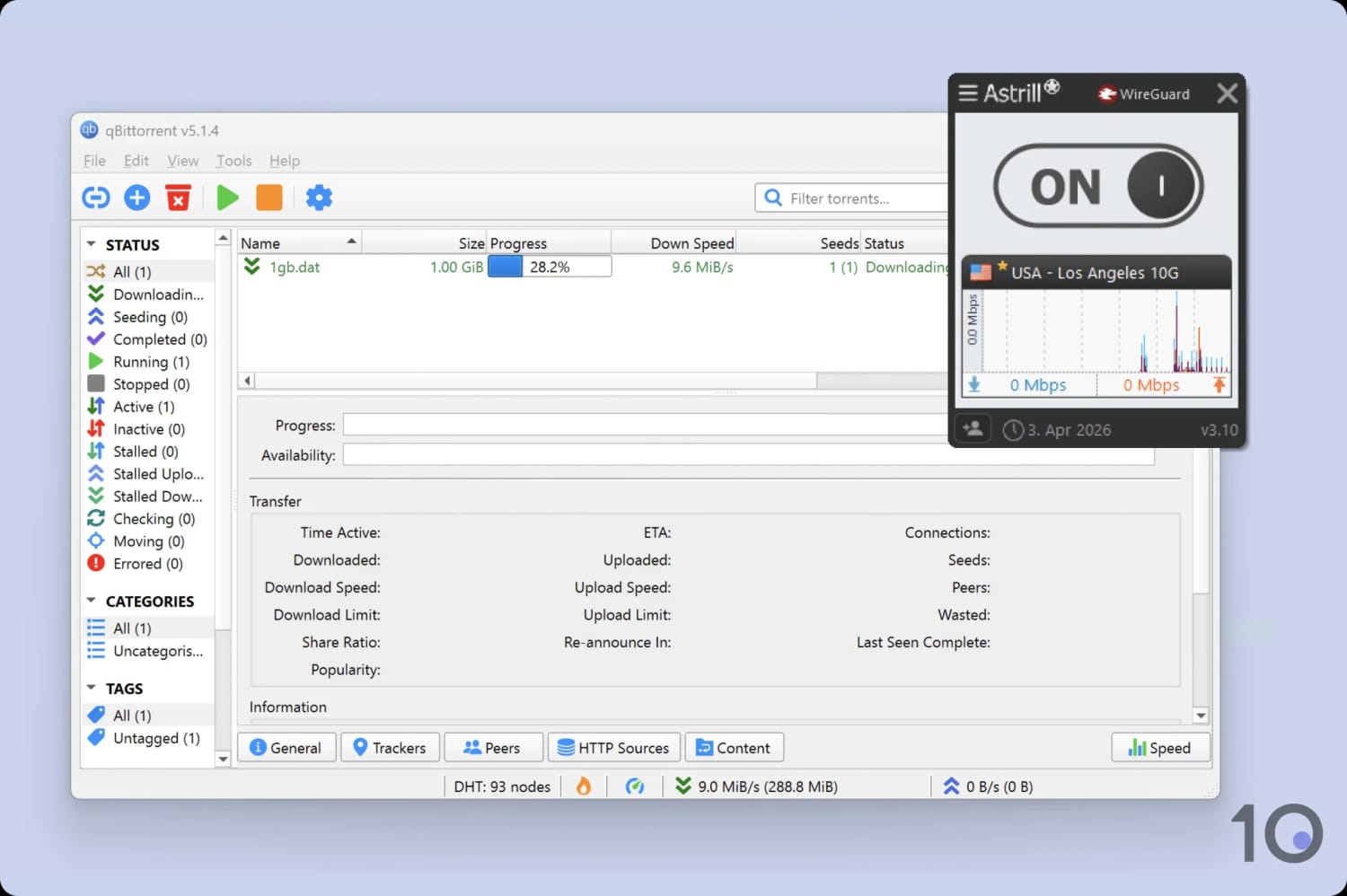
We tested Astrill’s torrenting capabilities on qBittorrent.
Seeders, copyright trolls, trackers, or ISPs won’t be able to see your identity or activity thanks to its AES-256 encryption.
You also won’t experience a leak or accidental exposure of your IP address due to Astrill’s DNS leak blocking feature and a reliable kill switch.
However, we don’t recommend that you torrent with the OpenWeb protocol. You should only use Astrill’s P2P-supported protocols: OpenVPN and WireGuard.
Fast P2P Speeds & Port Forwarding Support
Our testing revealed that Astrill is actually the fastest VPN for torrenting, with an exceptional average bitrate of 10.0MiB/s. This is faster than industry-leading VPN services like ExpressVPN and Surfshark.
Astrill’s excellent speeds are partly enabled by its support for automatic and manual port forwarding. This is enabled in the settings menu, but it will only work with servers that are marked with a star (these are highly-secure servers that are optimized for torrenting).
There’s also a port forward test tool found in the help menu, which allows you to check specific TCP ports. This feature is rare among even top VPN services, like NordVPN and IPVanish.
Astrill works well with torrenting clients like BitTorrent, qBittorrent, and uTorrent. You can configure UDP port forwarding in these clients and enable UDP traffic flow over a secure tunnel.
Device Compatibility
We calculated this rating by evaluating the VPN's support for various devices. We considered dedicated apps, browser extensions, Smart DNS functionality, and router compatibility.
Astrill provides apps for desktop, mobile, and Linux, and that's it. For such an expensive VPN service, we expect a lot more, like native apps for Fire TV, Apple TV, and Android TV. While you can use OpenWeb to protect your browser traffic, it's not the same as lightweight VPN browser extensions.
| Windows | Yes |
|---|---|
| Mac | Yes |
| iOS | Yes |
| Android | Yes |
| Linux | Yes |
| Amazon Fire TV | No |
| Android TV | No |
| Apple TV | No |
| Router | Manual Setup Only |
| Chrome | No |
| Smart DNS | No |
|---|
Simultaneous Connections: 5
Astrill functions in a similar way across each platform, but not every feature is available on each app. Below is a summary of the differences between each Astrill VPN app:
Astrill’s isn’t renowned for its device compatibility, so it isn’t surprising to see such a low simultaneous connection limit. Most paid-for VPNs opt for 10 devices (like ExpressVPN) or unlimited connections (like IPVanish).
To make matters worse, you can’t easily install Astrill on a router to bypass this strict limit. The VPN only supports manual installation, which is substantially harder than using a router app or buying one pre-flashed.
We’re also disappointed by the lack of a dedicated Fire TV Stick app. This isn’t surprising, though, given Astrill’s disinterest in providing a service for entertainment needs. Instead, you’ll have to manually install an .apk file to use the VPN on your Fire TV stick.
Additional Features
We calculated this rating by evaluating the VPN's extra capabilities beyond the basic VPN service. This includes bypassing censorship, additional tools like malware blockers, and customization options like split tunneling.
Astrill has a wide range of additional features. Most impressive is its StealthVPN protocol and OpenWeb protocols, designed to bypass online censorship in countries like China, the UAE, Turkey, and Russia. In China, it has a 100% success rate in the past year unblocking websites like YouTube and Instagram. It’s also got dedicated IP addresses, an ad blocker, and split tunneling.
| Additional Feature | Astrill |
|---|---|
| Split Tunneling | Yes |
| VPN Obfuscation | Yes |
| Multi-Hop Servers | Yes (additional fee) |
| Dedicated IP | Yes (additional fee) |
| Ad Blocker | Yes |
| Tor Over VPN Servers | Yes |
| DNS Server Customization | Yes |
Advanced Features Vary by Subscription
Astrill has more additional technical features than most VPN services, but their availability depends on your pricing plan.
You’ll need to purchase Astrill VIP to access the full suite of Astrill’s advanced features, which costs $10.00 a month extra.
Here’s a summary of how Astrill and Astrill VIP’s technical features differ:
| Feature | Description | Astrill | Astrill VIP |
|---|---|---|---|
| Onion Over VPN | Opening any .onion website in your regular browser automatically routers your traffic to the Tor network via the VPN tunnel. | Enabled on all servers by default | Enabled on all servers by default |
| DNS Server Customization | Allows you to choose between the default Astrill DNS servers, Google DNS, CloudFlare DNS, and more. | Available (Desktop only) | Available (Desktop only) |
| Multi-Hop Servers | Routes your traffic through two VPN servers instead of one, for increased anonymity. | No | Yes |
| VIP Servers | VPN servers optimized for fast speed and reduced latency, aimed at gamers and users in Asia. Capped by a monthly data limit. | No | Yes |
In addition to either plan, you can purchase a dedicated VPN IP address for an extra fee of $5.00 per month. This is a VPN IP address that only you can connect to and use. This allows for secure remote access and complete agency over your IP address.
Unlike other VPN services, Astrill automatically forwards ports to your dedicated IP, so all VOIP and P2P applications will work without additional configuration.
Astrill VPN Reliably Works in China
In the video below, we use Astrill to unblock censored websites in China:
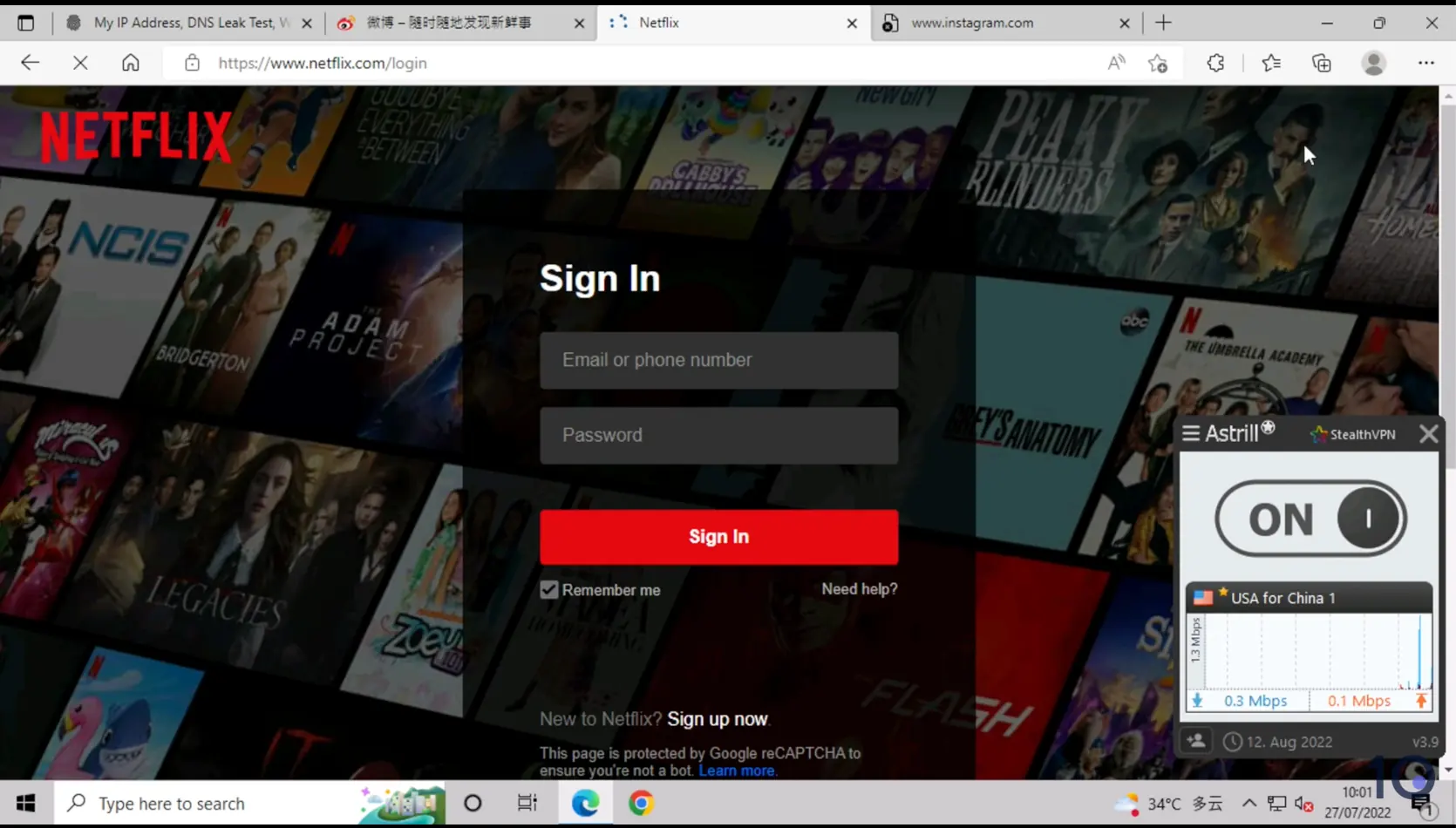
In our tests, Astrill unblocked Netflix and Instagram in China.
Without a doubt, Astrill is the number one VPN for China and other highly-censored countries thanks to its self-developed anti-censorship tools.
In our experience, StealthVPN works best for bypassing firewalls to access blocked websites in China. Annoyingly, it isn’t available on iOS, so we recommend installing ExpressVPN on your iPhone or iPad if you plan to use either.
Astrill has another feature called Smart Mode, a specialized split tunneling tool available only on the OpenWeb protocol, and only in China.
Smart Mode uses regional IP addresses to evade censors, while secretly tunneling and unblocking international platforms. We used it ourselves to access messaging apps, like WhatsApp, and streaming services, like YouTube.
While StealthVPN is better for accessing the Global internet, and Smart Mode for browsing on local sites within China, both work well for bypassing internet shutdowns.
In tandem with these features, Astrill offers specially-optimized SuperCharged servers, sometimes called China-optimized servers.
These are designed to maximize speeds and lower latency for users in China. There are also nearby servers in Hong Kong, Japan, and South Korea, which means you can evade censorship and retain optimal speeds at the same time.
Here’s how Astrill’s reliability in China compares with other top VPNs:
| VPN Service | % Reliability (12 Months) |
|---|---|
| Astrill VPN | 100% |
| ExpressVPN | 64% |
| Windscribe | 85% |
| Surfshark | 35% |
Clunky Split Tunneling Implementation
As is typical of Astrill VPN, its split tunneling is highly advanced but poorly implemented.
Split tunneling is a common VPN feature that lets you control which apps enter or do not enter the VPN tunnel. Some VPNs, like PIA, let you go further and customize the connection rules by apps, IP addresses, and websites.
Astrill provides the same level of granularity, but divides it into two separate features: app filter and site filter.
Though a small nitpick, we’d prefer to see these two features combined into one tool for convenience.
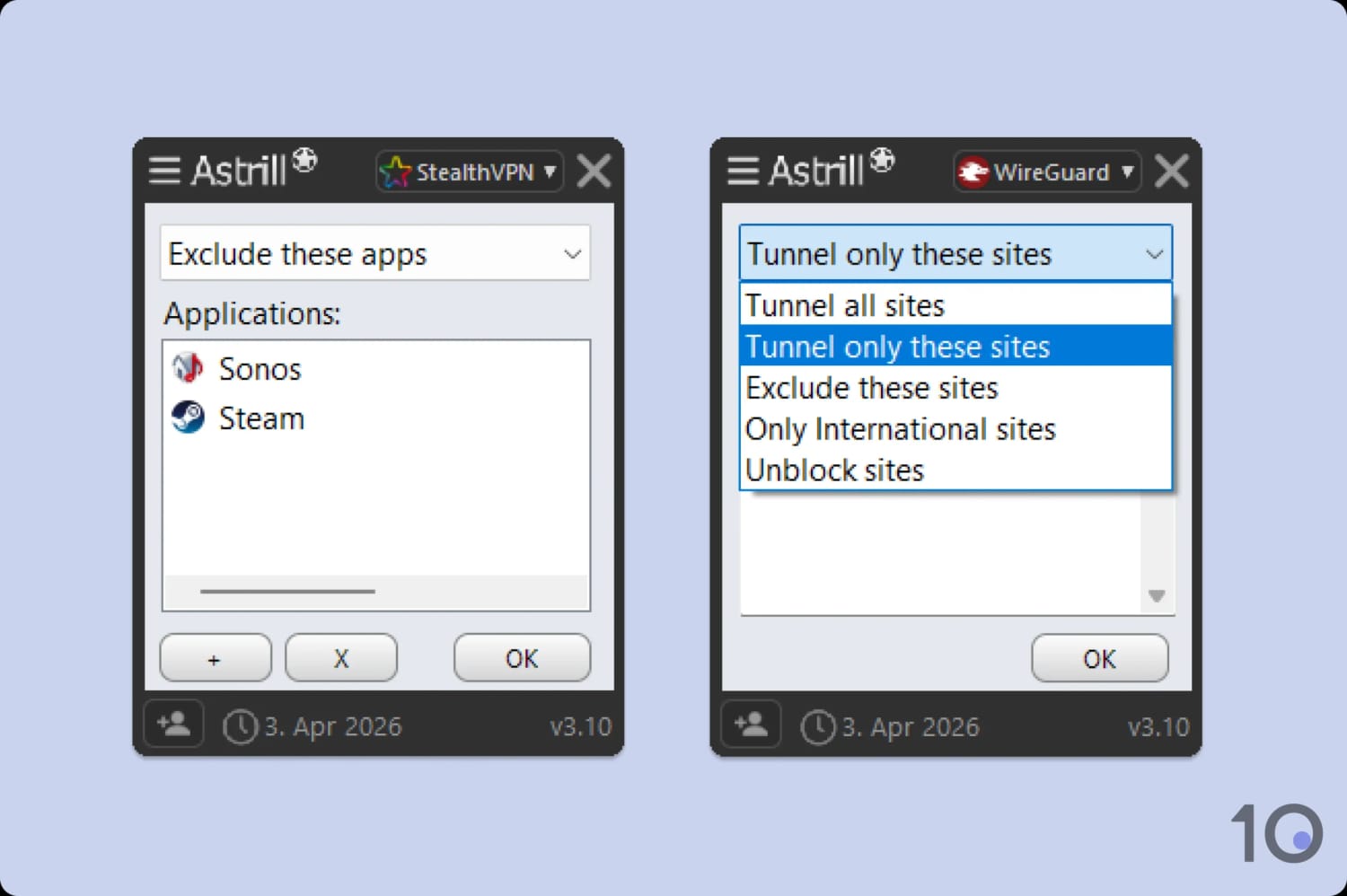
Astrill’s split tunneling functionality is divided between two separate tools.
Astrill Key Data
| Attribute | Astrill | Typical VPN |
|---|---|---|
| Owner | Veloxee Corp | Independent |
| Launch Date | 2009 | 2015 |
| Local Download Speed | 93Mbps (7% loss) | 89Mbps (11% loss) |
| International Download Speed | 75Mbps (25% loss) | 80Mbps (20% loss) |
| Countries with Servers | 57 | 40 |
| Privacy Policy | Identifiable Data | Identifiable Data |
| Simultaneous Connections | 5 | 10 |
| Netflix Libraries | 1 | 3 |
| Torrenting | Yes | Yes |
| Works In China? | Yes | No |
| Cheapest Price | $12.50/mo over 24 months | $3.87/mo over 24 months |
| Customer Support | 24/7 Live Chat | |
| Apps & Extensions |           | |