



The Bottom Line
PrivadoVPN doesn’t exactly reinvent the wheel, but it does everything I expect from a VPN. It uses the same industry-standard encryption as almost every other VPN, unblocks the major streaming services, and concentrates its server network in Europe and the Anglo-sphere. It’s a no-nonsense choice, distinguished primarily by a free version that punches above its weight class for streaming and speed.
9.3/10 5.0/10 6.6/10 7.7/10 2.7/10 6.2/10 7.7/10 6.6/10 5.1/10
PrivadoVPN Pros & Cons
- Best free VPN for streaming
- Unblocks US Netflix & BBC iPlayer
- Safe to download & use
- Fast speeds with no throttling
- Only 10GB of data per month
- Free data has to be manually refreshed
- Less advanced features than paid version
- Slow torrenting speeds
8.7/10 7.5/10 6.6/10 7.7/10 5.5/10 6.9/10 7.7/10 7.5/10 7.2/10
PrivadoVPN Pros & Cons
- Unblocks US Netflix, HBO Max & Hulu
- Affordable pricing plans
- Claims to log no identifying data
- Fast download speeds
- Works in China
- Based in privacy-friendly Iceland
- Unproven logging policy
- Doesn't use diskless servers
- No PQC, security audits, or open-source apps
- Poor server coverage
- Missing multi-hop servers & dedicated IP
PrivadoVPN launched in 2019 and has established a solid reputation, but mainly on the success of its free tier.
The paid version checks the necessary boxes: WireGuard, split tunneling, US Netflix access, and a sensible logging policy. The problem is it stops there.
There are no third-party audits, no multi-hop, no dedicated IP, and access to only 5 Netflix libraries across 44 countries. Industry-leaders like ExpressVPN cover twice as many countries and unblock three times as many Netflix regions.
The only two standouts of the paid plan are its extremely affordable prices (cheaper than every VPN in our top 10) and the GPS spoofing tool on Android. The latter is a game-changer for sports streaming as many platforms geo-restrict broadcasts at the GPS level.
The free plan is a completely different story. It can consistently access US Netflix, a feat most free VPNs can’t match, and its download speeds are faster than many paid VPNs I test.
It’s refreshing to see a freemium service actually invest in its free tier, while some providers (like Proton VPN) intentionally hamstring their basic plan to drive upgrades.
🔄 Recent Updates
I upgraded PrivadoVPN’s streaming rating following its improved performance and tested out the new SmartRoute feature.
Pricing Plans
$$$$| 1 month | $10.99 |
|---|---|
| 15 months | $19.95 ($1.33/mo) |
| 27 months | $29.97 ($1.11/mo) |
Free Trial Options
| Money-Back Guarantee | 30 days |
|---|---|
| Free Trial | No |
| 100% Free Plan | Yes |
| Data Cap | 10GB per month |
Privacy
We calculated this rating by examining the VPN's logging policy, jurisdiction, ownership, and privacy features. We also evaluated its history of handling user data and responding to legal requests.
We calculated this rating by examining the VPN's logging policy, jurisdiction, ownership, and privacy features. We also evaluated its history of handling user data and responding to legal requests.
PrivadoVPN doesn't log your IP address, browsing activity, or DNS requests, all key indicators of a private VPN service. Based in Iceland, it also benefits from one of the most privacy-friendly legal jurisdictions in the world. The bad news: it hasn't yet done enough to prove any of it.
| Originating IP Address | No |
|---|---|
| Browsing Activity | No |
| Individual Connection Timestamps | No |
| Date of Last Connection | No |
| VPN Server IP | No |
| Device Information | Yes |
| Individual Bandwidth Usage | Yes |
| Account Information | Yes |
| Jurisdiction | Iceland (Privacy Haven) |
|---|---|
| Privacy Policy | No Identifiable Data |
| Transparency Reports | No |
| Diskless Servers | No |
| Anonymous Payment Options | Yes |
You can read PrivadoVPN's full privacy policy on its website.
PrivadoVPN only collects a small amount of information, and none of it is identifiable. It doesn’t log any sensitive data, such as your IP address or the websites you visit.
What it does collect is more mundane: your email address, username, and total bandwidth used. App version and device type are also logged, but as anonymous aggregate statistics that can’t be tied back to your account.
I’m also pleased to see PrivadoVPN has addressed my previous criticism regarding transparency by listing the retention period for all logged metadata.
However, this is not a no-logs privacy policy. VPNs like Private Internet Access maintain a top-tier service without retaining any information at all.
Here’s where I have to be blunt: a good privacy policy isn’t the same as a proven one.
The VPN has never had its claims tested by a court case or server seizure, although this is obviously out of their control. More disappointingly, they are yet to commission an independent audit of their privacy policy, implement transparency reports, or display a warrant canary.
For now, you are taking PrivadoVPN at its word.
Is PrivadoVPN Trustworthy?
The company behind PrivadoVPN is legitimate and I like that it’s based in Iceland, which has no data retention laws and respects consumer privacy. It isn’t a member of the European Union, so it doesn’t abide by the Data Retention Directive, either.
Moreover, Iceland has no role in the Five Eyes or 14 Eyes alliances, or any other anti-privacy intelligence-sharing agreements. In other words, PrivadoVPN is under no legal obligation to store or share the data of its users.
For this reason, I think PrivadoVPN is trustworthy.
Streaming
We calculated this rating by identifying which streaming services the VPN could unblock and measuring how consistently it could access them.
We calculated this rating by identifying which streaming services the VPN could unblock and measuring how consistently it could access them.
PrivadoVPN is a run-of-the-mill VPN for streaming, unblocking the usual suspects like US Netflix, BBC iPlayer, and HBO Max. Upon closer inspection, however, you'll find it struggles with some major services like DAZN, and it only works with 5 Netflix libraries. On the other hand, its free version unblocks a similar range of platforms, which is quite impressive for a free VPN.
| Streaming Service | Works with PrivadoVPN (Free) | Works with PrivadoVPN |
|---|---|---|
| BBC iPlayer (UK) | Yes | Yes |
| DAZN (Canada) | No | No |
| Disney+ (UK) | Yes | Yes |
| Hulu (US) | Yes | Yes |
| ITVX (UK) | Yes | Yes |
| HBO Max (US) | Yes | Yes |
| Netflix (US) | Yes | Yes |
| Netflix (UK) | Yes | Yes |
| Prime Video (US) | Yes | Yes |
| Sky Go (UK) | Yes | Yes |
Whether you’re on the paid or free plan, PrivadoVPN unblocks US Netflix from anywhere. This is a major selling point given it is one of the few free VPNs that work with US Netflix.
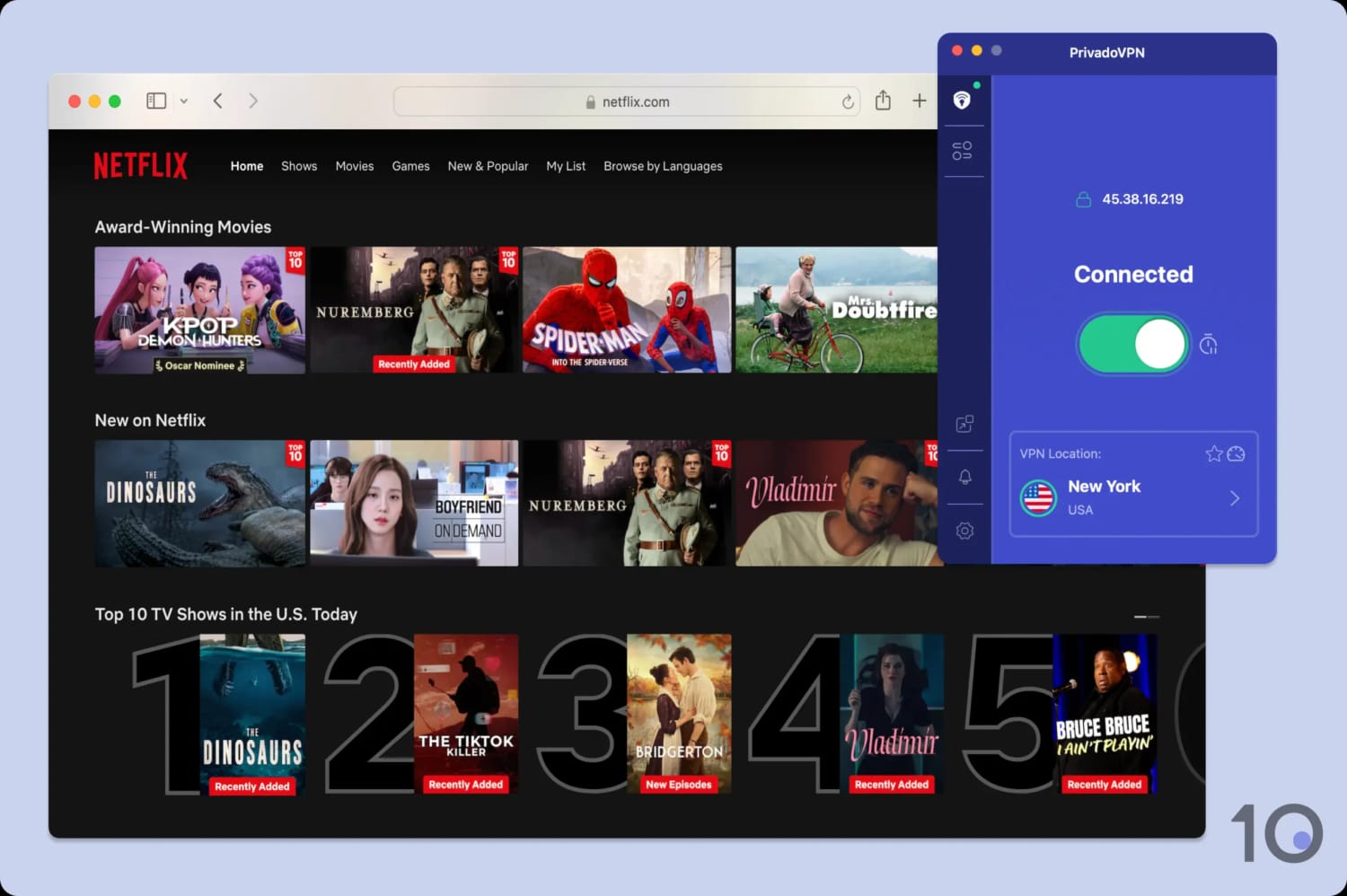
I’ve never had an issue accessing US Netflix with PrivadoVPN.
The paid version also unblocks Netflix in France, Israel, Turkey, and the UK. This is nowhere near as many Netflix libraries as similar VPNs can access (Windscribe unblocks 32) and some popular regions are missing like Japan, Canada, and Germany.
Both the paid and free version of PrivadoVPN also work to unblock US streaming services like HBO Max, Disney+, Hulu, and Amazon Prime Video.
Again, this is praiseworthy for a free VPN and marks PrivadoVPN out as the best free VPN for streaming overall.
However, the amount of time you can stream with the free tier is heavily restricted by its 10GB monthly data cap.
Outside of the US, the VPN’s streaming record has improved. Both versions of the VPN now work consistently with BBC iPlayer and ITVX, whether that’s for live or on demand content. I also ran into no issues streaming Channel 4 or the usually hard-to-unblock Sky Go.

PrivadoVPN unblocks ITVX on the first try.
On the other hand, the VPN performed poorly in the Americas, where OTT streaming services like DAZN and TV Azteca regularly detected my VPN connection.
Speed
We calculated this rating using our proprietary tests of download, upload, and ping speeds across servers in 10 countries.
We calculated this rating using our proprietary tests of download, upload, and ping speeds across servers in 10 countries.
Both versions of PrivadoVPN are very fast. I recorded a speed loss of only 7% on same-country connections. Long-distance connections are also fast; I only lost 10% of my normal speed connecting to the UK, despite 3,500 miles of distance. However, PrivadoVPN still doesn’t match the fastest VPNs like Hotspot Shield.
These results show that PrivadoVPN performs very well connecting to any part of the globe.
Its international speeds are naturally slower, but still more than enough for Full HD streaming, video calling, and even gaming.
For example, connecting to Australia saw my download speed drop by just 18% despite over 10,000 miles of geographical distance.
PrivadoVPN Free Is Faster than the Pro Version
PrivadoVPN’s free tier performed just as well, and sometimes better, than the paid version in my speed tests.
For example, I recorded an average speed loss of 3% on a nearby server, which is better than the premium VPN.
Similarly, its connection speeds into Germany were faster, and its long-distance UK speed scored a similar speed decrease of 11%.
This means that PrivadoVPN does not throttle its free servers like other free VPNs do, such as Hide.me’s free plan.
While this is excellent for users of the free version, paid users might feel short-changed by this.
Security
We calculated this rating by testing the VPN's security protocols, encryption, leak protection, and kill switch reliability. We also assessed the provider's track record and any past security incidents.
We calculated this rating by testing the VPN's security protocols, encryption, leak protection, and kill switch reliability. We also assessed the provider's track record and any past security incidents.
PrivadoVPN nails the basics: OpenVPN and WireGuard protocols, AES-256 and ChaCha20 encryption, and a kill switch on all apps. While this is enough to secure your online connection, it lacks forward-thinking features, like quantum-resistant technology. I'd also like PrivadoVPN to undergo independent security auditing and to open-source its app for increased transparency.
| Independent Audit | No |
|---|---|
| VPN Kill Switch | Yes |
| Leak Protection | Yes |
| OpenVPN (TCP/UDP) | Yes |
|---|---|
| WireGuard | Yes |
| ChaCha20 | Yes |
| AES-256 | Yes |
| Post-Quantum Cryptography | No |
PrivadoVPN tunnels your traffic with IKEv2 by default. I recommend changing to WireGuard or OpenVPN, since they’re more secure.
Annoyingly, WireGuard isn’t immediately available on macOS and it has to be manually authorized in your system settings. While this only takes a couple of seconds, it’s an unnecessary speed bump most VPNs avoid.
I tested all of the VPN’s protocols by running my connection through a data packet analyzer, called Wireshark. As shown in the screenshot below, PrivadoVPN encrypted my web traffic, displaying it as jumbled plaintext:
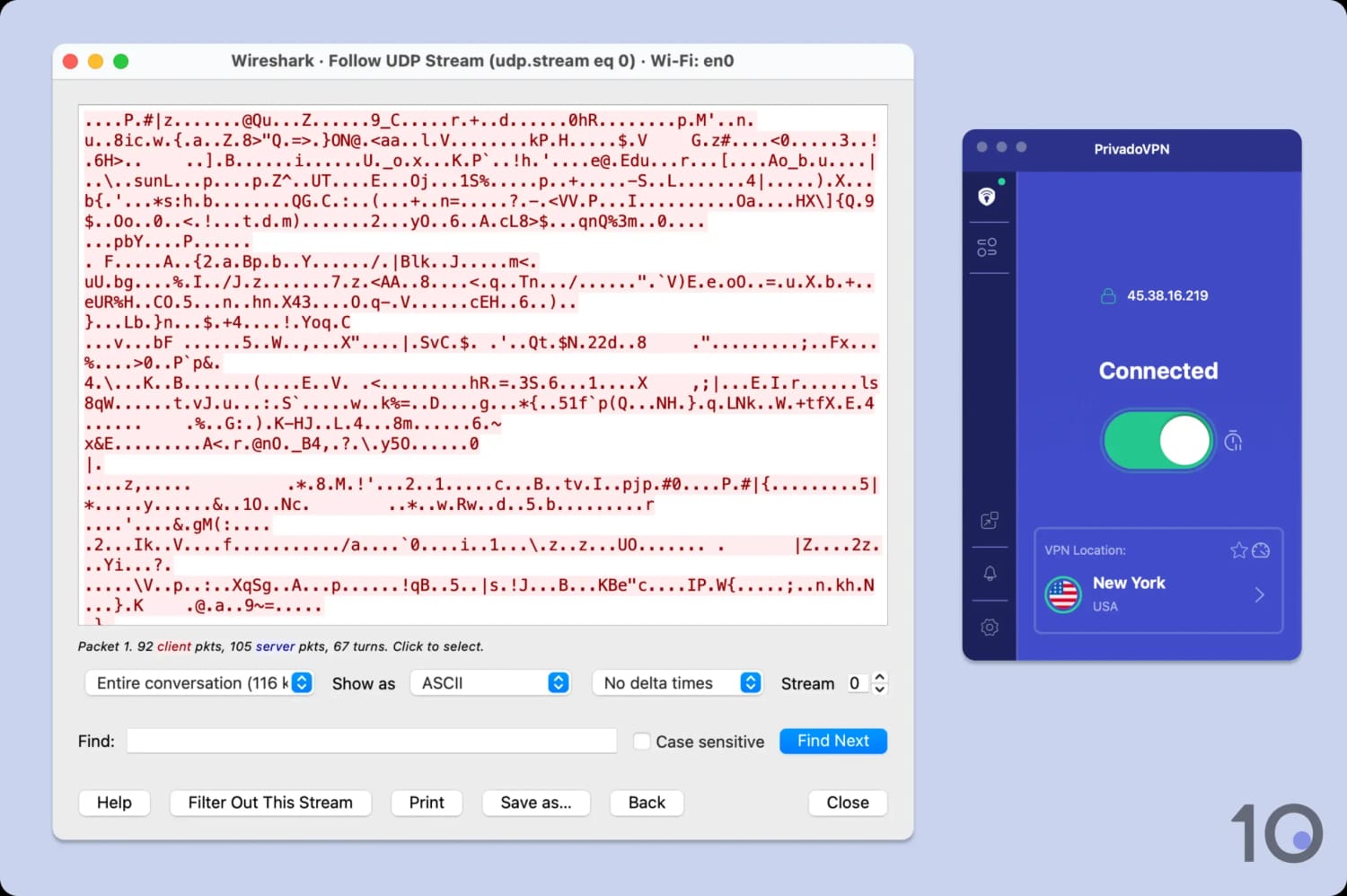
PrivadoVPN hides your internet traffic from your ISP.
Continuing my security tests, I used our custom-built tools to stress-test every PrivadoVPN app for IP, DNS, WebRTC, and kill switch leaks. The results were flawless: I detected no leaks whatsoever.
In my view, the VPN is perfectly safe to use, but I want the service to take a more proactive approach to security for the future.
Industry leaders like ExpressVPN and NordVPN have already done so by rolling out post-quantum cryptography. This protects against ‘Harvest Now, Decrypt Later’ attacks, where encrypted VPN traffic is intercepted by a cybercriminal today to be cracked once quantum computing develops.
Similarly, if PrivadoVPN open-sourced its codebase, security vulnerabilities could be flagged and fixed by the wider community far more quickly.
Server Locations
We calculated this rating by assessing the number of countries and cities available, their geographic spread, and availability in popular regions.
We calculated this rating by assessing the number of countries and cities available, their geographic spread, and availability in popular regions.
PrivadoVPN has a physical server network covering 44 countries, with several city-level options available. This is a good number, but it’s small in comparison to top-rated VPN services. The average number among top-tier VPNs is gradually increasing to 100 countries. Furthermore, PrivadoVPN is limited by the small number of individual servers that make up its entire network — only 322 servers in total.
| Continent | PrivadoVPN (Free) Countries with Servers | PrivadoVPN Countries with Servers |
|---|---|---|
| Europe | 5 | 24 |
| North America | 3 | 3 |
| South America | 2 | 2 |
| Asia | 1 | 12 |
| Africa | 0 | 1 |
| Oceania | 0 | 2 |
PrivadoVPN’s paid server network caters heavily to European countries, with only one server location on the African continent and two in South America. Asia is relatively well represented, but I’d like to see the VPN generally invest in more locations going forward.
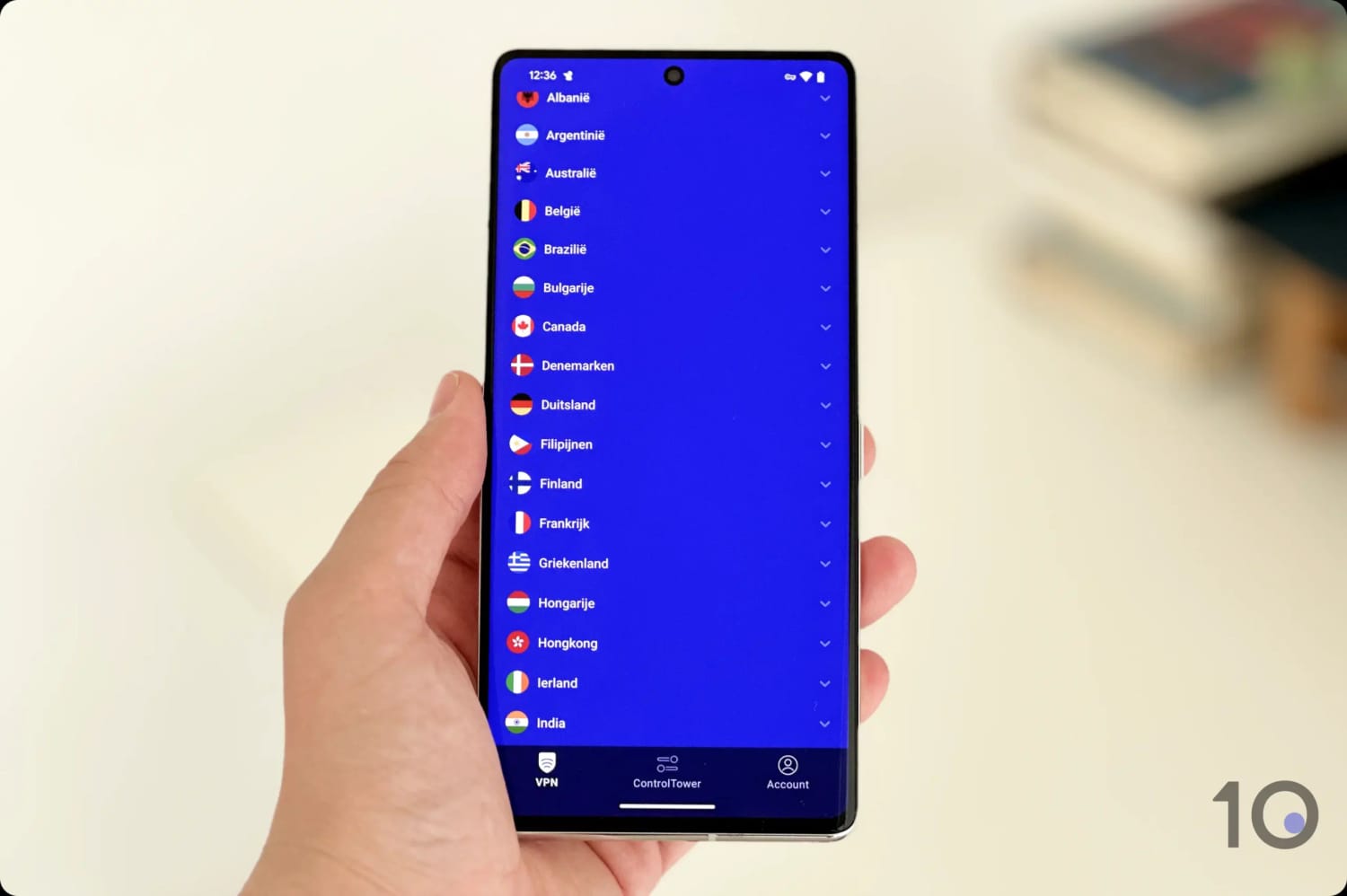
PrivadoVPN’s server network is small compared to the competition.
PrivadoVPN’s server network is nowhere near the size of networks offered by top-ranking VPNs.
ExpressVPN scores 9.9 in my server evaluation because it has lots of servers spread across 100 countries, including a much greater focus on often-neglected regions like Africa and the Middle East.
Small Network of Physical Servers
One of the reasons that PrivadoVPN has a small server network is that it’s exclusively devoted to building an all-physical server network. This is more expensive, and it makes it much harder for PrivadoVPN to provide IP addresses in countries with less developed infrastructure.
There are some privacy benefits to choosing physical over virtual servers, but I’m worried that, as the subscriber base grows, servers will become increasingly congested.
PrivadoVPN Offers Free Servers in 11 Countries
PrivadoVPN’s free service has a substantially smaller network compared to the paid version, but servers in 11 countries is a lot compared to other free VPNs like Hotspot Shield Basic, Betternet, and ZoogVPN, which all have only 3.
PrivadoVPN’s free server network is refreshingly diverse. Alongside major European and North American countries, it has IP addresses for Argentina, Brazil, and India. It’s also the best free VPN for Mexico, and there are four city-level server choices in the United States.
User Experience
We calculated this rating by assessing the VPN’s ease of use, interface design, and setup process across multiple platforms.
We calculated this rating by assessing the VPN’s ease of use, interface design, and setup process across multiple platforms.
PrivadoVPN continues to offer an approachable and streamlined service that makes it friendly for beginners and consistent across apps. However, advanced users will want more features and customization options.
Interface & Ease of Use
PrivadoVPN has made significant strides in improving the design and usability of its apps, making it a beginner-friendly VPN. The interface is consistent across devices, featuring a simple home screen with a large connect button, a server list, and a settings menu.
You can expand the sections below for a detailed analysis of the user experience, by platform:
Desktop & Laptop (Windows & macOS)
PrivadoVPN’s desktop app design sums up the VPN itself: simple, no-frills, and highly functional.

The home screen displays a gray background that turns to green to indicate a successful connection. If you prefer a more visually engaging design, you can also switch to a purple color palette in the app settings.
Using the app requires no learning curve at all: just click the large toggle and the VPN does the rest.
While straightforward enough, I noticed it takes a while for the VPN to establish a connection. Worse, the Mac app wouldn’t connect until I manually changed its protocol to OpenVPN TCP.
Another area for improvement is the settings menu, which opens in a separate window. This design choice feels fragmented and can clutter your desktop, especially if you forget to manually close the extra window.
On macOS, I appreciated the inclusion of a “dock to tray” feature, allowing you to either fix the app to the tray or drag and move it around your screen. That said, customization is limited: the app doesn’t allow resizing, and beyond toggling Auto Connect, there are few options.
Mobile (iPhone & Android)
Unlike on desktop, the mobile apps still use the purple legacy design. I actually prefer this as it feels less bland than the gray, washed-out look on PC.
Having said that, a dark mode option wouldn’t go amiss, especially on a smaller screen display.

The only other major visual difference is that the on/off toggle is replaced by a ‘Tap to Connect’ button. This works as expected: tap it once and the VPN connects to your nearest server.
Both mobile apps let you swipe up on the bottom third of the screen to reveal the server list. This isn’t something I’ve seen in other apps — normally its a separate tab or drop-down menu — but I quite liked it as it felt natural to mobile.
The server list itself is easy to use thanks to the options to sort alphabetically, search for a server, and favorite a particular location.
I also appreciated the ability to add a widget on iOS for quicker access.
Torrenting
We calculated this rating by assessing the VPN's torrenting features, including P2P servers and port forwarding support. We also evaluated its average bitrate and stance on file-sharing.
We calculated this rating by assessing the VPN's torrenting features, including P2P servers and port forwarding support. We also evaluated its average bitrate and stance on file-sharing.
PrivadoVPN supports P2P file sharing on its entire server network, and a SOCKS5 proxy is included on paid plans. While this makes PrivadoVPN a suitable choice for torrenting, its average bitrate is slower than the competition and its privacy policy isn't verified.
| Torrenting Attribute | PrivadoVPN (Free) | PrivadoVPN |
|---|---|---|
| Permits P2P Traffic | Yes | Yes |
| Average Download Bitrate | 5.7MiB/s (43% loss) | 7.9MiB/s (21% loss) |
| Countries with P2P Servers | 11 | 44 |
| Port Forwarding | No | No |
| Kill Switch | Yes | Yes |
| Logging Policy | No Identifiable Data | No Identifiable Data |
PrivadoVPN permits torrenting on all of its servers, including its free ones. The is great to see considering other freemium VPN services tend to ban P2P traffic on their free VPNs (like Proton VPN).
That said, PrivadoVPN’s privacy policy hasn’t been verified so the service could, in theory, monitor and log your torrenting activity. I’m yet to hear of anyone receiving a DMCA request while using PrivadoVPN, but it’s worth keeping in mind should you accidentally download copyrighted material.
I downloaded a test file while connected to a nearby PrivadoVPN server and found that my bitrate decreased by 21% on average.
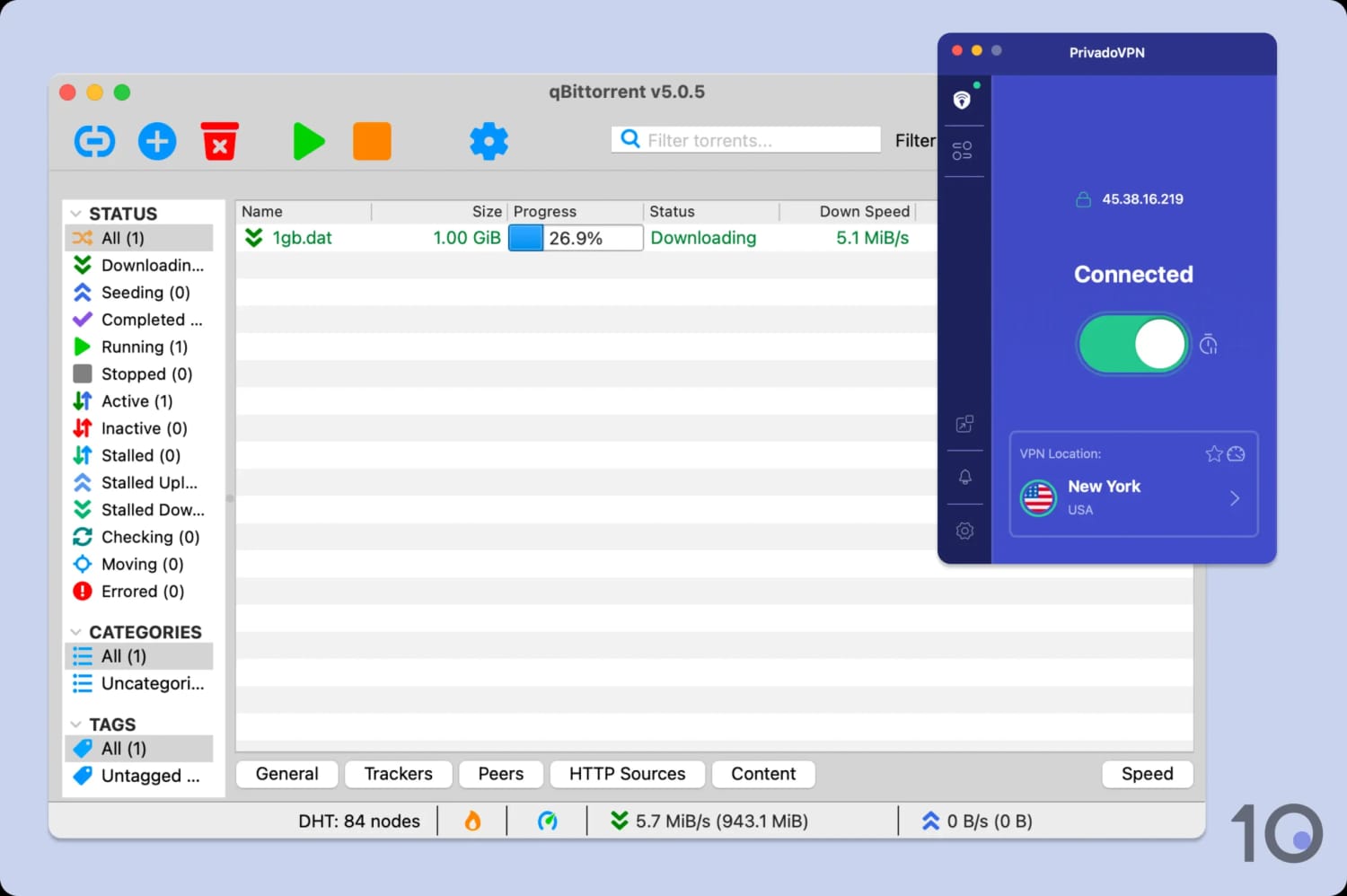
PrivadoVPN is fast enough for occasional torrenting.
While this is decent, other VPNs I test, like IPVanish, PIA, and Hide.me, all stay within a 5% loss margin. PrivadoVPN feels noticeably slower in comparison, especially when torrenting larger file sizes.
The free version of the VPN is much slower and comes with a 10GB data cap. This is fine for the occasional torrenting of smaller file types, but I suggest upgrading to a premium torrenting VPN for more heavy-duty downloads.
Subscribing to the VPN also provides access to a SOCKS5 proxy on every server. This is a favorite of torrenters as it can allow for faster speeds, at the cost of no encryption. This feature isn’t available on PrivadoVPN Free, though.
Unfortunately, PrivadoVPN doesn’t permit port forwarding on any of its plans, so you may not be able to seed files for fellow torrenters.
Device Compatibility
We calculated this rating by evaluating the VPN's support for various devices. We considered dedicated apps, browser extensions, Smart DNS functionality, and router compatibility.
We calculated this rating by evaluating the VPN's support for various devices. We considered dedicated apps, browser extensions, Smart DNS functionality, and router compatibility.
PrivadoVPN has apps for most platforms, including desktop, mobile, and streaming devices. There are also browser extensions for Chrome and Firefox, and you can manually install the VPN on Linux and routers.
| Windows | Yes |
|---|---|
| Mac | Yes |
| iOS | Yes |
| Android | Yes |
| Linux | Manual Setup Only |
| Amazon Fire TV | Yes |
| Android TV | Yes |
| Apple TV | Yes |
| Router | Manual Setup Only |
| Chrome | Yes |
| Smart DNS | Yes |
|---|---|
| Unblocks Content From |
|
Simultaneous Connections: 10
PrivadoVPN imposes a limit of 10 simultaneous connections, which is standard. While this should be enough to run the VPN on every device you own, there are VPNs that have abandoned device limits like IPVanish.
Alternatively, you can try and sidestep this restriction by installing the VPN on your WiFi router since this protects every device that connects.
There are manual setup guides on PrivadoVPN’s website that show you how to do this, but I only recommend it if you’re tech-savvy.
On paid accounts only, you can install PrivadoVPN’s Chrome extension. Unlike many other VPNs, PrivadoVPN’s browser extension actually encrypts your traffic.
The VPN extension works as intended, with almost zero speed loss, but its servers are limited to just 12 countries.
Additional Features
We calculated this rating by evaluating the VPN's extra capabilities beyond the basic VPN service. This includes bypassing censorship, additional tools like malware blockers, and customization options like split tunneling.
We calculated this rating by evaluating the VPN's extra capabilities beyond the basic VPN service. This includes bypassing censorship, additional tools like malware blockers, and customization options like split tunneling.
While PrivadoVPN has expanded its suite of additional features, it stall falls behind the elite VPNs. Its GPS Spoofer on Android is a real perk, but it still lacks power user staples like dedicated IP and a rotating IP feature. It also includes an obfuscated protocol that works well to bypass censorship, but I'd like to see some modern alternatives added, like QUIC/UDP-based protocols.
| Additional Feature | PrivadoVPN (Free) | PrivadoVPN |
|---|---|---|
| Split Tunneling | Yes | Yes |
| VPN Obfuscation | No | Yes |
| Multi-Hop Servers | No | Yes |
| Dedicated IP | No | No |
| Ad Blocker | No | Yes |
Scramble Mode Helps Bypass Web Censorship
Using the VPN’s Scramble Mode, I bypassed The Great Firewall of China on my Shanghai server.
To replicate this, go into protocol settings, select OpenVPN, and check the “Scramble” box.
However, as you can see in the video below, connections within China took a very long time to establish. While I unblocked YouTube when connecting to the Taiwan server, it took over four minutes to get around Chinese website blocks (I have shortened the video).

PrivadoVPN currently works to get the free internet in China.
It’s unclear how long PrivadoVPN’s success in China will last, since I expect the more popular PrivadoVPN comes, the more likely China will block it.
To future-proof against this, I’d like the VPN to implement more modern obfuscation technologies like QUIC.
It’s rare that a free VPN works in China, so it’s a shame that the manual refresh requirement has unintentionally stopped people from accessing the global internet.
One-Way Split Tunneling
Split tunneling is a feature that lets you customize which apps and websites run through the VPN tunnel.
You can use this feature on every PrivadoVPN app and on both its free and paid plans. But setting it up on Mac requires you to grant permissions in your system settings, which isn’t the case with most VPNs.
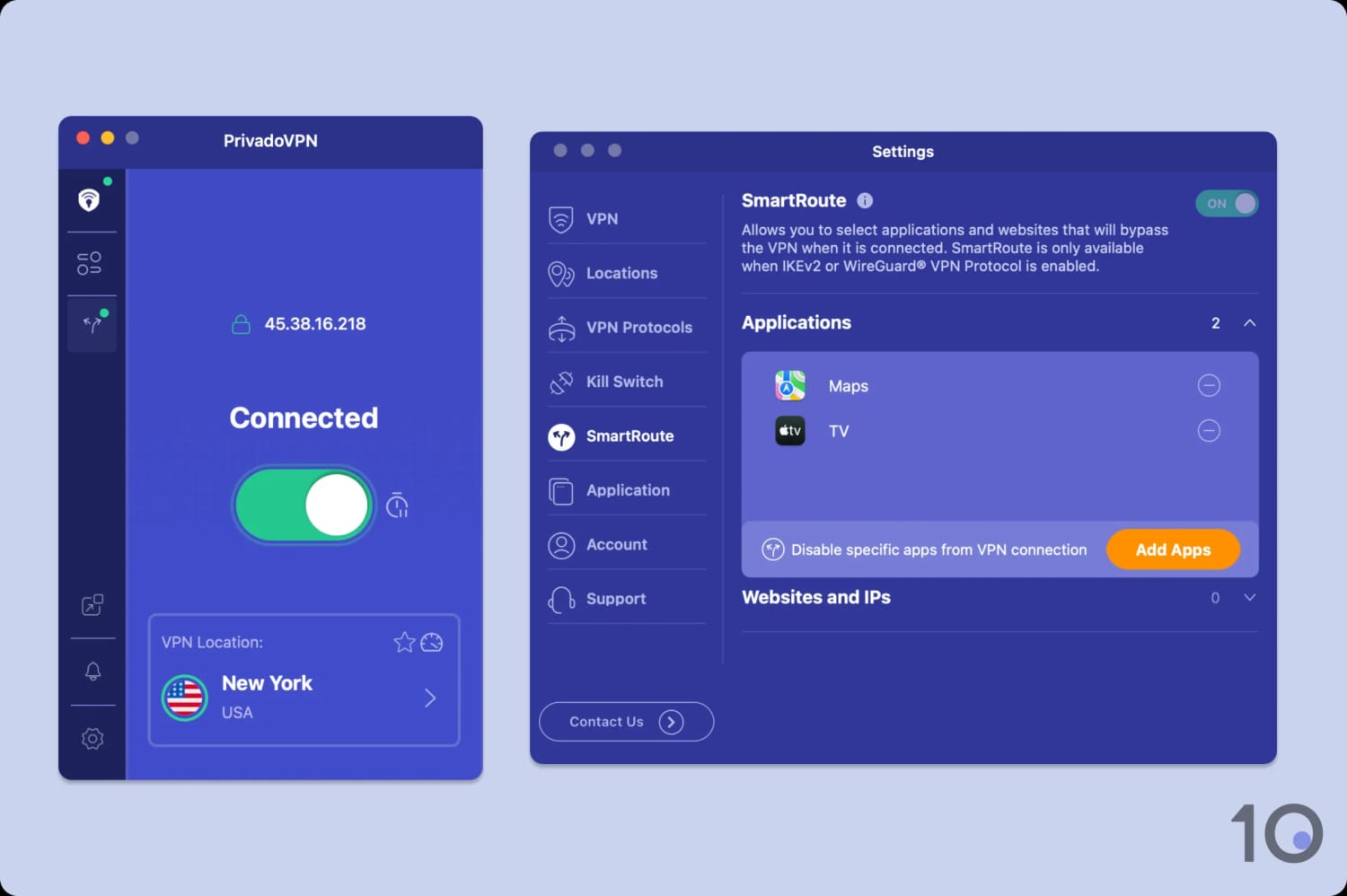
I excluded apps that require my real location from the VPN tunnel.
I also didn’t like PrivadoVPN’s rigid approach to split tunneling: only letting you choose apps to exclude from the tunnel. Many VPNs, like Hide.me and PIA, let you choose between including or excluding the apps, for a greater level of control.
GPS Spoofer Offers Genuine Value
PrivadoVPN includes a GPS spoofing tool on Android called “GeoJump” that works by syncing your device’s GPS location to your VPN’s location.
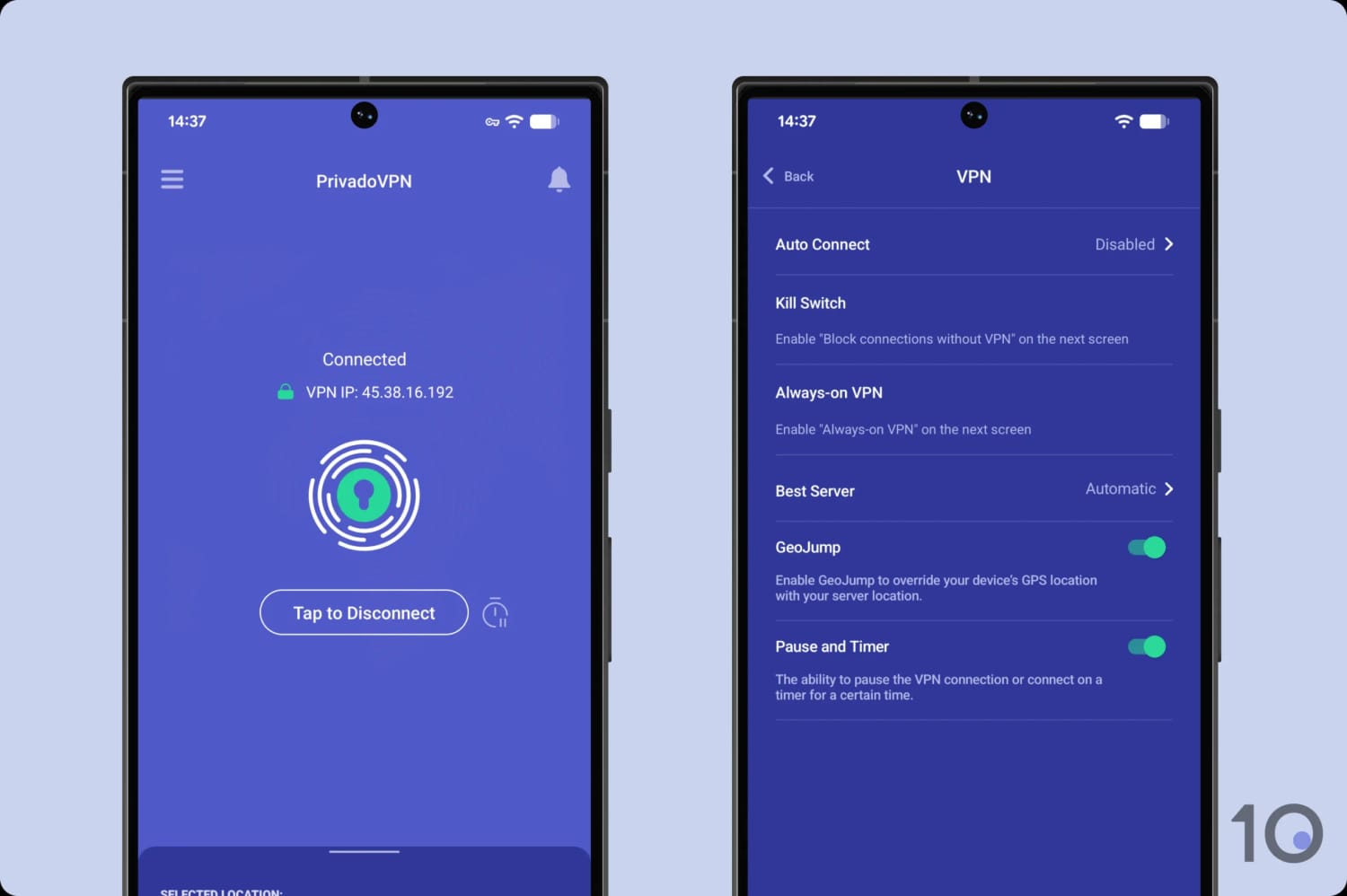
I used GeoJump to livestream NBA matches.
While the privacy benefits are obvious, an underrated use case for this feature is bypassing regional blackouts on sports broadcasts. Many streaming platforms, like NFL+ and ESPN+, implement strict geo-restrictions to enforce licensing agreements, including tracking your device’s GPS.
As a result, PrivadoVPN joins a select group of VPNs in Windscribe and Surfshark that include this niche, but useful, feature.
No Entry Node Selection for Multi-Hop
PrivadoVPN has added a multi-hop feature called “SmartRoute” that lets you route your traffic through two VPN server locations instead of one.
Since your connection enters through one location and exits at another, it’s much harder to track and de-anonymize your web activity.
I welcome this feature and found it barely impacted my download speeds, but there’s a reason for that: you can’t select your entry server.
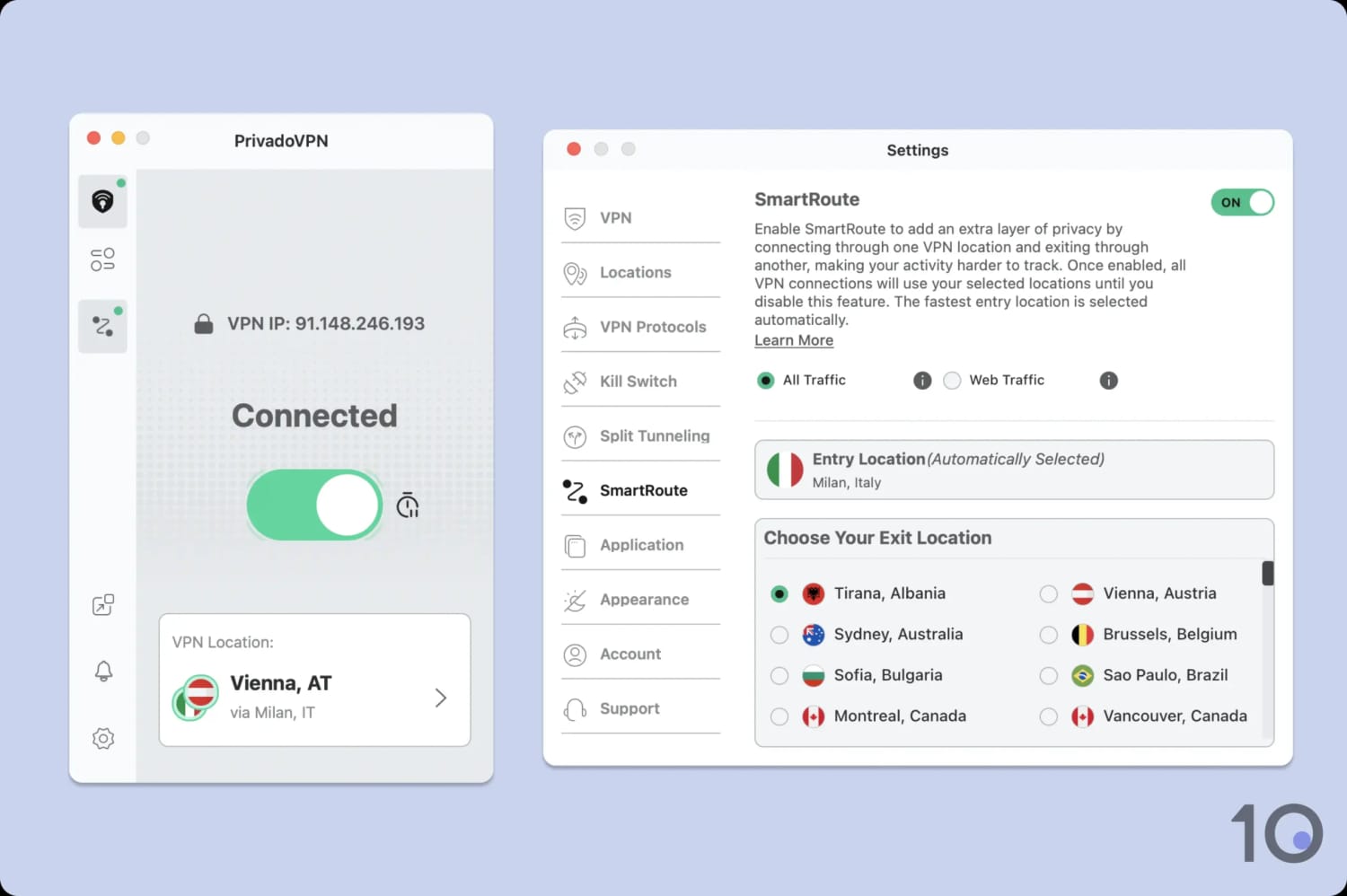
You can only choose your exit location for the multi-hop connection.
You pick your exit location, and PrivadoVPN chooses your initial server for you, often near to the one you selected. I’d much prefer Surfshark’s approach, which lets you manually select both your entry and exit locations.
PrivadoVPN (Free) Key Data
| Attribute | PrivadoVPN | Typical Free VPN |
|---|---|---|
| Owner | Privado Networks ehf (Independent) | Independent |
| Launch Date | 2019 | 2015 |
| Safe to Use | Yes | No |
| Data Cap | 10GB per month | 10GB per month |
| Payment Details Required | No | No |
| Account Required | Yes | Yes |
| Contains Ads | No | Yes |
| Local Download Speed | 97Mbps (3% loss) | 61Mbps (39% loss) |
| International Download Speed | 92Mbps (8% loss) | 55Mbps (45% loss) |
| Countries with Servers | 11 | 4 |
| Privacy Policy | No Identifiable Data | Identifiable Data |
| Simultaneous Connections | 1 | 1 |
| Manually Select Server Location | Yes | Yes |
| Netflix Libraries | 2 | 0 |
| Torrenting | Yes | No |
| Works In China? | Yes | No |
| Customer Support | Live Chat | Online Resources |
| Apps & Extensions |           | |
PrivadoVPN Key Data
| Attribute | PrivadoVPN | Typical VPN |
|---|---|---|
| Local Download Speed | 93Mbps (7% loss) | 89Mbps (11% loss) |
| International Download Speed | 84Mbps (16% loss) | 80Mbps (20% loss) |
| Countries with Servers | 44 | 40 |
| Privacy Policy | No Identifiable Data | Identifiable Data |
| Simultaneous Connections | 10 | 10 |
| Netflix Libraries | 5 | 3 |
| Torrenting | Yes | Yes |
| Works In China? | Yes | No |
| Cheapest Price | $1.11/mo over 27 months | $3.87/mo over 24 months |
| Customer Support | Live Chat | |
| Apps & Extensions | | |