



The Bottom Line
Mozilla may be known for championing privacy, but its VPN service isn’t private enough to use. Your real IP address is logged for 90 days, which isn’t what we expect from a household name like Mozilla. The VPN is undoubtedly fast and it uses the best encryption available, but our concerns over its privacy policy, and its inability to unblock many streaming services, makes it a poor choice for most users.
9.5/10 0.5/10 6.2/10 9.3/10 5.4/10 7.0/10 8.2/10 3.0/10 5.0/10
- Browsing activity isn't logged
- Close to zero speed loss on nearby servers
- Open-source apps
- Diskless servers
- User-friendly & attractive apps
- Customizable multi-hop servers
- Temporarily logs your IP address
- Regional gaps in server network
- Terrible for streaming
- Won’t work in China
- No apps for streaming devices
- Five-device limit for sign-ins
Mozilla is best known for developing Firefox, a popular web browser renowned for its privacy initiatives. Sadly, this doesn’t extend to its VPN service, which actively logs sensitive metadata, including your device’s operating system and your real IP address (held for 90 days).
While your browsing activity remains anonymous through Mozilla’s partnership with Mullvad, a highly trustworthy provider, this data collection is still disappointing from such a vocal privacy advocate.
From a security perspective, Mozilla does a much better job of living up to its reputation. It uses the best-in-class WireGuard protocol and has made the source code for all of its VPN apps public.
Furthermore, its shared access to Mullvad’s server network and infrastructure allows Mozilla VPN to output some of the fastest download speeds we’ve tested, with only a (3% loss on nearby connections.
This cuts both ways, though, as the VPN also inherits Mullvad’s notorious inability to unblock streaming services. We were only able to access HBO Max, Channel 4, and YouTube with it connected.
When you combine that with significant gaps in its server network, an intrusive privacy policy, and its high price point (even on longer-term plans), you have to ask yourself if Mozilla VPN is really the right VPN for you.
In our view, switching to a cheaper but more powerful alternative like PrivateVPN makes more sense. If you don’t care about streaming, then Mullvad is an even more obvious replacement given it has all the same benefits without the privacy risks.
🔄 Key Updates
We’ve corrected our stance on Mozilla VPN’s privacy policy, added new screenshots of its apps, and re-tested its encryption and kill switch. We’ve also spent some time trying out the VPN’s multi-hop and split tunneling features.
Pricing Plans
$$$$| 1 month | $9.99 |
|---|---|
| 12 months | $59.88 ($4.99/mo) |
Free Trial Options
| Money-Back Guarantee | 30 days |
|---|---|
| Free Trial | No |
| 100% Free Plan | No |
Privacy
We calculated this rating by examining the VPN's logging policy, jurisdiction, ownership, and privacy features. We also evaluated its history of handling user data and responding to legal requests.
Ranked #27 out of 59 VPNs for Privacy
Despite its ties to Mullvad VPN, Mozilla collects far too much data. It logs your real IP address and originating location, albeit for 90 days, which is enough to tie your real identity to your Mozilla account. The VPN doesn't store any activity logs (e.g. browsing activity), so it doesn't completely undermine your anonymity.
| Originating IP Address | Yes |
|---|---|
| Browsing Activity | No |
| Individual Connection Timestamps | No |
| Date of Last Connection | No |
| VPN Server IP | No |
| Device Information | Yes |
| Individual Bandwidth Usage | No |
| Account Information | Yes |
| Jurisdiction | US (Five Eyes) |
|---|---|
| Privacy Policy | Identifiable Data |
| Transparency Reports | Yes |
| Diskless Servers | Yes |
| Anonymous Payment Options | No |
You can read Mozilla VPN's full privacy policy on its website.
Due to its shared server network and partnership with Mullvad, Mozilla’s privacy policy is more confusing than most.
Here’s the crux of it: Mullvad deals with your encrypted web traffic (activity data), Mozilla handles everything else.
Given Mullvad’s no-logs policy and trustworthy reputation, you can rest assured that all of your activity logs are safe. This also means Mozilla uses Mullvad’s diskless server network, which are built on volatile memory to periodically wipe your browsing activity.
Unfortunately, the same can’t be said of Mozilla and its handling of your user logs.
According to its privacy policy, the VPN service logs your real IP address for 90 days. This undermines the entire point of using a VPN, since it directly links your real identity and location with your VPN account.
Moreover, Mozilla collects information about your device and your payment records, which makes it even easier to identify you once paired with an IP.
While this isn’t actually the worst privacy policy we’ve reviewed, its US jurisdiction means Mozilla is subject to some of the most intrusive data-sharing laws in the world.
If US law enforcement or a bad actor were to target Mozilla, your real IP, device information, and payment records would all be at risk of exposure.
Streaming
We calculated this rating by identifying which streaming services the VPN could unblock and measuring how consistently it could access them.
Ranked #44 out of 59 VPNs for Streaming
Mozilla VPN is a terrible VPN for unblocking streaming services. It struggles with almost everything: it can’t unblock any Netflix libraries, it doesn’t work with Amazon Prime Video US, and other US services like Hulu and Disney+ block it. In our testing it only managed to work with HBO Max (inconsistently), Channel 4, and YouTube.
| Streaming Service | Works with Mozilla VPN |
|---|---|
| BBC iPlayer (UK) | No |
| DAZN (Canada) | No |
| Disney+ (UK) | No |
| Hulu (US) | No |
| ITVX (UK) | No |
| HBO Max (US) | Yes |
| Netflix (US) | No |
| Netflix (UK) | No |
| Prime Video (US) | No |
| Sky Go (UK) | No |
Mozilla VPN’s ability to unblock streaming libraries is unfortunately tied to Mullvad’s ability to do so, as it operates using Mullvad’s infrastructure. Despite being a great VPN, Mullvad is terrible for streaming – and therefore Mozilla VPN is too.
The good news is that we were able to unblock HBO Max, an excellent US streaming service with lots of unique content – we just connected to Mozilla VPN’s US – Raleigh server and it let us stream straight away.
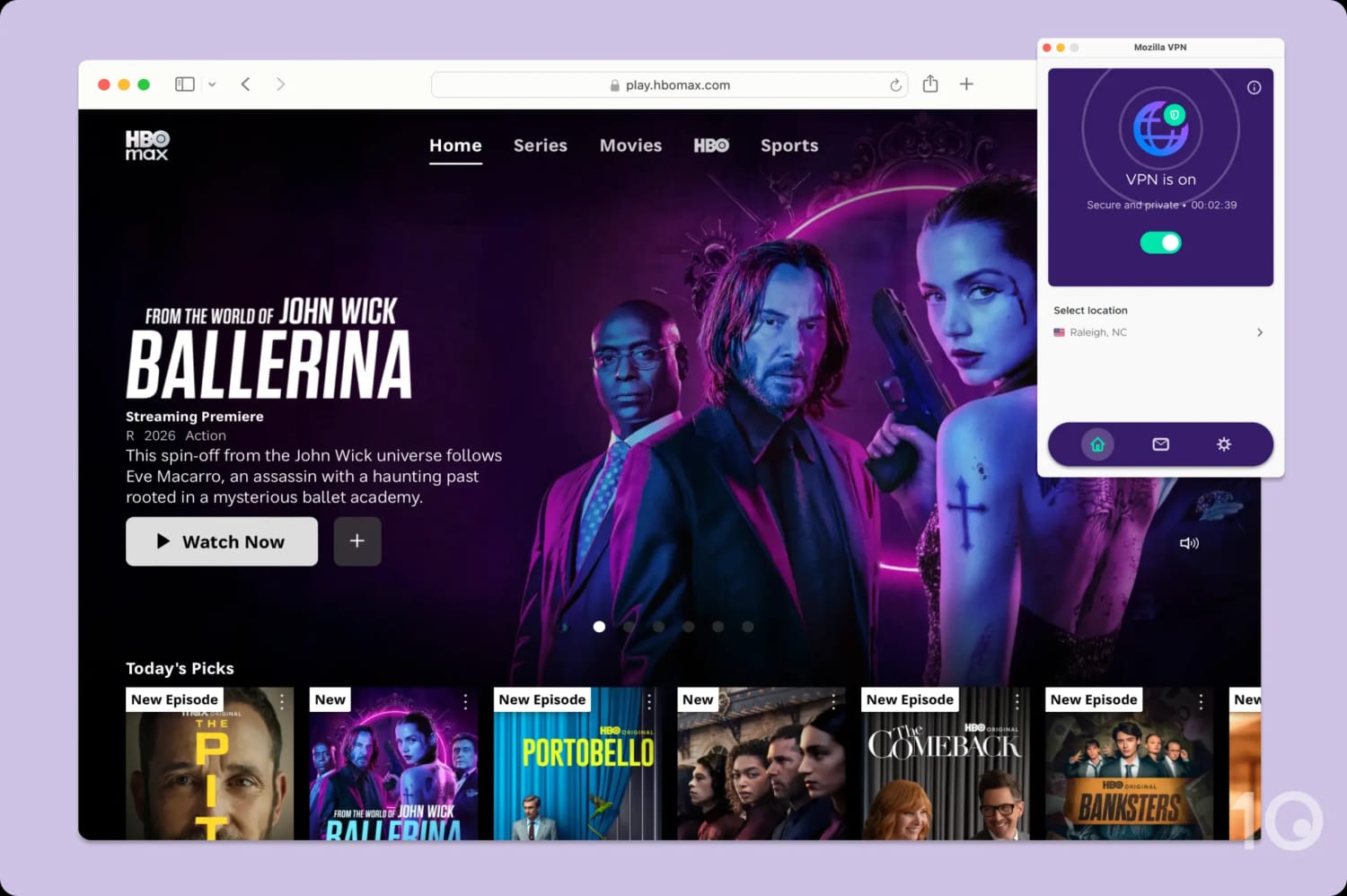
HBO Max is one of the few services Mozilla VPN works to unblock.
We were also able to watch UK-based streaming service Channel 4 by using the United Kingdom – Manchester server.
Those two services are the limit of Mozilla VPN’s streaming abilities. Every other popular service we attempted to access blocked us immediately or, in some cases, wouldn’t even let us log in.
A good streaming VPN should be able to unlock plenty of services, as well as multiple Netflix libraries from around the world to give you access to as much content as possible. ExpressVPN is the best VPN for streaming – it unblocks 10 Netflix libraries, BBC iPlayer, and more.
Speed
We calculated this rating using our proprietary tests of download, upload, and ping speeds across servers in 10 countries.
Ranked #11 out of 59 VPNs for Speed
Wherever you are in the world, Mozilla VPN is likely to record fast speeds. Across all testing locations, including distant ones like South Africa and Australia, our download speed never decreased by more than 20%. This is an exceptional result that ranks Mozilla among the very fastest VPNs.
When connected to a nearby server in New York, US, Mozilla VPN suffers just a 3% download speed loss. You’ll barely notice any difference to your internet speeds when connected to a nearby Mozilla server.
It also performed very well in a selection of distant locations like the US West Coast and Germany, and when connected to a server in neighboring Canada downloads slowed by an indistinguishable 1%.
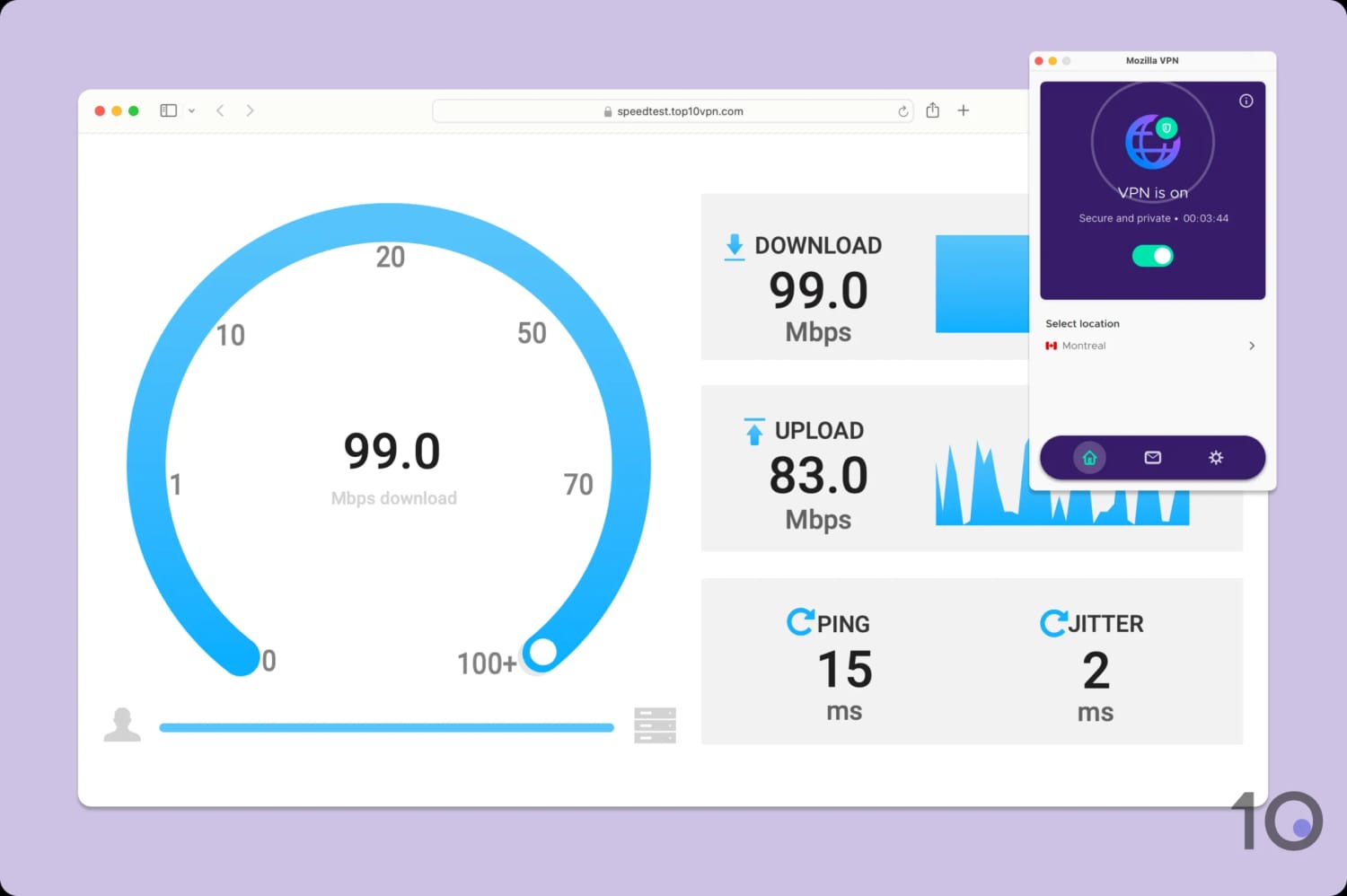
We didn’t notice a difference in our download speed when connecting to Canada.
When Mozilla VPN is running at its absolute maximum it comes close to the fastest VPNs on the market. While conducting multiple tests over a longer period of time we didn’tice some fluctuations, but not enough to seriously concern us.
Mozilla VPN records very impressive numbers for both upload and download speeds, wherever you are in the world. This is partly down to its total commitment to WireGuard, one of the fastest VPN protocols available.
Security
We calculated this rating by testing the VPN's security protocols, encryption, leak protection, and kill switch reliability. We also assessed the provider's track record and any past security incidents.
Ranked #4 out of 59 VPNs for Security
Despite a limited suite of security features, Mozilla VPN is perfectly safe. It aced all of our IP and DNS leak tests. Its kill switch is automatically and permanently activated on all platforms and works well. There’s no protocol selection: every app uses WireGuard only, but it’s a quick and safe protocol so we don’t mind too much.
| Independent Audit | Yes |
|---|---|
| VPN Kill Switch | Yes |
| Leak Protection | Yes |
| OpenVPN (TCP/UDP) | No |
|---|---|
| WireGuard | Yes |
| ChaCha20 | Yes |
| Post-Quantum Cryptography | No |
Unsurprisingly, Mozilla follows Mullvad’s lead of implementing a WireGuard-only VPN. This is the most up-to-date and best-performing VPN protocol, so we have no complaints here.
WireGuard works alongside the ChaCha20-Poly1305 cipher to encrypt your web traffic, which we confirmed ourselves using Wireshark:
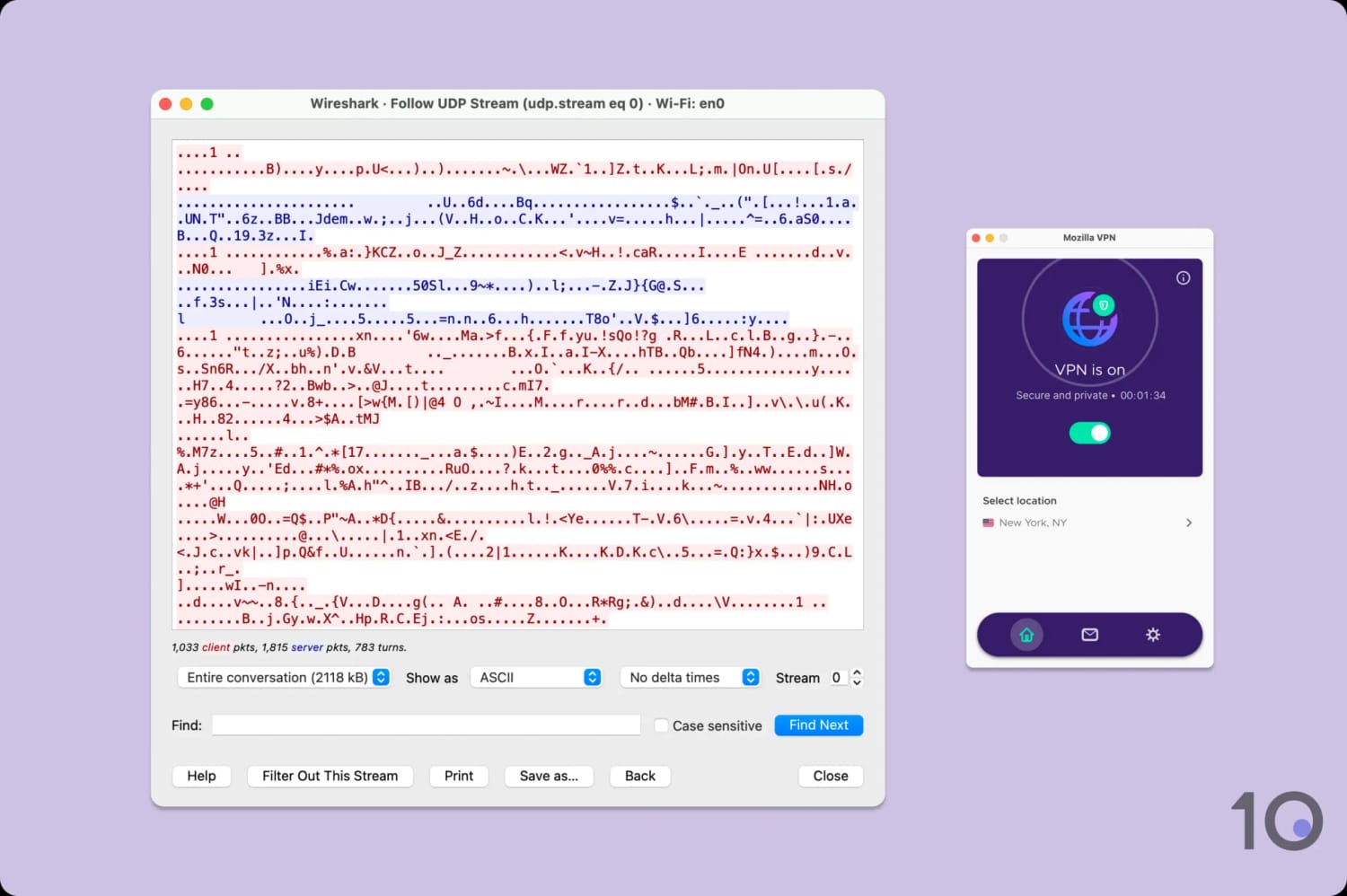
As expected, our internet traffic was left indecipherable.
We also stress-tested the VPN’s kill switch by simulating an unexpected connection drop. In every instance, the kill switch fired successfully and blocked our real IP address from leaking.
Putting encryption and leak protection to the side, Mozilla VPN’s biggest security asset are the apps themselves. Its desktop, mobile, and Linux apps are all open-source, allowing anyone to inspect their source code for vulnerabilities.
This is a great layer of transparency, which is only offered by top VPNs like Proton VPN and IVPN.
Server Locations
We calculated this rating by assessing the number of countries and cities available, their geographic spread, and availability in popular regions.
Ranked #24 out of 59 VPNs for Server Locations
As Mozilla VPN is powered using Mullvad VPN’s technologies and infrastructure, it also uses the exact same server network. That’s 674 servers across 50 countries and 68 cities. Of those servers roughly 20% are owned outright by Mullvad.
| Continent | Countries with Servers |
|---|---|
| Europe | 31 |
| Asia | 5 |
| North America | 2 |
| South America | 2 |
| Oceania | 2 |
| Africa | 1 |
Sharing Mullvad’s server network means that Mozilla VPN enjoys all the same strengths and suffers the exact same weakness as Mullvad.
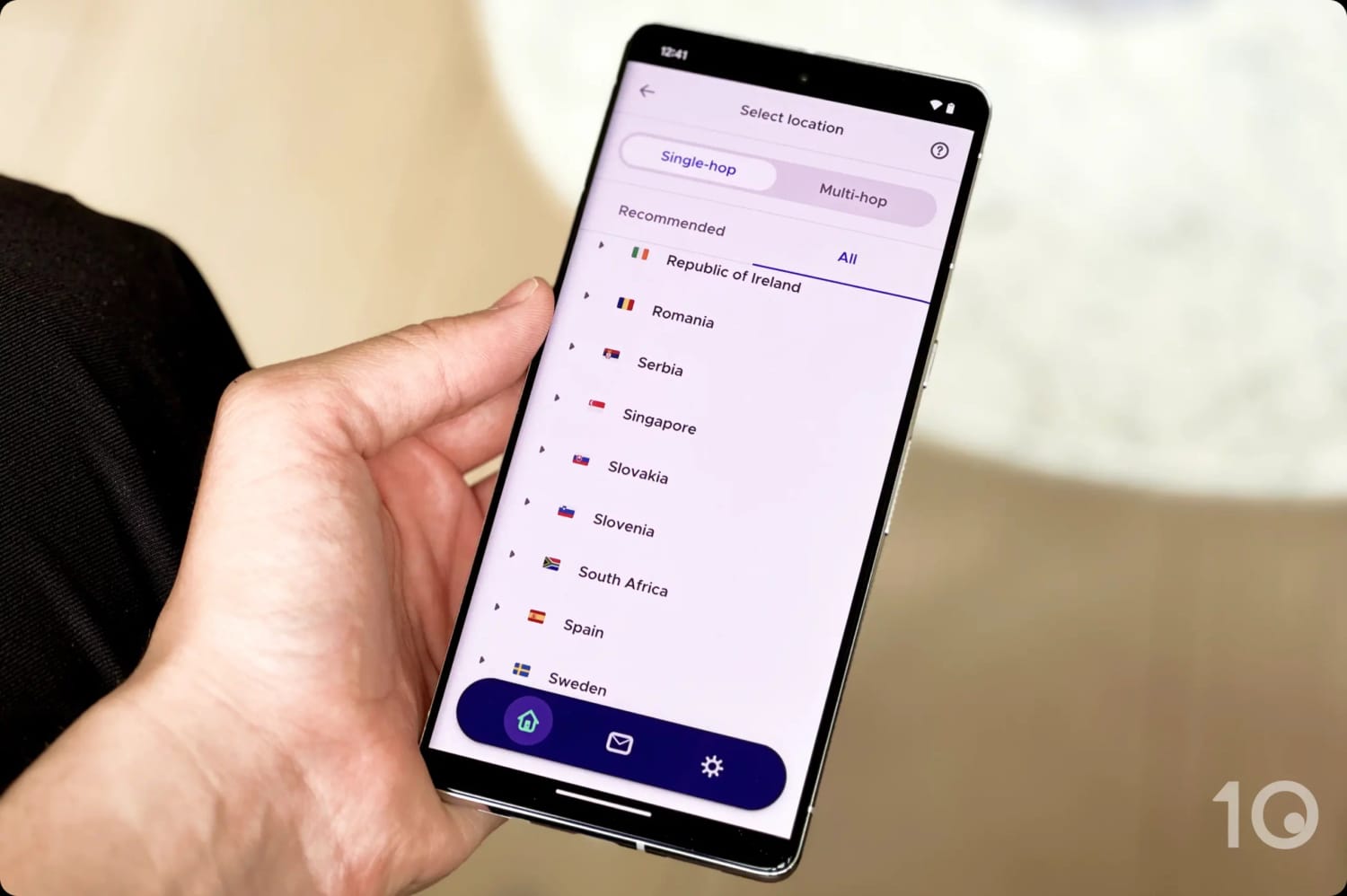
The main drawback is that Mozilla VPN’s server network completely ignores Central America, the Middle East, and large parts of South Asia and Africa. Leaving billions of potential users with no option but to use servers thousands of miles away is extremely disappointing.
The rest of the world sees good coverage, though. Mozilla VPN has city-level server coverage in seven countries:
You can choose city-level servers in 9 countries:
- Australia (six cities)
- Canada (three cities)
- France (two cities)
- Germany (two cities)
- Japan (two cities)
- Serbia (two cities)
- Sweden (four cities)
- UK (two cities)
- US (13 cities)
There’s also servers in 13 different US cities from coast-to-coast, so if that’s where you’re based you should get optimal speeds no matter what.
One Fifth of Mozilla VPN’s Servers Are Owned by Mullvad
Most VPNs rent their server network from third party providers. Mullvad is a little different in that it owns almost 20% of its server network itself. All of those privately owned servers are in Western Europe and Scandinavia.
While there’s nothing wrong with renting servers, knowing that your VPN provider owns its own provides that little extra bit of security. While these servers are owned by Mullvad and not Mozilla itself, the principle still stands – Mullvad is an extremely secure and trustworthy VPN.
EXPERT TIP: You can see a full technical breakdown of all of Mozilla VPN/Mullvad’s servers on its official website.
User Experience
We calculated this rating by assessing the VPN’s ease of use, interface design, and setup process across multiple platforms.
Ranked #10 out of 59 VPNs for User Experience
We love that Mozilla VPN’s apps are about as straightforward as possible. Smartly-laid out and with clear labels for most options it’s a great VPN app for anyone new to VPNs. Its apps also look almost identical across every available platform.
Interface & Ease of Use
When it comes to VPN apps, simpler is better — even if you’re an experienced user. Mozilla VPN is as simple as can be, and that makes using it a pleasure.
Mozilla VPN looks exactly the same on almost every platform, with only a feature changing here or there between them.
You can see what Mozilla VPN looks like on every platform below, as well as what’s different about each one.
Desktop & Laptop (Windows & Mac)
Mozilla VPN’s desktop apps are modern, simple, and tasteful.
Unlike some overly cluttered VPN apps, the user interface is very compact and only displays the essentials. You can quickly connect or disconnect using a toggle and there’s a widget for changing server location.

Clicking the settings cog lets you access advanced features like custom DNS and an ad blocker. You can also find split tunneling here, but Mozilla VPN calls it ‘Excluded apps’.
The macOS app is exactly the same as the Windows app, except it’s missing split tunneling. While this isn’t ideal, it’s also unfortunately common due to restrictions in Apple’s operating system.
Mobile (iPhone & Android)
The iOS app is identical to the macOS app, which is always nice to see. It has the same simple, bright design and all of the same features as its Apple desktop counterpart (including no split tunneling — again, due to iOS limitations).

We also like the inclusion of “Bypass VPN for select traffic” in the iOS app preferences, which allows specific Apple features like AirDrop to continue working while the VPN is active.
The only thing which might put you off here if you’re an iPhone user is that there’s no night mode, and Mozilla VPN uses white backdrops throughout.
Just like Windows, Android gets Mozilla VPN’s most complete app. All features are available here, wrapped up in a package that looks identical to its desktop counterparts.
Linux
Mozilla VPN has an excellent Linux app.
Not only does it have a full GUI, something a huge majority of even the best VPNs neglect, it also has the full range of features.

You get split tunneling, double VPN, and custom DNS. In our opinion, the app looks and feels identical to its Windows counterpart.
Torrenting
We calculated this rating by assessing the VPN's torrenting features, including P2P servers and port forwarding support. We also evaluated its average bitrate and stance on file-sharing.
Ranked #19 out of 59 VPNs for Torrenting
Mozilla allows torrenting on every server, but given its US jurisdiction and IP logging, we can't recommend this VPN for file-sharing. Plus, its average bitrate is far too slow and inconsistent for regular torrenting.
| Torrenting Attribute | Mozilla VPN |
|---|---|
| Permits P2P Traffic | Yes |
| Average Download Bitrate | 4.6MiB/s (54% loss) |
| Countries with P2P Servers | 43 |
| Port Forwarding | No |
| Kill Switch | Yes |
| Logging Policy | Identifiable Data |
Mozilla’s US jurisdiction and excessive data collection puts you at risk should you accidentally torrent copyrighted material.
It’s also not the most straightforward to torrent with since its download bitrate often fluctuates and drops out. This is reflected in an average speed loss of 54%, which can make even simple downloads take a long time.
Another disadvantage for torrenting is Mozilla VPN’s lack of port forwarding, which limits your upload speeds. If you want a technical VPN with plenty of pro-torrenting features, then AirVPN is a suitable alternative.
Device Compatibility
We calculated this rating by evaluating the VPN's support for various devices. We considered dedicated apps, browser extensions, Smart DNS functionality, and router compatibility.
Ranked #54 out of 59 VPNs for Device Compatibility
You can only install Mozilla VPN on the most popular desktop and mobile operating systems: Windows, macOS, Linux, iOS, and Android. There's no Chrome extension, no streaming device apps, and no router support to cover your consoles or smart devices. You can only use the VPN on five devices at once, which is quite limiting.
| Windows | Yes |
|---|---|
| Mac | Yes |
| iOS | Yes |
| Android | Yes |
| Linux | Yes |
| Amazon Fire TV | No |
| Android TV | No |
| Apple TV | No |
| Router | No |
| Chrome | No |
| Smart DNS | No |
|---|
Simultaneous Connections: 5
Without dedicated apps, router support, or Smart DNS, there isn’t a way to use Mozilla VPN on streaming devices or platforms that don’t support VPN software (like game consoles).
As expected, you can install a VPN extension on Firefox, Mozilla’s very own web browser. However, there aren’t any extensions available for Chrome or Microsoft Edge.
While it’s true that Mozilla VPN is still a relatively new product, this limited device compatibility is inexcusable.
Mozilla VPN Can Only Be Installed on Five Devices at Once
Perhaps the most annoying drawback, though, is Mozilla VPN’s five-device limit. Ordinarily a VPN will limit your number of simultaneous connections, but will let you install it on as many devices as you like. With Mozilla VPN, you can only be signed in on five devices at once, regardless of how many are actually being used at the same time.
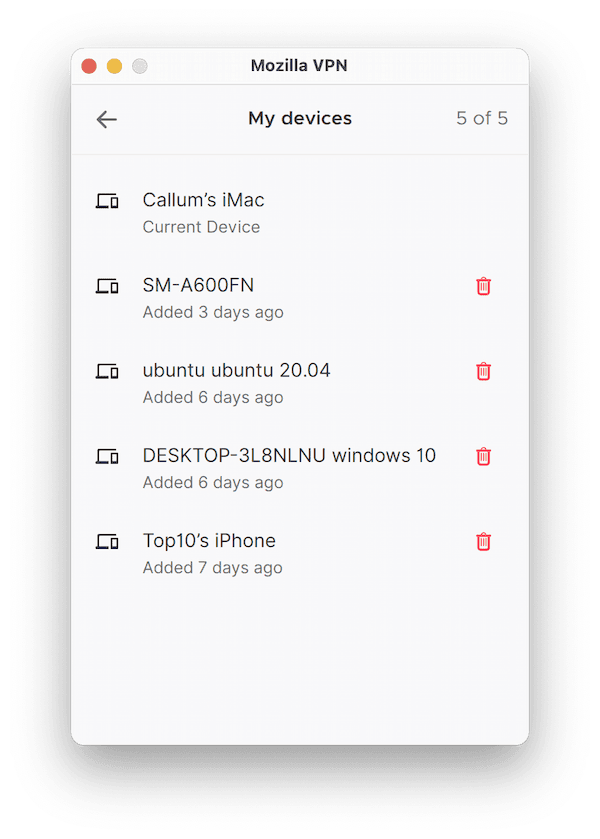
Mozilla VPN at least shows you the devices currently linked to your account within the app, so you can quickly remove the ones you don’t need.
Additional Features
We calculated this rating by evaluating the VPN's extra capabilities beyond the basic VPN service. This includes bypassing censorship, additional tools like malware blockers, and customization options like split tunneling.
Ranked #20 out of 59 VPNs for Additional Features
Mozilla VPN includes a basic set of additional features. The exception is its fully-customizable multi-hop, a rarity among VPN services. However, there are better competitors that offer this as well as a malware blocker, GPS spoofing, and dedicated IPs.
| Additional Feature | Mozilla VPN |
|---|---|
| Split Tunneling | Yes |
| VPN Obfuscation | Yes |
| Multi-Hop Servers | Yes |
| Dedicated IP | No |
| Ad Blocker | Yes |
Multi-Hop Is Available on Almost Every Server
Multi-hop (Double VPN) is a technology which routes your device’s web traffic through two servers instead of one.
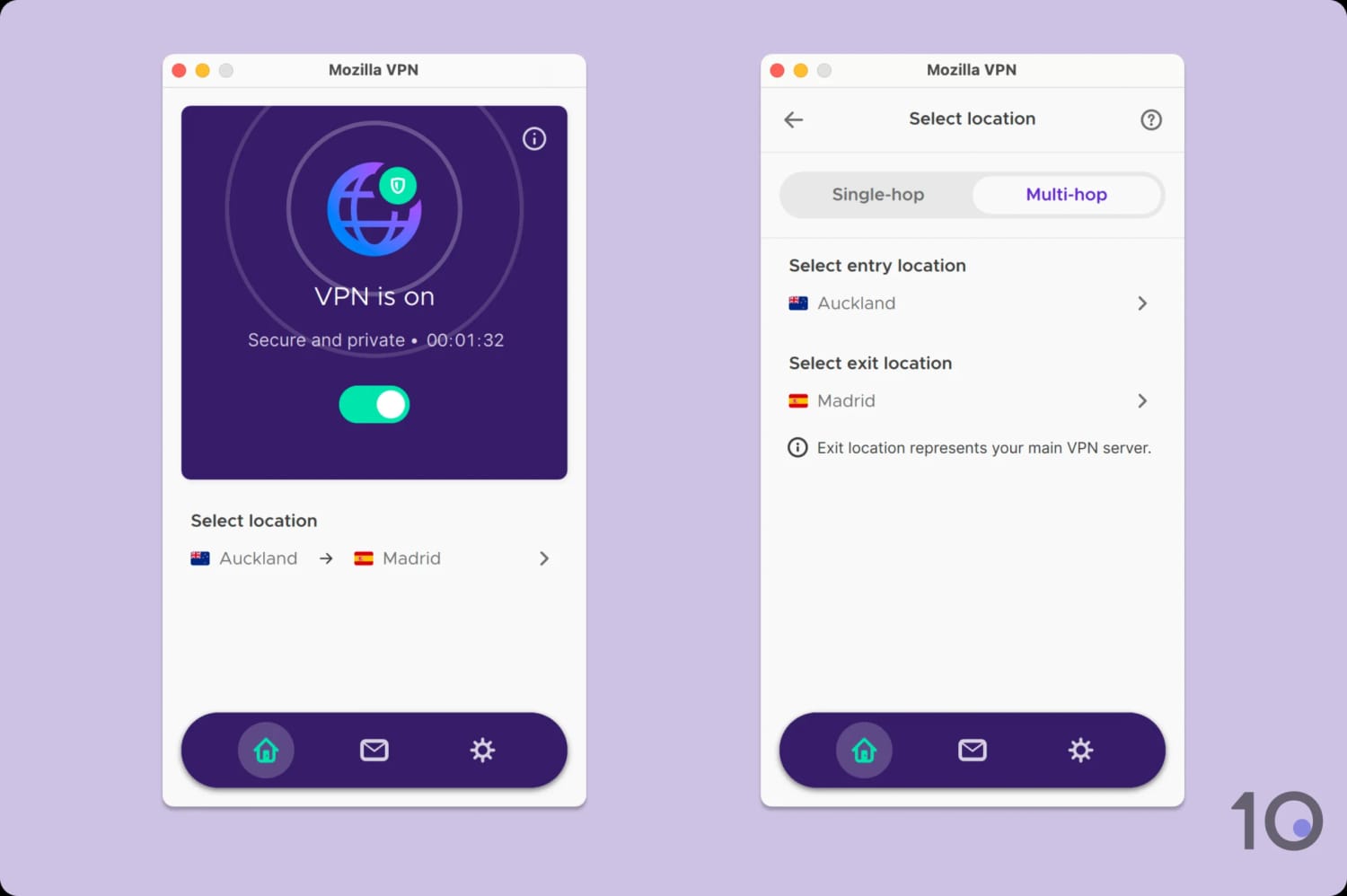
The exit location you choose determines the IP address you’re assigned.
While this makes you harder to track, it comes at the cost of speed since your data has to move through an additional location.
Mozilla VPN’s multi-hop is especially impressive because it doesn’t limit you to a handful of entry or exit nodes (like with NordVPN). Instead, the entire server network is available for you to select at both stages.
Ad Blocker Performs Adequately
One of Mozilla’s few extra features is custom DNS, which allows you to pick from ad blocking servers, tracker blocking servers, both at once, or a custom DNS of your own choosing (such as Google or Cloudflare’s).
The ad and tracker blockers work well, but they don’t catch everything they should. However, almost every VPN built-in ad blocker struggles, as we discovered in our in-depth testing on whether or not VPNs actually block ads.
One-Way Split Tunneling Feature
Mozilla includes a split tunneling feature, labeled “Excluded apps”, in its Windows and Android apps.
As the name suggests, this feature lets you choose which apps won’t be routed through the VPN tunnel. While a useful tool, many VPNs let you go further and switch between including or excluding apps from the VPN encryption.
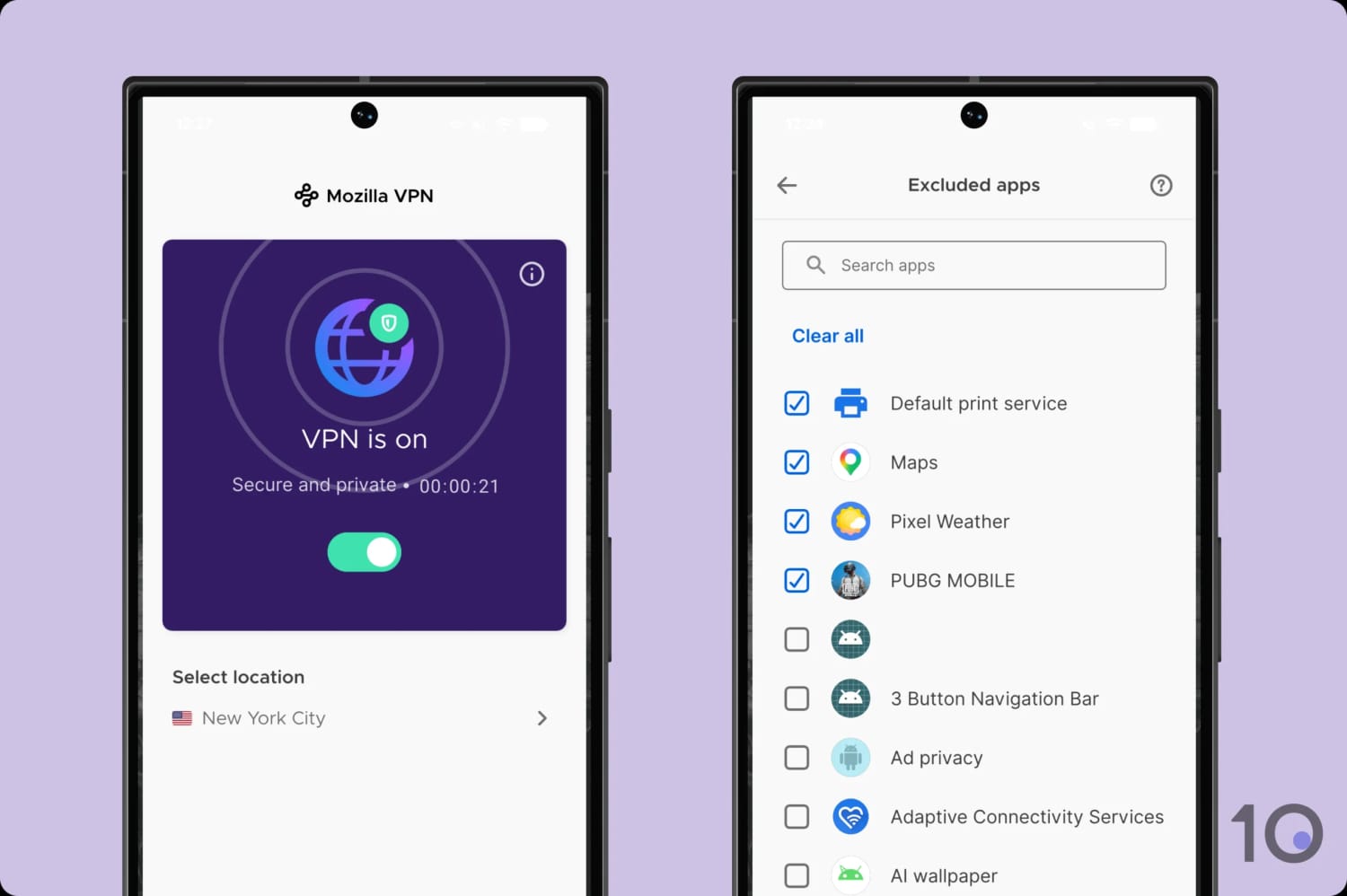
It took us seconds to set up split tunneling on Mozilla VPN.
That said, Mozilla VPN uniquely allows its ad and malware blockers to continue working on excluded apps. We applaud this functionality.
Mozilla VPN Key Data
| Attribute | Mozilla VPN | Typical VPN |
|---|---|---|
| Owner | Mozilla | Independent |
| Launch Date | 2020 | 2015 |
| Local Download Speed | 97Mbps (3% loss) | 89Mbps (11% loss) |
| International Download Speed | 88Mbps (12% loss) | 80Mbps (20% loss) |
| Countries with Servers | 43 | 40 |
| Privacy Policy | Identifiable Data | Identifiable Data |
| Simultaneous Connections | 5 | 10 |
| Netflix Libraries | 0 | 3 |
| Torrenting | Yes | Yes |
| Works In China? | No | No |
| Cheapest Price | $4.99/mo over 12 months | $3.87/mo over 24 months |
| Customer Support | Email & Online Resources Only | |
| Apps & Extensions |           | |