Top10VPN is editorially independent. We may earn commissions if you buy a VPN via our links.
What a VPN Can and Can’t Hide
Simon Migliano
Simon Migliano is a recognized world expert in VPNs. He's tested hundreds of VPN services and his research has featured on the BBC, The New York Times and more. Read full bio
A VPN encrypts and hides all internet traffic leaving your device. It hides your IP address and location from the websites you visit, as well as concealing your web browsing and downloads history from your Internet Service Provider (ISP) and WiFi admin. Most VPNs don’t hide your GPS location or MAC address, and governments and advertisers can still track your browsing activity, even with a VPN on.
A virtual private network (VPN) is one of the best tools you can use to protect your privacy, security, and freedom online.
A good VPN hides your downloads, searches, and browsing history from your Internet Service Provider (ISP), cybercriminals, government agencies as well as the websites and apps you use.
If you don’t use a VPN, each of these entities will know a lot more about who you are and what you do online.
What exactly a VPN hides often depends on who you’re trying to hide information from. You also need to know that a VPN won’t hide all your internet activity from everyone.
A good VPN hides the following:
Your personal IP address
Your geographic location
The websites you visit
The apps you use
How long you spend on websites and apps
The files you download or upload
Torrenting and P2P activity
The fact you’re using a VPN
Different entities have access to various pieces of the information listed above.
For instance, your ISP won’t see your browsing or download activity when you use a VPN, but it knows your real IP address and your geographic location since it assigned your IP address in the first place.
A VPN won’t make you completely anonymous, either. While it will hide some of your online identity and activity, government agencies and hackers can still figure out what you do online, as we explain later in our guide.
Why Trust Us?
We’re fully independent and have been reviewing VPNs since 2016. Our ratings are based on our own testing results and are unaffected by financial incentives. Learn who we are and how we test VPNs.
What a VPN Actually Hides
A VPN will hide information like your IP address and geographic location from the websites and apps you use, and your and web browsing activity from your ISP.
Here’s a table summarizing exactly what a VPN hides and from who:
Data Type
Your Internet Service Provider (ISP)
The Websites & Apps You Use
Governments & Police
Hackers (on Public WiFi)
Employers & Other WiFi Admins
Your IP Address
No
Yes
Sometimes
No
No
Your Physical Location
No
Yes, with IP-based geolocation
Sometimes
No
No
Websites/Apps You Visit
Yes
No
Mostly
Yes
Yes (but be careful)
Time Spent on Websites/Apps
Yes
No
Mostly
Yes
Yes, with obfuscation (but be careful)
Search History
Yes
Yes
Mostly
Yes
Yes, with obfuscation (but be careful)
Downloads
Yes
No
Mostly
Yes
Yes, with obfuscation (but be careful)
Torrenting
Yes, with obfuscation
Yes, with Static IP
Yes, with obfuscation
No
Yes, with obfuscation (but be careful)
The tricky part is understanding who can and can’t see some of this information.
It’s not enough to know that a VPN hides your location, you also need to know who it is and who it isn’t hidden from. Otherwise, you could put yourself at risk by believing you’re protected when you’re not.f
Detailed Summary of What a VPN Hides
Your IP Address: Websites and apps use your IP address to track your activity, create personalized content, impose bans and restrictions, and to collaborate with advertisers and law enforcement agencies.
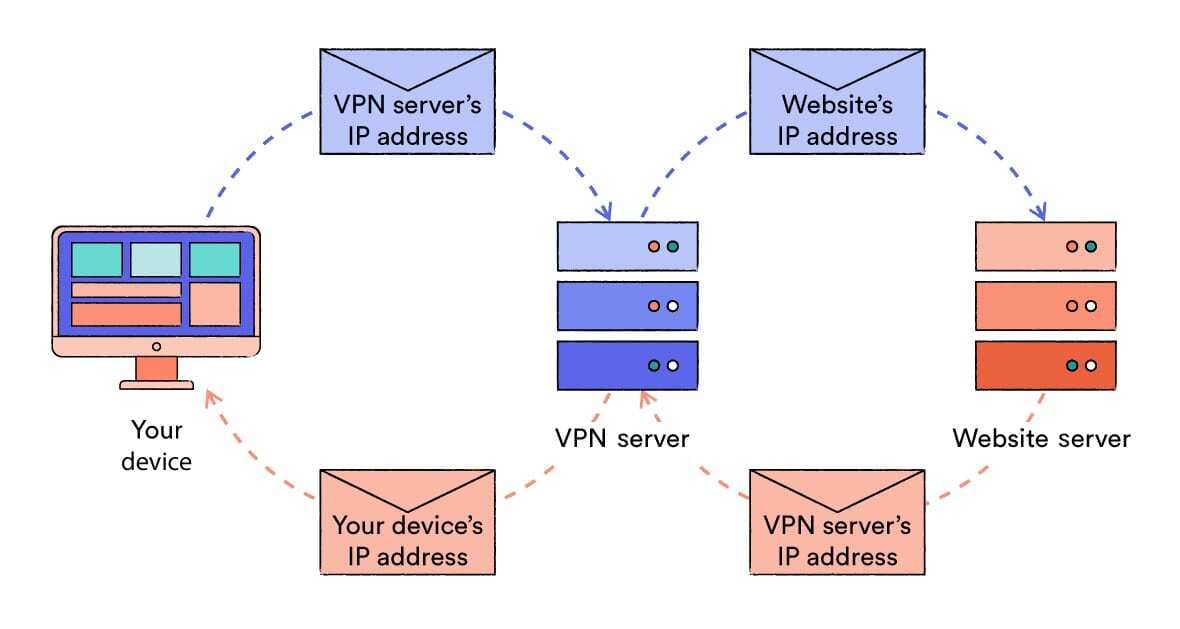
A VPN hides your IP address from these websites by tunneling your traffic through a VPN server. This makes it appear as though your traffic is coming from the VPN server’s IP address, thereby keeping your personal IP address hidden from view.
Your Location: Your IP address also contains information about your rough geographic location, which can be used to enforce regional restrictions. By hiding your IP address, a VPN can also change the way your location appears to certain websites, apps and services.
Your Browsing History: Your ISP tracks and records everything you do online. It can then share that information with governments and police, sell it to advertising networks, or use it to throttle (or even block) your connection.
A VPN encrypts your traffic, which hides your browsing history from ISPs and anyone they distribute information to. VPN encryption also hides your online activity from WiFi administrators at work, school, college, home, and in airports and coffee shops.
Your Personal & Sensitive Data: Cybercriminals use unsecured public WiFi networks to intercept your connection and steal sensitive information, including passwords, credit card numbers, and medical details. These are known as man-in-the-middle attacks and can take many different forms, such as DNS spoofing and session hijacking.
By encrypting your data, a VPN protects you from these attacks and keeps your personal information safe and hidden.
Your Torrenting & P2P Activity: Torrenting without a VPN poses a threat to your privacy. Your IP address is exposed to hackers and copyright trolls every time you download or upload a file. Also, your ISP can see when you visit torrent sites and is likely to pass that information to copyright holders.
When you use a VPN for torrenting, the encryption hides your activity from your ISP and only the VPN server’s IP address gets exposed in the ‘torrent swarm’.
The VPN Itself: When you use a VPN, your ISP, government, and WiFi administrator won’t see your browsing activity. However, your ISP can see that a VPN is being used. This can lead to censorship, legal problems, or a scolding from your employer or school administration.
To overcome this, the best VPNs can hide the very fact you are using a VPN. They do this through obfuscation technology, which camouflages your web traffic among regular HTTPS traffic.
We’ll now take a more in-depth look at each of these:
1. Your IP Address from Websites & Apps
A virtual private network (VPN), if working properly, hides your public IP address from the websites and applications you use.
Your IP address is tied to sensitive information, such as your Internet Service Provider (ISP) and your rough geographic location.
If someone knows your IP address, they can scan your router for open ports, which are vulnerable to malware.
Your IP address reveals sensitive information such as your approximate location.
Websites and apps use your IP address to register when you visit their site. This means they can record your activity and then link it back to you each time you return.
Websites regularly share this information with other websites, advertising networks, data brokers and online trackers, too. Collectively, they form profiles of you and your browsing habits, using your IP address to tie it all together.
These entities can then track you across the internet, targeting you with personalized ads, collecting additional information about you, and monitoring your browsing activity.
A VPN protects you from these advertising and surveillance networks by hiding your IP address as you browse.
When you use a VPN, your traffic travels via a VPN server on its way to the web service you’re accessing. This makes your traffic appear as if it’s coming from the VPN server, therefore hiding your personal IP address.
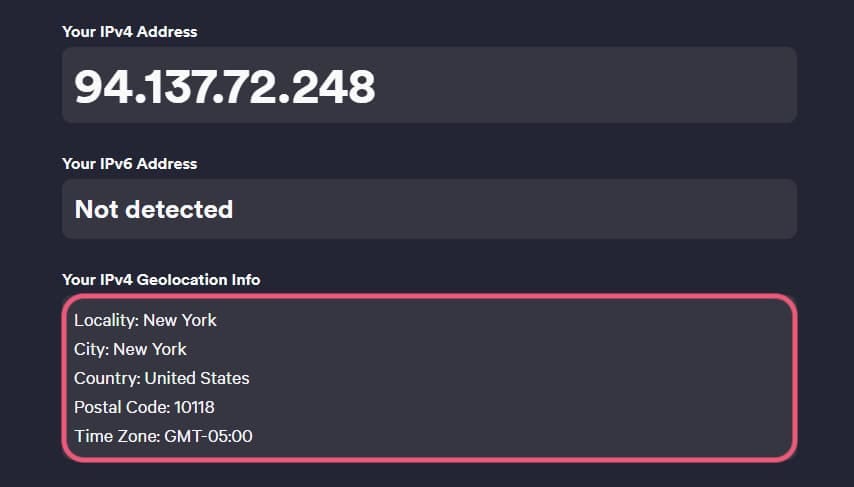
When you use a VPN, the websites you visit see the IP address of the VPN server.
Using a VPN doesn’t stop websites and advertisers from seeing what you do online, but it stops them from linking that activity back to you via your IP address and makes it much harder for them to gather information about you.
Hiding your IP address from websites and apps also allows you to bypass IP bans. Often websites, such as forums, use your IP address to issue suspensions to individuals who have broken their terms of use.
If you have been mistakenly banned, then using a VPN will let you regain access to the service because it hides your original, banned IP address from the website.
2. Your Real Location from Websites & Apps
By replacing your IP address with the VPN server’s IP address, a VPN will hide your real location from the websites you visit. This means you can trick streaming services into thinking you are physically located wherever the VPN server is.
Websites and apps can vary their content based on your geographic location. Netflix, for example, has a different catalog of movies and TV shows for US users than it does for UK users.
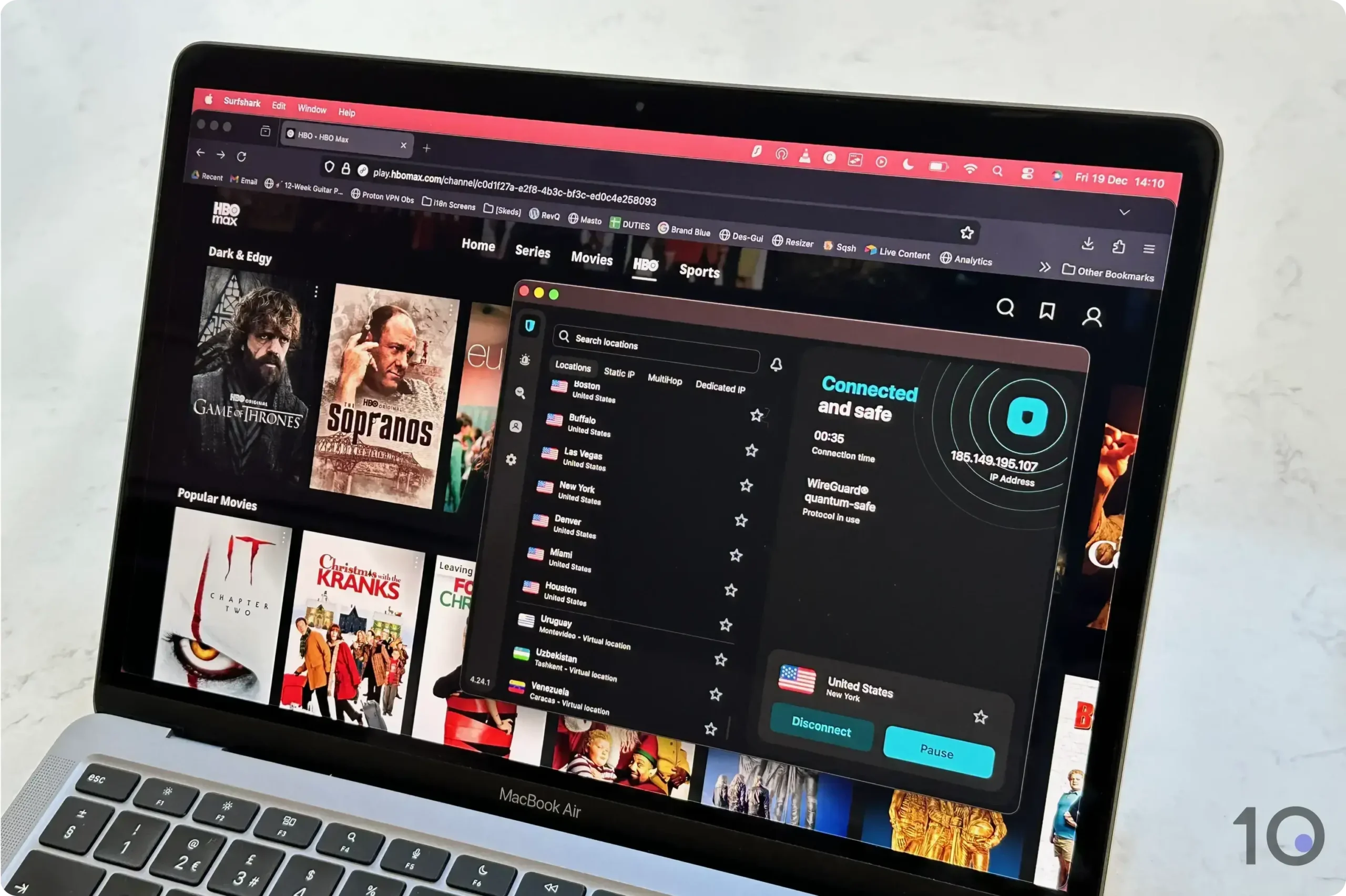
Streaming websites use your IP address to determine which country-specific content to show you. By changing your IP address with a VPN, you can for instance change your Netflix region and access content unavailable in your country.
We accessed different HBO Max regions using Surfshark.
But streaming isn’t the only reason to hide your physical location from websites. Other forms of internet censorship typically rely on IP-based geolocation too. For example, Microsoft Bing has been found to
Most ISPs keep logs of your browsing history whenever you don’t use a VPN. In many countries, such as the UK and Australia, they are required to do so by law. This poses a number of different risks:
Privacy. ISPs can share these browsing history logs with anyone they choose to. It’s likely that your ISP is passing over information about your browsing habits to data brokers who then sell on to willing buyers – usually advertising companies.
Freedom. ISPs may be compelled to share your browsing records with government agencies and police forces too. Not only does this facilitate global mass surveillance, it also allows governments to implement censorship regimes that limit your freedom online.
ISPs often work with governments to censor content and penalize individuals who access restricted information. They may even allow police to monitor your web traffic in real-time.
Security. Your ISP likely keeps logs of your historical web browsing activity in a database. If cybercriminals were to hack into these servers, they would gain access to that sensitive information.
Unfortunately, these security breaches are not unheard of, either. Austria’s largest ISP, A1 Telekom, suffered one in 2019. In 2017, 8.9 million people had their data exposed when a Russian ISP was breached.
Performance. ISPs have been known to throttle the speeds of internet users engaging in high-bandwidth activity, such as online gaming and P2P file-sharing. There are suspicions that ISPs sometimes use throttling to undermine competitors.
But if your ISP can’t see what you’re doing online, then it can’t throttle your gaming traffic, work with governments to implement censorship measures, or let police track you in real-time.
Moreover, since a VPN prevents your ISP from logging your browsing history, there will be less data susceptible to data breaches, shared with advertising networks, or used to aid government surveillance. However, VPNs can’t erase ISP records of your previous, unprotected search history.
And while a VPN can protect from internet throttling, ISPs can still see the total amount of bandwidth you’re using and may still throttle your connection if it deems that you’re using too much data.
4. Your Sensitive Data from Hackers & Cybercriminals
Using a VPN helps to keep your personal and sensitive data hidden from hackers and cybercriminals in a number of different ways.
We’ve already established that hiding your internet activity from your ISP can reduce the risk of data theft from security breaches, and that hiding your IP address protects from vishing, doxing and DDoS attacks.
Additionally, a VPN keeps sensitive data transfers concealed on open WiFi networks. In particular, it protects you from two main forms of man-in-the-middle attack:
DNS Spoofing: On unsecured public WiFi networks, it’s relatively easy for attackers to hijack your DNS requests. They can then re-route your connection to a website under their control, without you knowing.
A good VPN for public WiFi can protect you from these DNS spoofing attacks by encrypting your requests and resolving them on the VPN provider’s own DNS server. This stops the attacker from seeing your DNS request, let alone spoofing it.
Session Hijacking: Hackers might also steal the ‘session cookies’ that appear temporarily whilst you’re connected to a website’s server. These are small text files stored in your browser that authenticate and facilitate an individual session on that website.
On unsecured WiFi networks, attackers can use packet sniffing or fake hotspots to steal these cookies and take over your session. If you were online banking, then they could even make bank transfers from your account.
By encrypting your connection, a VPN makes your traffic unreadable to everyone except the VPN server. This includes hackers on a public WiFi connection. It therefore keeps your personal information safe and hidden from criminals.
5. Your Torrenting Activity from Your ISP, Police, & Copyright Holders
A good VPN hides your torrenting downloads and P2P file-sharing activity from your ISP. This is helpful because ISPs often throttle (or even block) P2P traffic due to its high-bandwidth nature.
By encrypting your data, however, a VPN can hide the fact you are torrenting from your ISP, leaving you free to enjoy fast download and upload speeds.
It also means your torrenting activity stays hidden from police and copyright holders, too. Your ISP would typically work with law enforcement to issue you with DMCA notices, fines and legal action, should you ever mistakenly download any copyrighted material. VPN encryption stops your ISP from logging your P2P activity in the first place, which means it has no relevant information to pass on to these authorities.
Using a VPN will also help keep you safe from other torrent users on the P2P network. That’s because downloading and uploading torrent files normally means exposing your IP address to everyone in the ‘torrent swarm’.
A VPN keeps you safe while torrenting by hiding your IP address behind the IP address of your VPN server. This means that the IP address seen in the torrent swarm, and the one associated with the torrents you download, is the VPN server’s IP address and not your real one.
6. The VPN Traffic Itself from Your ISP
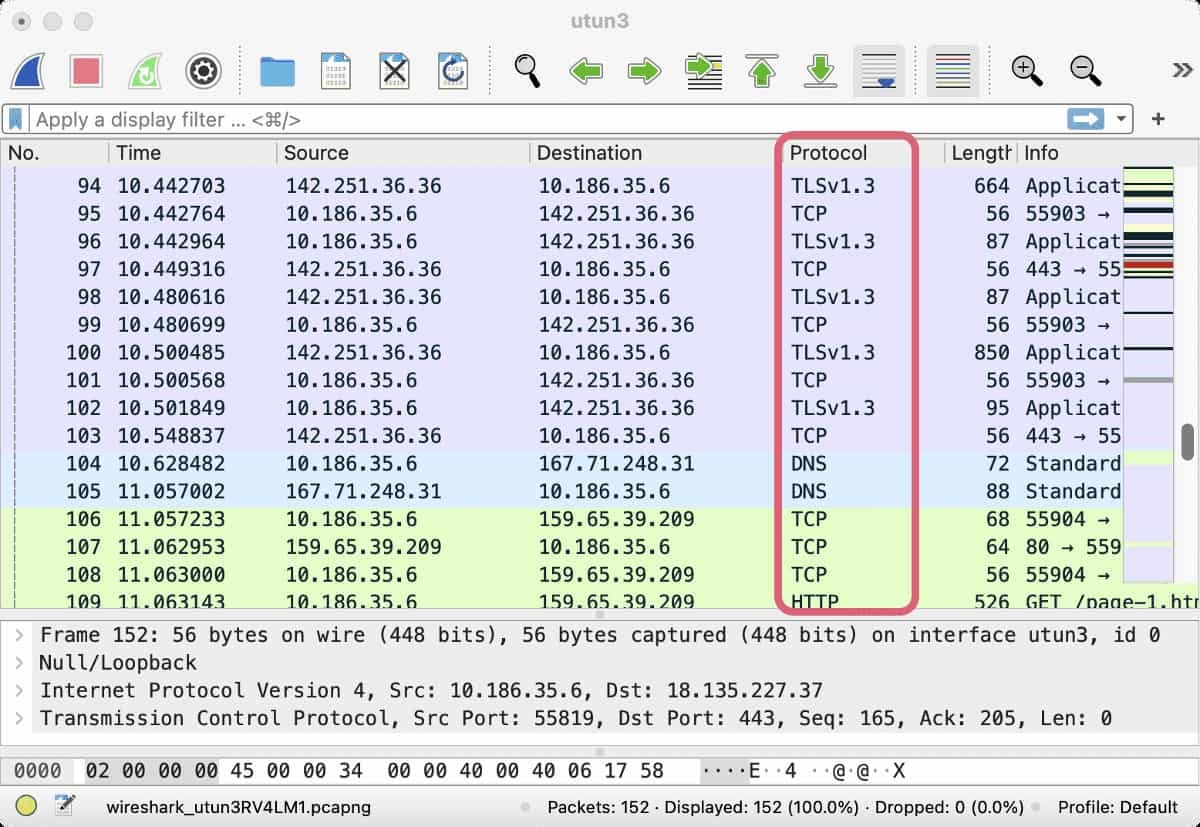
ISPs and WiFi administrators can’t see the details of your browsing activity when you use a VPN, but they can see that a VPN is being used. To do this, they can check the connection’s port number or, most commonly, use a tool known as Deep Packet Inspection.
Deep Packet Inspection (DPI) is an advanced method for analyzing network traffic. It uses sophisticated pattern-matching techniques to classify and categorize the ‘type’ of data being transmitted over the network, and is very effective at identifying normal VPN traffic.
The best VPN services can hide the fact you’re using a VPN from your ISP, government, and WiFi or network administrator. To do this, they use VPN obfuscation.
VPN obfuscation refers to the capacity of a VPN server to disguise your traffic as regular HTTPS traffic. When you use VPN obfuscation, DPI is much worse at detecting and identifying the VPN because your traffic becomes camouflaged amongst normal web traffic.
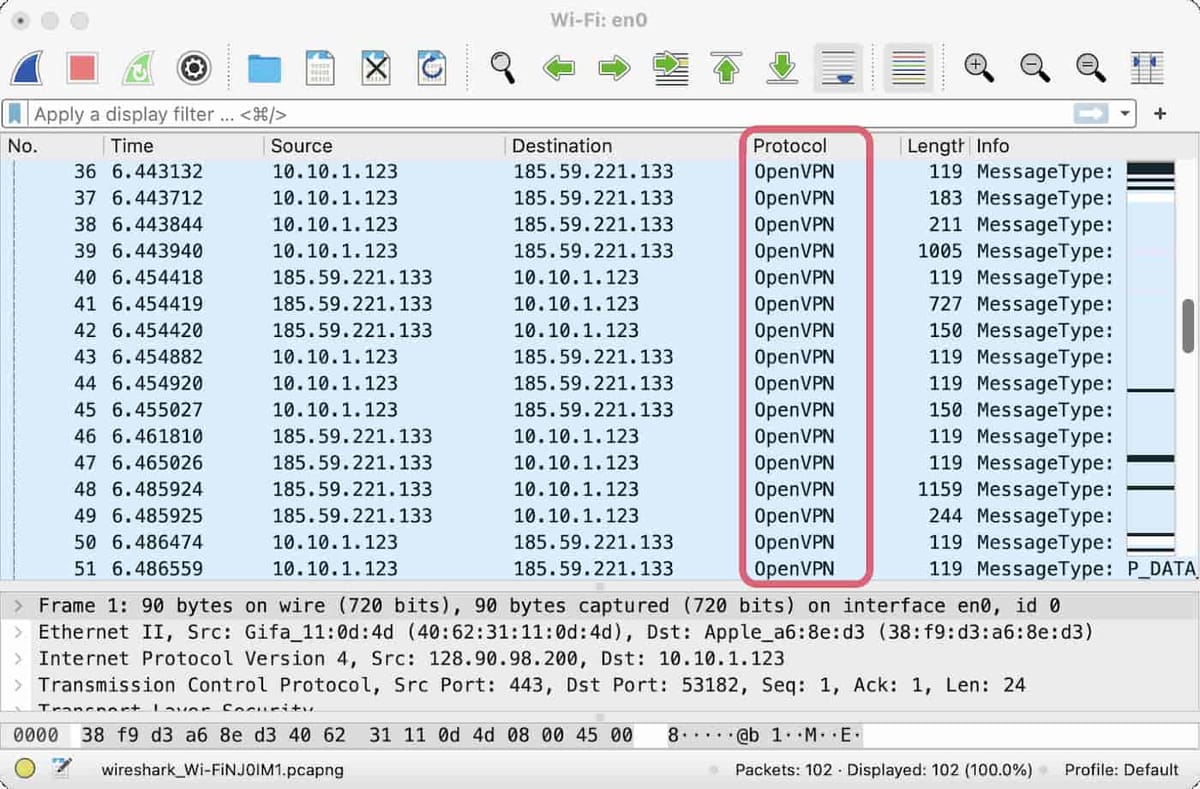
Here is our DPI analysis of VPN traffic without obfuscation:
The packet inspection tool detects an OpenVPN connection.
And here is our DPI analysis of VPN traffic with obfuscation:
The packet inspection tool perceives a regular HTTP, TLS, or TCP connection.
As you can see, our DPI tool was unable to detect VPN traffic when the connection was obfuscated.
A VPN can therefore hide itself from ISPs, governments, employers and WiFi administrators by using obfuscation.
What a VPN Doesn't Hide
VPN services can help to hide all of the information listed above, but they can’t make you completely anonymous online.
Here’s an overview of the things a VPN can’t hide, and who from:
Your IP Address or Physical Location from Your ISP
To supply you with an internet connection, your ISP has to know your physical location and assign you an IP address. There is therefore no way to hide these details from your ISP – not even by using a VPN.
In many countries, there is very little stopping them from sharing this information with governments, police, and any other third-parties willing to pay for it.
A VPN stops your ISP from monitoring and recording what you actually do online. When you use a VPN, your ISP knows who you are, but not what you’re doing.
Your Browsing Activity from the Websites and Apps You Visit
Using a VPN hides your browsing activity from your ISP and WiFi administrator, but it doesn’t hide that activity from the website or app you’re using – they can still see exactly what you do on their service.
They can also track your browsing behavior using cookies, which are small files set into your web browser whenever you visit a website. They send information back to the website when you return, enabling it to re-identify you.
Using a VPN doesn’t hide you from cookies because cookies aren’t linked to your IP address. That’s why it’s important to delete cookies regularly, or to use Incognito mode in your browser.
Nevertheless, with a VPN turned on, websites and apps are less likely to be able to trace your activity back to you because they can’t see your IP address. They can see what you do, but not who you are.
NOTE: Websites, advertisers and governments can also work out your identity from your browsing activity itself. If you’re logged into a social media account while browsing with a VPN, it won’t matter that your IP address is hidden — it will be possible to trace your online activity back to you.
Your GPS Location or WiFi Location
While many websites and services use your IP address to determine your physical location, it’s also possible to use your device’s GPS data or WiFi location tracking. This is how navigation apps and food delivery services find your location.
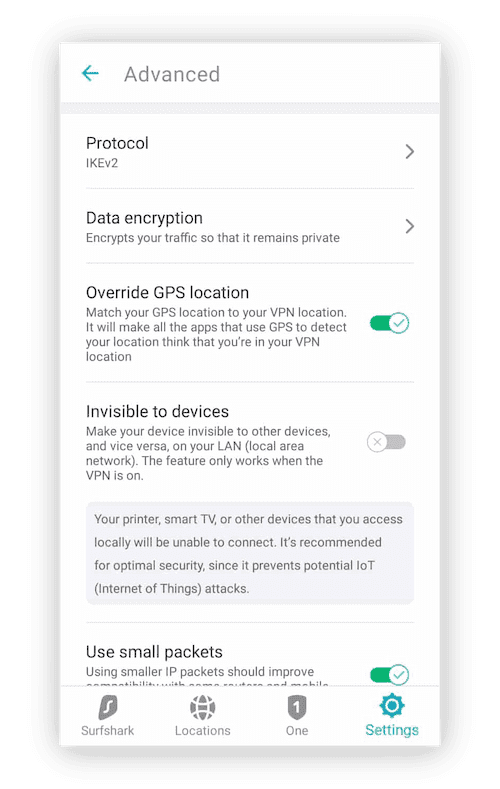
Most VPN services work by changing your IP address, which means they won’t successfully hide your location from websites and apps that use GPS tracking.
There are only four VPN services capable of hiding your GPS location: Surfshark VPN, Windscribe, IVPN, and TorGuard. Of these, we prefer Surfshark, in part thanks to its very effective GPS spoofing setting on Android.
You can override your GPS location with Surfshark VPN.
If your website or app uses WiFi Location Tracking, then there are no VPNs that will hide your location. WiFi location tracking uses the WiFi access points (e.g. routers and smart devices) around your device to triangulate its location.
Google and Apple both use WiFi location tracking. It’s an incredibly precise and robust way to track your location and, currently, there are no VPNs that can hide you from it.
Your MAC Address
Your device’s MAC address (Media Access Control address) is the unique, 12-character code that identifies the device on your local network.
It’s used to coordinate the transmission of information between local devices and to help prevent unauthorized access to the network.
Using a VPN doesn’t hide your MAC address. However, even without a VPN, your MAC address isn’t visible to anyone outside of your local network so isn’t something to really worry about.
Your Total Data Usage from Your ISP or Mobile Carrier
VPN encryption prevents cell phone carriers and ISPs from being able to monitor your online activity. With a VPN turned on, they can no longer see which websites you visit, when you visited them, and how long you spent there.
However, a VPN doesn’t hide how much data or bandwidth you’re consuming. ISPs and mobile carriers can still see exactly how much data is being transferred along your connection when you use a VPN. In fact, our research has shown that using a VPN can increase cellular data consumption by 4-20%.
You therefore can’t use a VPN to hide from monthly data caps or get unlimited roaming data. On the contrary, you’ll actually end up reaching your data cap faster and scoring more expensive roaming charges.
Your Identity & Activity from the VPN Service Itself
When you use a high-quality VPN, the only entity capable of seeing both who you are and what you do online is the VPN service itself. Essentially, you are opting to show everything to the VPN company in order to stay hidden from everyone else.
Using a VPN therefore requires a huge amount of trust in your VPN provider. If it wanted to, it could see:
Your name
Your email address
Your IP address
Information about your devices
Which websites and apps you use
The timestamps for each session on these websites and apps
Your download activity
Any P2P and torrenting traffic
The contents of any HTTP traffic (incl. usernames and passwords)
An untrustworthy provider might then sell that information on to criminals and advertisers, or even use it to carry out cyber-attacks against you. Indeed, this is precisely the business model for many unsafe free VPNs.
VPNs have also been known to install backdoors into their service so that governments and law enforcement agencies can spy on user traffic. This is particularly common in countries where VPN use is restricted, such as in China.
Can VPNs Be Tracked?
By encrypting your traffic and tunneling it through a VPN server, a VPN can hide a lot of information from many different people.
But can you still be tracked when using a VPN? The short answer is yes, it’s possible.
The reality is that VPNs aren’t bulletproof and can still be tracked, because they don’t make you completely anonymous online.
There are three main ways your VPN activity can be traced back to you:
1. Your VPN Isn’t Working Properly
If your VPN stops working or is poorly configured, it can easily lead to your VPN activity being exposed.
This can take the form of an IP, DNS or WebRTC leak, which reveals your true IP address to the websites and apps you’re using.
Leaks can be caused by errors in the VPN’s setup, or by VPN connection failures. To protect against the latter, your must use a VPN with a functional kill switch.
Your VPN may also use weak encryption protocols that allow ISPs, government agents, and hackers to decrypt your internet activity.
We only recommend using VPNs with the WireGuard, OpenVPN or equivalent proprietary protocol (and corresponding AES-256 or ChaCha20 encryption).
2. Alternative Means Of Tracking
A VPN is one of the most important tools for safeguarding your online privacy and security, but it isn’t a catch-all solution.
Put simply, there are many other ways for ISPs, governments, advertisers, hackers, and tech companies to keep tabs of what you do online. Using a VPN will often make it harder for them, but it won’t make it impossible.
Your browsing behavior is probably the easiest way for your VPN to be tracked. When you sign in to personal accounts, such as Google and Facebook, you give these companies the freedom to monitor your activity.
Moreover, since you gave them personal information when you created the account, they can easily link that activity back to you and your identity.
Other methods of tracking you online that work even when you’re using a VPN include:
Cookies and tracking scripts
Device fingerprinting, browser fingerprinting, and traffic fingerprinting
Spyware and stalkerware
Social media posts (incl. meta-data on images)
3. Your VPN Service Is Tracking You
Finally, as we’ve seen, a VPN service doesn’t protect your privacy by default. In fact, when you use a VPN, you are most vulnerable to tracking from the VPN service provider itself.
For this reason, you should never use a VPN without thoroughly researching it first. Luckily, we’ve done a lot of the work for you by reviewing 61 VPN services.
FAQs
Does a VPN Hide Your Browsing History from Network Admins?
VPNs can hide your browsing history from network administrators such as:
Employers
Parents
Landlords
School & College IT Technicians
Public WiFi Owners (e.g. Starbucks and airport staff)
Anyone with router-level access can see that your traffic is going to a VPN server, but they can’t see where it goes after that.
A VPN also has the added benefit of letting you bypass any firewalls on the router, which may allow you to unblock certain websites on workplace networks.
You should also be aware that a VPN is unlikely to hide your browsing activity when using a work or school computer.
This is because administrators often have a way of monitoring your screen directly, either through remote access software, keylogging technology, or a screen monitoring program that is pre-installed onto the device.
Does a VPN Hide Your Search History from Search Engines?
Using a VPN won’t hide your search history from Google or any other search engine.
Google, or any other search engine, will always know your search queries because you’re using its service to make them.
The question, however, is whether Google can link those searches back to you.
If you’re signed in to your Google account, then the answer is yes. If you’re not, and are using a VPN, it becomes much harder for Google to link your search history back to you.
Even then, it’s likely that Google uses Chrome browser fingerprinting to link searches to users. This involves using complex algorithms that use your device type, screen resolution, GPS location, behavioral patterns, and other factors to identify you.
Can the Police Track VPNs?
The police can’t decipher encrypted VPN traffic that uses secure encryption such as the WireGuard protocol and ChaCha20 cipher.
However, they can still track the activity originating from an individual VPN IP address. If you suffer from a data leak or log into an identifying account while using the VPN, it may be possible to connect that activity to you.
If the police have a court order, it’s also possible for the police to go to your ISP and even the VPN company itself for connection or activity logs.
In this case, your ISP will be able to confirm you’ve been using a VPN service, and potentially identify which particular VPN you’ve used.
If your VPN service collects logs, they may be legally obliged to hand over information about your activity or connection information in these circumstances.
That being said, the very best VPN services don’t collect any personally-identifiable information.