



Privacy
Ranked #5 out of 59 VPNs for Privacy
Mullvad doesn't log any sensitive data and its privacy claims have been proven. It only collects payment information and customer support queries. While not essential, I'd welcome the inclusion of transparency reports and any moves towards self-managed servers.
| Originating IP Address | No |
|---|---|
| Browsing Activity | No |
| Individual Connection Timestamps | No |
| Date of Last Connection | No |
| VPN Server IP | No |
| Device Information | No |
| Individual Bandwidth Usage | No |
| Account Information | No |
You can read Mullvad's full privacy policy on its website.
Mullvad’s privacy policy is clear: it doesn’t log any internet traffic, user bandwidth, or your originating IP address.
To minimize data collection, the service completely bypasses the signup process. You don’t need to provide an email address, instead you’re given a random 16-digit account number.
Alongside this, Mullvad doesn’t use traditional subscriptions, opting for a pay-as-you-go model. The advantage of this is that there isn’t an auto-renewal feature — as is the case with most VPNs — so it doesn’t need to save your name, email address, and payment details.
For maximum privacy, you can even pay by cryptocurrency or send cash in an envelope to one of Mullvad’s offices.
Mullvad went even further and made its entire VPN server infrastructure and DNS server network diskless — meaning that no data is stored in physical hardware.
The VPN’s various privacy initiatives were vindicated when, in May 2023, Swedish authorities raided Mullvad’s offices and no user data could be extracted. For me, this is the ultimate test, and passing it demonstrates that Mullvad is a genuine no-logs service.
Who Is Behind Mullvad VPN?
Mullvad VPN is owned by Swedish company Amagicom AB and run by its CEO, Jan Axel Jonsson. The owners and sole shareholders of Amagicom AB are Fredrik Strömberg and Daniel Berntsson, who describe themselves as “idealists”. The company is based at Engelbrektsgatan 28, 411 37 Göteborg, Sweden.
As more VPNs get acquired and consolidated under larger companies like Kape Technologies (owner of ExpressVPN , CyberGhost), Ziff Davis (IPVanish, StrongVPN), and Cyberspace (NordVPN, Surfshark) Mullvad remains an independent VPN service provider.
Streaming
Ranked #21 out of 59 VPNs for Streaming
Mullvad is very disappointing when it comes to streaming. It can only unblock the US Amazon Prime Video library and HBO Max on the Raleigh server. It failed to access US Netflix, Hulu, BBC iPlayer, and more.
| Streaming Service | Works with Mullvad VPN |
|---|---|
| BBC iPlayer (UK) | No |
| DAZN (Canada) | No |
| Disney+ (UK) | No |
| Hulu (US) | No |
| ITVX (UK) | No |
| HBO Max (US) | Yes |
| Netflix (US) | No |
| Netflix (UK) | No |
| Prime Video (US) | Yes |
| Sky Go (UK) | Yes |
Mullvad doesn’t unblock streaming services and doesn’t pretend to. It doesn’t work with any Netflix libraries, which has been the case for years, and it hasn’t developed a custom app for Amazon Fire TV Stick.
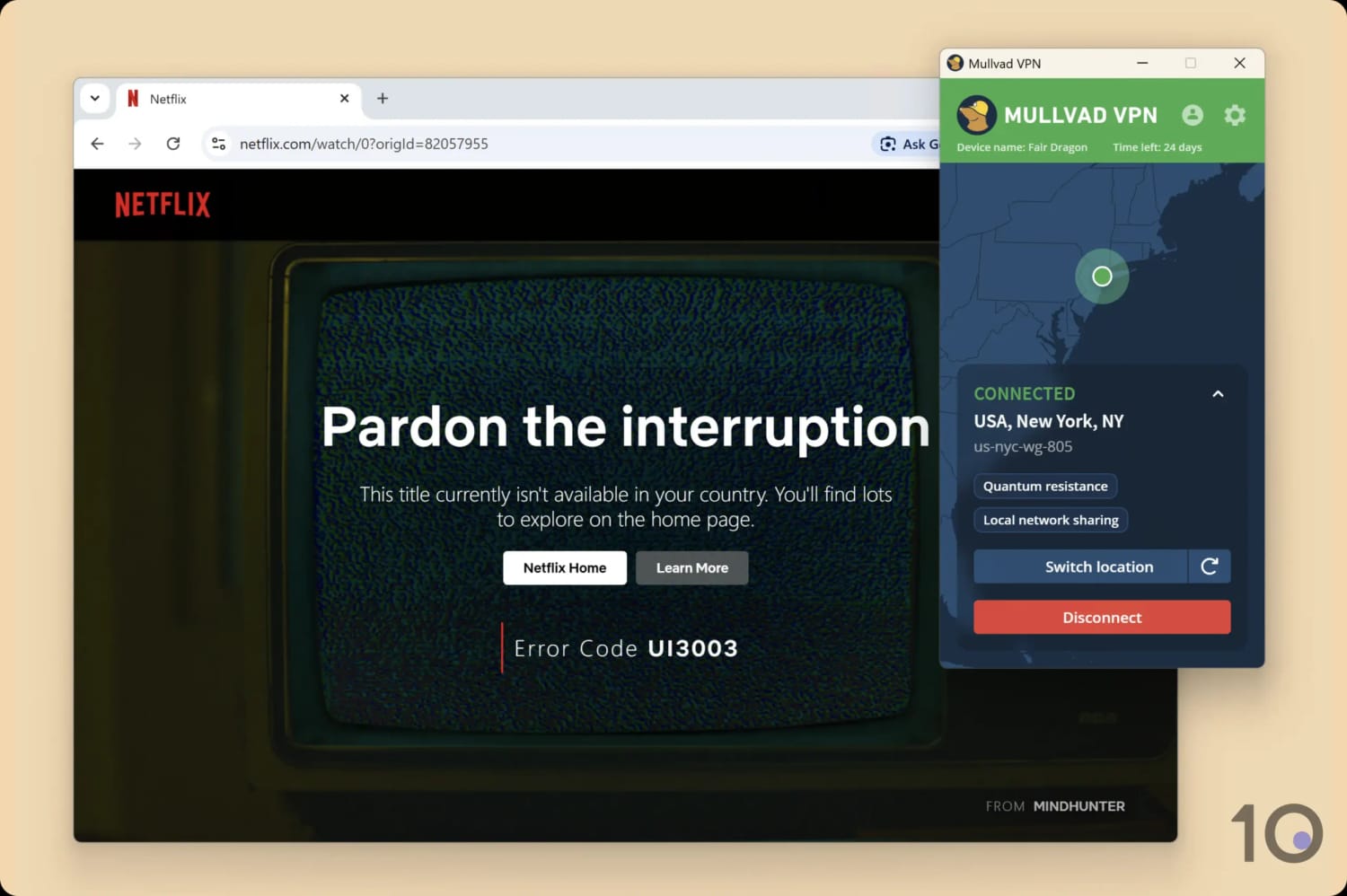
Mullvad failed to unblock US Netflix on multiple attempts.
I tested it on all the major streaming sites and recorded very little success. Only Amazon Prime Video (US) and HBO Max became available to me outside those regions. It won’t bypass Hulu blocks.
Despite this, I found that Mullvad is one of the best VPNs for streaming Sky Go and NOW. It almost always worked with both Sky products and maintained a 720p video quality.
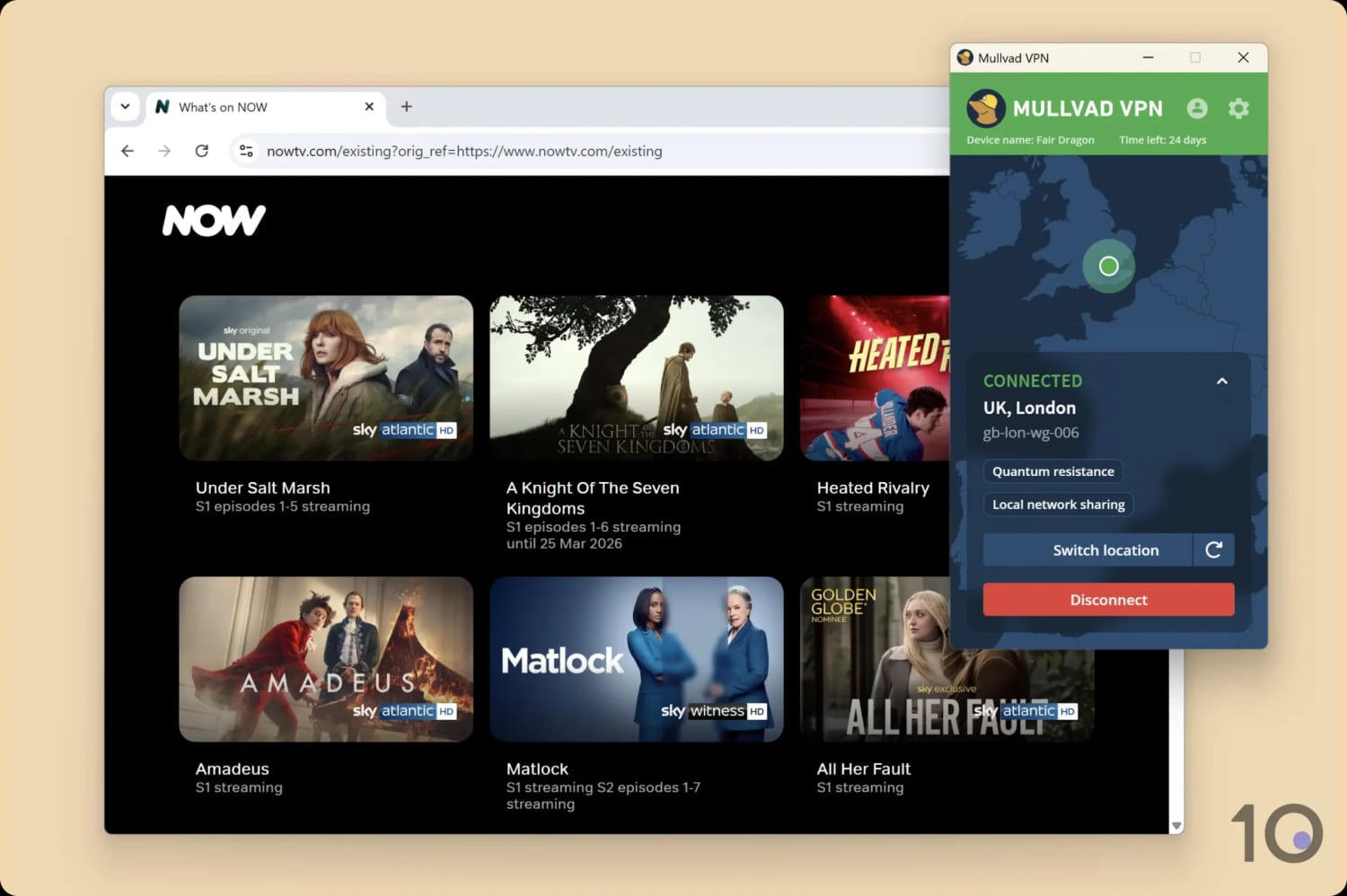
Mullvad is a reliable choice for both Sky Go and NOW.
Like with Astrill VPN, it’s fair enough that Mullvad focuses on privacy. But a VPN can do both. I’d love to see Mullvad expand into unblocking streaming platforms, especially Netflix — then I can recommend it wholeheartedly.
Speed
Ranked #32 out of 59 VPNs for Speed
Mullvad VPN connects via WireGuard exclusively, so it's fast. Local speeds are particularly excellent, with only a 6% speed loss compared to my normal internet connection. Speeds suffer more when connecting to long-distance countries, but no more than expected.
A 6% difference between my normal internet connection and a VPN-connected internet is very good, but not quite as fast as some other VPN services.
Connecting to Canada I recorded a download speed loss of 5%, which is very good for such a distance. Likewise, my speeds dropped by 10% connecting to Brazil.
However, an average speed loss of 13% when connecting to the UK is a little less impressive. As you can see the chart above, it struggles compared to some popular rival VPNs.
There are better VPNs for long-distance connections, like Hotspot Shield, but I think you’ll be satisfied with Mullvad’s performance.
Security
Ranked #3 out of 59 VPNs for Security
Mullvad is a VPN at the forefront of the industry's security innovations. It covers all the essentials: a reliable kill switch, ChaCha20 encryption, and the WireGuard protocol — while adding cutting-edge features like open-source apps and quantum-resistant WireGuard. Importantly, the VPN goes above and beyond to find and fix security vulnerabilities with yearly security audits.
| Independent Audit | Yes |
|---|---|
| VPN Kill Switch | Yes |
| Leak Protection | Yes |
As of 2026, Mullvad supports WireGuard exclusively, citing its superior performance over OpenVPN and a desire to focus on one protocol.
This isn’t surprising given Mullvad actually donated money towards the development of the WireGuard protocol and was one of the very first VPNs to implement it, which has since become industry practice.
I connected to a Mullvad server and ran my internet traffic through Wireshark, a data packet analyzer. My testing revealed that the VPN used ChaCha20 encryption to successfully hide my browsing activity:
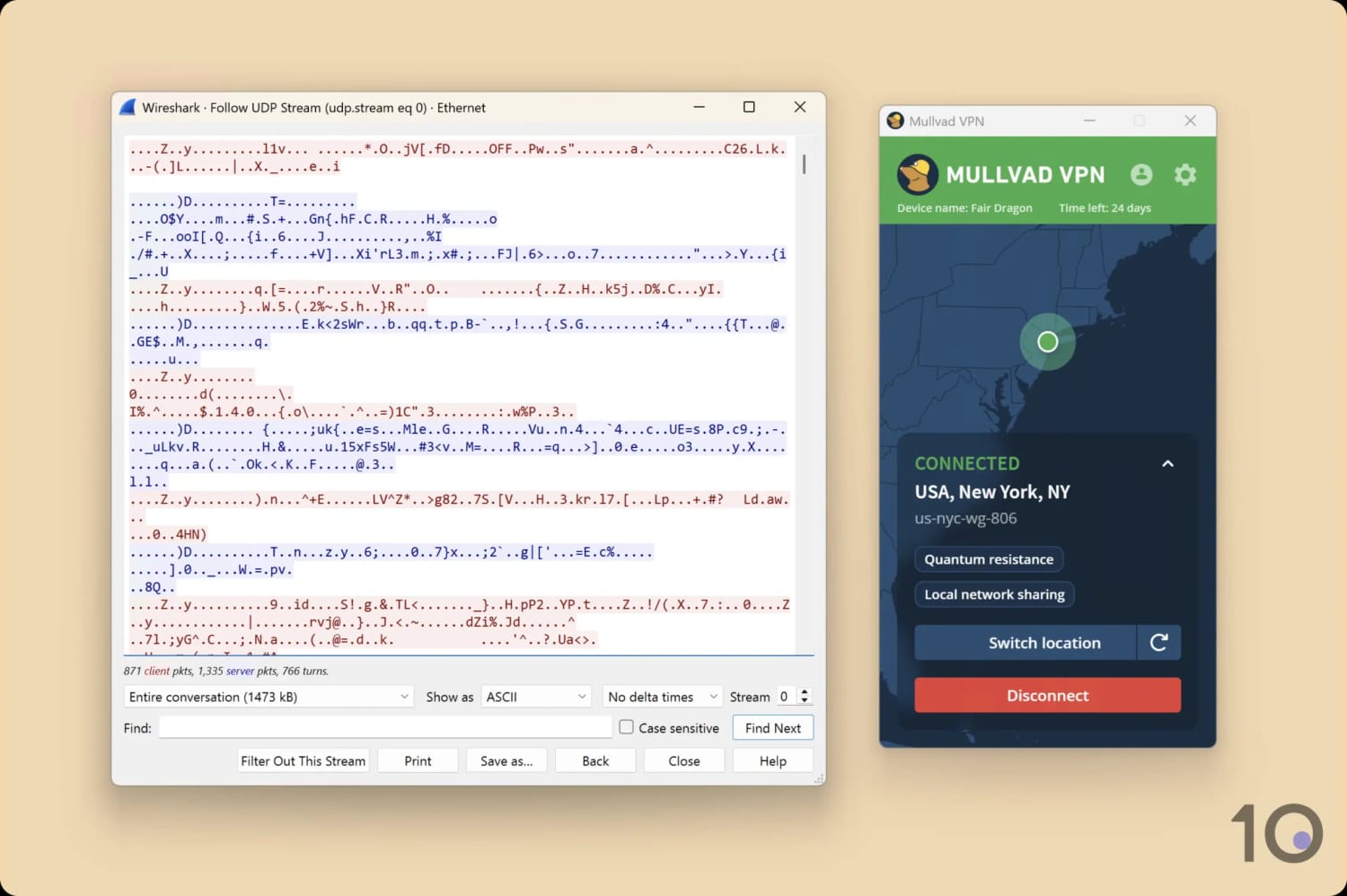
As expected, Mullvad encrypted my internet traffic.
Beyond encrypting your connection, Mullvad has found ways to improve and future-proof its version of WireGuard. For example, the Defense against AI-guided Traffic Analysis (DAITA) feature, which protects you against FBI mass surveillance by adding random background traffic to distort recognizable data patterns.
However, keep in mind that this feature increases the amount of data packets sent, which can slow down your speeds or make you run of out of data quicker.
In addition, Mullvad added quantum-resistant WireGuard connections, which protect against more sophisticated cyberattacks.
Moving away from WireGuard, Mullvad is also one of a few VPNs to support both IPv4 and IPv6 connections. Many other VPNs simply leak IPv6 addresses, or block the connection and redirect you to IPv4.
Automatic Kill Switch
Mullvad has an built-in kill switch always running, which stops your internet connection should the VPN connection drop.
Many VPNs have their kill switches turned off by default, so I like Mullvad’s approach because it prioritizes security and prevents accidental exposure of your real IP address.
On desktop, you can enable an advanced kill switch known as “Lockdown Mode”, which requires you to first connect to a Mullvad server before you can connect to the internet. This is even more secure, as your internet connection won’t be restored even if you quit the Mullvad app.
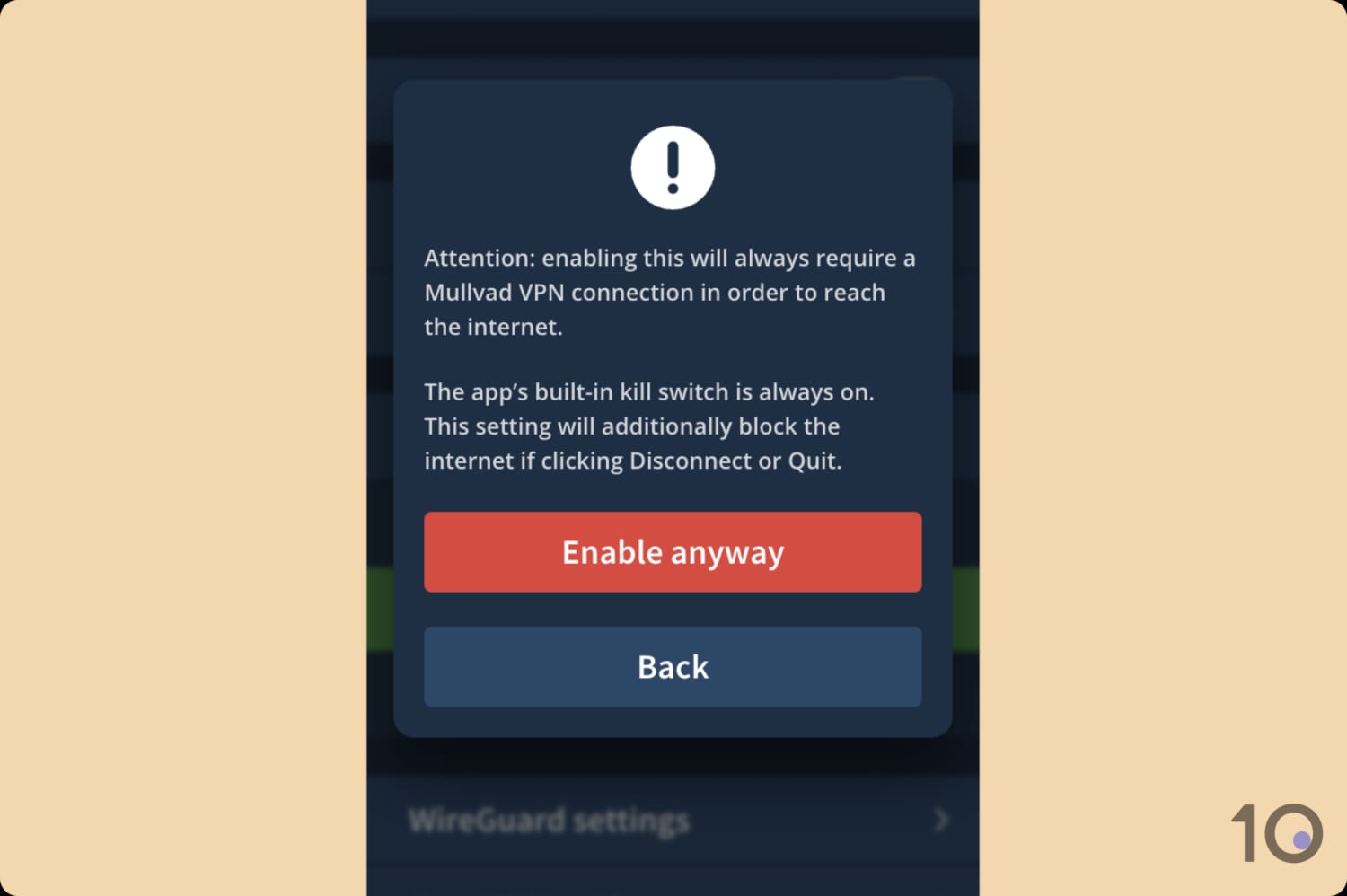
When enabled, Mullvad blocks your internet connection until you connect to a VPN server.
On Android, you have to adjust your Android device network settings: activating both Always-on VPN and Block connections without VPN. Ideally, this should be integrated into the Android app.
EXPERT ADVICE: Mullvad has warned its users of potential DNS leaks on its Android app, due to a bug stemming from Android OS. I suggest avoiding Mullvad on Android for anything sensitive until a fix is deployed.
Regular Security Audits & Open-Source Apps
I’m glad to see Mullvad implements regular security audits and penetration tests of its server infrastructure and apps.
These external audits can help a VPN identify bugs and vulnerabilities, which can then be fixed. Overall, they’re a great way to improve the security of a VPN service over time.
Here are some of Mullvad’s recent security audits and their results:
| Year/Audit | Critical | High-level | Medium-level | Low-level |
|---|---|---|---|---|
| 2024 – Mullvad OpenVPN & WireGuard | 0 | 0 | 1 | 1 |
| 2026 – Mullvad Account & Payment Services | 0 | 0 | 3 | 2 |
| 2026 – Mullvad GotaTun | 0 | 0 | 0 | 2 |
For further transparency, all of Mullvad’s desktop and mobile apps for fully open-source. This means anyone can easily view its code on GitHub and report vulnerabilities.
Other privacy-focused VPNs, like PIA and IVPN, have made their code open-source, but it still is quite rare in the VPN industry.
Server Locations
Ranked #24 out of 59 VPNs for Server Locations
Mullvad has 674 physical servers spread across 50 countries. It’s not a huge amount, but most users should be satisfied, especially if you’re in Europe where most of Mullvad’s servers are. Most of these servers are rented but have been vetted and remain safe.
| Continent | Countries with Servers |
|---|---|
| Europe | 31 |
| Asia | 7 |
| South America | 5 |
| North America | 3 |
| Africa | 2 |
| Oceania | 2 |
Mullvad has servers in 50 countries. This isn’t as expansive as many VPN competitors. ExpressVPN has servers in 113 countries, for example. Still, most users should be satisfied and speeds are unaffected by server congestion.
Mullvad has a good number of city servers across the globe.
Here are some countries with multiple city-level servers:
- Australia (five cities)
- Canada (four cities)
- France (three cities)
- Germany (three cities)
- Japan (two cities)
- UK (three cities)
- US (18 cities)
The US comes out on top for city-level servers, with 18 choices. This is a better spread than some of the best VPNs for the US, but it’s not as good as PIA’s servers in 50 US states.
Australia is also a standout with Adelaide, Brisbane, Melbourne, Perth, and Sydney IP addresses all available. Even the best VPN services for Australia usually only have around three or four city options.
However, other parts of the world aren’t served anywhere near as well as the US and Australia. Africa only has two country locations: South Africa and Nigeria. Asia and the Middle East are poorly served, too.
Mullvad Rents Most of Its Servers
Mullvad VPN is helpfully transparent about what sort of servers it operates and exactly how many of them there are (not all VPNs are).
Using Mullvad’s server page, you can see whether each server is owned or rented, if it supports 20Gbps speeds, and its current status.
Most of Mullvad’s servers are rented. This isn’t a problem if they are rented from trustworthy companies and Mullvad undertakes a rigorous vetting process. Mullvad claims to do so, and that the servers it rents aren’t shared with anyone else.
But as Mullvad is so transparent about its infrastructure you can identify and choose to connect to Mullvad-owned servers only. These will be the most secure servers, but the risk to privacy is very low on rented servers too.
User Experience
Ranked #8 out of 59 VPNs for User Experience
Mullvad’s apps are sleek, clutter-free, and pleasing to the eye. I like them for their simplicity and the explainers beside each feature, making it less intimidating for newcomers. I’ve never encountered a bug using Mullvad and the structure of the interface is identical across platforms. To avoid confusion, I do wish the features and tools were the same on all devices.
Installation & Setup
Setting up Mullvad is refreshingly simple. After creating a Mullvad account, which doesn’t require any personal information, I downloaded the app for my preferred device. Mullvad’s account system is unique — it uses anonymous account numbers instead of email addresses or passwords.
The installation process was quick and intuitive. For advanced users, some configuration options like WireGuard keys are accessible through Mullvad’s website, which I found slightly less convenient.
Despite this, Mullvad excels at guiding users through even the more technical features with in-app explainers that simplify the process.
Interface & Ease of Use
Mullvad’s interface is clean, consistent, and user-friendly. It’s stripped down to the essentials, which makes it a pleasure to use whether you’re a beginner or an experienced VPN user.
On both desktop (Windows and macOS) and mobile (iOS and Android), the app provides a straightforward layout with a large connect button, a server list, and a settings cog. This consistency across platforms ensures a unified experience for users switching between devices.
Expand the sections below for a detailed analysis of how Mullvad looks and feels on each platform:
Desktop & Laptop (Windows & Mac)
I like everything about the design of Mullvad’s desktop apps: the simple user interface, the absence of any annoying ads, and the slim window size.

In a time where VPNs are increasingly using up valuable screen space to promote their paid add-ons, I appreciate that Mullvad’s apps focus only on what’s necessary. From the home screen, you can connect to a server, change locations, open the settings menu, and that’s it.
Upon connecting, a reload button appears, which you can use to cycle through IP addresses until one works for whatever you’re trying to do. I found this so much easier than having to manually disconnect and re-connect, as is the case with many VPNs.
I also didn’t mind the map graphic in the background of the apps. Normally I’d criticize this, but here the map element actually works quite well to contextualize your online location.
The only difference between the two desktop apps, and my only criticism, is that the macOS app is stuck to the menu bar. This means you can’t position the app on your display to your liking.
I also noticed that you can’t right-click its icon to quit the app, as is the case with every other app, instead you have to delve into its settings.
Mobile (iPhone & Android)
Mullvad’s mobile apps look great and are easy enough to use, but they don’t include as many features as their desktop counterparts.

The Android app is the more developed of the two, it supports IPv6, local network sharing, and split tunneling. It also has more cosmetic options, letting you customize its appearance and app icon.
Your experience is comparatively more limited on iPhone. Not only does it have fewer features, but there’s less of an effort to integrate into its OS since the VPN doesn’t work with iOS widgets or Siri.
Having said that, both mobile apps are highly-advanced compared to those on offer from their rivals. For instance, they both include multi-hop, quantum-resistance WireGuard, and custom DNS. This is something CyberGhost and Mozilla can’t rival.
Torrenting
Ranked #7 out of 59 VPNs for Torrenting
Mullvad is much better for torrenting than streaming. All of its servers allow P2P activity, it downloads at 9.8MiB/s on average, the privacy policy is safe, and it comes with SOCKS5 proxy for faster file sharing. However, Mullvad has removed port forwarding.
| Torrenting Attribute | Mullvad VPN |
|---|---|
| Permits P2P Traffic | Yes |
| Average Download Bitrate | 9.8MiB/s (2% loss) |
| Countries with P2P Servers | 50 |
| Port Forwarding | No |
| Kill Switch | Yes |
| Logging Policy | No Identifiable Data |
Mullvad is a top torrenting VPN. All of its servers are optimized for P2P activity. Some VPNs, like TorGuard, now ban popular torrenting websites, but Mullvad still has no restrictions in place.
I tested Mullvad VPN on safe torrent clients like qBittorrent to see how it performed as a torrenting VPN. I found that the download speeds were quick and stable, with an excellent average torrenting bitrate of 9.8MiB/s.
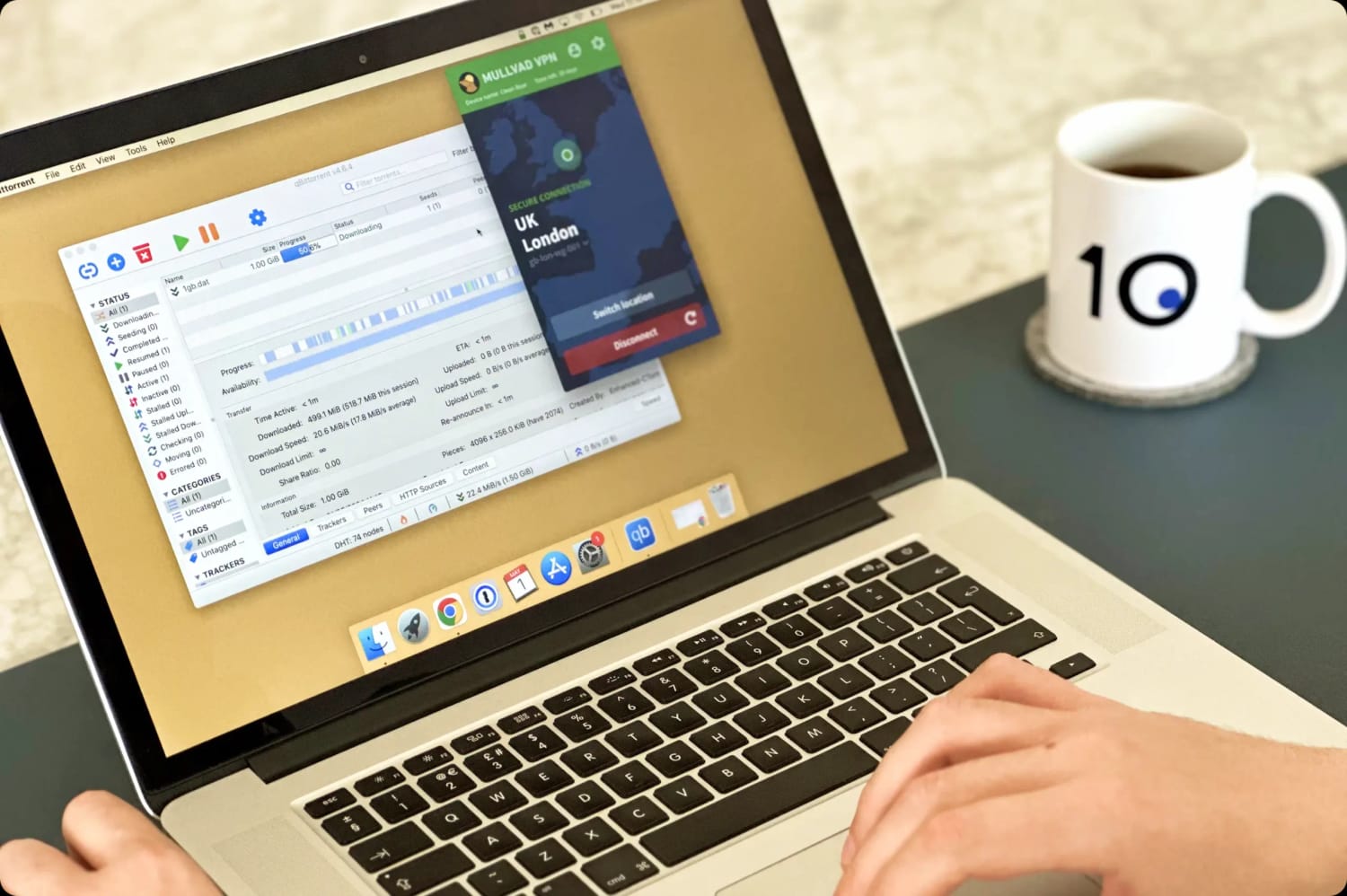
While Mullvad wasn’t as fast as the best VPNs for torrenting, it’s still a fast and private choice. The kill switch protection and safe logging policy make sure of that.
SOCKS5 is available on all of Mullvad’s servers once you activate it for the application you wish to use it on. This is great for torrenters and even reduces the chance of seeing CAPTCHAs.
However, citing “avenues for abuse,” Mullvad no longer allows you to use port forwarding for faster P2P connections. Port forwarding is a useful manual tool for gamers who use VPNs, as it allows you to optimize speeds, change your NAT type, and reduce lag.
Device Compatibility
Ranked #47 out of 59 VPNs for Device Compatibility
Mullvad VPN can be installed on most popular devices, including Mac, Windows, iOS, and Android. However, it lacks support for certain devices, such as a dedicated Fire TV app or a smart DNS service. While it can be manually configured on a router to extend coverage to smart TVs and games consoles, this workaround is far less convenient than native support.
| Windows | Yes |
|---|---|
| Mac | Yes |
| iOS | Yes |
| Android | Yes |
| Linux | Yes |
| Amazon Fire TV | No |
| Android TV | Yes |
| Apple TV | No |
| Router | Manual Setup Only |
| Chrome | No |
Simultaneous Connections: 5
Mullvad’s compatibility is below average compared to competitors. Notably, it lacks a dedicated Fire TV app despite offering an Android TV app for years.
Mullvad also allows you to be logged in on just five different devices at once. If you want to use it on more devices, you’ll have to offload a different device first.
Many competing services like Surfshark and Windscribe offer no device limitations at all.
Additional Features
Ranked #13 out of 59 VPNs for Additional Features
Mullvad offers a healthy amount of additional features, like split tunneling, an ad, tracker, and malware blocking for safe browsing. The VPN utilizes multi-hop servers for bypassing censorship, which works well in Russia and China.
| Additional Feature | Mullvad VPN |
|---|---|
| Split Tunneling | Yes |
| VPN Obfuscation | Yes |
| Multi-Hop Servers | Yes |
| Dedicated IP | No |
| Ad Blocker | Yes |
| Private Browser | Yes |
Obfuscation Technology
Mullvad provides several options for obfuscating your traffic to bypass censorship, and recommends you try all of them until one works.
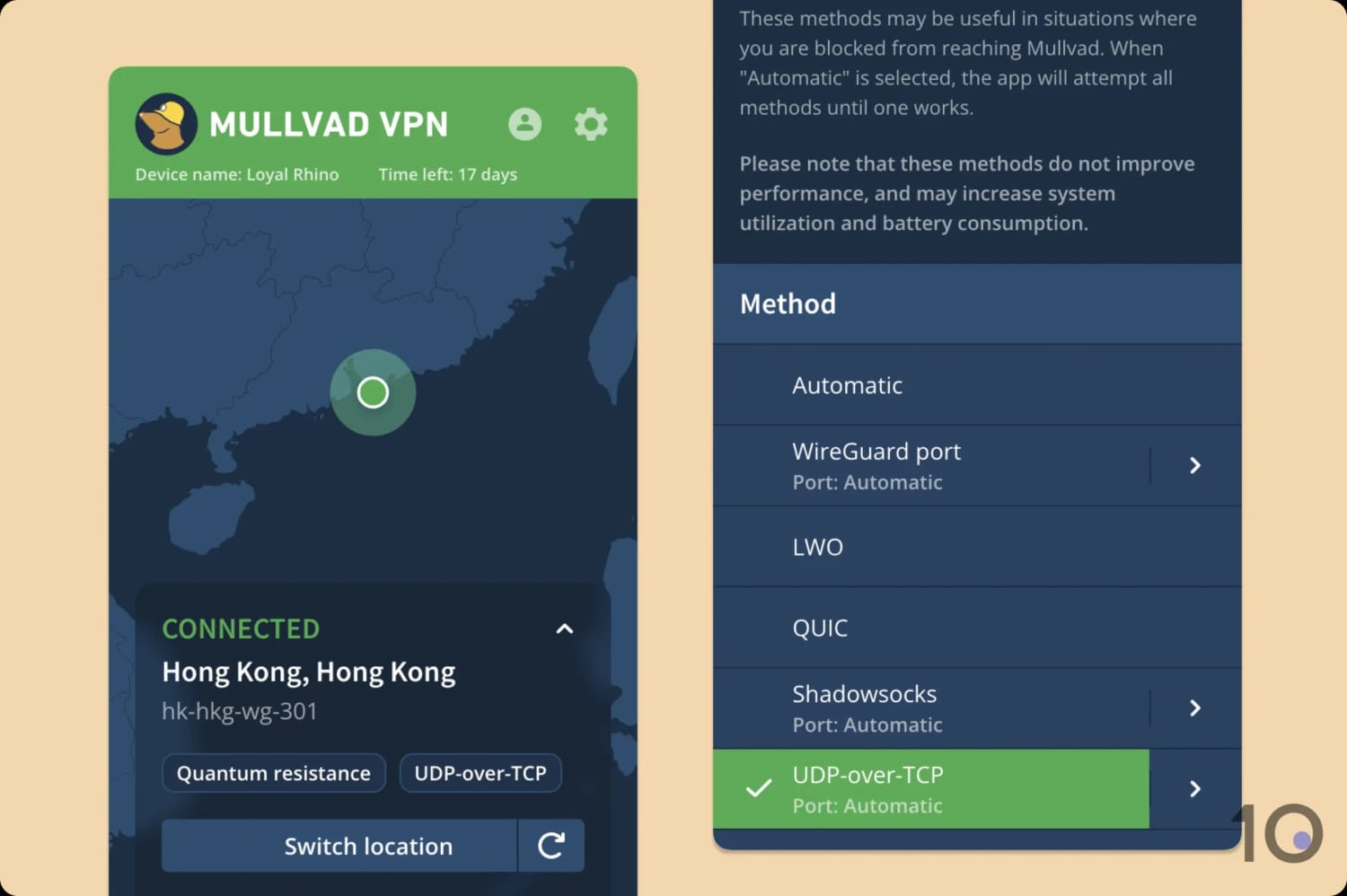
You can easily enable Mullvad’s anti-censorship mode in its app settings.
This technique worked well, with the QUIC protocol proving the most effective. It even managed to get around the Great Firewall of China, which has the strictest web censorship in the world.
Functional Split Tunneling
Mullvad includes a split tunneling feature that lets you exclude specific apps from the VPN tunnel. For example, you may want to stop your Steam traffic from traveling via a VPN server to prevent an increase in ping.
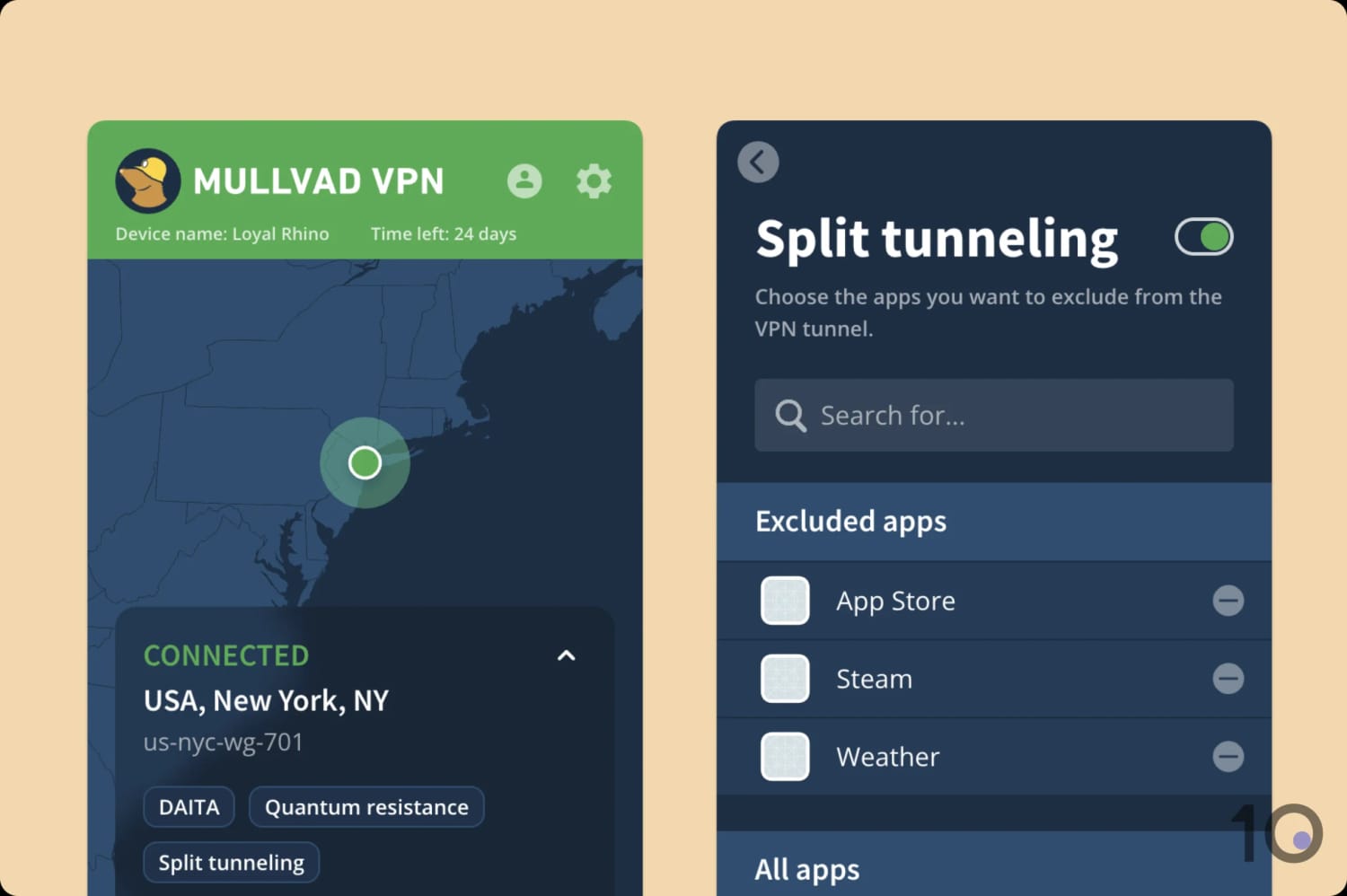
Split tunneling worked as intended across all apps.
Unlike the rest of the VPN’s toolkit, this feature is actually quite basic — especially when compared to other VPN services. For example, Hide.me lets you include or exclude apps from the tunnel, to tailor the VPN to your needs.
I also didn’t like that Mullvad requires full disk access to get split tunneling set up on Mac. This felt overly intrusive, especially as other VPNs let you split tunnel without this level of access.
Working Ad, Tracker & Malware blocker
Under Preferences, you can find toggle options to launch the app on start up and auto-connect, as well as activate ad, tracker, and malware blockers.
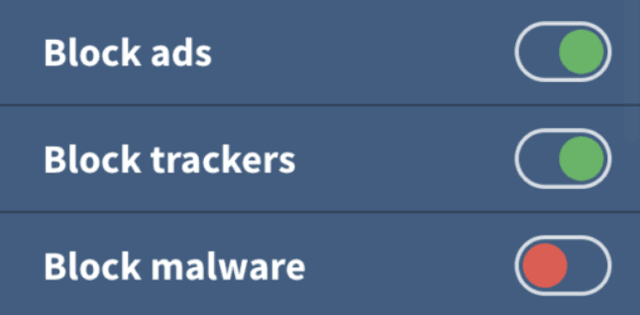
Mullvad can block intrusive ads, trackers, and malware.
Mullvad doesn’t have the best VPN ad blocker I’ve tested, but it does block the majority of social and analytic trackers, and some pop-up ads.
It’s worth enabling if you’ve already got Mullvad, but it’s not as effective as uBlock Origin.
Mullvad Browser
Mullvad Browser was created in collaboration with the Tor Project, and works to prevent tracking and browser fingerprinting.
It does this by:
- Deactivating telemetry data collection
- Blocking third-party trackers
- Deleting cookies, cache, and history after each session
You can use it on Windows, macOS, or Linux.


